
- Forums
- Product Forums
- General Purpose MicrocontrollersGeneral Purpose Microcontrollers
- i.MX Forumsi.MX Forums
- QorIQ Processing PlatformsQorIQ Processing Platforms
- Identification and SecurityIdentification and Security
- Power ManagementPower Management
- Wireless ConnectivityWireless Connectivity
- RFID / NFCRFID / NFC
- Advanced AnalogAdvanced Analog
- Neural Processing UnitsNeural Processing Units
- MCX Microcontrollers
- S32G
- S32K
- S32V
- MPC5xxx
- Other NXP Products
- S12 / MagniV Microcontrollers
- Powertrain and Electrification Analog Drivers
- Sensors
- Vybrid Processors
- Digital Signal Controllers
- 8-bit Microcontrollers
- ColdFire/68K Microcontrollers and Processors
- PowerQUICC Processors
- OSBDM and TBDML
- S32M
- S32Z/E
-
- Solution Forums
- Software Forums
- MCUXpresso Software and ToolsMCUXpresso Software and Tools
- CodeWarriorCodeWarrior
- MQX Software SolutionsMQX Software Solutions
- Model-Based Design Toolbox (MBDT)Model-Based Design Toolbox (MBDT)
- FreeMASTER
- eIQ Machine Learning Software
- Embedded Software and Tools Clinic
- S32 SDK
- S32 Design Studio
- GUI Guider
- Zephyr Project
- Voice Technology
- Application Software Packs
- Secure Provisioning SDK (SPSDK)
- Processor Expert Software
- Generative AI & LLMs
-
- Topics
- Mobile Robotics - Drones and RoversMobile Robotics - Drones and Rovers
- NXP Training ContentNXP Training Content
- University ProgramsUniversity Programs
- Rapid IoT
- NXP Designs
- SafeAssure-Community
- OSS Security & Maintenance
- Using Our Community
-
- Cloud Lab Forums
-
- Knowledge Bases
- ARM Microcontrollers
- i.MX Processors
- Identification and Security
- Model-Based Design Toolbox (MBDT)
- QorIQ Processing Platforms
- S32 Automotive Processing Platform
- Wireless Connectivity
- CodeWarrior
- MCUXpresso Suite of Software and Tools
- MQX Software Solutions
- RFID / NFC
- Advanced Analog
- Neural Processing Units
-
- NXP Tech Blogs
- Home
- :
- Model-Based Design Toolbox (MBDT)
- :
- Model-Based Design Toolbox (MBDT)
- :
- Transmitting CAN message periodically MDBT MPC5744P
Transmitting CAN message periodically MDBT MPC5744P
- Subscribe to RSS Feed
- Mark Topic as New
- Mark Topic as Read
- Float this Topic for Current User
- Bookmark
- Subscribe
- Mute
- Printer Friendly Page
Transmitting CAN message periodically MDBT MPC5744P

- Mark as New
- Bookmark
- Subscribe
- Mute
- Subscribe to RSS Feed
- Permalink
- Report Inappropriate Content
I am trying to send multiple CAN messages with different period. I am using the counter limited block and compare to constant block to periodically trigger the CAN send message block.
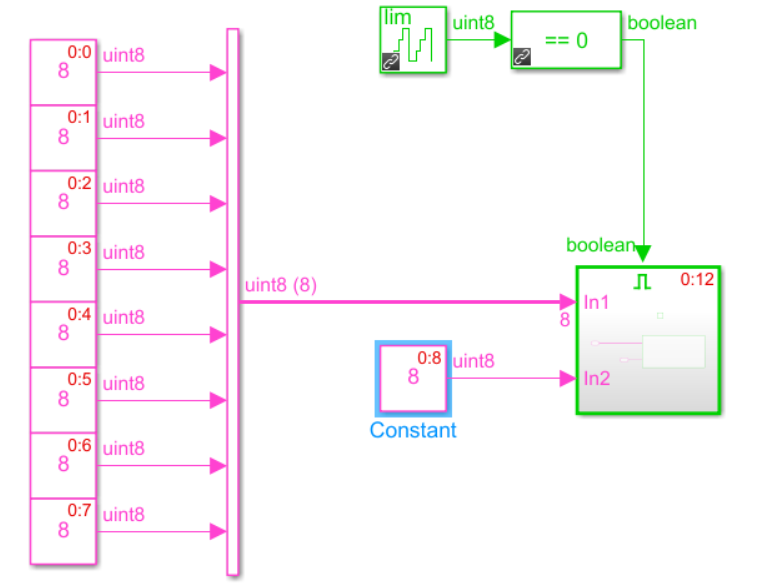
I could periodically transmit multiple messages with the same period by using this method but I am having trouble transmitting multiple messages with different period. I could transmit multiple messages if I didn't use the above mentioned two blocks but then the messages were not being sent periodically. Is there another way to transmit the message periodically? Moreover, I could not use Tx complete block with the above-mentioned method. I have attached my model which was created by 2018b.
Thanks and best regards,
Joe

 constantinrazva
- Mark as New
- Bookmark
- Subscribe
- Mute
- Subscribe to RSS Feed
- Permalink
- Report Inappropriate Content
Hello [email protected],
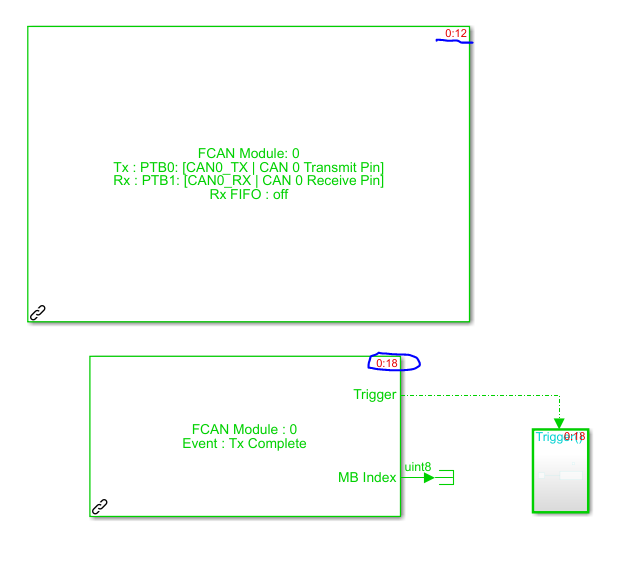
Regarding the CAN ISR usage, you can use the TX Complete event for every example in which you are sending something over CAN. Something that you must be aware is that the ISR block should be executed after the CAN Config block. You can view this either in the executed code, either by editing the priority in the model - you can do this by right clicking on a block -> Properties -> Priority. Note that lower number = HIGHer priority. Another thing you could do is hit CTRL + D while in the model, and watch the order that Simulink gives the blocks (e.g.: Config block has 0:12, and CAN ISR block has 0:18 - so in this example, the config block would be the 12th block for which code will be generated, while ISR will be the 18th).
I have attached a working model here.
Note: a TX complete event will be triggered after each CAN Send, so the toggle of the red LED in the example attached is actually made up of more toggles, as we execute 3 consecutive CAN writes.
(initial LED state - off)
1st stage - 3 frames sent
CAN Send - LED toggle to ON
CAN Send - LED toggle to off
CAN Send - LED toggle to ON
2nd stage - other 3 frames sent
CAN Send - LED toggle to off
CAN Send - LED toggle to ON
CAN Send - LED toggle to off
[etc]
Kind regards,
Razvan.
- Mark as New
- Bookmark
- Subscribe
- Mute
- Subscribe to RSS Feed
- Permalink
- Report Inappropriate Content
My model is working now. Thank you for your help and explanation.
Best Regards,
Joe
constantinrazva
- Mark as New
- Bookmark
- Subscribe
- Mute
- Subscribe to RSS Feed
- Permalink
- Report Inappropriate Content
Hello [email protected],
So for you to periodically transmit messages (or do anything else for that manner), you have 2 choices:
- software scheduling (via software timer)
- hardware scheduling (via hardware timer)
One of the many approaches available for software scheduling is what you did here - enabling a subsystem via a signal (limited counter in your case). The software approach I'd recommend is described here, in a nice article wrote by gramirezv.
If you want to go for the hardware triggering, you can do this by using a PIT (periodic interrupt timer). You can find it in our toolbox, under Core and system blocks -> PIT Timer.
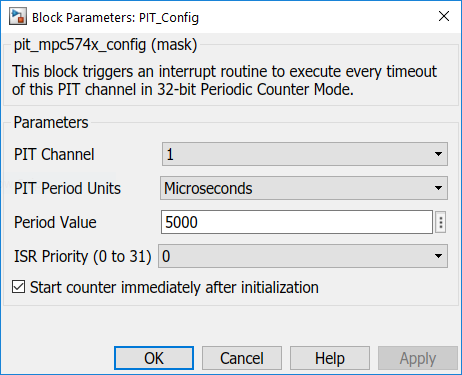
You can set the period here, and trigger a subsystem with this block.

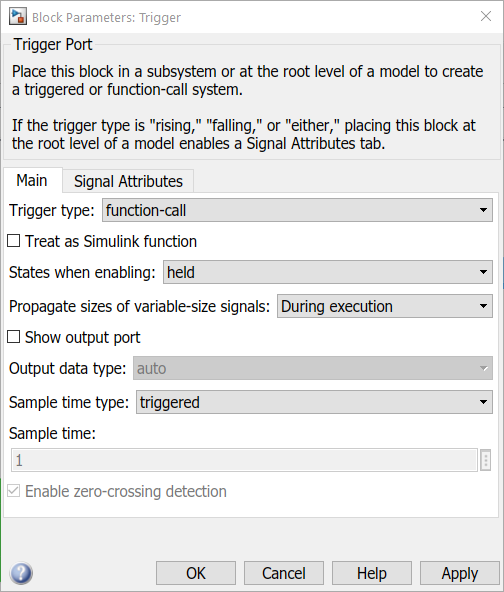
Note that inside the triggered subsystem you'll have to use a trigger block, setting it's type to function-call.
Kind regards,
Razvan.
