
- Forums
- Product Forums
- General Purpose MicrocontrollersGeneral Purpose Microcontrollers
- i.MX Forumsi.MX Forums
- QorIQ Processing PlatformsQorIQ Processing Platforms
- Identification and SecurityIdentification and Security
- Power ManagementPower Management
- Wireless ConnectivityWireless Connectivity
- RFID / NFCRFID / NFC
- Advanced AnalogAdvanced Analog
- Neural Processing UnitsNeural Processing Units
- MCX Microcontrollers
- S32G
- S32K
- S32V
- MPC5xxx
- Other NXP Products
- S12 / MagniV Microcontrollers
- Powertrain and Electrification Analog Drivers
- Sensors
- Vybrid Processors
- Digital Signal Controllers
- 8-bit Microcontrollers
- ColdFire/68K Microcontrollers and Processors
- PowerQUICC Processors
- OSBDM and TBDML
- S32M
- S32Z/E
-
- Solution Forums
- Software Forums
- MCUXpresso Software and ToolsMCUXpresso Software and Tools
- CodeWarriorCodeWarrior
- MQX Software SolutionsMQX Software Solutions
- Model-Based Design Toolbox (MBDT)Model-Based Design Toolbox (MBDT)
- FreeMASTER
- eIQ Machine Learning Software
- Embedded Software and Tools Clinic
- S32 SDK
- S32 Design Studio
- GUI Guider
- Zephyr Project
- Voice Technology
- Application Software Packs
- Secure Provisioning SDK (SPSDK)
- Processor Expert Software
- Generative AI & LLMs
-
- Topics
- Mobile Robotics - Drones and RoversMobile Robotics - Drones and Rovers
- NXP Training ContentNXP Training Content
- University ProgramsUniversity Programs
- Rapid IoT
- NXP Designs
- SafeAssure-Community
- OSS Security & Maintenance
- Using Our Community
-
- Cloud Lab Forums
-
- Knowledge Bases
- ARM Microcontrollers
- i.MX Processors
- Identification and Security
- Model-Based Design Toolbox (MBDT)
- QorIQ Processing Platforms
- S32 Automotive Processing Platform
- Wireless Connectivity
- CodeWarrior
- MCUXpresso Suite of Software and Tools
- MQX Software Solutions
- RFID / NFC
- Advanced Analog
- Neural Processing Units
-
- NXP Tech Blogs
- Home
- :
- モデルベース・デザイン・ツールボックス(MBDT)
- :
- モデルベース・デザイン・ツールボックス(MBDT)
- :
- Load Simulink to X-MPC5775E-EVB
Load Simulink to X-MPC5775E-EVB
- RSS フィードを購読する
- トピックを新着としてマーク
- トピックを既読としてマーク
- このトピックを現在のユーザーにフロートします
- ブックマーク
- 購読
- ミュート
- 印刷用ページ

- 新着としてマーク
- ブックマーク
- 購読
- ミュート
- RSS フィードを購読する
- ハイライト
- 印刷
- 不適切なコンテンツを報告
I have a X-MPC5775E-EVB that I want to run Simulink code on. I need to configure the board to receive the Simulink code. What are my options?
It has on-board OpenSDA, so with the right firmware I should be able to drag and drop the *.mot file created by Simulink to the board in Windows Explorer. I don't know if the firmware that enables this capability exists. I think it would be found at pemicro.com/opensda in Firmware Apps (Pemicro_OpenSDA_Debug_MSD_Update_Apps_2020_05_12.zip). Does this firmware exist? If so, what is the firmware filename and where is it found?
Currently when the board is connected to the PC by USB the board is recognized by Windows Explorer and the drive is called BOOTLOADER. However, the serial port is not recognized in Device Manage Ports.
Alternatively, is there a Simulink bootloader I need to load via the JTAG debugger?
I think I have been able to load a Simulink *.elf file using S32DS.PA and the debugger.
解決済! 解決策の投稿を見る。

 mariuslucianand
- 新着としてマーク
- ブックマーク
- 購読
- ミュート
- RSS フィードを購読する
- ハイライト
- 印刷
- 不適切なコンテンツを報告
Hello @ranulf,
That message suggests that you have to update the firmware of the OpenSDA. Normally, there should be only the COM port mounted in the Device Manager of Windows, no drive mounted in Computer.
Usually, the BOOTLOADER driver is only displayed if you keep the SW4, BOOT button pressed while you connect the USB cable. This action indeed mounts a driver, in which you will find 4 files.
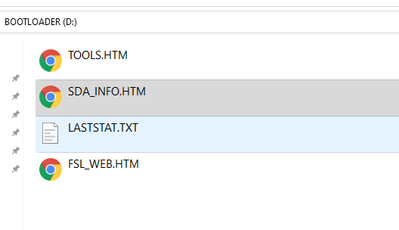
If you open the SDA_INFO.HTM, this will redirect you to the PEmicro's website, telling the Hardware information for your board.
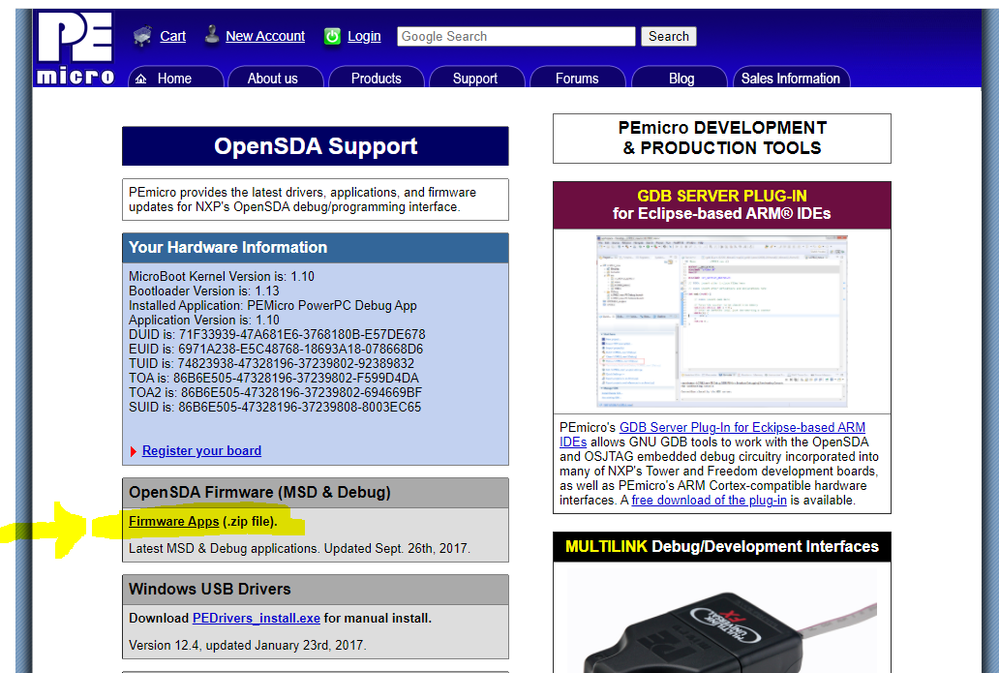
Since the message in the screenshot you have attached, tells that an update is required, please register and download the Firmware Apps .zip file as shown above. In the archive, you will see a lot of SDA files for but you are interested in the DEBUG_OPENSDA-E200_Pemicro_v110.SDA
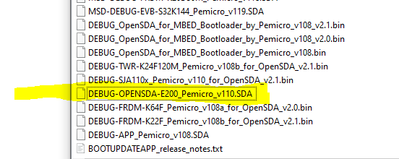
You have to unzip this file and copy-paste it in the BOOTLOADER drive.
Once the process has been completed, please unplug and replug the USB driver.
This should update the OpenSDA to the latest firmware and you should be able to flash the MPC5775E bootloader.
Hope this helps,
Marius
- 新着としてマーク
- ブックマーク
- 購読
- ミュート
- RSS フィードを購読する
- ハイライト
- 印刷
- 不適切なコンテンツを報告
@mariuslucianandThank you for the helpful information. I can now load Simulink code onto the X-MPC5775E-EVB over USB.
mariuslucianand
- 新着としてマーク
- ブックマーク
- 購読
- ミュート
- RSS フィードを購読する
- ハイライト
- 印刷
- 不適切なコンテンツを報告
Hello @ranulf
The OpenSDA on the board doesn't allow you to copy-paste the generated mot file as for S32K, so you have to use the same RAppID bootloader.
Now, the OpenSDA on the board will be used as USB2Serial converted for the RappId Bootloader and as JTAG to write the rbf file for the MC33775E board.
Flashing the RBF file:
For this, you have to open the S32DS for Power, use an example for MPC5777C (Yes, the settings are identical) and select the rbf file for UART0_CAN0.
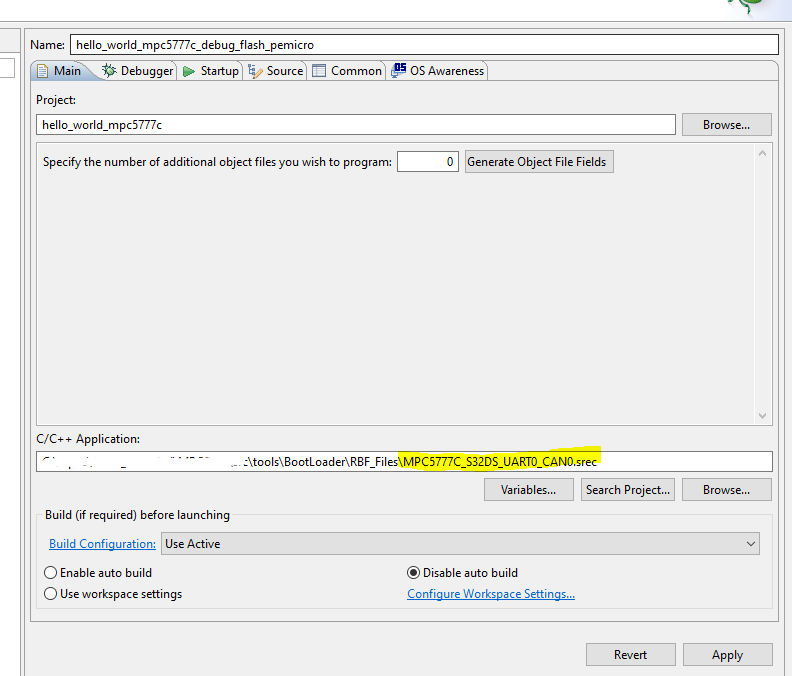
Do not forget to change flashing algorithm like in the image attached below.
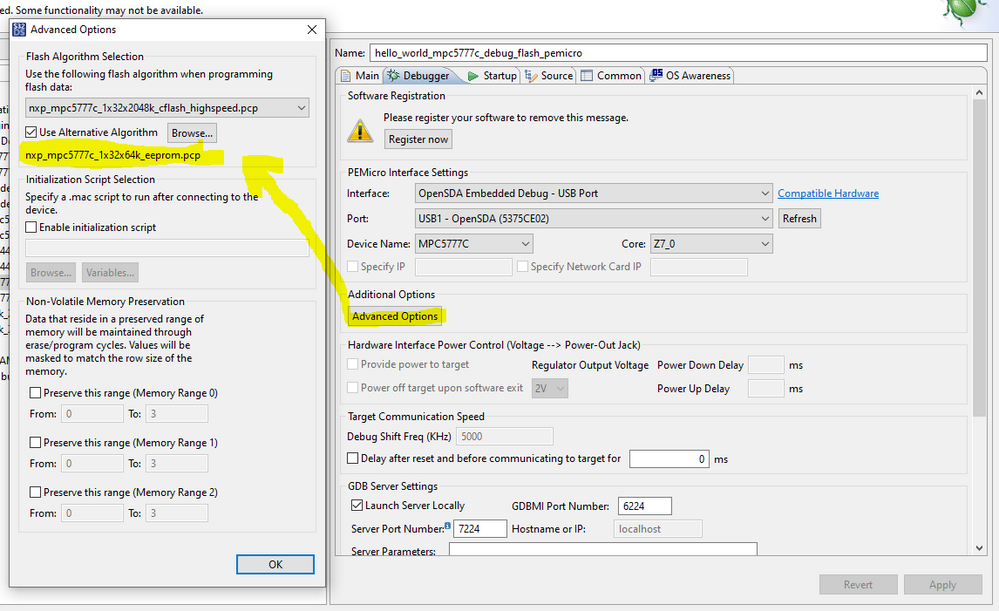
Now, keep in mind that the jumpers from the MCU_JTAG_SEL selects if you use the OpenSDA to flash the bootloader or an external JTAG, so for me, the following settings works on my board.
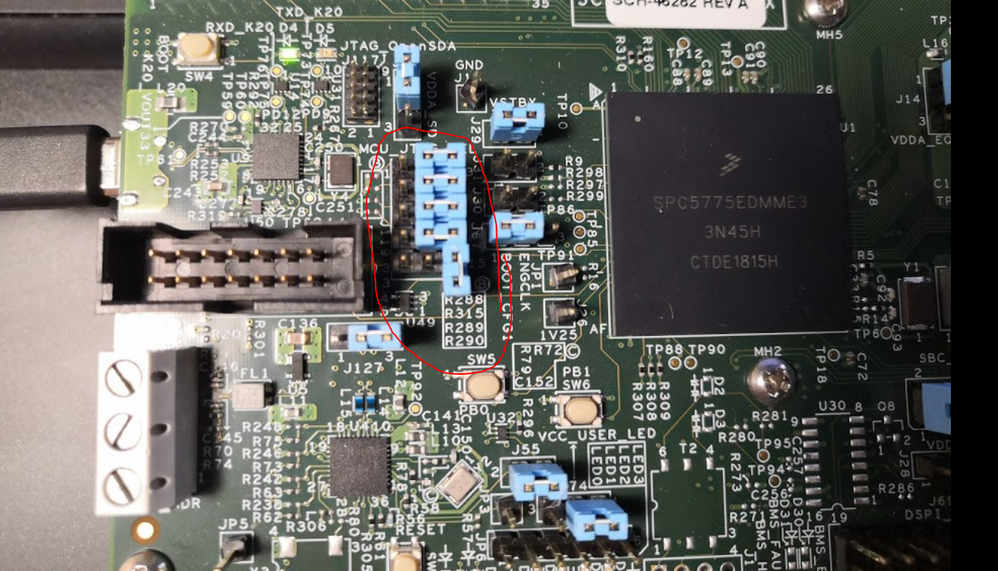
Now you should be able to generate the code and to upload the code from Simulink as you did before.
As an additional documentation, you can download the Getting Started document from this link
https://www.nxp.com/docs/en/application-note/AN12875.pdf
Hope this helps,
Marius
- 新着としてマーク
- ブックマーク
- 購読
- ミュート
- RSS フィードを購読する
- ハイライト
- 印刷
- 不適切なコンテンツを報告
@mariuslucianand Thanks for thoughtful answer and the quick reply. However, I still run into problems. In S32DS Power, when I try to flash the RBF file as you describe, I get the following error:
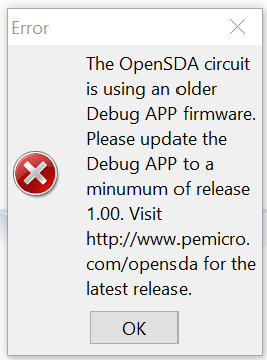
Windows Explorer recognizes the board as the drive BOOTLOADER (F:). The board is not recognized in Device Manager Ports (COM & LPT), which means that in its present state it is not capable of UART. The board is acting like it wants me to drag and drop firmware on the drive BOOTLOADER in Windows Explorer. I don't know how to get out of this state and in this state JTAG over OpenSDA does not seem to work.
mariuslucianand
- 新着としてマーク
- ブックマーク
- 購読
- ミュート
- RSS フィードを購読する
- ハイライト
- 印刷
- 不適切なコンテンツを報告
Hello @ranulf,
That message suggests that you have to update the firmware of the OpenSDA. Normally, there should be only the COM port mounted in the Device Manager of Windows, no drive mounted in Computer.
Usually, the BOOTLOADER driver is only displayed if you keep the SW4, BOOT button pressed while you connect the USB cable. This action indeed mounts a driver, in which you will find 4 files.
If you open the SDA_INFO.HTM, this will redirect you to the PEmicro's website, telling the Hardware information for your board.
Since the message in the screenshot you have attached, tells that an update is required, please register and download the Firmware Apps .zip file as shown above. In the archive, you will see a lot of SDA files for but you are interested in the DEBUG_OPENSDA-E200_Pemicro_v110.SDA
You have to unzip this file and copy-paste it in the BOOTLOADER drive.
Once the process has been completed, please unplug and replug the USB driver.
This should update the OpenSDA to the latest firmware and you should be able to flash the MPC5775E bootloader.
Hope this helps,
Marius
