Export MBDT generated code from Matlab to S32DS

cancel
Showing results for 
Show  only  | Search instead for 
Did you mean: 

Export MBDT generated code from Matlab to S32DS

Jump to solution
2,153 Views
rohit1749
Contributor III

I have generated code using MBDT with Matlab v2021b. However, after generating code using embedded coder and tried to import the projectinfo.xml file to s32DS. But getting below error.


rohit1749_0-1754737246050.png

I'm using S32DS V3.5.  Should I try changing the S32DS version?

Someone, please help me with this.

Regards

Rohit


0 Kudos
Reply
1 Solution
2,104 Views
dragostoma
NXP Employee
NXP Employee

Hi, @rohit1749, 

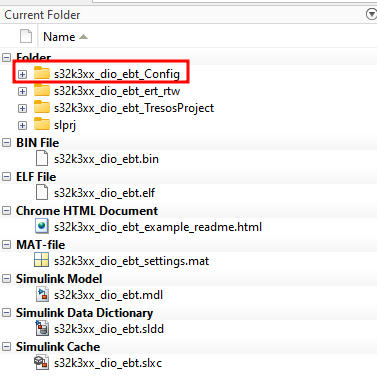
Following the build process of your Simulink model and the subsequent code generation, the next step is to import the modelName_Config folder into S32 Design Studio (S32DS).
dragostoma_3-1754915678432.png

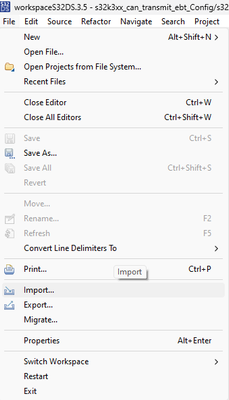
You should pres File -> Import

dragostoma_1-1754914571813.png

General -> Existing Project into Workspace -> Browse -> select the modelName_Config folder

dragostoma_2-1754914740313.png

Then you should be able to build and debug the application in S32DS.

Let us know about your progress.


Best regards,

Dragos


View solution in original post

7 Replies
48 Views
rathi_tg
Contributor III

Hi @dragostoma 


I tried importing the project from MATLAB to design studio using the method you have suggested but it always has some configuration errors


rathi_tg_0-1795691280195.png


Please look into the same and let me know.


Regards

Gopal

0 Kudos
Reply
40 Views
dragostoma
NXP Employee
NXP Employee

Hi @rathi_tg,

Thank you for sharing the screenshot.
 
We noticed that the project appears to be using S32K3 RTD 7.0.1, while MBDT for S32K3 1.8.0 officially supports RTD 7.0.0.
 
Could you please confirm which versions of MBDT, MATLAB, S32 Design Studio, and RTD you are currently using?
 
Also, if you are using MBDT 1.8.0, please let us know how the project was updated to RTD 7.0.1. This will help us reproduce your environment and further investigate the configuration errors.
 
 
Best regards,
Dragos

0 Kudos
Reply
19 Views
rathi_tg
Contributor III


Hi @dragostoma 

Versions are as follows

MBDT-->18.0

MATLAB -->2026a

S32 Design Studio--> 3.6.0 

RTD 7.0.1

I have followed the same process. Import-->Existing project--> Browse the conf file of MATLAB 

When I try to built the project it shows me no error, But, the code is not able to get flashed on the board..

When I try to open the configuration of the project i see the error marks on the peripherals which is shared previously.


Regards

Gopal


0 Kudos
Reply
14 Views
dragostoma
NXP Employee
NXP Employee

Hi,

The errors could be related to the RTD version change, as the version you are currently using is not included in the latest release.

Please install in S32 Design Studio the update site corresponding to the RTD version that was used to build the model example. There may be compatibility differences due to changes introduced in RTD 7.0.1.


Regards,

Dragos


0 Kudos
Reply
6 Views
rathi_tg
Contributor III
Hi

Can you help me doing it. I am unable to see an option to migrate to older version.

Regards
Gopal
0 Kudos
Reply
5 Views
dragostoma
NXP Employee
NXP Employee

Sure.

First of all you should open the Help -> S32DS Extensions and Updates page and take a look at the S32K3xx RTD version.

dragostoma_1-1795770648791.png

dragostoma_0-1795770628505.png

In case the RTD version is not yet installed or there is another RTD version installed (most likely 7.0.1 as we already seen), you should download the RTD 7.0.0 update site from the nxp.com website: S32K3 Standard Software -> S32K3/S32M27x - Real-Time Drivers for Cortex-M

dragostoma_2-1795770857189.png

You can install the updatesite from the bottom right button Add Update Site within the S32DS Extensions and Updates, or by following this guide (step 6) - HOWTO: offline install S32K3 RTD 4.0.0 in S32DS v3.5

Let us know about the progress.


Regards,

Dragos


0 Kudos
Reply
2,104 Views
dragostoma
NXP Employee
NXP Employee

Hi, @rohit1749, 

Following the build process of your Simulink model and the subsequent code generation, the next step is to import the modelName_Config folder into S32 Design Studio (S32DS).

dragostoma_3-1754915678432.png

You should pres File -> Import

dragostoma_1-1754914571813.png

General -> Existing Project into Workspace -> Browse -> select the modelName_Config folder

dragostoma_2-1754914740313.png

Then you should be able to build and debug the application in S32DS.

Let us know about your progress.


Best regards,

Dragos


%3CLINGO-SUB%20id%3D%22lingo-sub-2149492%22%20slang%3D%22en-US%22%20mode%3D%22CREATE%22%3EExport%20MBDT%20generated%20code%20from%20Matlab%20to%20S32DS%3C%2FLINGO-SUB%3E%3CLINGO-BODY%20id%3D%22lingo-body-2149492%22%20slang%3D%22en-US%22%20mode%3D%22CREATE%22%3E%3CP%3EI%20have%20generated%20code%20using%20MBDT%20with%20Matlab%20v2021b.%20However%2C%20after%20generating%20code%20using%20embedded%20coder%20and%20tried%20to%20import%20the%20projectinfo.xml%20file%20to%20s32DS.%20But%20getting%20below%20error.%3C%2FP%3E%3CBR%20%2F%3E%3CP%3E%3CSPAN%20class%3D%22lia-inline-image-display-wrapper%20lia-image-align-inline%22%20image-alt%3D%22rohit1749_0-1754737246050.png%22%20style%3D%22width%3A%20400px%3B%22%3E%3CSPAN%20class%3D%22lia-inline-image-display-wrapper%22%20image-alt%3D%22rohit1749_0-1754737246050.png%22%20style%3D%22width%3A%20400px%3B%22%3E%3CSPAN%20class%3D%22lia-inline-image-display-wrapper%22%20image-alt%3D%22rohit1749_0-1754737246050.png%22%20style%3D%22width%3A%20400px%3B%22%3E%3Cspan%20class%3D%22lia-inline-image-display-wrapper%22%20image-alt%3D%22rohit1749_0-1754737246050.png%22%20style%3D%22width%3A%20400px%3B%22%3E%3Cimg%20src%3D%22https%3A%2F%2Fcommunity.nxp.com%2Ft5%2Fimage%2Fserverpage%2Fimage-id%2F351647i3B752AE0C9F5AD27%2Fimage-size%2Fmedium%3Fv%3Dv2%26amp%3Bpx%3D400%22%20role%3D%22button%22%20title%3D%22rohit1749_0-1754737246050.png%22%20alt%3D%22rohit1749_0-1754737246050.png%22%20%2F%3E%3C%2Fspan%3E%3C%2FSPAN%3E%3C%2FSPAN%3E%3C%2FSPAN%3E%3C%2FP%3E%3CP%3EI'm%20using%20S32DS%20V3.5.%26nbsp%3B%20Should%20I%20try%20changing%20the%20S32DS%20version%3F%3C%2FP%3E%3CP%3ESomeone%2C%20please%20help%20me%20with%20this.%3C%2FP%3E%3CP%3ERegards%3C%2FP%3E%3CP%3ERohit%3C%2FP%3E%3CBR%20%2F%3E%3C%2FLINGO-BODY%3E%3CLINGO-SUB%20id%3D%22lingo-sub-2150099%22%20slang%3D%22en-US%22%20mode%3D%22CREATE%22%20translate%3D%22no%22%3ERe%3A%20Export%20MBDT%20generated%20code%20from%20Matlab%20to%20S32DS%3C%2FLINGO-SUB%3E%3CLINGO-BODY%20id%3D%22lingo-body-2150099%22%20slang%3D%22en-US%22%20mode%3D%22CREATE%22%3E%3CP%3EHi%2C%26nbsp%3B%3CA%20href%3D%22https%3A%2F%2Fcommunity.nxp.com%2Ft5%2Fuser%2Fviewprofilepage%2Fuser-id%2F251996%22%20target%3D%22_blank%22%3E%40rohit1749%3C%2FA%3E%2C%26nbsp%3B%3C%2FP%3E%0A%3CP%3EFollowing%20the%20build%20process%20of%20your%20Simulink%20model%20and%20the%20subsequent%20code%20generation%2C%20the%20next%20step%20is%20to%20import%20the%20%3CCODE%3EmodelName_Config%3C%2FCODE%3E%20folder%20into%20S32%20Design%20Studio%20(S32DS).%3C%2FP%3E%0A%3CP%3E%3CSPAN%20class%3D%22lia-inline-image-display-wrapper%20lia-image-align-inline%22%20image-alt%3D%22dragostoma_3-1754915678432.png%22%20style%3D%22width%3A%20400px%3B%22%3E%3CSPAN%20class%3D%22lia-inline-image-display-wrapper%22%20image-alt%3D%22dragostoma_3-1754915678432.png%22%20style%3D%22width%3A%20377px%3B%22%3E%3CSPAN%20class%3D%22lia-inline-image-display-wrapper%22%20image-alt%3D%22dragostoma_3-1754915678432.png%22%20style%3D%22width%3A%20377px%3B%22%3E%3Cspan%20class%3D%22lia-inline-image-display-wrapper%22%20image-alt%3D%22dragostoma_3-1754915678432.png%22%20style%3D%22width%3A%20377px%3B%22%3E%3Cimg%20src%3D%22https%3A%2F%2Fcommunity.nxp.com%2Ft5%2Fimage%2Fserverpage%2Fimage-id%2F351807i26592EB156538D64%2Fimage-size%2Fmedium%3Fv%3Dv2%26amp%3Bpx%3D400%22%20role%3D%22button%22%20title%3D%22dragostoma_3-1754915678432.png%22%20alt%3D%22dragostoma_3-1754915678432.png%22%20%2F%3E%3C%2Fspan%3E%3C%2FSPAN%3E%3C%2FSPAN%3E%3C%2FSPAN%3E%3C%2FP%3E%0A%3CP%3EYou%20should%20pres%20File%20-%26gt%3B%20Import%3C%2FP%3E%0A%3CP%3E%3CSPAN%20class%3D%22lia-inline-image-display-wrapper%20lia-image-align-inline%22%20image-alt%3D%22dragostoma_1-1754914571813.png%22%20style%3D%22width%3A%20400px%3B%22%3E%3CSPAN%20class%3D%22lia-inline-image-display-wrapper%22%20image-alt%3D%22dragostoma_1-1754914571813.png%22%20style%3D%22width%3A%20229px%3B%22%3E%3CSPAN%20class%3D%22lia-inline-image-display-wrapper%22%20image-alt%3D%22dragostoma_1-1754914571813.png%22%20style%3D%22width%3A%20229px%3B%22%3E%3Cspan%20class%3D%22lia-inline-image-display-wrapper%22%20image-alt%3D%22dragostoma_1-1754914571813.png%22%20style%3D%22width%3A%20229px%3B%22%3E%3Cimg%20src%3D%22https%3A%2F%2Fcommunity.nxp.com%2Ft5%2Fimage%2Fserverpage%2Fimage-id%2F351803i05CDC8DC16F9AE1E%2Fimage-size%2Fmedium%3Fv%3Dv2%26amp%3Bpx%3D400%22%20role%3D%22button%22%20title%3D%22dragostoma_1-1754914571813.png%22%20alt%3D%22dragostoma_1-1754914571813.png%22%20%2F%3E%3C%2Fspan%3E%3C%2FSPAN%3E%3C%2FSPAN%3E%3C%2FSPAN%3E%3C%2FP%3E%0A%3CP%3EGeneral%20-%26gt%3B%20Existing%20Project%20into%20Workspace%20-%26gt%3B%20Browse%20-%26gt%3B%20select%20the%20%3CCODE%3EmodelName_Config%3C%2FCODE%3E%20folder%3C%2FP%3E%0A%3CP%3E%3CSPAN%20class%3D%22lia-inline-image-display-wrapper%20lia-image-align-inline%22%20image-alt%3D%22dragostoma_2-1754914740313.png%22%20style%3D%22width%3A%20400px%3B%22%3E%3CSPAN%20class%3D%22lia-inline-image-display-wrapper%22%20image-alt%3D%22dragostoma_2-1754914740313.png%22%20style%3D%22width%3A%20376px%3B%22%3E%3CSPAN%20class%3D%22lia-inline-image-display-wrapper%22%20image-alt%3D%22dragostoma_2-1754914740313.png%22%20style%3D%22width%3A%20376px%3B%22%3E%3Cspan%20class%3D%22lia-inline-image-display-wrapper%22%20image-alt%3D%22dragostoma_2-1754914740313.png%22%20style%3D%22width%3A%20376px%3B%22%3E%3Cimg%20src%3D%22https%3A%2F%2Fcommunity.nxp.com%2Ft5%2Fimage%2Fserverpage%2Fimage-id%2F351804i6E3BBEEECC33E501%2Fimage-size%2Fmedium%3Fv%3Dv2%26amp%3Bpx%3D400%22%20role%3D%22button%22%20title%3D%22dragostoma_2-1754914740313.png%22%20alt%3D%22dragostoma_2-1754914740313.png%22%20%2F%3E%3C%2Fspan%3E%3C%2FSPAN%3E%3C%2FSPAN%3E%3C%2FSPAN%3E%3C%2FP%3E%0A%3CP%3EThen%20you%20should%20be%20able%20to%20build%20and%20debug%20the%20application%20in%20S32DS.%3C%2FP%3E%0A%3CP%3ELet%20us%20know%20about%20your%20progress.%3C%2FP%3E%0A%3CBR%20%2F%3E%0A%3CP%3EBest%20regards%2C%3C%2FP%3E%0A%3CP%3EDragos%3C%2FP%3E%0A%3CBR%20%2F%3E%3C%2FLINGO-BODY%3E%3CLINGO-SUB%20id%3D%22lingo-sub-2432704%22%20slang%3D%22en-US%22%20mode%3D%22CREATE%22%20translate%3D%22no%22%3ERe%3A%20Export%20MBDT%20generated%20code%20from%20Matlab%20to%20S32DS%3C%2FLINGO-SUB%3E%3CLINGO-BODY%20id%3D%22lingo-body-2432704%22%20slang%3D%22en-US%22%20mode%3D%22CREATE%22%3E%3CP%3EHi%26nbsp%3B%3CA%20href%3D%22https%3A%2F%2Fcommunity.nxp.com%2Ft5%2Fuser%2Fviewprofilepage%2Fuser-id%2F65563%22%20target%3D%22_blank%22%3E%40rathi_tg%3C%2FA%3E%2C%3C%2FP%3E%0A%3CDIV%20class%3D%22scriptor-paragraph%22%3E%3CSPAN%3EThank%20you%20for%20sharing%20the%20screenshot.%3C%2FSPAN%3E%3C%2FDIV%3E%0A%3CDIV%20class%3D%22scriptor-paragraph%22%3E%26nbsp%3B%3C%2FDIV%3E%0A%3CDIV%20class%3D%22scriptor-paragraph%22%3E%3CSPAN%3EWe%20noticed%20that%20the%20project%20appears%20to%20be%20using%20%3C%2FSPAN%3E%3CSPAN%3ES32K3%20%3CSTRONG%3ERTD%207.0.1%3C%2FSTRONG%3E%3C%2FSPAN%3E%3CSPAN%3E%2C%20while%20%3C%2FSPAN%3E%3CSPAN%3E%3CSTRONG%3EMBDT%20for%20S32K3%201.8.0%3C%2FSTRONG%3E%20officially%20supports%20%3CSTRONG%3ERTD%207.0.0%3C%2FSTRONG%3E%3C%2FSPAN%3E%3CSPAN%3E.%3C%2FSPAN%3E%3C%2FDIV%3E%0A%3CDIV%20class%3D%22scriptor-paragraph%22%3E%26nbsp%3B%3C%2FDIV%3E%0A%3CDIV%20class%3D%22scriptor-paragraph%22%3E%3CSPAN%3ECould%20you%20please%20confirm%20which%20versions%20of%20%3C%2FSPAN%3E%3CSTRONG%3EMBDT%2C%20MATLAB%2C%20S32%20Design%20Studio%2C%20and%20RTD%3C%2FSTRONG%3E%3CSPAN%3E%20you%20are%20currently%20using%3F%3C%2FSPAN%3E%3C%2FDIV%3E%0A%3CDIV%20class%3D%22scriptor-paragraph%22%3E%26nbsp%3B%3C%2FDIV%3E%0A%3CDIV%20class%3D%22scriptor-paragraph%22%3E%3CSPAN%3EAlso%2C%20if%20you%20are%20using%20MBDT%201.8.0%2C%20please%20let%20us%20know%20how%20the%20project%20was%20updated%20to%20RTD%207.0.1.%20This%20will%20help%20us%20reproduce%20your%20environment%20and%20further%20investigate%20the%20configuration%20errors.%3C%2FSPAN%3E%3C%2FDIV%3E%0A%3CDIV%20class%3D%22scriptor-paragraph%22%3E%26nbsp%3B%3C%2FDIV%3E%0A%3CDIV%20class%3D%22scriptor-paragraph%22%3E%26nbsp%3B%3C%2FDIV%3E%0A%3CDIV%20class%3D%22scriptor-paragraph%22%3E%3CSPAN%3EBest%20regards%2C%3C%2FSPAN%3E%3C%2FDIV%3E%0A%3CDIV%20class%3D%22scriptor-paragraph%22%3E%3CSPAN%3EDragos%3C%2FSPAN%3E%3C%2FDIV%3E%0A%3CP%3E%3CLI-WRAPPER%3E%3C%2FLI-WRAPPER%3E%3C%2FP%3E%3C%2FLINGO-BODY%3E%3CLINGO-SUB%20id%3D%22lingo-sub-2432692%22%20slang%3D%22en-US%22%20mode%3D%22CREATE%22%20translate%3D%22no%22%3ERe%3A%20Export%20MBDT%20generated%20code%20from%20Matlab%20to%20S32DS%3C%2FLINGO-SUB%3E%3CLINGO-BODY%20id%3D%22lingo-body-2432692%22%20slang%3D%22en-US%22%20mode%3D%22CREATE%22%3E%3CP%3EHi%26nbsp%3B%3CA%20href%3D%22https%3A%2F%2Fcommunity.nxp.com%2Ft5%2Fuser%2Fviewprofilepage%2Fuser-id%2F199423%22%20target%3D%22_blank%22%3E%40dragostoma%3C%2FA%3E%26nbsp%3B%3C%2FP%3E%3CBR%20%2F%3E%3CP%3EI%20tried%20importing%20the%20project%20from%20MATLAB%20to%20design%20studio%20using%20the%20method%20you%20have%20suggested%20but%20it%20always%20has%20some%20configuration%20errors%3C%2FP%3E%3CBR%20%2F%3E%3CP%3E%3CSPAN%20class%3D%22lia-inline-image-display-wrapper%20lia-image-align-inline%22%20image-alt%3D%22rathi_tg_0-1795691280195.png%22%20style%3D%22width%3A%20400px%3B%22%3E%3Cspan%20class%3D%22lia-inline-image-display-wrapper%22%20image-alt%3D%22rathi_tg_0-1795691280195.png%22%20style%3D%22width%3A%20400px%3B%22%3E%3Cimg%20src%3D%22https%3A%2F%2Fcommunity.nxp.com%2Ft5%2Fimage%2Fserverpage%2Fimage-id%2F399965iCACF1690536FD173%2Fimage-size%2Fmedium%3Fv%3Dv2%26amp%3Bpx%3D400%22%20role%3D%22button%22%20title%3D%22rathi_tg_0-1795691280195.png%22%20alt%3D%22rathi_tg_0-1795691280195.png%22%20%2F%3E%3C%2Fspan%3E%3C%2FSPAN%3E%3C%2FP%3E%3CBR%20%2F%3E%3CP%3EPlease%20look%20into%20the%20same%20and%20let%20me%20know.%3C%2FP%3E%3CBR%20%2F%3E%3CP%3ERegards%3C%2FP%3E%3CP%3EGopal%3C%2FP%3E%3C%2FLINGO-BODY%3E