
- Forums
- Product Forums
- General Purpose MicrocontrollersGeneral Purpose Microcontrollers
- i.MX Forumsi.MX Forums
- QorIQ Processing PlatformsQorIQ Processing Platforms
- Identification and SecurityIdentification and Security
- Power ManagementPower Management
- Wireless ConnectivityWireless Connectivity
- RFID / NFCRFID / NFC
- Advanced AnalogAdvanced Analog
- Neural Processing UnitsNeural Processing Units
- MCX Microcontrollers
- S32G
- S32K
- S32V
- MPC5xxx
- Other NXP Products
- S12 / MagniV Microcontrollers
- Powertrain and Electrification Analog Drivers
- Sensors
- Vybrid Processors
- Digital Signal Controllers
- 8-bit Microcontrollers
- ColdFire/68K Microcontrollers and Processors
- PowerQUICC Processors
- OSBDM and TBDML
- S32M
- S32Z/E
-
- Solution Forums
- Software Forums
- MCUXpresso Software and ToolsMCUXpresso Software and Tools
- CodeWarriorCodeWarrior
- MQX Software SolutionsMQX Software Solutions
- Model-Based Design Toolbox (MBDT)Model-Based Design Toolbox (MBDT)
- FreeMASTER
- eIQ Machine Learning Software
- Embedded Software and Tools Clinic
- S32 SDK
- S32 Design Studio
- GUI Guider
- Zephyr Project
- Voice Technology
- Application Software Packs
- Secure Provisioning SDK (SPSDK)
- Processor Expert Software
- Generative AI & LLMs
-
- Topics
- Mobile Robotics - Drones and RoversMobile Robotics - Drones and Rovers
- NXP Training ContentNXP Training Content
- University ProgramsUniversity Programs
- Rapid IoT
- NXP Designs
- SafeAssure-Community
- OSS Security & Maintenance
- Using Our Community
-
- Cloud Lab Forums
-
- Knowledge Bases
- ARM Microcontrollers
- i.MX Processors
- Identification and Security
- Model-Based Design Toolbox (MBDT)
- QorIQ Processing Platforms
- S32 Automotive Processing Platform
- Wireless Connectivity
- CodeWarrior
- MCUXpresso Suite of Software and Tools
- MQX Software Solutions
- RFID / NFC
- Advanced Analog
- Neural Processing Units
-
- NXP Tech Blogs
- Home
- :
- モデルベース・デザイン・ツールボックス(MBDT)
- :
- モデルベース・デザイン・ツールボックス(MBDT)
- :
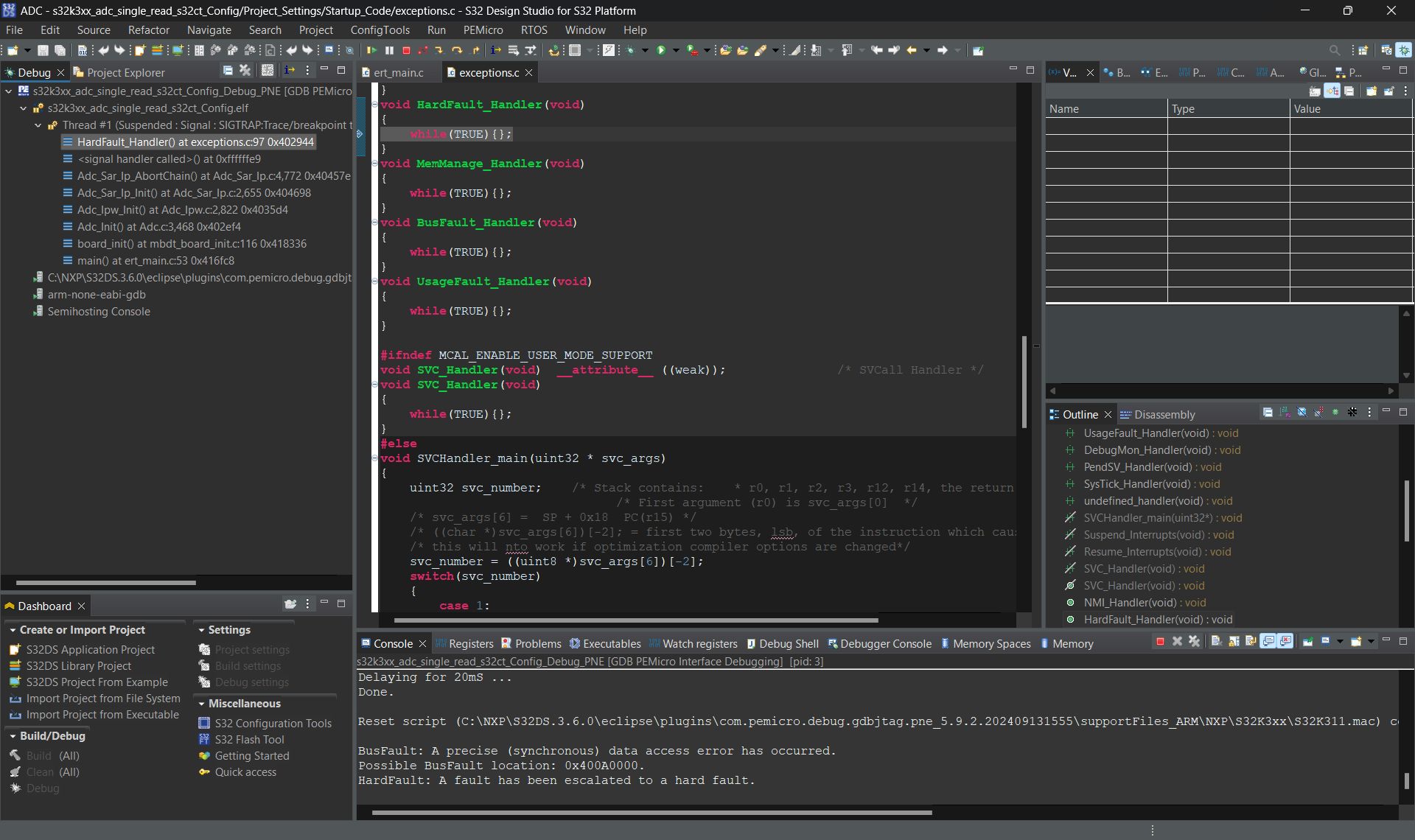
- ADC0 causes a Hardware Fault interrupt.
ADC0 causes a Hardware Fault interrupt.
- RSS フィードを購読する
- トピックを新着としてマーク
- トピックを既読としてマーク
- このトピックを現在のユーザーにフロートします
- ブックマーク
- 購読
- ミュート
- 印刷用ページ
ADC0 causes a Hardware Fault interrupt.

- 新着としてマーク
- ブックマーク
- 購読
- ミュート
- RSS フィードを購読する
- ハイライト
- 印刷
- 不適切なコンテンツを報告
I have been able to configure the ADC1 in the S32 configuration tool and have successfully added 2 sampling groups.
However, when I try to do the same for ADC0, I end up getting a Hardware Fault interrupt.
I have tried configuring both with and without ADC1 also configured, with the same results.
Is this a known issue with the MBDT?
- 新着としてマーク
- ブックマーク
- 購読
- ミュート
- RSS フィードを購読する
- ハイライト
- 印刷
- 不適切なコンテンツを報告
Thanks, I had missed this step:
Then we need to enable the ADC0 peripheral clock in MCU Configuration -> McuModuleConfiguration -> McuModeSettingConfig:
Thank you for your assistance!
 stefanvlad
- 新着としてマーク
- ブックマーク
- 購読
- ミュート
- RSS フィードを購読する
- ハイライト
- 印刷
- 不適切なコンテンツを報告
Hi @Automan ,
Yes, that step is usually forgotten by most users, enabling the peripheral clock in MCU Configuration -> McuModuleConfiguration -> McuModeSettingConfig.
You can select this thread Re: ADC0 causes a Hardware Fault interrupt. - NXP Community
and click on Accept as Solution,
Glad that now everything works ,
Stefan V.
stefanvlad
- 新着としてマーク
- ブックマーク
- 購読
- ミュート
- RSS フィードを購読する
- ハイライト
- 印刷
- 不適切なコンテンツを報告
Hi @Automan ,
Are you using our latest NXP Model-Based Design Toolbox for S32K3 version 1.6.0.?
What board are you using and what model have you tried to configure the ADC0?
Also can you provide more details about the ADC configuration, screenshot and logs of the encountered error ?
Thank you,
Stefan V.
- 新着としてマーク
- ブックマーク
- 購読
- ミュート
- RSS フィードを購読する
- ハイライト
- 印刷
- 不適切なコンテンツを報告
stefanvlad
- 新着としてマーク
- ブックマーク
- 購読
- ミュート
- RSS フィードを購読する
- ハイライト
- 印刷
- 不適切なコンテンツを報告
Hi @Automan
Thank you for using our latest NXP Model-Based Design Toolbox for S32K3 version 1.6.0.
We also have a guide on how to enable a new ADC channel for S32K3 boards Controlling LED intensity with ADC and PWM - NXP Community
In your case with the the S32K31XEVB-Q100 EVB board, there is only one ADC1 channel configured in the S32CT.
If you want to add an ADC0 channel, we need to first add a pin intro Pin Manager:
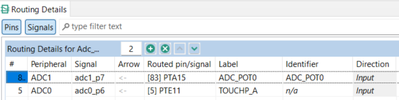
For example PTE11 pin is on ADC0 and connected to TOUCHO_A on the board.
Next we need to add thisPTE11 pin in Peripherals -> Port Configuration:

Then we need to enable the ADC0 interrupt in Platform Configuration -> Interrupt Controller:
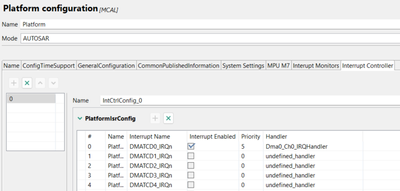
Scroll down the Interrupt Controller page and find and enable ADC0:

Then we need to enable the ADC0 peripheral clock in MCU Configuration -> McuModuleConfiguration -> McuModeSettingConfig:

We need to add ADC0_EOC and ADC0_WD in ADC Configuration-> ADC Interrupt:
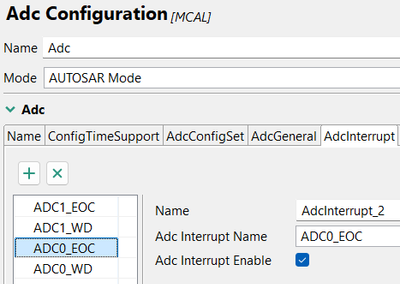
Then we need to add another ADC Hardware Instance in ADC configuration:
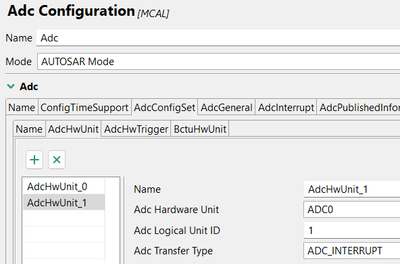
After we need to configure the Channel configurations array P6_ChanNum6:

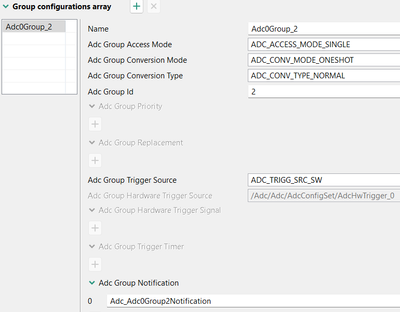
Update the Adc0Group_2 with the Adc_Adc0Group2Notification in the Group configuration array:
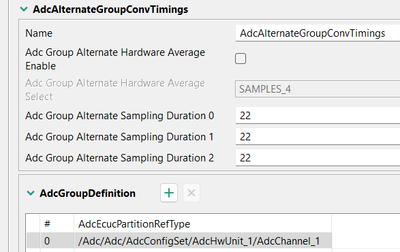
Select the AdcChannel_1 in the AdcGroupDefinition:
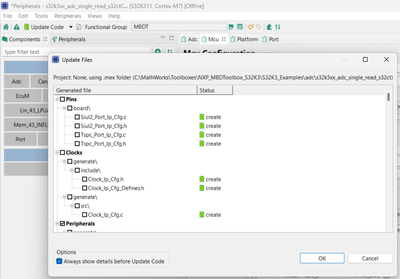
After this we can Update Code and a pop-up Update Files will appear, press OK:
After this process is done, we can close S32CT and go back to the model.
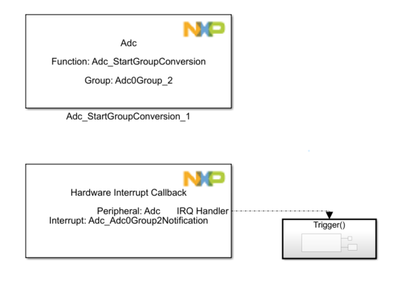
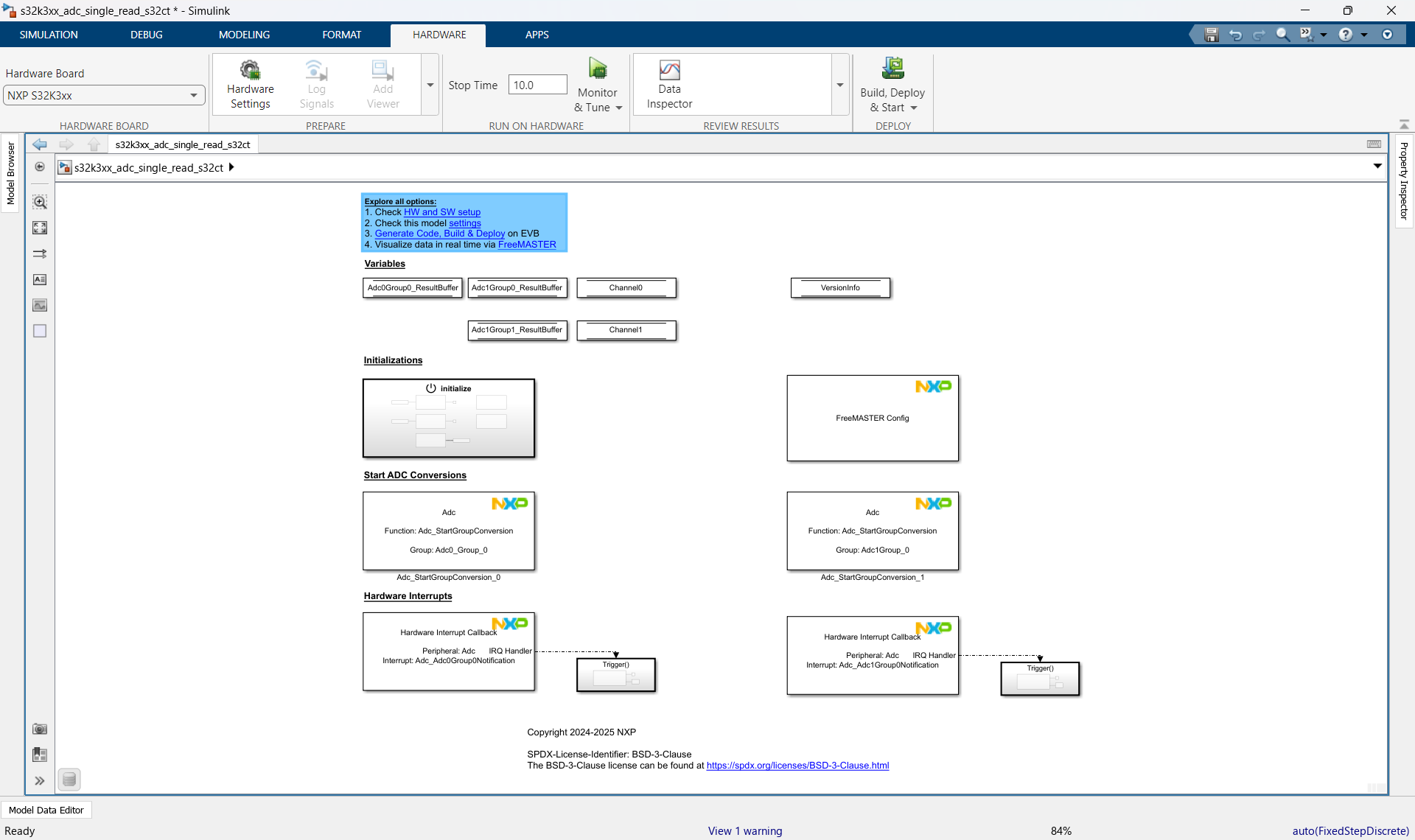
Update in the s32k3xx_adc_single_read_s32ct model, with Adc0Group_2:

Then go back to MATLAB and delete the following:
- s32k3xx_adc_single_read_s32ct_ert_rtw
- slprj
- s32k3xx_adc_single_read_s32ct.slxc

Select Yes to all, then go back to the s32k3xx_adc_single_read_s32ct.mdl and press on Build, Deploy &Start (keyboard shortcut CTRL+B
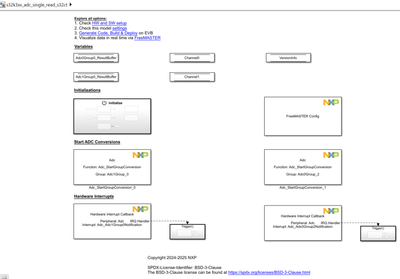
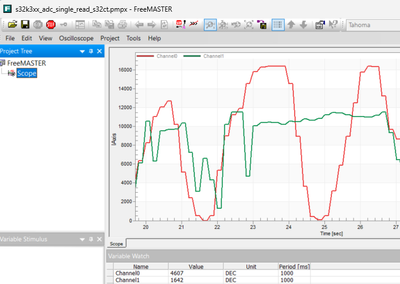
After the generated code is automatically flashed into the S32K311EVB, open FreeMaster and watch the newly added Channel_1:
Hope the steps above help you,
Stefan V.
