
- Forums
- Product Forums
- General Purpose MicrocontrollersGeneral Purpose Microcontrollers
- i.MX Forumsi.MX Forums
- QorIQ Processing PlatformsQorIQ Processing Platforms
- Identification and SecurityIdentification and Security
- Power ManagementPower Management
- Wireless ConnectivityWireless Connectivity
- RFID / NFCRFID / NFC
- Advanced AnalogAdvanced Analog
- Neural Processing UnitsNeural Processing Units
- MCX Microcontrollers
- S32G
- S32K
- S32V
- MPC5xxx
- Other NXP Products
- S12 / MagniV Microcontrollers
- Powertrain and Electrification Analog Drivers
- Sensors
- Vybrid Processors
- Digital Signal Controllers
- 8-bit Microcontrollers
- ColdFire/68K Microcontrollers and Processors
- PowerQUICC Processors
- OSBDM and TBDML
- S32M
- S32Z/E
-
- Solution Forums
- Software Forums
- MCUXpresso Software and ToolsMCUXpresso Software and Tools
- CodeWarriorCodeWarrior
- MQX Software SolutionsMQX Software Solutions
- Model-Based Design Toolbox (MBDT)Model-Based Design Toolbox (MBDT)
- FreeMASTER
- eIQ Machine Learning Software
- Embedded Software and Tools Clinic
- S32 SDK
- S32 Design Studio
- GUI Guider
- Zephyr Project
- Voice Technology
- Application Software Packs
- Secure Provisioning SDK (SPSDK)
- Processor Expert Software
- Generative AI & LLMs
-
- Topics
- Mobile Robotics - Drones and RoversMobile Robotics - Drones and Rovers
- NXP Training ContentNXP Training Content
- University ProgramsUniversity Programs
- Rapid IoT
- NXP Designs
- SafeAssure-Community
- OSS Security & Maintenance
- Using Our Community
-
- Cloud Lab Forums
-
- Knowledge Bases
- ARM Microcontrollers
- i.MX Processors
- Identification and Security
- Model-Based Design Toolbox (MBDT)
- QorIQ Processing Platforms
- S32 Automotive Processing Platform
- Wireless Connectivity
- CodeWarrior
- MCUXpresso Suite of Software and Tools
- MQX Software Solutions
- RFID / NFC
- Advanced Analog
- Neural Processing Units
-
- NXP Tech Blogs
- RSS フィードを購読する
- トピックを新着としてマーク
- トピックを既読としてマーク
- このトピックを現在のユーザーにフロートします
- ブックマーク
- 購読
- ミュート
- 印刷用ページ
cse secureboot mpc5777C

- 新着としてマーク
- ブックマーク
- 購読
- ミュート
- RSS フィードを購読する
- ハイライト
- 印刷
- 不適切なコンテンツを報告
Hi,
I need someone to explain to me how exactly the secureboot command will be executed during reset as it was mentioned in the datasheet:
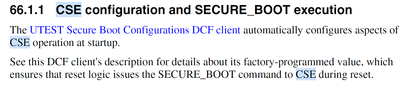
from what i understand through going though the reference manual + some application notes:
- the secureboot command can be executed by the BAM right?
- the DCF records for the secureboot configuration is done in the factory and cannot be changed right?
- When i try to view the UTEST area i couldn't find any Record for that secureboot configuration
- what should i do if i want the secureboot command to be executed automatically after every reset ?
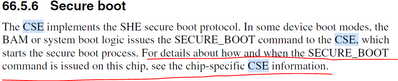

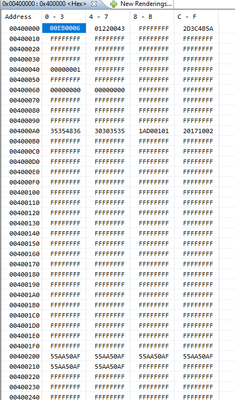

 lukaszadrapa
- 新着としてマーク
- ブックマーク
- 購読
- ミュート
- RSS フィードを購読する
- ハイライト
- 印刷
- 不適切なコンテンツを報告
Hi @Othmane1
Secure boot is enabled on all production devices. And parallel boot mode is selected. This is configured in NXP factory by DCF record and it cannot be changed. The DCF record is not visible in the memory map, it's hidden for user.
The device is configured in a way that SECURE_BOOT command is always executed by CSE during reset. If the BOOT_MAC_KEY is empty that nothing will happen and the process is just finished.
To make it working:
1. It is necessary to program DCF records to define start address and size for secure boot:
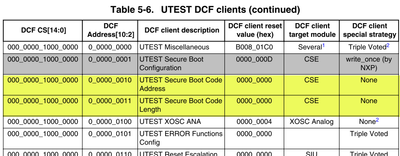
This DCF configurator could help:
https://community.nxp.com/t5/MPC5xxx-Knowledge-Base/MPC5777C-DCF-Configurator/ta-p/1104470
2. Load MASTER_ECU_KEY and BOOT_MAC_KEY by using LOAD_KEY command
3. Power cycle the device. The CSE will automatically calculate MAC of defined area and it will be stored automatically to BOOT_MAC slot. Afte next reset, you can just check CSE status register if secure boot was successful or not.
And notice that there's following erratum which is important in case you want to calculate the BOOT_MAC by yourself:
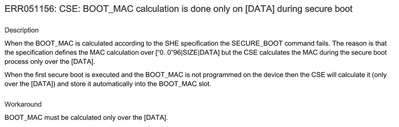
https://www.nxp.com/docs/en/errata/MPC5777C_3N45H.pdf
Regards,
Lukas
- 新着としてマーク
- ブックマーク
- 購読
- ミュート
- RSS フィードを購読する
- ハイライト
- 印刷
- 不適切なコンテンツを報告
can you please further explain the erratum?
does it mean that the GENERATE_MAC command that I can use to calculate the MAC of the software doesn't work?
lukaszadrapa
- 新着としてマーク
- ブックマーク
- 購読
- ミュート
- RSS フィードを購読する
- ハイライト
- 印刷
- 不適切なコンテンツを報告
Hi @Othmane1
GENERATE_MAC command works as expected.
The erratum says that CSE does not calculate correctly only the BOOT_MAC. SHE specification requires to calculate the BOOT_MAC like:
CMAC( BOOT_MAC_KEY (“0...0“ 96 | SIZE | DATA))
However, CSE is doing only (CMAC( BOOT_MAC_KEY (DATA)))
If you calculate BOOT_MAC offline by some external tools, it's necessary to take this into account.
Regards,
Lukas
- 新着としてマーク
- ブックマーク
- 購読
- ミュート
- RSS フィードを購読する
- ハイライト
- 印刷
- 不適切なコンテンツを報告
Now i understand.
i have other questions:
1.the official way to do secureboot on cse is to first flash the UTEST (DCF) address and length of the code then load the boot_mac_key right?
2.Does the previous method apply to the HSM too?
3.I saw in some old documentation of CSE that we can specify the address and length by following this table attached, is both method for secure boot can be used?
4.if I don't want to erase the keys every time I update the software (due to the secure boot failing for mismatch of boot_mac) can I just use the function

