- Forums
- Product Forums
- General Purpose MicrocontrollersGeneral Purpose Microcontrollers
- i.MX Forumsi.MX Forums
- QorIQ Processing PlatformsQorIQ Processing Platforms
- Identification and SecurityIdentification and Security
- Power ManagementPower Management
- Wireless ConnectivityWireless Connectivity
- RFID / NFCRFID / NFC
- Advanced AnalogAdvanced Analog
- Neural Processing UnitsNeural Processing Units
- MCX Microcontrollers
- S32G
- S32K
- S32V
- MPC5xxx
- Other NXP Products
- S12 / MagniV Microcontrollers
- Powertrain and Electrification Analog Drivers
- Sensors
- Vybrid Processors
- Digital Signal Controllers
- 8-bit Microcontrollers
- ColdFire/68K Microcontrollers and Processors
- PowerQUICC Processors
- OSBDM and TBDML
- S32M
- S32Z/E
-
- Solution Forums
- Software Forums
- MCUXpresso Software and ToolsMCUXpresso Software and Tools
- CodeWarriorCodeWarrior
- MQX Software SolutionsMQX Software Solutions
- Model-Based Design Toolbox (MBDT)Model-Based Design Toolbox (MBDT)
- FreeMASTER
- eIQ Machine Learning Software
- Embedded Software and Tools Clinic
- S32 SDK
- S32 Design Studio
- GUI Guider
- Zephyr Project
- Voice Technology
- Application Software Packs
- Secure Provisioning SDK (SPSDK)
- Processor Expert Software
- Generative AI & LLMs
-
- Topics
- Mobile Robotics - Drones and RoversMobile Robotics - Drones and Rovers
- NXP Training ContentNXP Training Content
- University ProgramsUniversity Programs
- Rapid IoT
- NXP Designs
- SafeAssure-Community
- OSS Security & Maintenance
- Using Our Community
-
- Cloud Lab Forums
-
- Knowledge Bases
- ARM Microcontrollers
- i.MX Processors
- Identification and Security
- Model-Based Design Toolbox (MBDT)
- QorIQ Processing Platforms
- S32 Automotive Processing Platform
- Wireless Connectivity
- CodeWarrior
- MCUXpresso Suite of Software and Tools
- MQX Software Solutions
- RFID / NFC
- Advanced Analog
- Neural Processing Units
-
- NXP Tech Blogs
- RSS フィードを購読する
- トピックを新着としてマーク
- トピックを既読としてマーク
- このトピックを現在のユーザーにフロートします
- ブックマーク
- 購読
- ミュート
- 印刷用ページ
Eqadc 8 bits ADC Resolution

- 新着としてマーク
- ブックマーク
- 購読
- ミュート
- RSS フィードを購読する
- ハイライト
- 印刷
- 不適切なコンテンツを報告
In the configuration of the EQADC in the micro MPC5634 as I can change the resolution of the ADC to 8 bits.
EQADC.CFPR[0].R = 0x80040C00; /* Conversion command: convert channel 12--->0C// 16 bits */
EQADC.CFCR[0].R = 0x0410; /* with ADC0, set EOQ, and send result to RFIFO 0 */
while (EQADC.FISR[0].B.RFDF != 1){} /* Wait for RFIFO 0's Drain Flag to set */
Tps = EQADC.RFPR[0].R; /* ADC result */
TpsMv = (uint32_t)((5000*Tps)/0x3FFC); /* ADC result in milivolts */
EQADC.FISR[0].R = 0x10020000;
Thank you

 davidtosenovjan
- 新着としてマーク
- ブックマーク
- 購読
- ミュート
- RSS フィードを購読する
- ハイライト
- 印刷
- 不適切なコンテンツを報告
If I understand well you want to change resolution to 8-bit.
It can be done by choosing Conversion Command Format for Alternate Configurations, it the such one having 0x08-0x0F on LSB place.
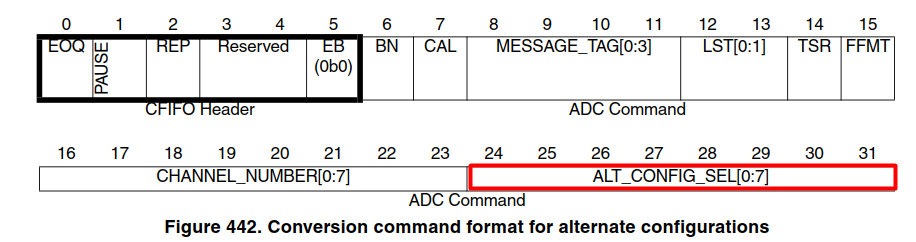
For instance 0x08 choose Alternate configuration 1 that is related to ADC_ACR1 register
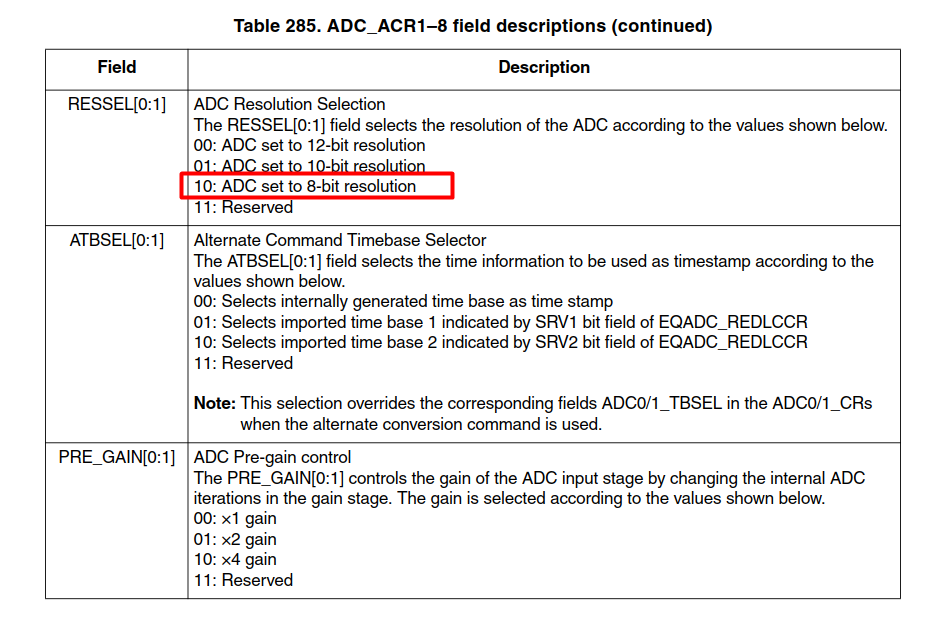
I would recommend to see following example code:
Example MPC5674F eQADC+eDMA Single_Scan CW210
I am using there header file called eQADC_macros_MONACO.h which you possibly simplify you configuration.
For instance mentioned example uses following command queue
// Conversion Command Queue 0
uint32_t CQueue_0[] =
{
( CHANNEL(0) | B0 | MESSAGE_TAG(RFIFO0) ),
( CHANNEL(1) | B1 | MESSAGE_TAG(RFIFO0) | EOQ )
};
In you case it would like this
// Conversion Command Queue 0
uint32_t CQueue_0[] =
{
( ALT_CONFIG_SEL(ALT_CONF_1) | CHANNEL(0) | MESSAGE_TAG(RFIFO0) ),
( ALT_CONFIG_SEL(ALT_CONF_1) | CHANNEL(1) | MESSAGE_TAG(RFIFO0) | EOQ ),
};
It is not all necessary changes but I hope it helps a bit.
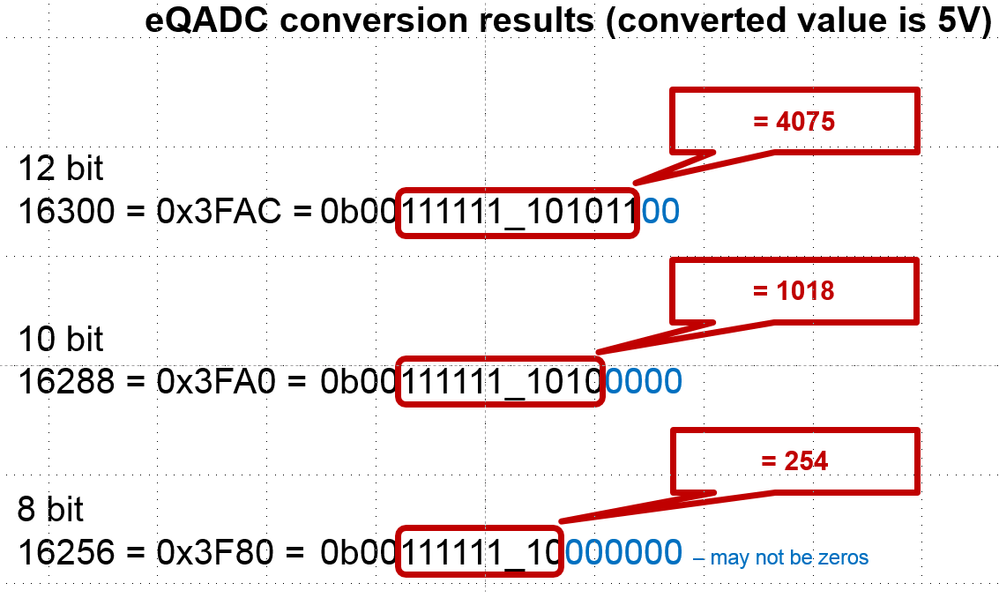
One yet note about result format (as it be possibly confusing) - it is basically placed in the middle of result register like in this examples :

- 新着としてマーク
- ブックマーク
- 購読
- ミュート
- RSS フィードを購読する
- ハイライト
- 印刷
- 不適切なコンテンツを報告
What is the resolution of eQADC in standart configuration? @davidtosenovjan
davidtosenovjan
- 新着としてマーク
- ブックマーク
- 購読
- ミュート
- RSS フィードを購読する
- ハイライト
- 印刷
- 不適切なコンテンツを報告
No, 12-bit is a standard configuration.
- 新着としてマーク
- ブックマーク
- 購読
- ミュート
- RSS フィードを購読する
- ハイライト
- 印刷
- 不適切なコンテンツを報告
thanks for answering
I change it in Alternate configuration 0x08 but the values I get remain the same as 14 bits as the image.
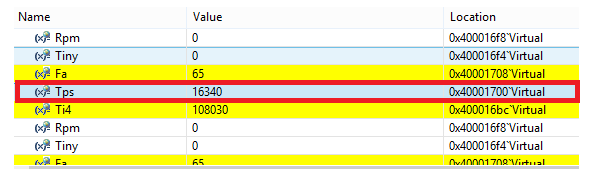
I have the code as well.
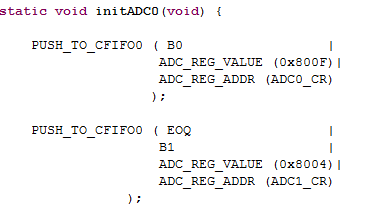


Does not change to 8bit
It is better a resolution of 14 bits as the one I get or 8 bits is for the calculation of the times of injection of a motor
davidtosenovjan
- 新着としてマーク
- ブックマーク
- 購読
- ミュート
- RSS フィードを購読する
- ハイライト
- 印刷
- 不適切なコンテンツを報告
It is needed to mask results as I depicted by red color. otherwise you have just 14-bit result but never 14-bit accuracy.
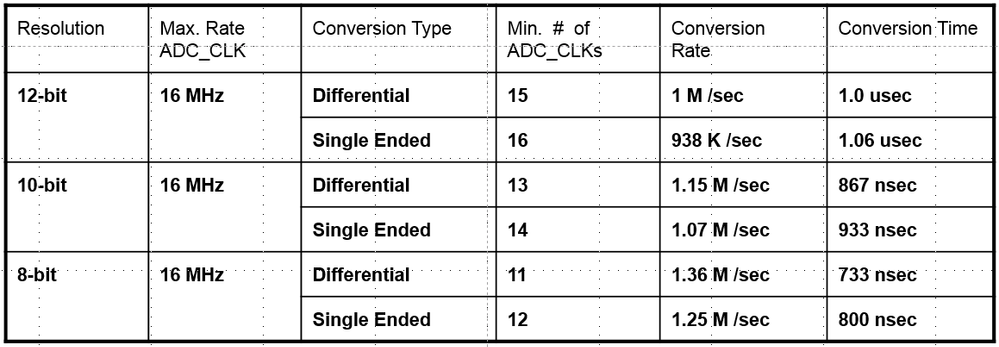
The only reason for choosing 10/8bit is shorter conversion time by one/two adc cycles.