
- Forums
- Product Forums
- General Purpose MicrocontrollersGeneral Purpose Microcontrollers
- i.MX Forumsi.MX Forums
- QorIQ Processing PlatformsQorIQ Processing Platforms
- Identification and SecurityIdentification and Security
- Power ManagementPower Management
- Wireless ConnectivityWireless Connectivity
- RFID / NFCRFID / NFC
- Advanced AnalogAdvanced Analog
- Neural Processing UnitsNeural Processing Units
- MCX Microcontrollers
- S32G
- S32K
- S32V
- MPC5xxx
- Other NXP Products
- S12 / MagniV Microcontrollers
- Powertrain and Electrification Analog Drivers
- Sensors
- Vybrid Processors
- Digital Signal Controllers
- 8-bit Microcontrollers
- ColdFire/68K Microcontrollers and Processors
- PowerQUICC Processors
- OSBDM and TBDML
- S32M
- S32Z/E
-
- Solution Forums
- Software Forums
- MCUXpresso Software and ToolsMCUXpresso Software and Tools
- CodeWarriorCodeWarrior
- MQX Software SolutionsMQX Software Solutions
- Model-Based Design Toolbox (MBDT)Model-Based Design Toolbox (MBDT)
- FreeMASTER
- eIQ Machine Learning Software
- Embedded Software and Tools Clinic
- S32 SDK
- S32 Design Studio
- GUI Guider
- Zephyr Project
- Voice Technology
- Application Software Packs
- Secure Provisioning SDK (SPSDK)
- Processor Expert Software
- Generative AI & LLMs
-
- Topics
- Mobile Robotics - Drones and RoversMobile Robotics - Drones and Rovers
- NXP Training ContentNXP Training Content
- University ProgramsUniversity Programs
- Rapid IoT
- NXP Designs
- SafeAssure-Community
- OSS Security & Maintenance
- Using Our Community
-
- Cloud Lab Forums
-
- Knowledge Bases
- ARM Microcontrollers
- i.MX Processors
- Identification and Security
- Model-Based Design Toolbox (MBDT)
- QorIQ Processing Platforms
- S32 Automotive Processing Platform
- Wireless Connectivity
- CodeWarrior
- MCUXpresso Suite of Software and Tools
- MQX Software Solutions
- RFID / NFC
- Advanced Analog
- Neural Processing Units
-
- NXP Tech Blogs
- Home
- :
- MCUXpressoソフトウェアとツール
- :
- MCUXpressoセキュアプロビジョニングツール
- :
- Incorrect FDCB for Adesto EcoXIP?
Incorrect FDCB for Adesto EcoXIP?
- RSS フィードを購読する
- トピックを新着としてマーク
- トピックを既読としてマーク
- このトピックを現在のユーザーにフロートします
- ブックマーク
- 購読
- ミュート
- 印刷用ページ
Incorrect FDCB for Adesto EcoXIP?

- 新着としてマーク
- ブックマーク
- 購読
- ミュート
- RSS フィードを購読する
- ハイライト
- 印刷
- 不適切なコンテンツを報告
Hello,
I am trying to use the Secure Provisioning Tool to upload an XIP application to an Embedded Artists i.MX RT1062 board which uses the Adesto EcoXIP (ATXP032) for Flash.
Using MCUXpresso (and J-Link debugger) the application uploads and runs fine.
Switching to Secure Provisioning Tool (or MCUBootUtility) the application uploads, but cannot execute.
I am also using a custom flashloader.bin based on the MCUboot SDK example in MCUXpresso SDK 2.8.6
I used MCUBootUtility to read out the flash memory (from location 0x60000000) to compare the two images.
There are some substantial differences between the two methods.
Specifically, the Flash Device Config Block (which starts at 0x60000000) is different. Then the IVT, Boot Data and DCD sections (which start at 0x60001000) are also very different.
It seems that these differences cause the application to fail to run. I manually removed the boot header from an MCUExpresso based binary image and loaded it using Secure Provisioning Tool directly, and it did successfully execute from Flash (although very slowly). But this doesn't fix the FDCB section, which seems cause the poor execution performance.
It looks like the flashloader function "flexspi_nor_generate_config_block_adesto_octalflash" is responsible for setting up the FDCB section.
Here are some screenshots highlighting my findings:

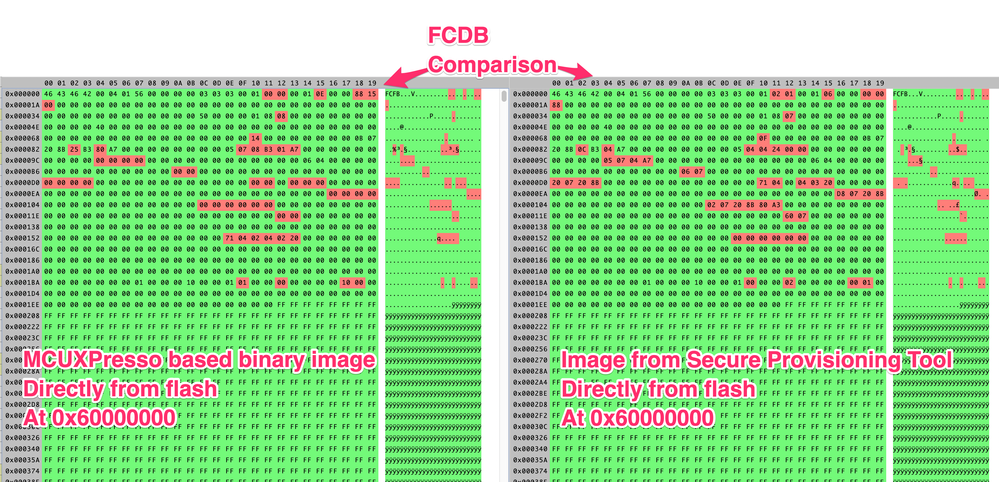
Is it possible that the FDCB configuration for the Adesto Octal flash is incorrect or hasn't been updated in the SDK example for the flashloader?
thanks
- 新着としてマーク
- ブックマーク
- 購読
- ミュート
- RSS フィードを購読する
- ハイライト
- 印刷
- 不適切なコンテンツを報告
Hi, was this issue ever resolved. I wonder if its related to my issue: https://community.nxp.com/t5/i-MX-RT/Run-bootloader-from-application-rt1062/m-p/1282335#M14372
Also, where can I find the file "fcb.bin"?

 marek-trmac
- 新着としてマーク
- ブックマーク
- 購読
- ミュート
- RSS フィードを購読する
- ハイライト
- 印刷
- 不適切なコンテンツを報告
Hi jackking,
in Secure Provisioning Tool, you can use custom FCB:
- select Boot Type on toolbar: "flex-spi-nor/user FCB file"
- click Edit button and select existing custom "fcb.bin" file
The other Boot Type devices are provided as a templates with simplified configuration. You can always customize simplified configuration using Edit button.
Hope this helps.
Regards, Marek
Marek
NOTE: If you find the answer useful, kindly click on [ACCEPT AS SOLUTION] button
- 新着としてマーク
- ブックマーク
- 購読
- ミュート
- RSS フィードを購読する
- ハイライト
- 印刷
- 不適切なコンテンツを報告
I don't think there is an option to use a custom FCB bin file. You can use a JSON config file and edit a few settings.
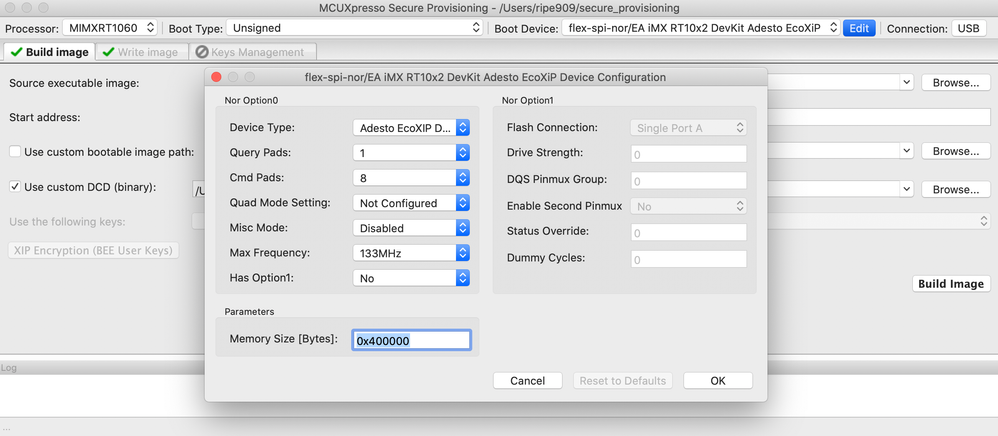 marek-trmac
- 新着としてマーク
- ブックマーク
- 購読
- ミュート
- RSS フィードを購読する
- ハイライト
- 印刷
- 不適切なコンテンツを報告
Hi jackking,
I'd recommend to try again the following two steps:
in Secure Provisioning Tool, you can use custom FCB:
- select Boot Type on toolbar: "flex-spi-nor/user FCB file"
- click Edit button and select existing custom "fcb.bin" file
Custom FCB was supported in Secure Provisioning V1 and I believe it is still there.
Regards
Marek
Marek
NOTE: If you find the answer useful, kindly click on [ACCEPT AS SOLUTION] button
- 新着としてマーク
- ブックマーク
- 購読
- ミュート
- RSS フィードを購読する
- ハイライト
- 印刷
- 不適切なコンテンツを報告
OK, I see that. I assume I can just extract a binary FCB file from an image created via MCUXpresso and then use that in Secure Provisioning.
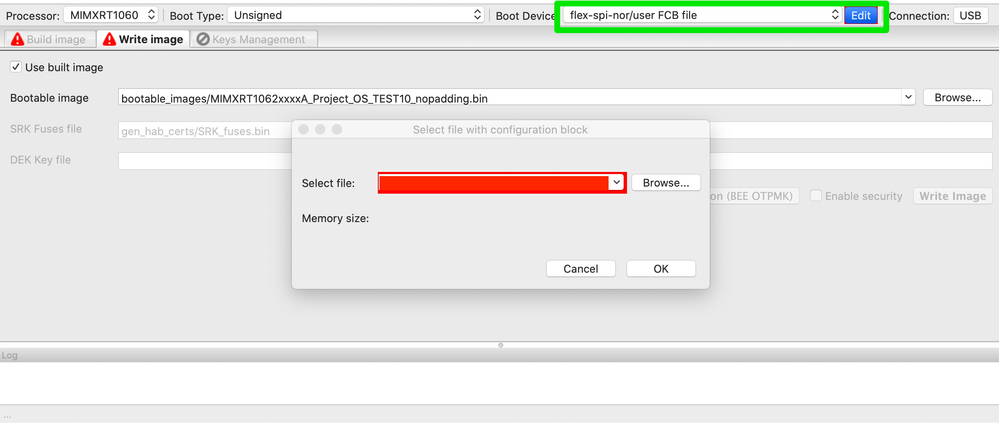
 liborukropec
- 新着としてマーク
- ブックマーク
- 購読
- ミュート
- RSS フィードを購読する
- ハイライト
- 印刷
- 不適切なコンテンツを報告
Hello jaccking,
1. your custom flashloader - do you use it with Secure Provisioning?
2. what version of Secure Provisioning Tool are you using? 2.1?
3. The question to the adesto flash supported by the flashloader - this question should be placed probably in the "MCUXpresso SDK" community.
Regards,
Libor
- 新着としてマーク
- ブックマーク
- 購読
- ミュート
- RSS フィードを購読する
- ハイライト
- 印刷
- 不適切なコンテンツを報告
1. I used both my custom flashloader and the one that ships with Secure Provisioning. Both with Secure Provisioning v2.0 and v2.1. I had to use the Embedded Artists EVK to use the provided flashloader, as my custom board needs the modified flashloader to work.
2. I tried both Secure Provisioning 2.0 and 2.1, with the same result.
3. I will also post to the SDK community and see what the support for Adesto EcoXIP looks like.
Thanks
