
- Forums
- Product Forums
- General Purpose MicrocontrollersGeneral Purpose Microcontrollers
- i.MX Forumsi.MX Forums
- QorIQ Processing PlatformsQorIQ Processing Platforms
- Identification and SecurityIdentification and Security
- Power ManagementPower Management
- Wireless ConnectivityWireless Connectivity
- RFID / NFCRFID / NFC
- Advanced AnalogAdvanced Analog
- Neural Processing UnitsNeural Processing Units
- MCX Microcontrollers
- S32G
- S32K
- S32V
- MPC5xxx
- Other NXP Products
- S12 / MagniV Microcontrollers
- Powertrain and Electrification Analog Drivers
- Sensors
- Vybrid Processors
- Digital Signal Controllers
- 8-bit Microcontrollers
- ColdFire/68K Microcontrollers and Processors
- PowerQUICC Processors
- OSBDM and TBDML
- S32M
- S32Z/E
-
- Solution Forums
- Software Forums
- MCUXpresso Software and ToolsMCUXpresso Software and Tools
- CodeWarriorCodeWarrior
- MQX Software SolutionsMQX Software Solutions
- Model-Based Design Toolbox (MBDT)Model-Based Design Toolbox (MBDT)
- FreeMASTER
- eIQ Machine Learning Software
- Embedded Software and Tools Clinic
- S32 SDK
- S32 Design Studio
- GUI Guider
- Zephyr Project
- Voice Technology
- Application Software Packs
- Secure Provisioning SDK (SPSDK)
- Processor Expert Software
- Generative AI & LLMs
-
- Topics
- Mobile Robotics - Drones and RoversMobile Robotics - Drones and Rovers
- NXP Training ContentNXP Training Content
- University ProgramsUniversity Programs
- Rapid IoT
- NXP Designs
- SafeAssure-Community
- OSS Security & Maintenance
- Using Our Community
-
- Cloud Lab Forums
-
- Knowledge Bases
- ARM Microcontrollers
- i.MX Processors
- Identification and Security
- Model-Based Design Toolbox (MBDT)
- QorIQ Processing Platforms
- S32 Automotive Processing Platform
- Wireless Connectivity
- CodeWarrior
- MCUXpresso Suite of Software and Tools
- MQX Software Solutions
- RFID / NFC
- Advanced Analog
- Neural Processing Units
-
- NXP Tech Blogs
- Home
- :
- MCUXpressoソフトウェアとツール
- :
- MCUXpresso IDE
- :
- Re: flash two version apps on the same microcontroller
flash two version apps on the same microcontroller
- RSS フィードを購読する
- トピックを新着としてマーク
- トピックを既読としてマーク
- このトピックを現在のユーザーにフロートします
- ブックマーク
- 購読
- ミュート
- 印刷用ページ
flash two version apps on the same microcontroller

- 新着としてマーク
- ブックマーク
- 購読
- ミュート
- RSS フィードを購読する
- ハイライト
- 印刷
- 不適切なコンテンツを報告
Hello,
We are using the MK64FN1M microcontroller and we are trying to have the ability to flash two versions of the same app , remotely, into the program memory. The ideia is to prevent the device to be stuck if the flashing process goes wrong on one part of the memory having always the other half with an older version.
We are using an ethernet bootloader and we already can flash both parts of the memory and run the app from one or the other, but never having them both on memory or having the ability to switch from one to the other, or reflash them.
We must be doing something wrong on the memory partition , but I cant figure out what. Here is our partition :
Block 1
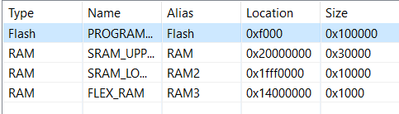
with SCB->VTOR = 0xF000 and when flashing, at the bootloader, the erase goes from 0xf000 to 0x7A000 and the start address is 0xF1D5;
Block 2
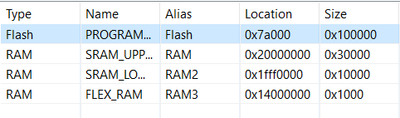
with SCB->VTOR = 0x7A000 and when flashing, at the bootloader, the erase goes from 0x7A000 to 0xF4240 and the start address is 0x7A1D5;
Can you please share some info on this idea.
Thank you for the help
Regards
- 新着としてマーク
- ブックマーク
- 購読
- ミュート
- RSS フィードを購読する
- ハイライト
- 印刷
- 不適切なコンテンツを報告
Hi @ErichStyger and @jingpan ,
Thank you very much for the help . I will try this tool in order to see if I find the issue.
But in the meanwhile I am still struggling to find the reason for block 2 app not being able to access the configuration part of memory shared with the bootloader on the 0xFE000 . Block 1 app is able to do so.
Thank you for the help.
I will continue trying to find the issue and I if do so, I will let you know.
Regards
- 新着としてマーク
- ブックマーク
- 購読
- ミュート
- RSS フィードを購読する
- ハイライト
- 印刷
- 不適切なコンテンツを報告
Hello,
I think I have managed to find one of the issues so far: I did managed to flash both apps in memory and switch between each other. It seems that I had a large app that was not fitting in half a memory, so when I reduced the size of it, it could be flashed and switched between apps.
So far so good, but something is still wrong. While using the app that is in the block 2 I cant access part of the shared memory with the bootloader for configuration. But if in the app on block 1 I can still change the configuration parameters on the bootloader shared memory at the address 0xFE000 . I need to config it via the app, so that the bootloader behaves differently on the next reset.
I must be doing something wrong with the correct position of the memory, but I cant figure out what is going wrong.
Can you please share some information, or a memory structural info about this topic?
Thank you
Regards

 jingpan
- 新着としてマーク
- ブックマーク
- 購読
- ミュート
- RSS フィードを購読する
- ハイライト
- 印刷
- 不適切なコンテンツを報告
Hi @joao_ribeiro ,
Do you mean the share memory is in block 2 and bootloader can't read the data in this share memory? Does the data really there or be covered by some error? You can use flash tool to read them out and compare.
Regards,
Jing
- 新着としてマーク
- ブックマーク
- 購読
- ミュート
- RSS フィードを購読する
- ハイライト
- 印刷
- 不適切なコンテンツを報告
Hi @jingpan ,
Thank you for the help and concern.
I am sorry if I was a bit confusing on my last post. With this image I intend to clarify the idea that I have for the memory
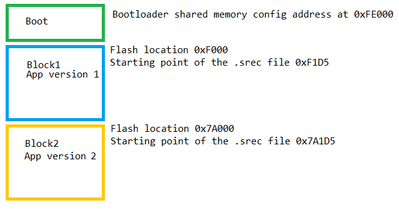
So I can jump from block 1 and block 2 having app 1 and app 2 running well, so the bootloader can point to 0xF1D5 and also to 0x7A1D5 without any issue. Although when I try to change the bootloader's configuration that is in the 0xFE000 address I can only have success if I am running the block1 and not the block2. As if the app in block 2 could not reach the memory at the address 0xFE000.
Using a flash tool could be a good way to find more about the issue, you are right. Can we recover the entire memory with the MCUXpresso IDE?
Thank you for the help
Regards

- 新着としてマーク
- ブックマーク
- 購読
- ミュート
- RSS フィードを購読する
- ハイライト
- 印刷
- 不適切なコンテンツを報告
Hi @joao_ribeiro ,
>>Using a flash tool could be a good way to find more about the issue, you are right. Can we recover the entire memory with the MCUXpresso IDE?
do you mean storing the memory in a file or something like that?
You can do that with the MCUXpresso IDE: there is an export functionality here:
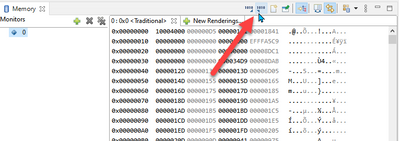
Or see https://mcuoneclipse.com/2012/05/04/dump-my-device-memory/
Other than that, the IDE comes with the SEGGER/J-Link tool. So if you use the SEGGER firmware with your board, than you can use the J-Flash lite to dump the memory too.
I hope this helps,
Erich
jingpan
- 新着としてマーク
- ブックマーク
- 購読
- ミュート
- RSS フィードを購読する
- ハイライト
- 印刷
- 不適切なコンテンツを報告
