
- Forums
- Product Forums
- General Purpose MicrocontrollersGeneral Purpose Microcontrollers
- i.MX Forumsi.MX Forums
- QorIQ Processing PlatformsQorIQ Processing Platforms
- Identification and SecurityIdentification and Security
- Power ManagementPower Management
- Wireless ConnectivityWireless Connectivity
- RFID / NFCRFID / NFC
- Advanced AnalogAdvanced Analog
- MCX Microcontrollers
- S32G
- S32K
- S32V
- MPC5xxx
- Other NXP Products
- S12 / MagniV Microcontrollers
- Powertrain and Electrification Analog Drivers
- Sensors
- Vybrid Processors
- Digital Signal Controllers
- 8-bit Microcontrollers
- ColdFire/68K Microcontrollers and Processors
- PowerQUICC Processors
- OSBDM and TBDML
- S32M
- S32Z/E
-
- Solution Forums
- Software Forums
- MCUXpresso Software and ToolsMCUXpresso Software and Tools
- CodeWarriorCodeWarrior
- MQX Software SolutionsMQX Software Solutions
- Model-Based Design Toolbox (MBDT)Model-Based Design Toolbox (MBDT)
- FreeMASTER
- eIQ Machine Learning Software
- Embedded Software and Tools Clinic
- S32 SDK
- S32 Design Studio
- GUI Guider
- Zephyr Project
- Voice Technology
- Application Software Packs
- Secure Provisioning SDK (SPSDK)
- Processor Expert Software
- Generative AI & LLMs
-
- Topics
- Mobile Robotics - Drones and RoversMobile Robotics - Drones and Rovers
- NXP Training ContentNXP Training Content
- University ProgramsUniversity Programs
- Rapid IoT
- NXP Designs
- SafeAssure-Community
- OSS Security & Maintenance
- Using Our Community
-
- Cloud Lab Forums
-
- Knowledge Bases
- ARM Microcontrollers
- i.MX Processors
- Identification and Security
- Model-Based Design Toolbox (MBDT)
- QorIQ Processing Platforms
- S32 Automotive Processing Platform
- Wireless Connectivity
- CodeWarrior
- MCUXpresso Suite of Software and Tools
- MQX Software Solutions
- RFID / NFC
- Advanced Analog
-
- NXP Tech Blogs
- Home
- :
- MCUXpresso Software and Tools
- :
- MCUXpresso IDE
- :
- Re: MCUXpresso IDE on Ubuntu 17.04
MCUXpresso IDE on Ubuntu 17.04
- Subscribe to RSS Feed
- Mark Topic as New
- Mark Topic as Read
- Float this Topic for Current User
- Bookmark
- Subscribe
- Mute
- Printer Friendly Page
MCUXpresso IDE on Ubuntu 17.04

- Mark as New
- Bookmark
- Subscribe
- Mute
- Subscribe to RSS Feed
- Permalink
- Report Inappropriate Content
Hi,
I had installed MCUXpresso 10.0.0 build 344 on Ubuntu 16.04 and my LPCLink2 probe was working fine. I have found that after upgrading to Ubuntu 17.04 that the probes can no longer be found and debugging fails. I have also tried with an LPC11u68 xpresso v2 board with the same result. The system is able to both probes, but ProbeList returns no probes.
$ dmesg
[ 133.076818] usb 1-1: new high-speed USB device number 7 using xhci_hcd
[ 133.217912] usb 1-1: New USB device found, idVendor=1fc9, idProduct=000c
[ 133.217916] usb 1-1: New USB device strings: Mfr=1, Product=2, SerialNumber=3
[ 133.217919] usb 1-1: Product: LPC
[ 133.217921] usb 1-1: Manufacturer: NXP
[ 133.217923] usb 1-1: SerialNumber: ABCD$ lsusb
Bus 001 Device 007: ID 1fc9:000c NXP Semiconductors
redlink> ProbeList
No probes found
Has anyone managed to get the probe working under Ubuntu 17.04?
Cheers,
- Shane

- Mark as New
- Bookmark
- Subscribe
- Mute
- Subscribe to RSS Feed
- Permalink
- Report Inappropriate Content
I'm also having a similar problem using McuXpresso 10.0.2_411 (downloaded today) on Ubuntu 17.04 communicating with a FRDM-KL27/upgrdaded to boot Pemicro_v118.sda.
When I switch to P&E (after cutting J18) I'm getting same effect as not finding
lsusb
Bus 001 Device 017: ID 1357:0503 P&E Microcomputer Systems USB-ML-12 HCS08/HCS12 Multilink
Any advice?
thanks

 lpcxpresso_supp
- Mark as New
- Bookmark
- Subscribe
- Mute
- Subscribe to RSS Feed
- Permalink
- Report Inappropriate Content
Hi Shane,
Thanks for the information. We will aim to address this in a future release but our develop and test remains on the LTS version.
As of now, I think the best option is to pre-program your LPC-Link2 with debug probe firmware (rather than booting on demand) - so it will always appear as ID 1fc9:0090 NXP Semiconductors when connected.
We have a tool to do this called LPCScrypt LPCScrypt v1.8.0|NXP that can automate the process ... now some weasel words. This tool is pending an update to support the latest debug probe firmware etc. Although the older firmware will work without issue, you could patch an LPCScrypt installation with the latest firmware from the MCUXpresso IDE Install at ide/bin -> LPC432_CMSIS_DAP_V5_182.bin.hdr to LPCScrypt/probe_firmware_LPCLink2 . Also, the host software for this tool is 32 bit and not tested in Ubuntu 17.04.
If you have access to more than one LPC-Link2 (or another LinkServer compatible debug probe), you could perform the same programming operation using MCUXpresso IDE by connecting the debug probe to the target LPC-Link2's LPC4370 'J2' connection.
Then create a dummy project (or use any existing project), select this and click the GUI Flash Programmer 'Chip' Icon.
From the dialogue, you need to specify the flash driver as shown (else the projects driver will be used), browse to the firmware in ide/bin directory, and then set the base address of the LPC-Link2 SPIFI flash at 0x14000000, then click OK.
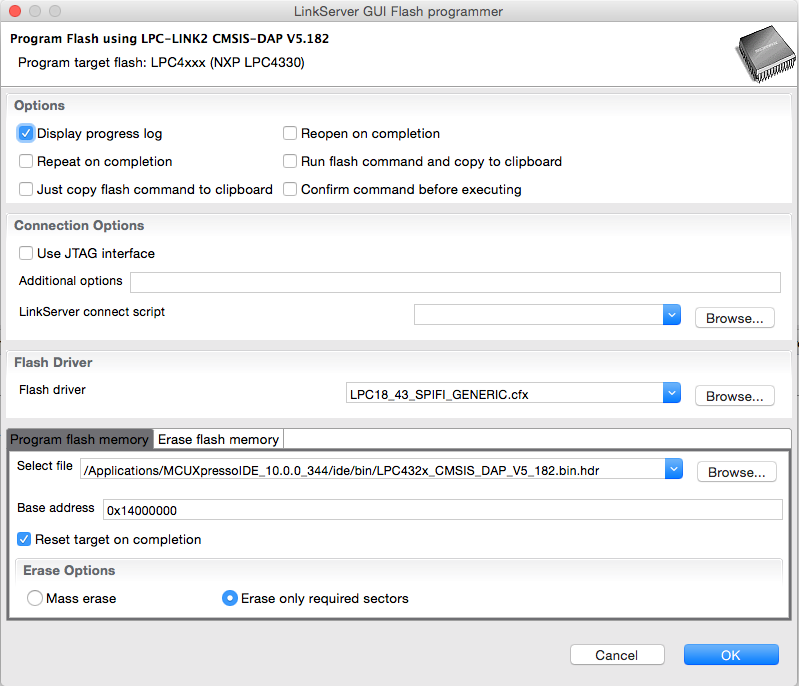
To use your programmed LPC-Link2 debug probe, ensure that the link JP1 (nearest the USB connector) is made and reboot the probe.
Thank you for your report and help with this issue.
Yours,
LPCXpresso Support
lpcxpresso_supp
- Mark as New
- Bookmark
- Subscribe
- Mute
- Subscribe to RSS Feed
- Permalink
- Report Inappropriate Content
Hi Shane,
To help us investigate - could I ask you to connect a LPC-Link2 - run lsusb.
Then try to boot the LPC-Link2 probe via the boot_link2 script located in the ide/bin directory
Run lsusb one more time and then paste the result back to this thread.
Yours,
LPCXpresso Support
- Mark as New
- Bookmark
- Subscribe
- Mute
- Subscribe to RSS Feed
- Permalink
- Report Inappropriate Content
Sure thing.
$ lsusb
Bus 001 Device 039: ID 1fc9:000c NXP Semiconductors
$ ./boot_link2
/usr/local/mcuxpressoide/ide/bin/dfu_boot -s ./boot_link2 -n LPC-Link2 -v 0x1fc9:0x000c -i /usr/local/mcuxpressoide/ide/bin/../bin/LPC432x_CMSIS_DAP_V5_182.bin.hdr
Looking for DFU devices with VID 1fc9 PID 000c ...
dfu-util -d 1fc9:000c -c 1 -i 0 -t 2048 -R -D /usr/local/mcuxpressoide/ide/bin/../bin/LPC432x_CMSIS_DAP_V5_182.bin.hdr
Booted LPC-Link2 (1fc9:000c) with /usr/local/mcuxpressoide/ide/bin/../bin/LPC432x_CMSIS_DAP_V5_182.bin.hdr
$ lsusb
Bus 001 Device 042: ID 1fc9:0090 NXP Semiconductors
After running boot_link2 manually, I am able to see the probe in MCUXpresso. After disconnecting and reconnecting, it is not visible until I rerun the command by hand. It looks like MCUXpresso is not booting the probe. Even when I hit the "Boot Debug Probe" button it does not work.
Cheers,
Shane
- Mark as New
- Bookmark
- Subscribe
- Mute
- Subscribe to RSS Feed
- Permalink
- Report Inappropriate Content
I have discovered two more pieces of information:
- The issue is there on Debian testing, and both systems work fine with LPCXpresso 8.2.2
- MCUXpresso is able to see the probe if I first boot it with LPCXpresso
Is MCUXpresso initialising the probe differently than LPCXpresso is? Could it be related to a missing library that I have the i386 version installed, and not the x64 version that MCUXpresso is expecting?
Cheers,
- Shane
