
- Forums
- Product Forums
- General Purpose MicrocontrollersGeneral Purpose Microcontrollers
- i.MX Forumsi.MX Forums
- QorIQ Processing PlatformsQorIQ Processing Platforms
- Identification and SecurityIdentification and Security
- Power ManagementPower Management
- Wireless ConnectivityWireless Connectivity
- RFID / NFCRFID / NFC
- Advanced AnalogAdvanced Analog
- Neural Processing UnitsNeural Processing Units
- MCX Microcontrollers
- S32G
- S32K
- S32V
- MPC5xxx
- Other NXP Products
- S12 / MagniV Microcontrollers
- Powertrain and Electrification Analog Drivers
- Sensors
- Vybrid Processors
- Digital Signal Controllers
- 8-bit Microcontrollers
- ColdFire/68K Microcontrollers and Processors
- PowerQUICC Processors
- OSBDM and TBDML
- S32M
- S32Z/E
-
- Solution Forums
- Software Forums
- MCUXpresso Software and ToolsMCUXpresso Software and Tools
- CodeWarriorCodeWarrior
- MQX Software SolutionsMQX Software Solutions
- Model-Based Design Toolbox (MBDT)Model-Based Design Toolbox (MBDT)
- FreeMASTER
- eIQ Machine Learning Software
- Embedded Software and Tools Clinic
- S32 SDK
- S32 Design Studio
- GUI Guider
- Zephyr Project
- Voice Technology
- Application Software Packs
- Secure Provisioning SDK (SPSDK)
- Processor Expert Software
- Generative AI & LLMs
-
- Topics
- Mobile Robotics - Drones and RoversMobile Robotics - Drones and Rovers
- NXP Training ContentNXP Training Content
- University ProgramsUniversity Programs
- Rapid IoT
- NXP Designs
- SafeAssure-Community
- OSS Security & Maintenance
- Using Our Community
-
- Cloud Lab Forums
-
- Knowledge Bases
- ARM Microcontrollers
- i.MX Processors
- Identification and Security
- Model-Based Design Toolbox (MBDT)
- QorIQ Processing Platforms
- S32 Automotive Processing Platform
- Wireless Connectivity
- CodeWarrior
- MCUXpresso Suite of Software and Tools
- MQX Software Solutions
- RFID / NFC
- Advanced Analog
- Neural Processing Units
-
- NXP Tech Blogs
- Home
- :
- MCUXpressoソフトウェアとツール
- :
- MCUXpressoコンフィグツール
- :
- Re: Where is the driver selection in Config Tools v4?
Where is the driver selection in Config Tools v4?
- RSS フィードを購読する
- トピックを新着としてマーク
- トピックを既読としてマーク
- このトピックを現在のユーザーにフロートします
- ブックマーク
- 購読
- ミュート
- 印刷用ページ
Where is the driver selection in Config Tools v4?

- 新着としてマーク
- ブックマーク
- 購読
- ミュート
- RSS フィードを購読する
- ハイライト
- 印刷
- 不適切なコンテンツを報告
If I choose to create a new configuration based on the Hello World example, and then try to configure the SPI1 peripheral it show an error saying the driver is not found. Ok, well, why doesn't it let me import it? The config tools know which SDK I am using, it should be able to import the necessary driver files.

 Alice_Yang
- 新着としてマーク
- ブックマーク
- 購読
- ミュート
- RSS フィードを購読する
- ハイライト
- 印刷
- 不適切なコンテンツを報告
Hello Benjamin Noack ,
When using the MCUXpresso Config tool to config peripherals, it generate two files "peripherals.c" and "peripherals.h",
it only includes the initialize information code, the drivers are in driver files, when you create project, you need choose
peripherals driver that you need. Please ignore the error , in fact, the initialize code has generate in the peripherals .c file,
just export them , then add them into your project 。
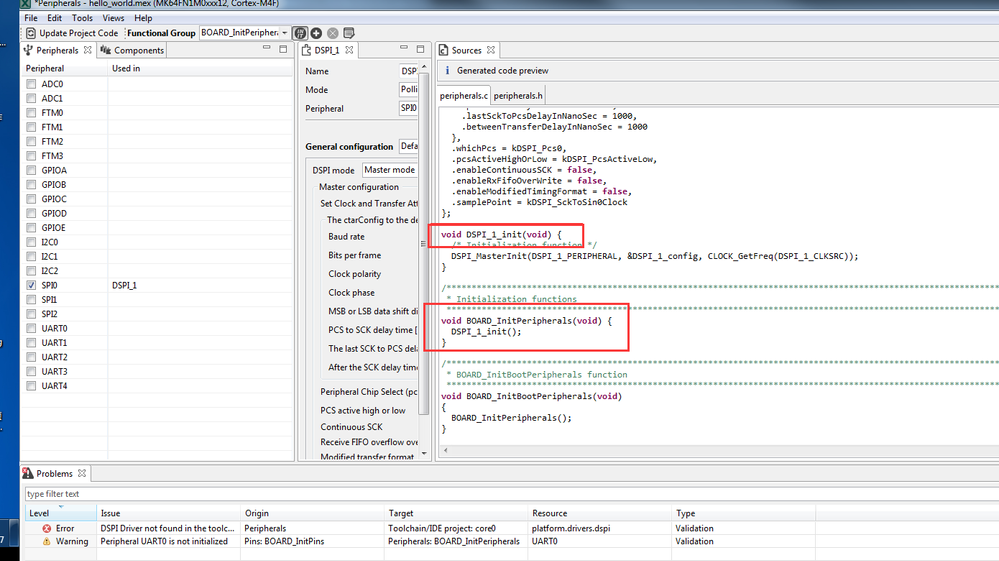

Also if you need MCUXpresso IDE, you can refer to Marek's said righting click the error
reminder, then choose Add component .
Hope it helps,
Alice
- 新着としてマーク
- ブックマーク
- 購読
- ミュート
- RSS フィードを購読する
- ハイライト
- 印刷
- 不適切なコンテンツを報告
Ok, so it seems the config tools no longer support the automatic inclusion of drivers during project creation. That is disappointing. The screenshot I attached is from v3 and it was a nice feature. Thank you for the reply.
 marek-trmac
- 新着としてマーク
- ブックマーク
- 購読
- ミュート
- RSS フィードを購読する
- ハイライト
- 印刷
- 不適切なコンテンツを報告
Hi,
error "XXX Driver is missing" means, that the driver is not included in the toolchain project. This does not cause any problem for Config Tools, e.g. you can ignore the error continue working in Config Tools, but when you switch back to IDE (MDK, IAR or MCUXpresso IDE), the project will not be compilable until you add the SDK driver.
Regards
Marek
Marek
NOTE: If you find the answer useful, kindly click on [ACCEPT AS SOLUTION] button
marek-trmac
- 新着としてマーク
- ブックマーク
- 購読
- ミュート
- RSS フィードを購読する
- ハイライト
- 印刷
- 不適切なコンテンツを報告
Hi Benjamin,
if you are using MCUXpresso IDE, just click on the problem in Problems view and select "Add component". Several problems allows to be fixed this way.
Regards
Marek
Marek
NOTE: If you find the answer useful, kindly click on [ACCEPT AS SOLUTION] button
