
- Forums
- Product Forums
- General Purpose MicrocontrollersGeneral Purpose Microcontrollers
- i.MX Forumsi.MX Forums
- QorIQ Processing PlatformsQorIQ Processing Platforms
- Identification and SecurityIdentification and Security
- Power ManagementPower Management
- Wireless ConnectivityWireless Connectivity
- RFID / NFCRFID / NFC
- Advanced AnalogAdvanced Analog
- Neural Processing UnitsNeural Processing Units
- MCX Microcontrollers
- S32G
- S32K
- S32V
- MPC5xxx
- Other NXP Products
- S12 / MagniV Microcontrollers
- Powertrain and Electrification Analog Drivers
- Sensors
- Vybrid Processors
- Digital Signal Controllers
- 8-bit Microcontrollers
- ColdFire/68K Microcontrollers and Processors
- PowerQUICC Processors
- OSBDM and TBDML
- S32M
- S32Z/E
-
- Solution Forums
- Software Forums
- MCUXpresso Software and ToolsMCUXpresso Software and Tools
- CodeWarriorCodeWarrior
- MQX Software SolutionsMQX Software Solutions
- Model-Based Design Toolbox (MBDT)Model-Based Design Toolbox (MBDT)
- FreeMASTER
- eIQ Machine Learning Software
- Embedded Software and Tools Clinic
- S32 SDK
- S32 Design Studio
- GUI Guider
- Zephyr Project
- Voice Technology
- Application Software Packs
- Secure Provisioning SDK (SPSDK)
- Processor Expert Software
- Generative AI & LLMs
-
- Topics
- Mobile Robotics - Drones and RoversMobile Robotics - Drones and Rovers
- NXP Training ContentNXP Training Content
- University ProgramsUniversity Programs
- Rapid IoT
- NXP Designs
- SafeAssure-Community
- OSS Security & Maintenance
- Using Our Community
-
- Cloud Lab Forums
-
- Knowledge Bases
- ARM Microcontrollers
- i.MX Processors
- Identification and Security
- Model-Based Design Toolbox (MBDT)
- QorIQ Processing Platforms
- S32 Automotive Processing Platform
- Wireless Connectivity
- CodeWarrior
- MCUXpresso Suite of Software and Tools
- MQX Software Solutions
- RFID / NFC
- Advanced Analog
- Neural Processing Units
-
- NXP Tech Blogs
- Home
- :
- MCUXpresso Software and Tools
- :
- MCUXpresso Config Tools
- :
- Re: Set up debug UART
Set up debug UART
- Subscribe to RSS Feed
- Mark Topic as New
- Mark Topic as Read
- Float this Topic for Current User
- Bookmark
- Subscribe
- Mute
- Printer Friendly Page
Set up debug UART

- Mark as New
- Bookmark
- Subscribe
- Mute
- Subscribe to RSS Feed
- Permalink
- Report Inappropriate Content
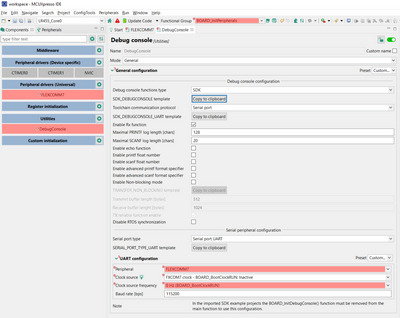
Brand new to NXP and their tools, sorry. Using the Xpresso GUI can set up gpios and FlexComm7 as an UART, hopefully for the PRINTF function. This is for a custom product board and the h/w designer chose the pins. The pin configuration is good. When I open Utilities/DebugConsole and set the UART Conf/Peripheral to Flexcomm7 they both, (Flexcomm7 and DebugConsole), go red, with errors.
For the Flexcomm Interface USART-CMSIS the peripheral box, Flexcomm7, is red.
For the Debug Console the peripheral box, Flexcomm7, is red along with Clock source freq.
Any help would be appreciated.


 Petr_H
- Mark as New
- Bookmark
- Subscribe
- Mute
- Subscribe to RSS Feed
- Permalink
- Report Inappropriate Content
Hi,
The DebugConsole component does not use the FlexComm component, it initializes (and allocates) the FlexCom peripheral on it's own. That's probably why you see the problem there. The problems details are shown in the tooltips and in the problems view.
I suggest to use the following steps:
- Remove the FlexComm component that uses the FlexCom7 (using context menu 'Remove' in the Components view) and keep only the DebugConsole
- In the DebugConsole, in the Serial port configuration, ensure you have selected the FlexComm7
- If there is disabled clock, use the context menu (right click the green bulb icon) and select 'Enable FXCOM7 clock' to simply enable the clock:
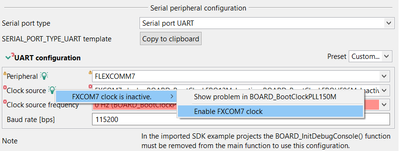
Please let us know if you'd need more help.
Regards
Petr Hradsky
Config Tools Team
 Alice_Yang
- Mark as New
- Bookmark
- Subscribe
- Mute
- Subscribe to RSS Feed
- Permalink
- Report Inappropriate Content
Hello ,
I see you create private case, I will reply you on that place.
BR
Alice
Alice_Yang
- Mark as New
- Bookmark
- Subscribe
- Mute
- Subscribe to RSS Feed
- Permalink
- Report Inappropriate Content
Hello,
Which chip? Part number?
BR
Alice
- Mark as New
- Bookmark
- Subscribe
- Mute
- Subscribe to RSS Feed
- Permalink
- Report Inappropriate Content
Yep, sorry.
Part# LPC55S69
com.nxp.mcuxpresso.tools.bin.win32_11.5.0.202112161150
com.nxp.mcuxpresso.tools.win32_11.5.0.202107051138
com.nxp.mcuxpresso.tools.wizards_11.5.0.202107051138
Product: MCUXpresso IDE
Version: MCUXpresso IDE v11.5.0 [Build 7232] [2022-01-11]
Operating system: Windows 10
Thanks
