
- Forums
- Product Forums
- General Purpose MicrocontrollersGeneral Purpose Microcontrollers
- i.MX Forumsi.MX Forums
- QorIQ Processing PlatformsQorIQ Processing Platforms
- Identification and SecurityIdentification and Security
- Power ManagementPower Management
- Wireless ConnectivityWireless Connectivity
- RFID / NFCRFID / NFC
- Advanced AnalogAdvanced Analog
- Neural Processing UnitsNeural Processing Units
- MCX Microcontrollers
- S32G
- S32K
- S32V
- MPC5xxx
- Other NXP Products
- S12 / MagniV Microcontrollers
- Powertrain and Electrification Analog Drivers
- Sensors
- Vybrid Processors
- Digital Signal Controllers
- 8-bit Microcontrollers
- ColdFire/68K Microcontrollers and Processors
- PowerQUICC Processors
- OSBDM and TBDML
- S32M
- S32Z/E
-
- Solution Forums
- Software Forums
- MCUXpresso Software and ToolsMCUXpresso Software and Tools
- CodeWarriorCodeWarrior
- MQX Software SolutionsMQX Software Solutions
- Model-Based Design Toolbox (MBDT)Model-Based Design Toolbox (MBDT)
- FreeMASTER
- eIQ Machine Learning Software
- Embedded Software and Tools Clinic
- S32 SDK
- S32 Design Studio
- GUI Guider
- Zephyr Project
- Voice Technology
- Application Software Packs
- Secure Provisioning SDK (SPSDK)
- Processor Expert Software
- Generative AI & LLMs
-
- Topics
- Mobile Robotics - Drones and RoversMobile Robotics - Drones and Rovers
- NXP Training ContentNXP Training Content
- University ProgramsUniversity Programs
- Rapid IoT
- NXP Designs
- SafeAssure-Community
- OSS Security & Maintenance
- Using Our Community
-
- Cloud Lab Forums
-
- Knowledge Bases
- ARM Microcontrollers
- i.MX Processors
- Identification and Security
- Model-Based Design Toolbox (MBDT)
- QorIQ Processing Platforms
- S32 Automotive Processing Platform
- Wireless Connectivity
- CodeWarrior
- MCUXpresso Suite of Software and Tools
- MQX Software Solutions
- RFID / NFC
- Advanced Analog
- Neural Processing Units
-
- NXP Tech Blogs
- Home
- :
- MCUXpresso软件和工具
- :
- MCUXpresso配置工具
- :
- MCUXpresso config tool command line dont work
MCUXpresso config tool command line dont work
MCUXpresso config tool command line dont work

Hi, I created a new project in:
MCUXpresso IDE v11.1.1 [Build 3241] [2020-03-02]
and tried to autogenerate bsp files using command line and standalone version of MCUXpresso config tool:
Version and Build id: 7.0.0.202002070841
The project is located in:
λ pwd
C:\user\workspaces\mcuxpresso_11_1_1_first\good_example_bsp
The directory tree in the project is standard one (I skipped uninteresting folders) :
λ tree /f
Folder PATH listing
Volume serial number is 0ED0-4231
C:.
│ .cproject
│ .project
│ good_example_bsp.mex
│
├───.settings
│ language.settings.xml
│
├───board
│ board.c
│ board.h
│ clock_config.c
│ clock_config.h
│ pin_mux.c
│ pin_mux.h
I formulated the following command:
C:\user\workspaces\mcuxpresso_11_1_1_first\good_example_bsp
λ tools.exe -noSplash -application com.nxp.swtools.framework.application -consoleLog -Load C:\user\workspaces\mcuxpresso_11_1_1_first\good_example_bsp\good_example.mex -HeadlessTool Pins -ExportAll C:\user\workspaces\mcuxpresso_11_1_1_first\good_example_bsp\board -SDKVersion ksdk2_0
This command does not work - it does not regenerate deleted pin_mux.c and other files in board folder. There is no console log. How can I repair this?
Thank you, it looks like we are closer to solving this issue.
Prior to describing what happend after applying the advices I would like to ask some more basic questions:
1. Shall I update my Config Tools?
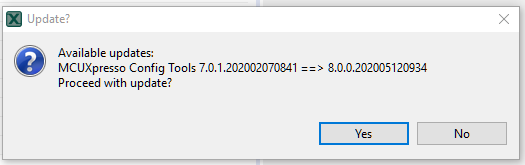
2. Shall I call Config Tools from specific path and can I use system PATH to execute tools.exe?
What happend after applying advices:
-I deleted -SDKVersion and -application com.nxp.swtools.framework.application from arguments
-I checked again mex file with Config Tools Gui and there is only "No toolchain project detected" information in Problems tab, however when I switch the view with "Tools->Device Configuration" there is an information "ERRORS: Processor not supported" in the lower part of the window

-All function that I need are working properly - "File->Export->Pins Tools->Export HTML Report" works properly
"Update Code" recognizes that pin_mux.c file was deleted/modified in order to test generation and generates it again.
-There is no errors in c:\Users\user\.nxp\swtools.log file:
maj 14, 2020 12:40:10 PM com.nxp.swtools.framework.KExCmdLine parseCmdLine
WARNING: Program arguments were not processed: "[-showlocation]"
maj 14, 2020 12:43:41 PM com.nxp.swtools.clocks.data.model.SettingsConfig getSettingValue
WARNING: Setting value of "OSC::CR[RANGE].bitField" has not been initialized yet.
maj 14, 2020 12:43:41 PM com.nxp.swtools.clocks.data.model.SettingsConfig getSettingValue
WARNING: Setting value of "OSC::CR[RANGE].bitField" has not been initialized yet.
maj 14, 2020 1:26:32 PM com.nxp.swtools.utils.scripting.internal.ScriptApi logWarning
WARNING: Initialization code of SPI0 component in BOARD_InitPeripherals functional group is not generated due to invalid configuration.
maj 14, 2020 1:26:32 PM com.nxp.swtools.utils.scripting.internal.ScriptApi logWarning
WARNING: Initialization code of SPI0_2 component in BOARD_InitPeripherals functional group is not generated due to invalid configuration.
maj 14, 2020 1:26:43 PM com.nxp.swtools.utils.scripting.internal.ScriptApi logWarning
WARNING: Initialization code of SPI0 component in BOARD_InitPeripherals functional group is not generated due to invalid configuration.
maj 14, 2020 1:26:43 PM com.nxp.swtools.utils.scripting.internal.ScriptApi logWarning
WARNING: Initialization code of SPI0_2 component in BOARD_InitPeripherals functional group is not generated due to invalid configuration.
maj 14, 2020 2:13:24 PM com.nxp.swtools.framework.KExCmdLine parseCmdLine
WARNING: Program arguments were not processed: "[-showlocation]"
maj 14, 2020 2:14:07 PM com.nxp.swtools.clocks.data.model.SettingsConfig getSettingValue
WARNING: Setting value of "OSC::CR[RANGE].bitField" has not been initialized yet.
maj 14, 2020 2:14:07 PM com.nxp.swtools.clocks.data.model.SettingsConfig getSettingValue
WARNING: Setting value of "OSC::CR[RANGE].bitField" has not been initialized yet.
maj 14, 2020 2:14:07 PM com.nxp.swtools.clocks.data.model.SettingsConfig getSettingValue
WARNING: Setting value of "OSC::CR[RANGE].bitField" has not been initialized yet.
maj 14, 2020 2:14:07 PM com.nxp.swtools.clocks.data.model.SettingsConfig getSettingValue
WARNING: Setting value of "OSC::CR[RANGE].bitField" has not been initialized yet.
maj 18, 2020 12:27:32 PM com.nxp.swtools.framework.KExCmdLine parseCmdLine
WARNING: Program arguments were not processed: "[-showlocation]"
maj 18, 2020 12:34:37 PM com.nxp.swtools.framework.KExCmdLine parseCmdLine
WARNING: Program arguments were not processed: "[-showlocation]"
- I noticed that new entries do not appear even though the errors are repeated and deleted log file content.
- I tried once again execute command line call
C:\user\workspaces\mcuxpresso_11_1_1_first\good_example_bsp
λ tools.exe -noSplash -consoleLog -Load C:\user\workspaces\mcuxpresso_11_1_1_first\good_example_bsp\good_example.mex -HeadlessTool Pins -ExportAll C:\user\workspaces\mcuxpresso_11_1_1_first\good_example_bsp
- This time HTML file was generated (as well as empty csv file) in proper place, but with this error code:
Pins model not supported for the selected target Processor
- There were no new entries in log file.
- I tried calling toolsc.exe with the parameters listed below and a few other combinations but there was absolutly no console informations.
C:\user\workspaces\mcuxpresso_11_1_1_first\good_example_bsp
λ toolsc.exe -noSplash -consoleLog -Load C:\user\workspaces\mcuxpresso_11_1_1_first\good_example_bsp\good_example.mex -HeadlessTool Pins -ExportAll C:\user\workspaces\mcuxpresso_11_1_1_first\good_example_bsp
- Error level was set to 2 after calling toolsc.exe
C:\dsabala\workspaces\mcuxpresso_11_1_1_first\good_example_bsp
λ ECHO %ERRORLEVEL%
2
Best regards

 liborukropec
Hello,
1. do NOT update the config tools, this was configuration error and this version is not yet to be released and could break you installation (different eclipse framework). Now it should not offer the update.
2. ideally execute tools.exe from working directory where it is installed.
- Device Configuration is supported on few devices, that might be correct.
>> Pins model not supported for the selected target Processor
This seems as a problem. Could you please share your project, including the MEX file? *.c and *.h files can be omited (except the pin_mux.*)
Please let me know the content of this file (the processor data version): c:\ProgramData\NXP\mcu_data_v8\processors\PROCESSORUSED\ksdk2_0\processor.properties
ERRORLEVEL 1 means incomplete CLI parameter
ERRORLEVEL 2 means some error occured during processing the CLI
Regards,
Libor
liborukropec
Hello,
sorry for late reply. I was not able to reproduce your issue, tried both v7 and v7.0.1.
I noticed in your CLI execution, that the MEX file name does not match the file name in the attached project. But it is probably only typo here, otherwise you should see an exception stacktrace in the CLI that the MEX file is not found.
Could you please try these steps?
- Close MCUXpresso IDE
- Close MCUXpresso Config Tools
- Make sure, no file from that project is locked/opened by the IDE or other editor, including Excel (for the *.csv)
- Delete (rename) the c:\ProgramData\NXP\mcu_data_v7 folder - processor data
- Run the MCUXpresso Config Tools GUI and open the MEX for this project.
Config Tools should download the data files over internet. This will ensure the fresh data is downloaded and with correct access rights. - Export code from GUI
- Close GUI
- Export code from CLI
Please let me know if any problem has occurred during the steps, especially for 6. and 8. If any problem, please attach c:\Users\user\.nxp\swtools.log
Regards,
Libor
Hi, thank you for advices, but it all failed silently anyway.
After deleting mentioned folder I opened MEX file in Config Tools GUI, it downloaded the files without problems and again there werent any warning and errors only one information about IDE not founded. I successfully exported all board files and html documentation. But then when I tried to run this tool from command line it failed to generate anything. This time even one line *.html file with this short fail information wasnt generated. ERRORLEVEL returned 2.
I will give up attempts to run this for some time. If I can suggest what could solve those problems - debug informations - i didnt saw even one line of debug informations (both in tools.exe -consoleLog and toolsc.exe... And this swtools.log file is still empty and previously it contained only a few not interesting warnings.
There is one more problem in GUI version: when exporting clocks with clocks diagram, the exported png file is whole black with no content.
liborukropec
Hello,
please few comments to the command line parameters
- if you specify MEX file, there's no need to specify the -SDKVersion ksdk2_0
- if you specify -SDKVersion, tool reports error in case the -MCU parameter is not specified (they must go together - but see above point, it is not necessary now)
- if you use stand-alone Config Tools, there's no need to specify `-application com.nxp.swtools.framework.application` (if you want to execute config tools from IDE, that you have to)
- command -ExportAll will create nested board/ in your board/ folder, so if you want to rewrite the existing sources, remove the trailing `/board` from path
- make sure if you open the MEX in the GUI that there are no errors in Pins and that the sources can be exported
- please check c:\Users\user\.nxp\swtools.log for any logged warnings/errors
Last thing, what can you help with the tools messages in console is to:
- copy (don't rename, theoretical future update will fail) eclipsec.exe to toolsc.exe - mandatory for next step
- instead of tools.exe use toolsc.exe - above step is required so the INI is found by the eclipse framework
- now, when you run toolsc.exe param1 param2 etc. - you will see the application console (no new console window)
Regards,
Libor
