
- Forums
- Product Forums
- General Purpose MicrocontrollersGeneral Purpose Microcontrollers
- i.MX Forumsi.MX Forums
- QorIQ Processing PlatformsQorIQ Processing Platforms
- Identification and SecurityIdentification and Security
- Power ManagementPower Management
- Wireless ConnectivityWireless Connectivity
- RFID / NFCRFID / NFC
- Advanced AnalogAdvanced Analog
- Neural Processing UnitsNeural Processing Units
- MCX Microcontrollers
- S32G
- S32K
- S32V
- MPC5xxx
- Other NXP Products
- S12 / MagniV Microcontrollers
- Powertrain and Electrification Analog Drivers
- Sensors
- Vybrid Processors
- Digital Signal Controllers
- 8-bit Microcontrollers
- ColdFire/68K Microcontrollers and Processors
- PowerQUICC Processors
- OSBDM and TBDML
- S32M
- S32Z/E
-
- Solution Forums
- Software Forums
- MCUXpresso Software and ToolsMCUXpresso Software and Tools
- CodeWarriorCodeWarrior
- MQX Software SolutionsMQX Software Solutions
- Model-Based Design Toolbox (MBDT)Model-Based Design Toolbox (MBDT)
- FreeMASTER
- eIQ Machine Learning Software
- Embedded Software and Tools Clinic
- S32 SDK
- S32 Design Studio
- GUI Guider
- Zephyr Project
- Voice Technology
- Application Software Packs
- Secure Provisioning SDK (SPSDK)
- Processor Expert Software
- Generative AI & LLMs
-
- Topics
- Mobile Robotics - Drones and RoversMobile Robotics - Drones and Rovers
- NXP Training ContentNXP Training Content
- University ProgramsUniversity Programs
- Rapid IoT
- NXP Designs
- SafeAssure-Community
- OSS Security & Maintenance
- Using Our Community
-
- Cloud Lab Forums
-
- Knowledge Bases
- ARM Microcontrollers
- i.MX Processors
- Identification and Security
- Model-Based Design Toolbox (MBDT)
- QorIQ Processing Platforms
- S32 Automotive Processing Platform
- Wireless Connectivity
- CodeWarrior
- MCUXpresso Suite of Software and Tools
- MQX Software Solutions
- RFID / NFC
- Advanced Analog
- Neural Processing Units
-
- NXP Tech Blogs
- Home
- :
- QorIQ Processing Platforms
- :
- Layerscape
- :
- Re: OpenWrt for "ls1012afrdm" Bootloader Selection Missing
OpenWrt for "ls1012afrdm" Bootloader Selection Missing
- Subscribe to RSS Feed
- Mark Topic as New
- Mark Topic as Read
- Float this Topic for Current User
- Bookmark
- Subscribe
- Mute
- Printer Friendly Page

- Mark as New
- Bookmark
- Subscribe
- Mute
- Subscribe to RSS Feed
- Permalink
- Report Inappropriate Content
Hello Everyone,
Trying to build OpenWrt for FRDM-LS1012A-PA, but the boot loader selection is missing the menuconfig of Openwrt.
I followed below steps in Ubuntu 17.10 host,working with commit id 0f1a1489a6c584d7de6680a65b457acf328818bd
# git clone https://github.com/lede-project/source.git
# ./scripts/feeds update -a
# ./scripts/feeds install -a
# make menuconfig
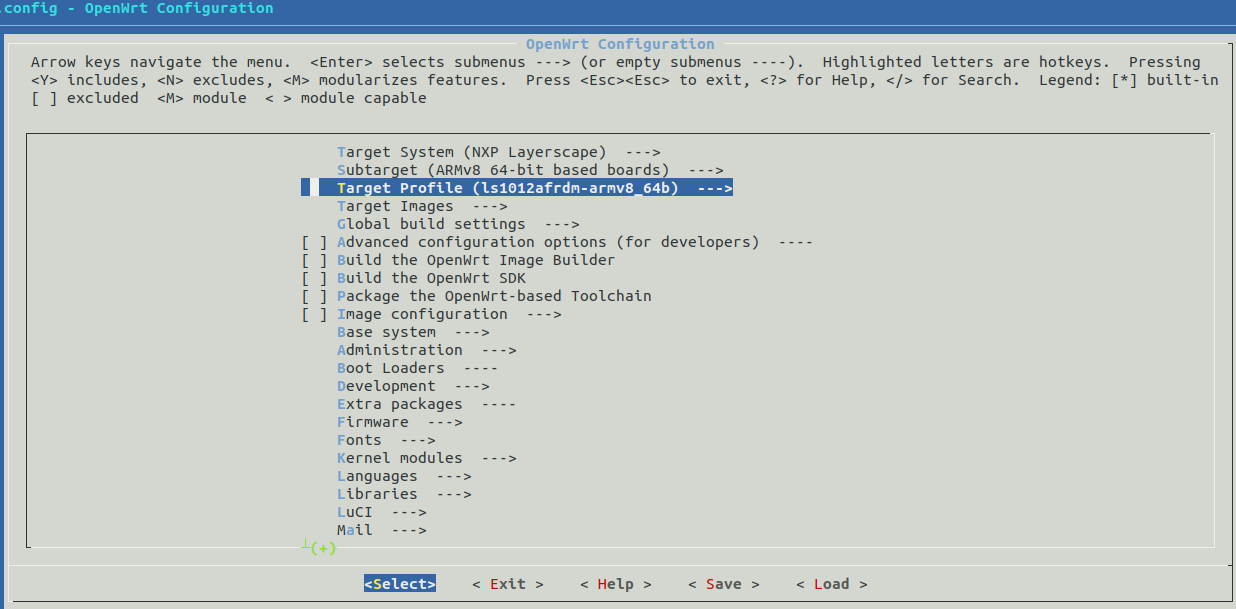
Target System (NXP Layerscape)
Subtarget (ARMv8 64-bit based boards) --->
Target Profile (ls1012afrdm-armv8_64b) --->
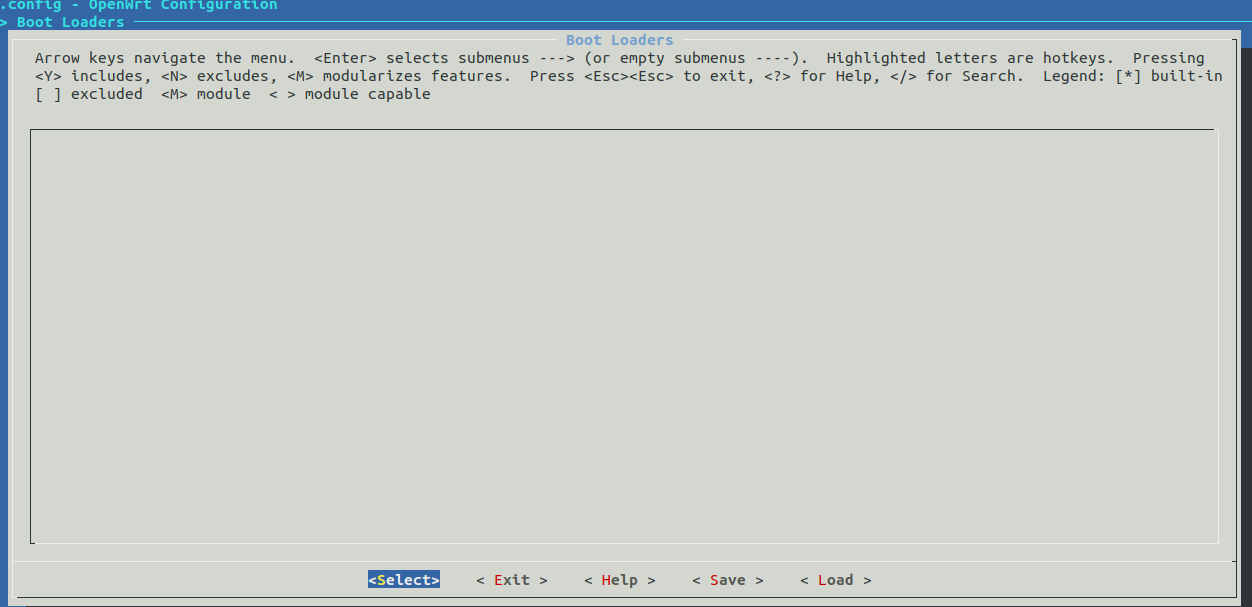
Now when I check the "Boot loader option section" No boot loader selection listed, Attaching the screen shot also for reference.
Could you please help me to resolve this?, How can I build Openwrt for ls1012afrdm
Thanks
Abhilash
Solved! Go to Solution.
- Mark as New
- Bookmark
- Subscribe
- Mute
- Subscribe to RSS Feed
- Permalink
- Report Inappropriate Content
Hi abhilash,
I had the same concern when I started working with this board in OpenWRT, but all is ok. The u-boot configs are automatically created when you chose the FRDM-LS1012A platform. You could see them in the .config file in /home/administrador/lede/source/ directory.
If you compile it, in directory:
/home/administrador/lede/source/build_dir/target-aarch64_generic_musl/uboot-layerscape-ls1012afrdm/uboot-layerscape-2017.09
you could see the u-boot binary.
I've write a small guide for anyone that want to try this interesting board with openWRT.
In directory:
/home/administrador/lede/source/bin/targets/layerscape
you could see the whole binary image:
openwrt-layerscape-armv8_64b-ls1012afrdm-squashfs-firmware.bin
that includes the following map of binary code:
spi Lede 17.01 file system map:
000 0000 – 00F FFFF RCW 1MB
010 0000 – 03F FFFF uboot 3MB
040 0000 – 09F FFFF ppa 6MB
0A0 0000 – 0EF FFFF ppfe 5MB
0F0 0000 – 0FF FFFF dtb 1MB
100 0000 – 0FF FFFF kernel 16MB
200 0000 – 3FF FFFF rootfs 30MB
You could see how is created in:
/home/administrador/lede/source/target/linux/layerscape/image/Makefile
In directory:
/home/administrador/lede/source/build_dir/target-aarch64_generic_musl/linux-layerscape_armv8_64b
you could find the following files:
image-fsl-ls1012a-frdm.dtb Device tree binary file. Created from dts
ls1012afrdm-30M.root.ext4 Root file system, in ext4 format
ls1012afrdm-kernel.bin Linux kernel, in uImage format
Be careful when writing spi flash, because if you write a wrong RCW binary the only way to recover the board is Codewarrior TAP, an expensive tool ($500) that NXP forces us to buy, because the Layerscape processors has no usb boot code, and the only way to boot is spi rcw. USB CMSIS can't write RCW (why?). For new boards you should buy it, or include a mechanism to write spi flash externally.
I use to write only the rootfs or kernel directly.
u-boot ethernet driver in openwrt give errors in my board (in linux ethernet works very well). That's why I use usb pendrive to load the files.
The USB has to be powered with an external 5V power supply to work. I use a micro-usb to usb-a female adapter to connect the pendrive.
The pendrive has to be formated as fat.
Then, the commands to load a new kernel are:
usb start
fatload usb 0:1 96000000 ls1012afrdm-kernel.bin
sf probe 0:0
sf erase 1000000 +$filesize
sf write 96000000 1000000 $filesize
The commands to load a new root file system are:
usb start
fatload usb 0:1 96000000 ls1012afrdm-30M.root.ext4
sf probe 0:0
sf erase 2000000 +$filesize
sf write 96000000 2000000 $filesize
RCW file is in directory:
/home/administrador/lede/source/build_dir/target-aarch64_generic_musl/ls-rcw-2017.09-ls1012afrdm/ls-rcw-2017.09/ls1012afrdm/N_SSNP_3305/PBL_0x33_0x05_800_250_1000_default.bin
To change it for a new board, you should use Codewarrior Development Studio for Networked applications.
This tool is not free, like in almost all manufacturers nowadays (for example Texas Instruments CCS), It is not even cheap: it cost $3000. But you could use the evaluation version to change RCW.
But you should have in mind that if you want to make your own board and you want to use the ddr validation tool to
calibrate ram, you should buy the Specialist version of Codewarrior that cost $5000.
I think that semiconductor manufacturers has to get money from silicon chips, not from developer tools. Developer tools has to be free to atract developers to their platforms. And that is specially clear here, because under Codewarrior there is an open source tool: Eclipse, that NXP is using at no charge.
If you make your own board, you could need to change dts to reflect changes from FRDM-LS1012A board.
There is two kind of dts files: the u-boot dts files, and the kernel dts files.
The u-boot dts files get integrated in u-boot binarty and you could find them in:
/home/administrador/lede/source/build_dir/target-aarch64_generic_musl/uboot-layerscape-ls1012afrdm/uboot-layerscape-2017.09/arch/arm/dts/fsl-ls1012a-frdm.dts
/home/administrador/lede/source/build_dir/target-aarch64_generic_musl/uboot-layerscape-ls1012afrdm/uboot-layerscape-2017.09/arch/arm/dts/fsl-ls1012a-frdm.dtsi
The kernel dts files should be written in spi, and you could find them in:
/home/administrador/lede/source/build_dir/target-aarch64_generic_musl/linux-layerscape_armv8_64b/linux-4.9.67/arch/arm64/boot/dts/freescale/fsl-ls1012a.dtsi
/home/administrador/lede/source/build_dir/target-aarch64_generic_musl/linux-layerscape_armv8_64b/linux-4.9.67/arch/arm64/boot/dts/freescale/fsl-ls1012a-frdm.dts
The commands to load a new dtb are:
usb start
fatload usb 0:1 96000000 fsl-ls1012a-frdm.dtb
sf probe 0:0
sf erase F00000 +$filesize
sf write 96000000 F00000 $filesize
- Mark as New
- Bookmark
- Subscribe
- Mute
- Subscribe to RSS Feed
- Permalink
- Report Inappropriate Content
@Miguel: I tried your described flashing procedure with my recently shiped FRDM board. However the kernel isn't executed due to a decompression error:
U-Boot 2016.01LS1012A-SDK+g7944a94 (Aug 30 2016 - 13:13:19 +0800)
SoC: LS1012AE (0x87040010)
Clock Configuration:
CPU0(A53):800 MHz
Bus: 250 MHz DDR: 1000 MT/s
Reset Configuration Word (RCW):
00000000: 08000008 00000000 00000000 00000000
00000010: 33050000 c000000c 40000000 00001800
00000020: 00000000 00000000 00000000 000c4571
00000030: 00000000 00c28120 00000096 00000000
I2C: ready
DRAM: 510 MiB
Using SERDES1 Protocol: 13061 (0x3305)
SF: Detected S25FS512S_256K with page size 512 Bytes, erase size 128 KiB, total 64 MiB
In: serial
Out: serial
Err: serial
Model: LS1012A FREEDOM Board
Board: LS1012AFRDM Net: cbus_baseaddr: 0000000004000000, ddr_baseaddr: 0000000083800000, ddr_phys_baseaddr: 03800000
class init complete
tmu init complete
bmu1 init: done
bmu2 init: done
GPI1 init complete
GPI2 init complete
HGPI init complete
hif_tx_desc_init: Tx desc_base: 0000000083e40400, base_pa: 03e40400, desc_count: 64
hif_rx_desc_init: Rx desc base: 0000000083e40000, base_pa: 03e40000, desc_count: 64
HIF tx desc: base_va: 0000000083e40400, base_pa: 03e40400
HIF init complete
bmu1 enabled
bmu2 enabled
pfe_hw_init: done
pfe_firmware_init
pfe_load_elf: no of sections: 13
pfe_firmware_init: class firmware loaded
pfe_load_elf: no of sections: 10
pfe_firmware_init: tmu firmware loaded
ls1012a_configure_serdes 0
ls1012a_configure_serdes 1
pfe_eth0, pfe_eth1
Hit any key to stop autoboot: 0
Stopping PFE...
SF: Detected S25FS512S_256K with page size 512 Bytes, erase size 128 KiB, total 64 MiB
device 0 offset 0xa00000, size 0x2800000
SF: 41943040 bytes @ 0xa00000 Read: OK
## Booting kernel from Legacy Image at 96000000 ...
Image Name: ARM64 OpenWrt Linux-4.9.120
Image Type: AArch64 Linux Kernel Image (gzip compressed)
Data Size: 6912618 Bytes = 6.6 MiB
Load Address: 80080000
Entry Point: 80080000
Uncompressing Kernel Image ... Error: inflate() returned -3
gzip compressed: uncompress error -1
Must RESET board to recover
resetting ...
I built the openwrt firmware on my local desktop using subtarget "ARMv8 64-bit" and target profile "ls1012afrdm-armv8_64b". I used the kernel and userspace binaries that are created in the described folders to flash these two files ("ls1012afrdm-kernel.bin" and "root.ubifs") to the address 1000000 and 2000000.
Like this:
tftp 0x96000000 ls/ls1012afrdm-kernel.bin
sf probe 0:0
sf erase 1000000 +$filesizesf write 96000000 1000000 $filesize
tftp 0x96000000 ls/root.ext4
sf probe 0:0
sf erase 2000000 +$filesizesf write 96000000 2000000 $filesize
tftp 0x96000000 ls/image-fsl-ls1012a-frdm.dtb
sf probe 0:0
sf erase F00000 +$filesize
sf write 96000000 F00000 $filesizereset
uBoot seems to recognize the kernel in some regard and tries to decompress it. But gzip fails with error -1.
The only difference I did was loading the image using the tftp command to load the image from my atftp server...
I also tried to boot an initramfs image. But this didn't work neither :-(...
Any ideas?
- Mark as New
- Bookmark
- Subscribe
- Mute
- Subscribe to RSS Feed
- Permalink
- Report Inappropriate Content
Hi,
What is your uboot init script?
Could you send a printenv result?
- Mark as New
- Bookmark
- Subscribe
- Mute
- Subscribe to RSS Feed
- Permalink
- Report Inappropriate Content
Hi abhilash,
I had the same concern when I started working with this board in OpenWRT, but all is ok. The u-boot configs are automatically created when you chose the FRDM-LS1012A platform. You could see them in the .config file in /home/administrador/lede/source/ directory.
If you compile it, in directory:
/home/administrador/lede/source/build_dir/target-aarch64_generic_musl/uboot-layerscape-ls1012afrdm/uboot-layerscape-2017.09
you could see the u-boot binary.
I've write a small guide for anyone that want to try this interesting board with openWRT.
In directory:
/home/administrador/lede/source/bin/targets/layerscape
you could see the whole binary image:
openwrt-layerscape-armv8_64b-ls1012afrdm-squashfs-firmware.bin
that includes the following map of binary code:
spi Lede 17.01 file system map:
000 0000 – 00F FFFF RCW 1MB
010 0000 – 03F FFFF uboot 3MB
040 0000 – 09F FFFF ppa 6MB
0A0 0000 – 0EF FFFF ppfe 5MB
0F0 0000 – 0FF FFFF dtb 1MB
100 0000 – 0FF FFFF kernel 16MB
200 0000 – 3FF FFFF rootfs 30MB
You could see how is created in:
/home/administrador/lede/source/target/linux/layerscape/image/Makefile
In directory:
/home/administrador/lede/source/build_dir/target-aarch64_generic_musl/linux-layerscape_armv8_64b
you could find the following files:
image-fsl-ls1012a-frdm.dtb Device tree binary file. Created from dts
ls1012afrdm-30M.root.ext4 Root file system, in ext4 format
ls1012afrdm-kernel.bin Linux kernel, in uImage format
Be careful when writing spi flash, because if you write a wrong RCW binary the only way to recover the board is Codewarrior TAP, an expensive tool ($500) that NXP forces us to buy, because the Layerscape processors has no usb boot code, and the only way to boot is spi rcw. USB CMSIS can't write RCW (why?). For new boards you should buy it, or include a mechanism to write spi flash externally.
I use to write only the rootfs or kernel directly.
u-boot ethernet driver in openwrt give errors in my board (in linux ethernet works very well). That's why I use usb pendrive to load the files.
The USB has to be powered with an external 5V power supply to work. I use a micro-usb to usb-a female adapter to connect the pendrive.
The pendrive has to be formated as fat.
Then, the commands to load a new kernel are:
usb start
fatload usb 0:1 96000000 ls1012afrdm-kernel.bin
sf probe 0:0
sf erase 1000000 +$filesize
sf write 96000000 1000000 $filesize
The commands to load a new root file system are:
usb start
fatload usb 0:1 96000000 ls1012afrdm-30M.root.ext4
sf probe 0:0
sf erase 2000000 +$filesize
sf write 96000000 2000000 $filesize
RCW file is in directory:
/home/administrador/lede/source/build_dir/target-aarch64_generic_musl/ls-rcw-2017.09-ls1012afrdm/ls-rcw-2017.09/ls1012afrdm/N_SSNP_3305/PBL_0x33_0x05_800_250_1000_default.bin
To change it for a new board, you should use Codewarrior Development Studio for Networked applications.
This tool is not free, like in almost all manufacturers nowadays (for example Texas Instruments CCS), It is not even cheap: it cost $3000. But you could use the evaluation version to change RCW.
But you should have in mind that if you want to make your own board and you want to use the ddr validation tool to
calibrate ram, you should buy the Specialist version of Codewarrior that cost $5000.
I think that semiconductor manufacturers has to get money from silicon chips, not from developer tools. Developer tools has to be free to atract developers to their platforms. And that is specially clear here, because under Codewarrior there is an open source tool: Eclipse, that NXP is using at no charge.
If you make your own board, you could need to change dts to reflect changes from FRDM-LS1012A board.
There is two kind of dts files: the u-boot dts files, and the kernel dts files.
The u-boot dts files get integrated in u-boot binarty and you could find them in:
/home/administrador/lede/source/build_dir/target-aarch64_generic_musl/uboot-layerscape-ls1012afrdm/uboot-layerscape-2017.09/arch/arm/dts/fsl-ls1012a-frdm.dts
/home/administrador/lede/source/build_dir/target-aarch64_generic_musl/uboot-layerscape-ls1012afrdm/uboot-layerscape-2017.09/arch/arm/dts/fsl-ls1012a-frdm.dtsi
The kernel dts files should be written in spi, and you could find them in:
/home/administrador/lede/source/build_dir/target-aarch64_generic_musl/linux-layerscape_armv8_64b/linux-4.9.67/arch/arm64/boot/dts/freescale/fsl-ls1012a.dtsi
/home/administrador/lede/source/build_dir/target-aarch64_generic_musl/linux-layerscape_armv8_64b/linux-4.9.67/arch/arm64/boot/dts/freescale/fsl-ls1012a-frdm.dts
The commands to load a new dtb are:
usb start
fatload usb 0:1 96000000 fsl-ls1012a-frdm.dtb
sf probe 0:0
sf erase F00000 +$filesize
sf write 96000000 F00000 $filesize
- Mark as New
- Bookmark
- Subscribe
- Mute
- Subscribe to RSS Feed
- Permalink
- Report Inappropriate Content
Thank you so much Miguel !
I am able to build for ls1012afrdm , Need to try on the board!
Thanks
Abhilash

 Pavel
Pavel
- Mark as New
- Bookmark
- Subscribe
- Mute
- Subscribe to RSS Feed
- Permalink
- Report Inappropriate Content
Look at the following pages about OpenWRT for the LS1012a board:
and
http://www.mouser.com/pdfdocs/LS1012APB.pdf
and
https://openwrt.org/toh/hwdata/nxp/nxp_ls1012ardb
and
https://git.openwrt.org/?p=openwrt/openwrt.git;a=commit;h=15a14cf1665ef3d8b5c77cce69b52d131340e3b3
Have a great day,
Pavel Chubakov
-----------------------------------------------------------------------------------------------------------------------
Note: If this post answers your question, please click the Correct Answer button. Thank you!
-----------------------------------------------------------------------------------------------------------------------
- Mark as New
- Bookmark
- Subscribe
- Mute
- Subscribe to RSS Feed
- Permalink
- Report Inappropriate Content
Thank you Pavel for the reply. But I am looking Openwrt port for FRDM-LS1012A board not LS1012A-RDB
