
- Forums
- Product Forums
- General Purpose MicrocontrollersGeneral Purpose Microcontrollers
- i.MX Forumsi.MX Forums
- QorIQ Processing PlatformsQorIQ Processing Platforms
- Identification and SecurityIdentification and Security
- Power ManagementPower Management
- Wireless ConnectivityWireless Connectivity
- RFID / NFCRFID / NFC
- Advanced AnalogAdvanced Analog
- Neural Processing UnitsNeural Processing Units
- MCX Microcontrollers
- S32G
- S32K
- S32V
- MPC5xxx
- Other NXP Products
- S12 / MagniV Microcontrollers
- Powertrain and Electrification Analog Drivers
- Sensors
- Vybrid Processors
- Digital Signal Controllers
- 8-bit Microcontrollers
- ColdFire/68K Microcontrollers and Processors
- PowerQUICC Processors
- OSBDM and TBDML
- S32M
- S32Z/E
-
- Solution Forums
- Software Forums
- MCUXpresso Software and ToolsMCUXpresso Software and Tools
- CodeWarriorCodeWarrior
- MQX Software SolutionsMQX Software Solutions
- Model-Based Design Toolbox (MBDT)Model-Based Design Toolbox (MBDT)
- FreeMASTER
- eIQ Machine Learning Software
- Embedded Software and Tools Clinic
- S32 SDK
- S32 Design Studio
- GUI Guider
- Zephyr Project
- Voice Technology
- Application Software Packs
- Secure Provisioning SDK (SPSDK)
- Processor Expert Software
- Generative AI & LLMs
-
- Topics
- Mobile Robotics - Drones and RoversMobile Robotics - Drones and Rovers
- NXP Training ContentNXP Training Content
- University ProgramsUniversity Programs
- Rapid IoT
- NXP Designs
- SafeAssure-Community
- OSS Security & Maintenance
- Using Our Community
-
- Cloud Lab Forums
-
- Knowledge Bases
- ARM Microcontrollers
- i.MX Processors
- Identification and Security
- Model-Based Design Toolbox (MBDT)
- QorIQ Processing Platforms
- S32 Automotive Processing Platform
- Wireless Connectivity
- CodeWarrior
- MCUXpresso Suite of Software and Tools
- MQX Software Solutions
- RFID / NFC
- Advanced Analog
- Neural Processing Units
-
- NXP Tech Blogs
- Home
- :
- QorIQ处理平台
- :
- Layerscape
- :
- Flash eMMC ls1028a
Flash eMMC ls1028a
Flash eMMC ls1028a
Hi,
I have a custom board with a LS1028A I have an external eMMC connected on eSDHC2. I am trying to flash the eMMC using CodeWarrior Flash Programmer, but I am unable to read or write anything of the device.
Does anyone know how to configure the Flash Programmer to read/write of an external eMMC?
Ekstra info:
On eSDHC1 I have a SD-Card reader and I can read the manufacturer ID. I have tried using the configuration files that came along with CW and also configured my own. Here is the configuration file I am using now:

 yipingwang
Hello Ola Normand,
1. Please create a bare board project, please refer to section "3.2.1 Creating, building bareboard project" in Freescale\CW4NET_v2019.01\CW_ARMv8\ARMv8\Help\Getting_Started_for_CW_ARMv8.pdf.
2. Please click the project, click Run->Debug Configurations->GDB Hardware Debugging-><project>->Startup and configure this panel as the following to avoid CodeWarrior downloading ELF to DDR memory.
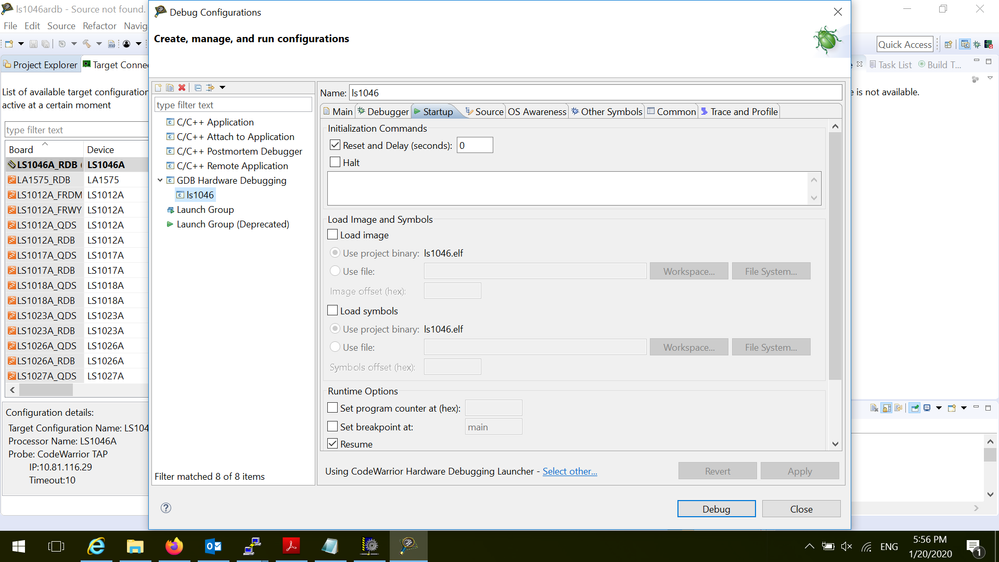
3.Open CW initialization file panel from Target Connections->LS1028A_RDB(1)->Target Initialization file, please modify "USE_SAFE_RCW = False" to "USE_SAFE_RCW = True" to configure the target board to use hard-coded RCW.
Please modify the following section to add MMC device under "def Config_Flash_Devices():".
gdb.execute("fl_device --alias mmc --name MMCP1xxx_LSCH2 --address 0x00000000 --waddress 0x10000000 --wsize 0x1FFFF --geometry 8x1 --controller eSDHC")
4. Please click the project and connect to the target board from Run->Debug Configurations->Debug, then click the suspend button to suspend the core.
5. Please click the flash programming button to program MMC card. For details, please refer to section "7.7 Using flash programmer from eclipse IDE" in Freescale\CW4NET_v2019.01\CW_ARMv8\ARMv8\Help\PDF\ARMv8_Targeting_Manual.pd
Thanks,
Yiping
