
- Forums
- Product Forums
- General Purpose MicrocontrollersGeneral Purpose Microcontrollers
- i.MX Forumsi.MX Forums
- QorIQ Processing PlatformsQorIQ Processing Platforms
- Identification and SecurityIdentification and Security
- Power ManagementPower Management
- Wireless ConnectivityWireless Connectivity
- RFID / NFCRFID / NFC
- Advanced AnalogAdvanced Analog
- Neural Processing UnitsNeural Processing Units
- MCX Microcontrollers
- S32G
- S32K
- S32V
- MPC5xxx
- Other NXP Products
- S12 / MagniV Microcontrollers
- Powertrain and Electrification Analog Drivers
- Sensors
- Vybrid Processors
- Digital Signal Controllers
- 8-bit Microcontrollers
- ColdFire/68K Microcontrollers and Processors
- PowerQUICC Processors
- OSBDM and TBDML
- S32M
- S32Z/E
-
- Solution Forums
- Software Forums
- MCUXpresso Software and ToolsMCUXpresso Software and Tools
- CodeWarriorCodeWarrior
- MQX Software SolutionsMQX Software Solutions
- Model-Based Design Toolbox (MBDT)Model-Based Design Toolbox (MBDT)
- FreeMASTER
- eIQ Machine Learning Software
- Embedded Software and Tools Clinic
- S32 SDK
- S32 Design Studio
- GUI Guider
- Zephyr Project
- Voice Technology
- Application Software Packs
- Secure Provisioning SDK (SPSDK)
- Processor Expert Software
- Generative AI & LLMs
-
- Topics
- Mobile Robotics - Drones and RoversMobile Robotics - Drones and Rovers
- NXP Training ContentNXP Training Content
- University ProgramsUniversity Programs
- Rapid IoT
- NXP Designs
- SafeAssure-Community
- OSS Security & Maintenance
- Using Our Community
-
- Cloud Lab Forums
-
- Knowledge Bases
- ARM Microcontrollers
- i.MX Processors
- Identification and Security
- Model-Based Design Toolbox (MBDT)
- QorIQ Processing Platforms
- S32 Automotive Processing Platform
- Wireless Connectivity
- CodeWarrior
- MCUXpresso Suite of Software and Tools
- MQX Software Solutions
- RFID / NFC
- Advanced Analog
- Neural Processing Units
-
- NXP Tech Blogs
- Home
- :
- General Purpose Microcontrollers
- :
- LPC Microcontrollers
- :
- Re: lpc4330 Xplorer image flashing
lpc4330 Xplorer image flashing
- Subscribe to RSS Feed
- Mark Topic as New
- Mark Topic as Read
- Float this Topic for Current User
- Bookmark
- Subscribe
- Mute
- Printer Friendly Page
lpc4330 Xplorer image flashing

- Mark as New
- Bookmark
- Subscribe
- Mute
- Subscribe to RSS Feed
- Permalink
- Report Inappropriate Content
Dear Sir,
I had a lpc4330 xplorer board on hand now.
And already build an image from NXP exmple code using "mcuexpresso ide 10.0.24".
How could I flash my image to the xplorer board ?
I found the the boot mode jumper could be config to USART0 or USART3
to enter the UART ISP mode (AN11239). But I could not find more details.
Note: I only had the lpc4330 and did NOT have the lpc-link2 (om13054).
Thx, Eric.Chen
- Mark as New
- Bookmark
- Subscribe
- Mute
- Subscribe to RSS Feed
- Permalink
- Report Inappropriate Content
Hi Kerry,
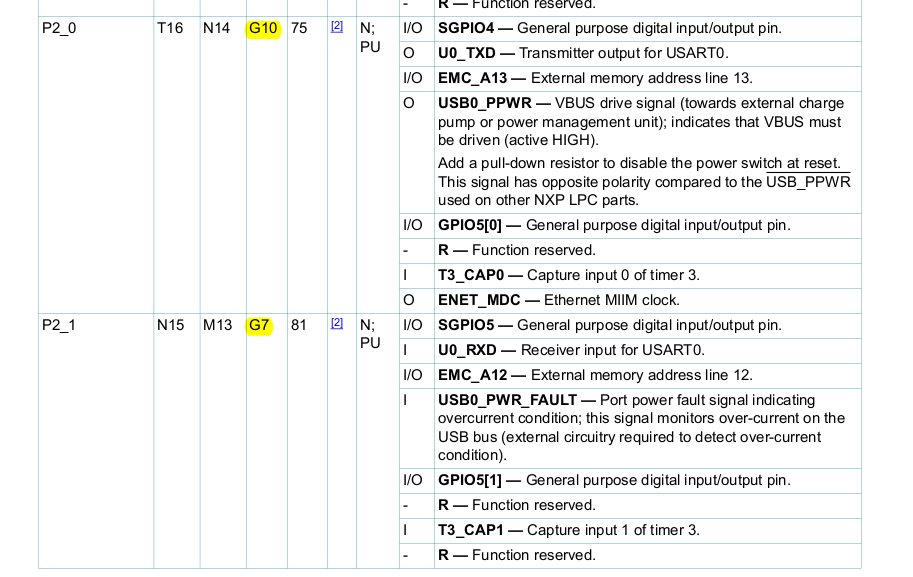
I had checked the Pins P2_0(U0_TXD) and P2_1(U0_RXD) from the lpc4330 Xplorer board schematic (om13027).
The P2_0 is already used by Ethernet ENET_MDC and the P2_1 is used by USB0_PWR_FAULT.
Is it possible to use the USART3 for the UART ISP ?
Thx, Eric.Chen

 kerryzhou
- Mark as New
- Bookmark
- Subscribe
- Mute
- Subscribe to RSS Feed
- Permalink
- Report Inappropriate Content
Hi Eric,
Please check the user manual:
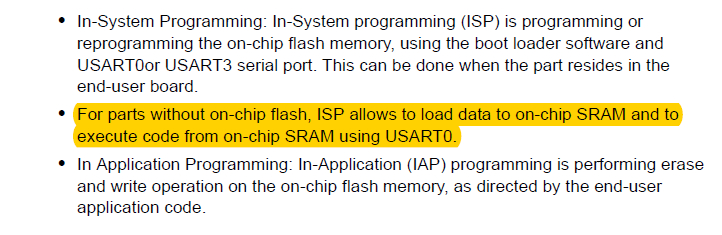
Because the chip without on chip flash, then you need to USART0, even the according pin is connect other component, but you still can connect it to the UART.
Please follow my step:
1. Connect your USB-UART tool to these pins:
1) P2_0 is GPIO5[0], it is J10_16. TX pin, connect to your USB-UART tool RX pin.
2)P2_1 is GPIO5[1], it is J10_26, RX pin, connect to your USB-UART tool TX pin.
2. Power on the board after you connect the USB-UART pin to your board.
3. Press RESET and SW2 switch, then release the RESET at first, then release SW2.
4. open FlashMagic, choose the COM port as the number of your USB-UART, then ISP->Device signature
You will find the chip is connect to the flashmagic
This is the picture from my NGX LPC4330 board.
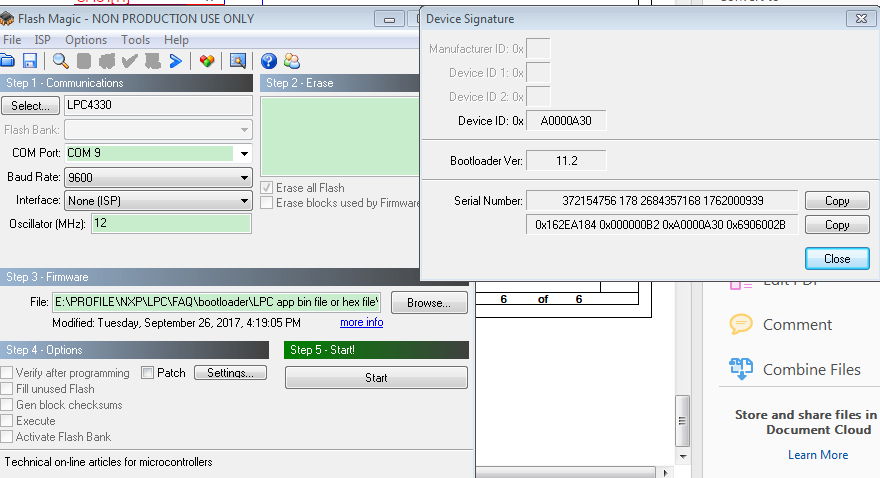
You can try it on your side.
Wish it helps you!
Have a great day,
Kerry
-----------------------------------------------------------------------------------------------------------------------
Note: If this post answers your question, please click the Correct Answer button. Thank you!
-----------------------------------------------------------------------------------------------------------------------
- Mark as New
- Bookmark
- Subscribe
- Mute
- Subscribe to RSS Feed
- Permalink
- Report Inappropriate Content
Hi Kerry,
Thanks for your detailed information.
I had follow the steps one by one.
But I get the error message "Operation Failed. (reading signature)".
Is there any configuration needed to be done in Flash Magic ?
(ex: menu item [Options] --> [Advanced options ..] )
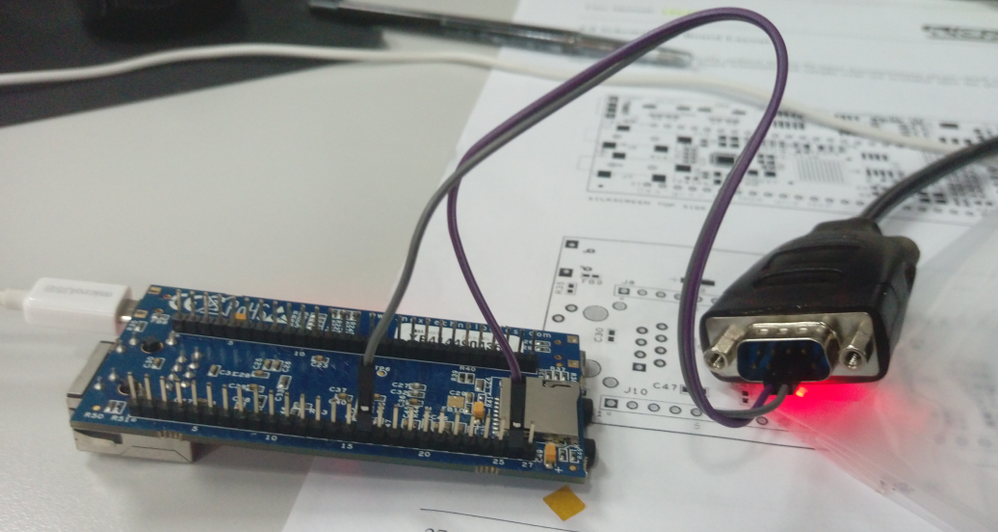
1) P2_0 is GPIO5[0], it is J10_16. TX pin, connect to USB-UART tool RX pin_2.
2) P2_1 is GPIO5[1], it is J10_26, RX pin, connect to USB-UART tool TX pin_3.
Thanks,
Eric.Chen
kerryzhou
- Mark as New
- Bookmark
- Subscribe
- Mute
- Subscribe to RSS Feed
- Permalink
- Report Inappropriate Content
Hi Eric,
You didn't connect the GND pin, please also add it.
Besides, give me another photo of the board top view.
That's strange, I have test it on my side.
Before you connect the flash magic, note this point:
Press RESET and SW2 switch, then release the RESET at first, then release SW2., enter ISP mode.
Have a great day,
Kerry
-----------------------------------------------------------------------------------------------------------------------
Note: If this post answers your question, please click the Correct Answer button. Thank you!
-----------------------------------------------------------------------------------------------------------------------
- Mark as New
- Bookmark
- Subscribe
- Mute
- Subscribe to RSS Feed
- Permalink
- Report Inappropriate Content
Hi Kerry,
The top view as below.
I had connect the GND pin and retry again.
I had follow the steps you describe, press RESET and SW2, then release RESET at first.
and then release SW2.
And this time, I get prompt message "Operation Failed. Failed to autobaud ...."
Thx, Eric.Chen
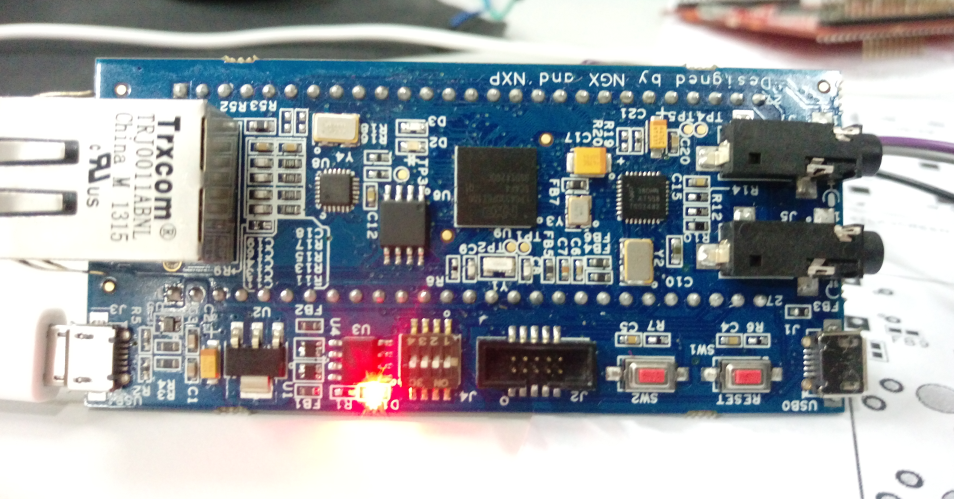
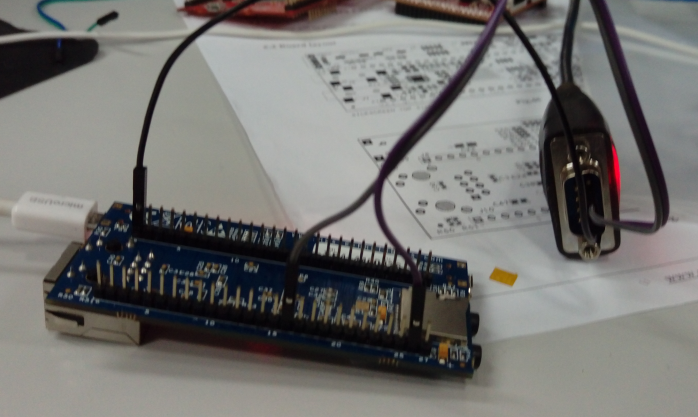 kerryzhou
- Mark as New
- Bookmark
- Subscribe
- Mute
- Subscribe to RSS Feed
- Permalink
- Report Inappropriate Content
Hi Eric Chen,
Sorry for my later reply.
I check your connection with my connection, two points:
1. I use USB0 power on the chip
2. J4, 1 is ON, 2-4 is OFF.
I can use flash magic connect the board, you can try it again.
Any updated information, please let me know.
Have a great day,
Kerry
-----------------------------------------------------------------------------------------------------------------------
Note: If this post answers your question, please click the Correct Answer button. Thank you!
-----------------------------------------------------------------------------------------------------------------------
- Mark as New
- Bookmark
- Subscribe
- Mute
- Subscribe to RSS Feed
- Permalink
- Report Inappropriate Content
Hi Kerry,
I had tried your configuration but still not work.
I am just thinking that if I had follow your configurations/instructions step by step,
then the only difference is the working environment.
My host O.S. is window 8 and I got two usb-to-serial calbes - one is Profolic and the other is FTDI.
I had test the 2 cables but neither one can work.
I also tried to remove all related applications and re-install again but there's still no help.
I already spend too much time in this issue with using the UART ISP programming.
So I start to search another way to flash the lpc4330.
Fortunately I find that the lpcScrypt use USB DFU to download the f/w and the
lpc4330 could boot from USB. I will try this out to see if it could help.
And thanks for your patient and help.
Thx, Eric.Chen
kerryzhou
- Mark as New
- Bookmark
- Subscribe
- Mute
- Subscribe to RSS Feed
- Permalink
- Report Inappropriate Content
Hi Eric,
You also can try to separate the TX and RX wire, these two wire is bond together in your side.
My PC is win 7, but I don't think it is the PC problem. FlashMagic can support win8 system.
OK, now you can try to use LPCScrypt.
If you still my help, just let me know!
Have a great day,
Kerry
-----------------------------------------------------------------------------------------------------------------------
Note: If this post answers your question, please click the Correct Answer button. Thank you!
-----------------------------------------------------------------------------------------------------------------------
kerryzhou
- Mark as New
- Bookmark
- Subscribe
- Mute
- Subscribe to RSS Feed
- Permalink
- Report Inappropriate Content
Hi Eric chen,
If you don't have the debugger.
You can use the UART ISP to download the code.
LPC4330 is the flashless chip, so you just can use UART0.
Pins P2_0(U0_TXD) and P2_1(U0_RXD) are used for communication with the USART0.
LOW level after reset on pin P2_7 indicates an external hardware request to start the ISP command handler.
You can use the MCUXpresso generate the hex file, then use flash magic, with UART ISP to download the code to the SRAM.
You can try it at first, if you still have problem after you test, just let me know!
Have a great day,
Kerry
-----------------------------------------------------------------------------------------------------------------------
Note: If this post answers your question, please click the Correct Answer button. Thank you!
-----------------------------------------------------------------------------------------------------------------------
