
- Forums
- Product Forums
- General Purpose MicrocontrollersGeneral Purpose Microcontrollers
- i.MX Forumsi.MX Forums
- QorIQ Processing PlatformsQorIQ Processing Platforms
- Identification and SecurityIdentification and Security
- Power ManagementPower Management
- Wireless ConnectivityWireless Connectivity
- RFID / NFCRFID / NFC
- Advanced AnalogAdvanced Analog
- Neural Processing UnitsNeural Processing Units
- MCX Microcontrollers
- S32G
- S32K
- S32V
- MPC5xxx
- Other NXP Products
- S12 / MagniV Microcontrollers
- Powertrain and Electrification Analog Drivers
- Sensors
- Vybrid Processors
- Digital Signal Controllers
- 8-bit Microcontrollers
- ColdFire/68K Microcontrollers and Processors
- PowerQUICC Processors
- OSBDM and TBDML
- S32M
- S32Z/E
-
- Solution Forums
- Software Forums
- MCUXpresso Software and ToolsMCUXpresso Software and Tools
- CodeWarriorCodeWarrior
- MQX Software SolutionsMQX Software Solutions
- Model-Based Design Toolbox (MBDT)Model-Based Design Toolbox (MBDT)
- FreeMASTER
- eIQ Machine Learning Software
- Embedded Software and Tools Clinic
- S32 SDK
- S32 Design Studio
- GUI Guider
- Zephyr Project
- Voice Technology
- Application Software Packs
- Secure Provisioning SDK (SPSDK)
- Processor Expert Software
- Generative AI & LLMs
-
- Topics
- Mobile Robotics - Drones and RoversMobile Robotics - Drones and Rovers
- NXP Training ContentNXP Training Content
- University ProgramsUniversity Programs
- Rapid IoT
- NXP Designs
- SafeAssure-Community
- OSS Security & Maintenance
- Using Our Community
-
- Cloud Lab Forums
-
- Knowledge Bases
- ARM Microcontrollers
- i.MX Processors
- Identification and Security
- Model-Based Design Toolbox (MBDT)
- QorIQ Processing Platforms
- S32 Automotive Processing Platform
- Wireless Connectivity
- CodeWarrior
- MCUXpresso Suite of Software and Tools
- MQX Software Solutions
- RFID / NFC
- Advanced Analog
- Neural Processing Units
-
- NXP Tech Blogs
- Home
- :
- 汎用マイクロコントローラ
- :
- LPCマイクロコントローラ
- :
- Re: Trying to build LED blinking project in baremetal
Trying to build LED blinking project in baremetal
- RSS フィードを購読する
- トピックを新着としてマーク
- トピックを既読としてマーク
- このトピックを現在のユーザーにフロートします
- ブックマーク
- 購読
- ミュート
- 印刷用ページ

- 新着としてマーク
- ブックマーク
- 購読
- ミュート
- RSS フィードを購読する
- ハイライト
- 印刷
- 不適切なコンテンツを報告
I made the project to toggle the LED without using GPIO_PORTToggle(). I prepared the code but don't know how to clear the port. I tried to use gpio->CLR[1] = (1<<LED_RED); but it failed. Please let me know to clear the gpio registers.
Following is the code snippet.
void delay_ms(uint32_t count)
{
for(uint32_t i = 0 ; i < count*1000 ; i++);
}
int main(void) {
GPIO_Type *gpio = GPIO;
// TODO: insert code here
//
SYSCON_Type *syscon = SYSCON;
syscon->AHBCLKCTRL.AHBCLKCTRL0 |= (1<<15);//ENABLE GPIO1 CLOCK
syscon->AHBCLKCTRL.AHBCLKCTRL0 |= (1<<13);//ENABLE IOCON CLOCK
gpio->SET[1] = 0xff;//enable gpio 1 for reading/writing
gpio->DIR[1] = 0xff;// make gpio as output
// Force the counter to be placed into memory
volatile static int i = 0 ;
// Enter an infinite loop, just incrementing a counter
while(1) {
i++ ;
gpio->B[1][LED_RED] = (1<<LED_RED);
delay_ms(1000);
gpio->B[1][LED_GREEN] = (1<<LED_GREEN);
delay_ms(1000);
gpio->B[1][LED_BLUE] = (1<<LED_BLUE);
delay_ms(1000);
}
return 0 ;
}
解決済! 解決策の投稿を見る。

 RaRo
RaRo
- 新着としてマーク
- ブックマーク
- 購読
- ミュート
- RSS フィードを購読する
- ハイライト
- 印刷
- 不適切なコンテンツを報告
Hello @smishra125,
Do you want to clear the port as a way of turning off the LED?
First of all, as an advice I would recommend you take a look at driver fsl_gpio.h and fsl_gpio.c. There you will find functions that work with GPIO. Even if you don't want to use the functions for your application, it is good to have a look and see what the function is doing. For example, you are using B: Byte pin registers for all port GPIO pins for Pin Write, that is good, but look the normal usage of it:
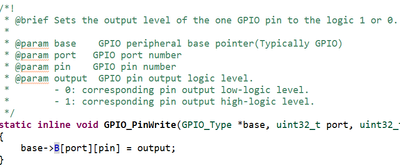
[fsl_gpio.h]
Now take a look to what you are doing: gpio->B[1][LED_BLUE] = (1<<LED_BLUE);
Your code should be something like: gpio -> B[1][LED_BLUE]=1; or gpio -> B[1][LED_BLUE]=0; depending on the output you want to have at that moment.
Being that said, there are two ways that you could implement the Toggle on the LEDs, and do the RGB change:
- Through NOT as Toggle.
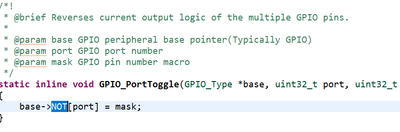
[fsl_gpio.h]
In this one, you may have to do a Pin Initialization (whether LED_RED starts ON and others OFF, for example). But the logic it is pretty simple, every time the line it is called: gpio->NOT[1][LED_RED]=(1<<LED_RED); the value of LED_RED would change between ON/OFF (or HIGH/LOW). Look the next example:
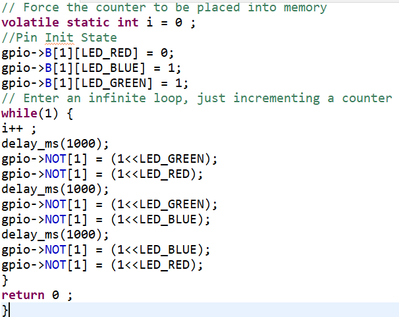
[Example of NOT usage]
- Through B as Pin Write. In this one, you may change the output between 1 and 0. As follows:
gpio -> B[1][LED_BLUE]=1;
delay_ms(1000);
gpio -> B[1][LED_BLUE]=0;
Best regards, Raul.
RaRo
- 新着としてマーク
- ブックマーク
- 購読
- ミュート
- RSS フィードを購読する
- ハイライト
- 印刷
- 不適切なコンテンツを報告
Hello @smishra125,
Do you want to clear the port as a way of turning off the LED?
First of all, as an advice I would recommend you take a look at driver fsl_gpio.h and fsl_gpio.c. There you will find functions that work with GPIO. Even if you don't want to use the functions for your application, it is good to have a look and see what the function is doing. For example, you are using B: Byte pin registers for all port GPIO pins for Pin Write, that is good, but look the normal usage of it:
[fsl_gpio.h]
Now take a look to what you are doing: gpio->B[1][LED_BLUE] = (1<<LED_BLUE);
Your code should be something like: gpio -> B[1][LED_BLUE]=1; or gpio -> B[1][LED_BLUE]=0; depending on the output you want to have at that moment.
Being that said, there are two ways that you could implement the Toggle on the LEDs, and do the RGB change:
- Through NOT as Toggle.
[fsl_gpio.h]
In this one, you may have to do a Pin Initialization (whether LED_RED starts ON and others OFF, for example). But the logic it is pretty simple, every time the line it is called: gpio->NOT[1][LED_RED]=(1<<LED_RED); the value of LED_RED would change between ON/OFF (or HIGH/LOW). Look the next example:
[Example of NOT usage]
- Through B as Pin Write. In this one, you may change the output between 1 and 0. As follows:
gpio -> B[1][LED_BLUE]=1;
delay_ms(1000);
gpio -> B[1][LED_BLUE]=0;
Best regards, Raul.

- 新着としてマーク
- ブックマーク
- 購読
- ミュート
- RSS フィードを購読する
- ハイライト
- 印刷
- 不適切なコンテンツを報告
> gpio->B[1][LED_RED] = (1<<LED_RED);
Assuming the access to the gpio.B struct really translates into the proper peripheral registers - I cannot see how this code should effect a toggle.
You are always setting the bit.
- 新着としてマーク
- ブックマーク
- 購読
- ミュート
- RSS フィードを購読する
- ハイライト
- 印刷
- 不適切なコンテンツを報告
Hello @frank_m ,
In this code I am trying to glow RGB led in such a way that first red light glows, then green light glows and then blue light glows. But my problem is that it is working for the first time only. I put the breakpoint in beginning of main function and went in steps, so I found in first iteration, it is working fine but after that it does not happen(after led becoming blue, it should be red). Please help me out, and suggest me if I am doing something wrong?
- 新着としてマーク
- ブックマーク
- 購読
- ミュート
- RSS フィードを購読する
- ハイライト
- 印刷
- 不適切なコンテンツを報告
Your code always sets the respective outputs, which has a visible effect only the first time.
To toggle the LED, you need to alternatively turn it on and off.
Either directly by reading the current state back, or indirectly by a cycle counter.
- 新着としてマーク
- ブックマーク
- 購読
- ミュート
- RSS フィードを購読する
- ハイライト
- 印刷
- 不適切なコンテンツを報告
@frank_m Can you send me sample example to turn on and off a LED using registers.
- 新着としてマーク
- ブックマーク
- 購読
- ミュート
- RSS フィードを購読する
- ハイライト
- 印刷
- 不適切なコンテンツを報告
Sorry, but I don't have any such example.
I almost always use the provided HAL layer of the SDK, usually coming as a library (in source code). With optimization settings higher than "none", there is very little gain by the extra effort.
As mentioned in another of your threads, you could use code from a SDK example as a starting point, and strip it down. And, as also mentioned, the gain in speed rarely ever justifies the increased development effort. With proper optimization and linker settings, there is often no measurable difference in code size either (if you stay away from expensive clib functions like printf).
Other important sources for bare-metal are the user manual / reference manual which document the peripheral units and their registers, and the device-specific header that provides defines, structs and macros for the access. Having a project for a LPC54628, this file is "LPC54628.h" in my case. With more than 20.000 lines not a small one, though.
However, I think your issue is one of a plain C language & logic, not a register access issue.
Instead of reading the current state back, I use a simple toggle counter in such cases.
Incrementing the counter once in every "while (1)" loop, I set the respective bit it the LSB of the counter is 1, or reset it of the LSB is zero. Here a pseudo code example:
while (1)
{
...
counter++;
if (counter % 2)
B[<n>][<m>] = LED_BITMASK;
else
B[<n>][<m>] = ~LED_BITMASK;
delay();
}
