
- Forums
- Product Forums
- General Purpose MicrocontrollersGeneral Purpose Microcontrollers
- i.MX Forumsi.MX Forums
- QorIQ Processing PlatformsQorIQ Processing Platforms
- Identification and SecurityIdentification and Security
- Power ManagementPower Management
- Wireless ConnectivityWireless Connectivity
- RFID / NFCRFID / NFC
- Advanced AnalogAdvanced Analog
- Neural Processing UnitsNeural Processing Units
- MCX Microcontrollers
- S32G
- S32K
- S32V
- MPC5xxx
- Other NXP Products
- S12 / MagniV Microcontrollers
- Powertrain and Electrification Analog Drivers
- Sensors
- Vybrid Processors
- Digital Signal Controllers
- 8-bit Microcontrollers
- ColdFire/68K Microcontrollers and Processors
- PowerQUICC Processors
- OSBDM and TBDML
- S32M
- S32Z/E
-
- Solution Forums
- Software Forums
- MCUXpresso Software and ToolsMCUXpresso Software and Tools
- CodeWarriorCodeWarrior
- MQX Software SolutionsMQX Software Solutions
- Model-Based Design Toolbox (MBDT)Model-Based Design Toolbox (MBDT)
- FreeMASTER
- eIQ Machine Learning Software
- Embedded Software and Tools Clinic
- S32 SDK
- S32 Design Studio
- GUI Guider
- Zephyr Project
- Voice Technology
- Application Software Packs
- Secure Provisioning SDK (SPSDK)
- Processor Expert Software
- Generative AI & LLMs
-
- Topics
- Mobile Robotics - Drones and RoversMobile Robotics - Drones and Rovers
- NXP Training ContentNXP Training Content
- University ProgramsUniversity Programs
- Rapid IoT
- NXP Designs
- SafeAssure-Community
- OSS Security & Maintenance
- Using Our Community
-
- Cloud Lab Forums
-
- Knowledge Bases
- ARM Microcontrollers
- i.MX Processors
- Identification and Security
- Model-Based Design Toolbox (MBDT)
- QorIQ Processing Platforms
- S32 Automotive Processing Platform
- Wireless Connectivity
- CodeWarrior
- MCUXpresso Suite of Software and Tools
- MQX Software Solutions
- RFID / NFC
- Advanced Analog
- Neural Processing Units
-
- NXP Tech Blogs
- Home
- :
- 汎用マイクロコントローラ
- :
- LPCマイクロコントローラ
- :
- LPC54114 NO_ISP setting for CRP
LPC54114 NO_ISP setting for CRP
- RSS フィードを購読する
- トピックを新着としてマーク
- トピックを既読としてマーク
- このトピックを現在のユーザーにフロートします
- ブックマーク
- 購読
- ミュート
- 印刷用ページ
LPC54114 NO_ISP setting for CRP

- 新着としてマーク
- ブックマーク
- 購読
- ミュート
- RSS フィードを購読する
- ハイライト
- 印刷
- 不適切なコンテンツを報告
I am using PIO0_31 in my product which also happens to be the pin that is used to put the MCU into ISP mode at boot. Due to pin constraints, it is really difficult to use a different pin and I do not really intend jumping to the ISP modes using this pin.
Reading the User guide, it appeard that I can disable the ISP modes using the CRP register location in Flash. Reading through the documents here https://www.nxp.com/docs/en/user-guide/MCUXpresso_IDE_User_Guide.pdf Page 119, it sounds like the following code can instruct the linker to load in this setting to Flash:
__CRP const unsigned int CRP_WORD = CRP_NO_CRP ;The doc also refers to a gui setting in the "linker tab" which I have been unable to find. I did find the code snippet in my startup_lpc5411x.c file. So I edited that file to:
//*****************************************************************************
// Variable to store CRP value in. Will be placed automatically
// by the linker when "Enable Code Read Protect" selected.
// See crp.h header for more information
//*****************************************************************************
#if !defined (CORE_M0PLUS)
#include <NXP/crp.h>
__CRP const unsigned int CRP_WORD = CRP_NO_ISP;
#endifRe-build and program the device, it seems like the ISP is still enabled. I test by driving the PIO0_31 pin low (enables ISP) and I can see with the debugger that the CPU jumps to a bootloader. If I drive the pin high, code runs as expected.
So I'm confident that my method for changing CRP is not working, what is the recommended way, is there some GUI function that overrides it?

 kerryzhou
- 新着としてマーク
- ブックマーク
- 購読
- ミュート
- RSS フィードを購読する
- ハイライト
- 印刷
- 不適切なコンテンツを報告
Hi Luke Beno,
From the MCUXpresso IDE user manual, we can get:
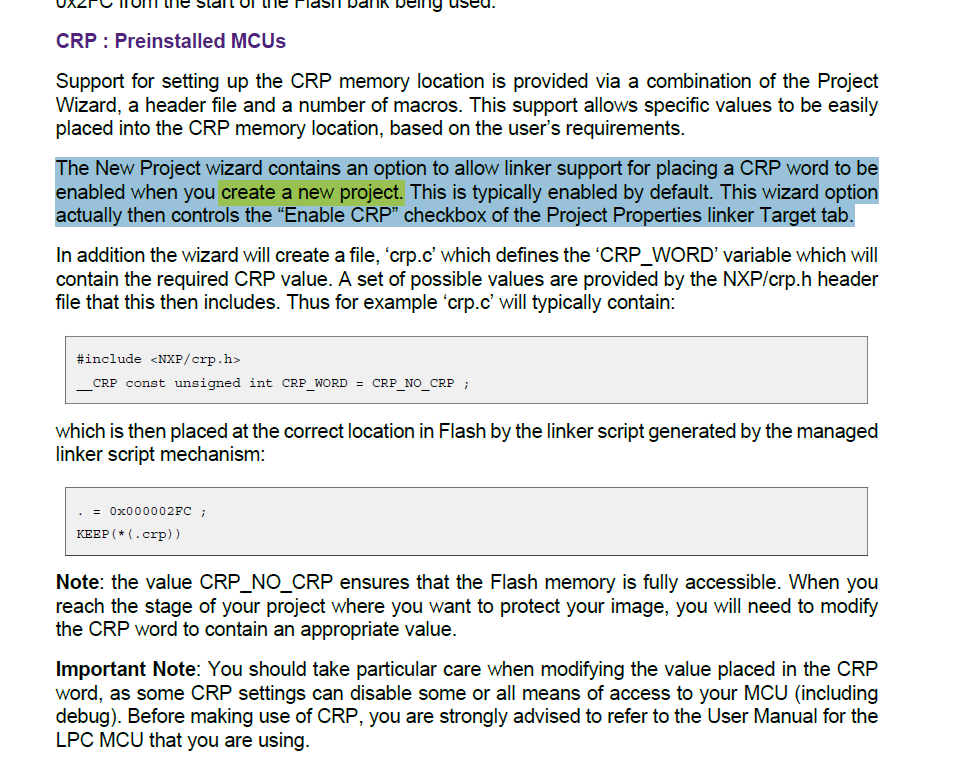
The new project create Wizard have the CRP options:
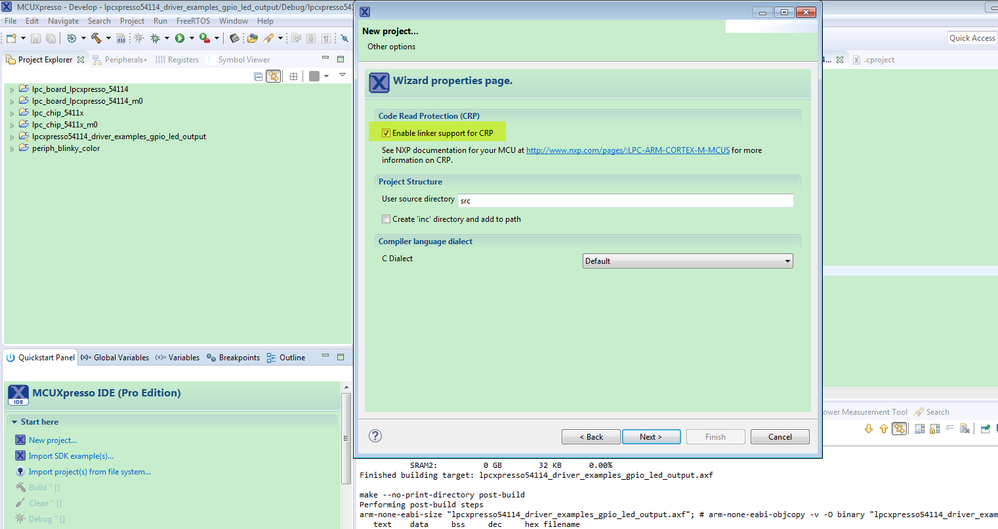
You can refer to this post:
How to create a new LPC project using LPCOpen and MCUXpresso IDE
After create it, then modify the crp.c file:
#if defined (__CODE_RED)
#include <NXP/crp.h>
// Variable to store CRP value in. Will be placed automatically
// by the linker when "Enable Code Read Protect" selected.
// See crp.h header for more information
__CRP const unsigned int CRP_WORD = CRP_NO_ISP;//CRP_NO_CRP ;
#endif
Then build the project again, you can find the .hex file, address 0x2fc already be changed to the CRP_NO_ISP data:
#define CRP_NO_ISP 0x4E697370
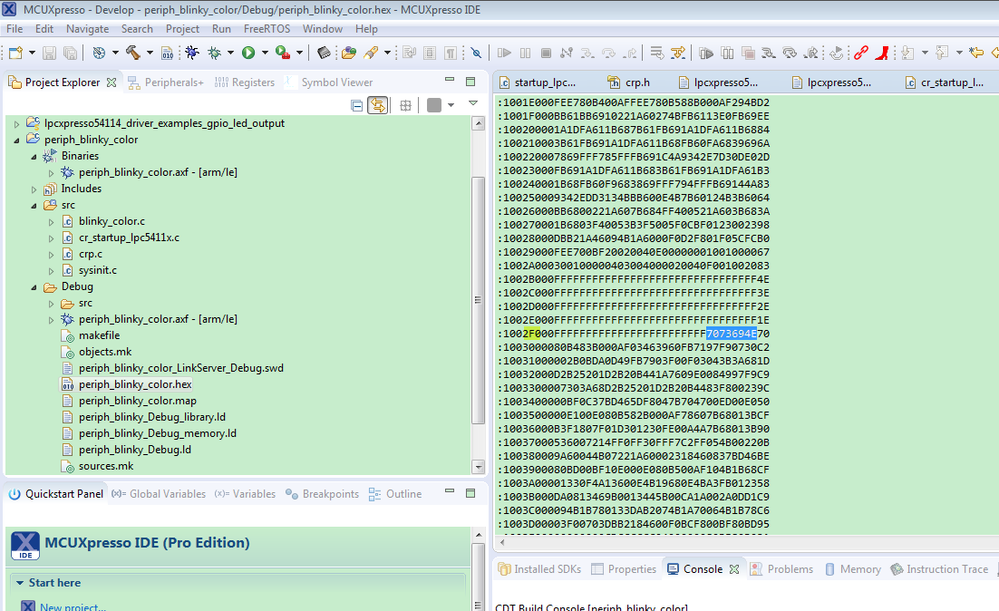
Then debug the code, check the memory:
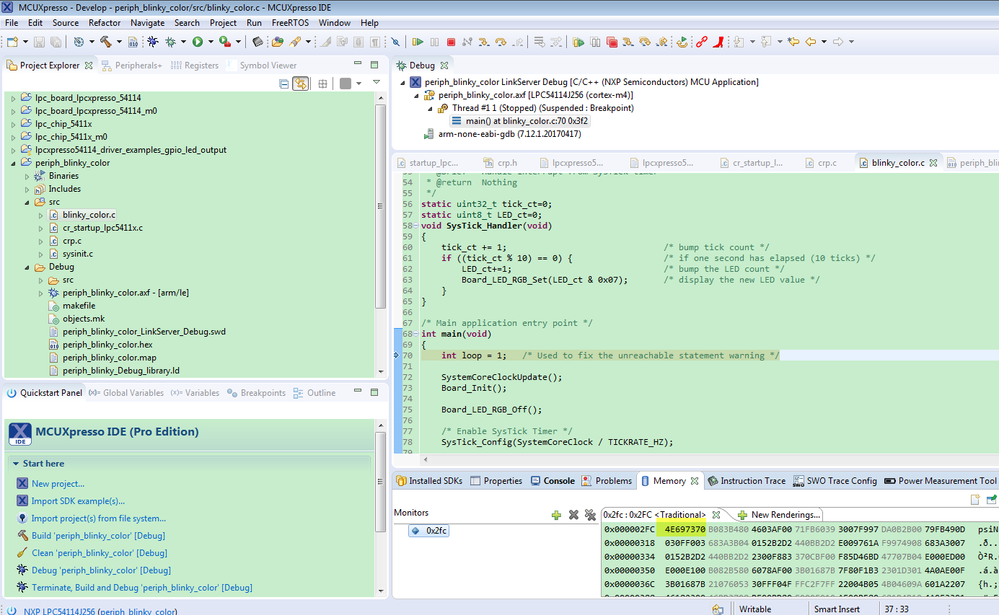
The CRP data really be changed.
You can't make it work, you can check your hex file, whether 0X2FC have changed to 0x4E697370.
Just modify the data, and don't do the configuration in the IDE, won't realize the CRP modified function.
But, to the SDK, I still meet the same problem as you, I didn't find the CRP enable item in both the SDK create and SDK sample code, I will check it with our IDE department, after I get the reply, I will let you know!
Please wait patiently.
But if you are using the lpcopen, you can try my above method.
Wish it helps you!
Have a great day,
Kerry
-----------------------------------------------------------------------------------------------------------------------
Note: If this post answers your question, please click the Correct Answer button. Thank you!
-----------------------------------------------------------------------------------------------------------------------
- 新着としてマーク
- ブックマーク
- 購読
- ミュート
- RSS フィードを購読する
- ハイライト
- 印刷
- 不適切なコンテンツを報告
I have the same problem. Can I set NO_ISP in SDK example?
