
- Forums
- Product Forums
- General Purpose MicrocontrollersGeneral Purpose Microcontrollers
- i.MX Forumsi.MX Forums
- QorIQ Processing PlatformsQorIQ Processing Platforms
- Identification and SecurityIdentification and Security
- Power ManagementPower Management
- Wireless ConnectivityWireless Connectivity
- RFID / NFCRFID / NFC
- Advanced AnalogAdvanced Analog
- Neural Processing UnitsNeural Processing Units
- MCX Microcontrollers
- S32G
- S32K
- S32V
- MPC5xxx
- Other NXP Products
- S12 / MagniV Microcontrollers
- Powertrain and Electrification Analog Drivers
- Sensors
- Vybrid Processors
- Digital Signal Controllers
- 8-bit Microcontrollers
- ColdFire/68K Microcontrollers and Processors
- PowerQUICC Processors
- OSBDM and TBDML
- S32M
- S32Z/E
-
- Solution Forums
- Software Forums
- MCUXpresso Software and ToolsMCUXpresso Software and Tools
- CodeWarriorCodeWarrior
- MQX Software SolutionsMQX Software Solutions
- Model-Based Design Toolbox (MBDT)Model-Based Design Toolbox (MBDT)
- FreeMASTER
- eIQ Machine Learning Software
- Embedded Software and Tools Clinic
- S32 SDK
- S32 Design Studio
- GUI Guider
- Zephyr Project
- Voice Technology
- Application Software Packs
- Secure Provisioning SDK (SPSDK)
- Processor Expert Software
- Generative AI & LLMs
-
- Topics
- Mobile Robotics - Drones and RoversMobile Robotics - Drones and Rovers
- NXP Training ContentNXP Training Content
- University ProgramsUniversity Programs
- Rapid IoT
- NXP Designs
- SafeAssure-Community
- OSS Security & Maintenance
- Using Our Community
-
- Cloud Lab Forums
-
- Knowledge Bases
- ARM Microcontrollers
- i.MX Processors
- Identification and Security
- Model-Based Design Toolbox (MBDT)
- QorIQ Processing Platforms
- S32 Automotive Processing Platform
- Wireless Connectivity
- CodeWarrior
- MCUXpresso Suite of Software and Tools
- MQX Software Solutions
- RFID / NFC
- Advanced Analog
- Neural Processing Units
-
- NXP Tech Blogs
- Home
- :
- General Purpose Microcontrollers
- :
- Kinetis Microcontrollers
- :
- QN908xCDK wirelee examples_bluetooth_wireless _uart_freertos Cannot get connected with IOT Toobox
QN908xCDK wirelee examples_bluetooth_wireless _uart_freertos Cannot get connected with IOT Toobox
- Subscribe to RSS Feed
- Mark Topic as New
- Mark Topic as Read
- Float this Topic for Current User
- Bookmark
- Subscribe
- Mute
- Printer Friendly Page
QN908xCDK wirelee examples_bluetooth_wireless _uart_freertos Cannot get connected with IOT Toobox

- Mark as New
- Bookmark
- Subscribe
- Mute
- Subscribe to RSS Feed
- Permalink
- Report Inappropriate Content
Hi,
I got some demo examples work with IoT Toolbox on the iPhone include blood_pressure, heart_rate and proximity_reporter. However, I could not get the wireless_uart to connected with IoT Toolbox. There is any difference with the others in connection? I guess the uart demo is close to my application for sensors connecting with smart phone.
Also I have problem to compiler the other demo examples, like temperature sensor freertos, errors display like this below:
../source/app_config.c:87:20: error: 'gAppUseBonding_d' undeclared here (not in a function)
.withBonding = gAppUseBonding_d,
^~~~~~~~~~~~~~~~
make: *** [source/subdir.mk:26: source/app_config.o] Error 1
make: *** Waiting for unfinished jobs....
In file included from ../freertos/FreeRTOS.h:98:0,
from ../freertos/heap_4.c:85:
../source/FreeRTOSConfig.h:114:59: error: 'gTotalHeapSize_c' undeclared here (not in a function)
#define configTOTAL_HEAP_SIZE ((size_t)(gTotalHeapSize_c))
^
../freertos/heap_4.c:107:25: note: in expansion of macro 'configTOTAL_HEAP_SIZE'
static uint8_t ucHeap[ configTOTAL_HEAP_SIZE ];
^~~~~~~~~~~~~~~~~~~~~
../freertos/heap_4.c:107:17: warning: 'ucHeap' defined but not used [-Wunused-variable]
static uint8_t ucHeap[ configTOTAL_HEAP_SIZE ];
^~~~~~
make: *** [freertos/subdir.mk:44: freertos/heap_4.o] Error 1
Albert
- Mark as New
- Bookmark
- Subscribe
- Mute
- Subscribe to RSS Feed
- Permalink
- Report Inappropriate Content
Hi Ricardo,
i have met the same problem as Albert did.
the glucose demo can be connected by the android ble app(like nrf connect ) and lightblue, but the wireless uart demo will immediately disconnected from the phone apps...
here is the serial port log:
------------------------------------------------------------------------------ log from serial terminator ------------------
Wireless UART starting as GAP Central, press the role switch to change it.
Switched role to GAP Peripheral.
Advertising...
Connected to device 0 as slave.
Disconnected from device 0.
Advertising...
Connected to device 0 as slave.
Disconnected from device 0.
Advertising...
Connected to device 0 as slave.
Disconnected from device 0.
Advertising...
Connected to device 0 as slave.
Disconnected from device 0.
Advertising...
Connected to device 0 as slave.
Disconnected from device 0.
Advertising...
-------------------------------------------------------------------------
i am so sure the disconnected request is from kw36 part.
Regards,
- Mark as New
- Bookmark
- Subscribe
- Mute
- Subscribe to RSS Feed
- Permalink
- Report Inappropriate Content
Hi Ricardo,
Yes, I see. Thanks,
the BleApp_HandleKeys deal with the switch event. and BleApp_Start switches GAP Role. The program runs main_task in ApplMain.c and then enter while(1) loop in App_thread ( param).
For the disconnection problem, I have reset the iPhone and did not get it to connection, I also have tested Android phone Samsung S7 that had same problem. Hover, reset the SDK board makes it works again. I believe there is some bugs in either end.
As offering IoT Toolbox to our customer, you are right, we may better to develop a new App for users. I hope I could do Xcode….
Best regards,
Albert
- Mark as New
- Bookmark
- Subscribe
- Mute
- Subscribe to RSS Feed
- Permalink
- Report Inappropriate Content
Hi Ricardo,
Thanks for your recommend reading. So far I can edit the demo code to check the incoming message from iPhone and send back something to iPhone.
It is possible for me to start a project at this stage. However, I need to find the c code location for switches to change the code so that my real code does not include all three switches and it is just a server for IoT Toolbox. Do you know where is the code location/files? I don't know how to create a custom profile and where to replace the original profile in code location/files.
Second, I need fix the problem of re-connection, once the iPhone away from the SDK board. I must rest the SDk to get "true" connection. Do you know what C code function related to this issue?
Third, I would like to know if there is any problems if I offer the app of IoT ToolBox to our users?
Regards,
Albert

 nxf51211
- Mark as New
- Bookmark
- Subscribe
- Mute
- Subscribe to RSS Feed
- Permalink
- Report Inappropriate Content
Hi Albert,
1. The code for the control of the switches is located inside the wireless_uart.c file.
a) When you switch to GAP Peripheral (by pressing SW2) you define the variable mGapRole to "gGapPeripheral_c" at the funciton called "BleApp_HandleKeys":
case gKBD_EventPressPB2_c:
{
/* Switch current role */
if( mGapRole == gGapCentral_c )
{
Serial_Print(gAppSerMgrIf, "\n\rSwitched role to GAP Peripheral.\n\r", gAllowToBlock_d);
mAppUartNewLine = TRUE;
mGapRole = gGapPeripheral_c;
}
.
.
.
}b) After switching to Peripheral, you start advertising by pressing SW1 and the case redirects you to the "BleApp_Start" function, where you wait for the connection:
case gGapPeripheral_c:
{
Serial_Print(gAppSerMgrIf, "\n\rAdvertising...\n\r", gAllowToBlock_d);
mAppUartNewLine = TRUE;
gPairingParameters.localIoCapabilities = gIoDisplayOnly_c;
BleApp_Advertise();
break;
}2. Regarding your problem with the connections, the issue is caused by the fact that the iPhone looses connection while the board still thinks that there is one. This problem is caused by the phone and not by the board; in order to fix this you would have to develop a new app which would allow the iPhone to reconnect properly.
3. I'm not sure if you are allowed to use the IoT Toolbox for your customers; I'm still checking if you are able to do it (I will let you know as soon as I get any information). However, I do not recommend using it in that way due to the fact that the app is only for testing, and does not have the support for a commercial use.
I hope this information can help you.
Best Regards,
Ricardo Delsordo
- Mark as New
- Bookmark
- Subscribe
- Mute
- Subscribe to RSS Feed
- Permalink
- Report Inappropriate Content
Hi Ricardo,
The SDK actually send back typed message from Tera Term VT today. That is great. I guess I did not setup the terminal right.
But I found a problem. Once the SDK board lost connection, re-connect seems work( both sides display RedLED and IoT Toolbox connected) , but the "chat" could not go through. Please advise.
Another thing, If I would like to change the SDK to be a permanent server or AGP peripheral , where should be changed in the code?
Best regards,
Albert
nxf51211
- Mark as New
- Bookmark
- Subscribe
- Mute
- Subscribe to RSS Feed
- Permalink
- Report Inappropriate Content
Hi Albert,
It could be possible that somehow you are blocking the RTOS scheduler at some point, which causes the phone to lose connection with the board. However, when you attempt to reconnect with it and the phones connects to it again, the board thinks that it never lost the connection but now is blocked from the communication (when this happens you have to restart the board to connect again).
Regarding your second question, for what I understand, you want your board to be set always as a server/GAP peripheral; this can be achieved by creating a custom profile (please correct me if I did not understand). If you're trying to create a custom profile, I highly recommend you check the following tutorials that would allow you to have better understanding of the subject:
Also, I recommend you check the BLE Demo Applications User's Guide, which would allow you to see what has to happened when you try any of the IoT Toolbox applications: https://www.nxp.com/files-static/32bit/doc/user_guide/KBLETMAUG.pdf?&fsrch=1&sr=2&pageNum=1
I hope this information can help you.
Best Regards,
Ricardo Delsordo
- Mark as New
- Bookmark
- Subscribe
- Mute
- Subscribe to RSS Feed
- Permalink
- Report Inappropriate Content
plus,
I changed terminal setup select Local echo and autoswitch, Newline select Receive "Auto", transmit ="CR+LF", I can type the into the screen but there is no display on the iPhone.
Albert
- Mark as New
- Bookmark
- Subscribe
- Mute
- Subscribe to RSS Feed
- Permalink
- Report Inappropriate Content
Hi Ricardo,
I caannot type into the terminal. That maybe due to terminal setup?
Albert
- Mark as New
- Bookmark
- Subscribe
- Mute
- Subscribe to RSS Feed
- Permalink
- Report Inappropriate Content
Hi Ricardo,
Yes, it works. the Tera Term displays the message send from IoT ToolBox from iPhone. But where should I to edit the code that could respond the message and send it to IoT ToolBox on iPhone?
Albert
nxf51211
- Mark as New
- Bookmark
- Subscribe
- Mute
- Subscribe to RSS Feed
- Permalink
- Report Inappropriate Content
Hi Albert,
Sorry if I don't understand, but what do you mean when you say you want to edit the code? The test project that you are using works as a chat between the board (through the terminal) and the IoT Toolbox (through your phone). If you type into the terminal your phone receives the characters you're typing.
Regards,
Ricardo Delsordo
nxf51211
- Mark as New
- Bookmark
- Subscribe
- Mute
- Subscribe to RSS Feed
- Permalink
- Report Inappropriate Content
Hi Albert,
I would like to ask you the following questions:
1) When you run the wireless_uart project, do you set the QN9080 as GAP Peripheral and then activate its Advertising so it can appear on your phone's scanning at the Iot Toolbox App?
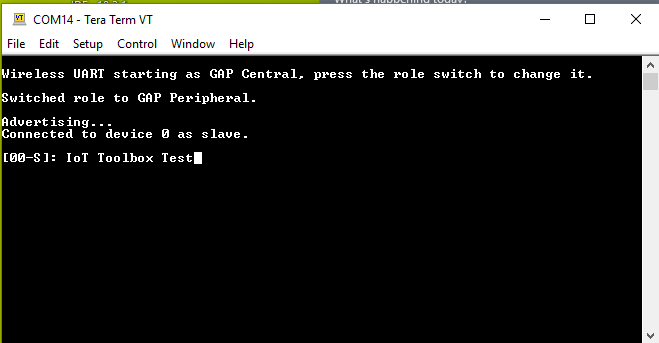
2) What iPhone are you using to try the demo?
3) When you encounter the problem that you described (when compiling any of the other demos). Have you tried deleting the project and create it again (This type of problems could be caused by internal errors from the IDE and are fixed by creating a new demo project)?
Best Regards,
Ricardo Delsordo
- Mark as New
- Bookmark
- Subscribe
- Mute
- Subscribe to RSS Feed
- Permalink
- Report Inappropriate Content
Hi Ricardo,
I used iPhone 6S for app IoT Tool Box. After the debug downloaded the project. I press SDK reset button, then button1, the 3-LED blinking red. I clicked the wireless icon of IoT on iPhone, It started scanning. but it never get connected, not as the other projects of heart rate, blood pressure and proximate.
I imported demo project by clicking MCUXpressor left low corner import SDK example(s), when window pop out picture of qn908xcdk, click SDK board picture, click wireless_examples, click bluetooth, then click temperature_sensor, bm and freerots. click finish...
I have not used GAP peripheral.
Thanks,
Albert

 nxf51211
- Mark as New
- Bookmark
- Subscribe
- Mute
- Subscribe to RSS Feed
- Permalink
- Report Inappropriate Content
Hi Albert,
You need to first set your board as GAP Peripheral. I saw in your video that after you reset the board, you press only SW1; the board starts as GAP Central after reset, and when you press SW1 you start scanning for other devises. However if you switch to GAP Peripheral first and then start advertising your board (first press SW2, and then SW1) your phone should be able to detect the board. The first time you attempt to connect the board might take a few seconds.
PS: In order to make sure that you are set as GAP Peripheral, I highly recommend that you use a terminal (like I did on my first answer) so you can see the current state of your board, and also to see if the messages that you sent from your phone are received (like the message "IoT Toolbox Text" that can be seen in the image I added on my previous answer).
I hope this information can help you.
Best Regards,
Ricardo Delsordo
