
- Forums
- Product Forums
- General Purpose MicrocontrollersGeneral Purpose Microcontrollers
- i.MX Forumsi.MX Forums
- QorIQ Processing PlatformsQorIQ Processing Platforms
- Identification and SecurityIdentification and Security
- Power ManagementPower Management
- Wireless ConnectivityWireless Connectivity
- RFID / NFCRFID / NFC
- Advanced AnalogAdvanced Analog
- Neural Processing UnitsNeural Processing Units
- MCX Microcontrollers
- S32G
- S32K
- S32V
- MPC5xxx
- Other NXP Products
- S12 / MagniV Microcontrollers
- Powertrain and Electrification Analog Drivers
- Sensors
- Vybrid Processors
- Digital Signal Controllers
- 8-bit Microcontrollers
- ColdFire/68K Microcontrollers and Processors
- PowerQUICC Processors
- OSBDM and TBDML
- S32M
- S32Z/E
-
- Solution Forums
- Software Forums
- MCUXpresso Software and ToolsMCUXpresso Software and Tools
- CodeWarriorCodeWarrior
- MQX Software SolutionsMQX Software Solutions
- Model-Based Design Toolbox (MBDT)Model-Based Design Toolbox (MBDT)
- FreeMASTER
- eIQ Machine Learning Software
- Embedded Software and Tools Clinic
- S32 SDK
- S32 Design Studio
- GUI Guider
- Zephyr Project
- Voice Technology
- Application Software Packs
- Secure Provisioning SDK (SPSDK)
- Processor Expert Software
- Generative AI & LLMs
-
- Topics
- Mobile Robotics - Drones and RoversMobile Robotics - Drones and Rovers
- NXP Training ContentNXP Training Content
- University ProgramsUniversity Programs
- Rapid IoT
- NXP Designs
- SafeAssure-Community
- OSS Security & Maintenance
- Using Our Community
-
- Cloud Lab Forums
-
- Knowledge Bases
- ARM Microcontrollers
- i.MX Processors
- Identification and Security
- Model-Based Design Toolbox (MBDT)
- QorIQ Processing Platforms
- S32 Automotive Processing Platform
- Wireless Connectivity
- CodeWarrior
- MCUXpresso Suite of Software and Tools
- MQX Software Solutions
- RFID / NFC
- Advanced Analog
- Neural Processing Units
-
- NXP Tech Blogs
- Home
- :
- General Purpose Microcontrollers
- :
- Kinetis Microcontrollers
- :
- Re: MK22 - Fail to flash it
MK22 - Fail to flash it
- Subscribe to RSS Feed
- Mark Topic as New
- Mark Topic as Read
- Float this Topic for Current User
- Bookmark
- Subscribe
- Mute
- Printer Friendly Page
MK22 - Fail to flash it

- Mark as New
- Bookmark
- Subscribe
- Mute
- Subscribe to RSS Feed
- Permalink
- Report Inappropriate Content
Hey Guys,
I have a custom board with the MK22FN1M0VLL12 1N41K.
I have pull up resistors in the reset_b and EZP_CS (10K each), and 10ohm resistor with 47mF to slow down the power startup. Other signal; VBat connected to 3V3, VREFH and VREFL connected to 3V3 and GND, all VDD and VSS connected, no cristals
Using Jlink Lite or Jlink commander I can connect the MCU, erase it, and unlock it, also can access the memory. I acn see the erase working and there are no errors at all. After the erase the reset_b goes high, but if we do a power off and a power on the saw wave in the reset_b it shows up again, it does not go away. When I try to upload (flash) a sketch through KDS I go a time out error. So I am unable to change the factory state in this MCU.
All the connections are ok and I just welded the minimum components to do the first erase and upload. I have used the same process with the MKL05, MKE06, and MK10 and everything was ok, and easy.
So my questions are:
What else more can I try? I am running out of options.
Has someone successfully put the K22 in a custom board to work using a probe like Segger Jlink ?
Any help on this issue will be very appreciated.
Best Regards,
Antonio Oliveira
Not answered yet...
- Mark as New
- Bookmark
- Subscribe
- Mute
- Subscribe to RSS Feed
- Permalink
- Report Inappropriate Content
Hi Kerry,
Thank you for answering my question.
I followed your suggestion and used the loadbin in the J-Link commander and surprisingly it works. But the KDS is still being not able to connect to the MK22.
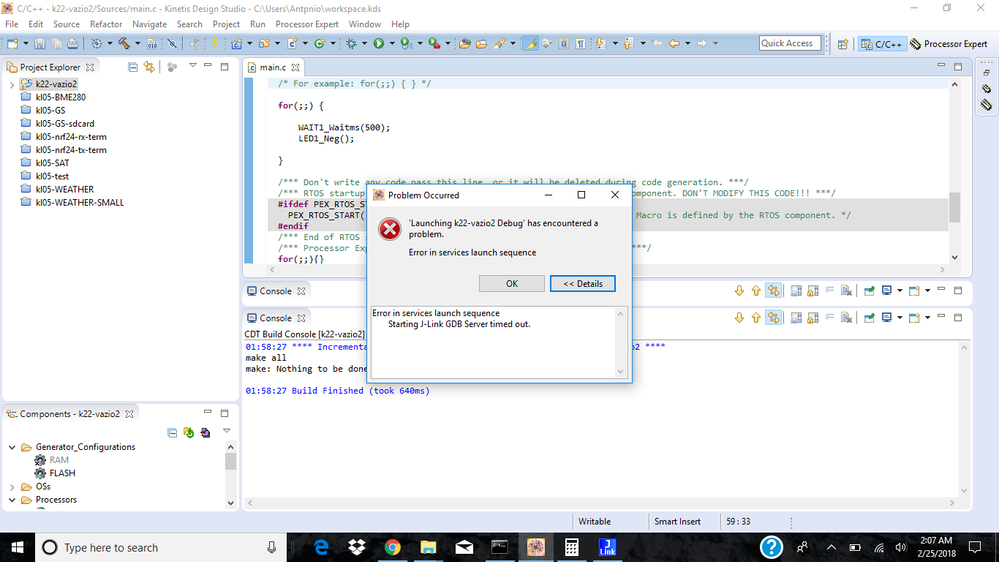
In the commander the sequence is:
1- launch commander -> Jlink.exe
2- type -> device mk22fn1m0xxx12
3- type -> connect
4- it will ask the programmer type - SWD, and speed -> 100
5- then should connect
6- type -> erase
7- check if is unsecured, type - mem 40c 1 (it will show the FSEC status, it should be "FE")
8- if is not "FE", try erase again, and connect again.
9- type mem40c 1, it should show "FE"
10- type loadbin <your_file.bin> 0
11- if everything is ok it will load the file
If you mess up the sequence, and get errors, just poer on/off the board and restart the commander.
Took me a while to figure out the right way to do the file upload because I was tricked by the IDE, it works perfectly for other MCUs, but does not work for the K22. I do not know why.
The hardware needs to include:
1- Resitor of 10ohm and capacitor of 47mF to slow down the power up just for the first upload, put them in a proto-board and connect a power supply set at 3V4.
2- Pull up resistors (4.7K) for SWD_DIO and RESET_b
3- Pull up resistor in EZP_CS is not required
4- The 3V3 regulator requires capacitors in VIN and VOUT. Resitor of 10ohm and capacitor of 47mF are not required after the first upload, I did disable the EZ port at POR by software in my sketch, so it will not come up on POR.
So, this is based on the best of my abilities, it might have other ways but this is the one that works for me.
But I still do not know why the IDE cannot flash the board, would be nice to solve this issue, because is more practical using the IDE alone, instead IDE + commander.
Best Regards,
Antonio Oliveira

 kerryzhou
- Mark as New
- Bookmark
- Subscribe
- Mute
- Subscribe to RSS Feed
- Permalink
- Report Inappropriate Content
Hi Antonio Oliveira,
Thank you for your updated information.
If the JLINK can download the code, and the code function works, I think the problem should in the IDE configuration side.
Do you follow my suggestion, just to create a empty project, then use the JLINK to download it?
Please make sure the part number is the same as your chip, because the K22 has a lot of part number, different part number have different feature.
After you create the KDS project, in the debug configuration, choose Segger JLINK, interface should select SWD, not JTAG, please try again.
If you still have problem in KDS, please give me your debug configuration picture, and the KDS debug log, I need to check it.
Have a great day,
Kerry
-----------------------------------------------------------------------------------------------------------------------
Note: If this post answers your question, please click the Correct Answer button. Thank you!
-----------------------------------------------------------------------------------------------------------------------
kerryzhou
- Mark as New
- Bookmark
- Subscribe
- Mute
- Subscribe to RSS Feed
- Permalink
- Report Inappropriate Content
Hi Antonio Oliveira,
If you welded the minimum components, you can use the JLINK commander find the ARM cortex M4, and can do the erase, I think your smallest system don't have big problem.
You said, when you use the KDS download the code, it will be time out, I have a question about your KDS project, whether your KDS project is match with the MK22FN1M0VLL12.
You can create a empty project for MK22FN1M0VLL12, then in the debug configuration, you need to use the JLINK, select the according SWD or JTAG interface.
If you still have problem, you also can generate the .bin file, then try to download the file directly in the JLINK commander, with command: loadfile xxx.bin
Whether you can do it correctly or not?
Please try it at first.
If you still have problem about it, please give me some picture about the KDS error problem, the debug log, and the JLINK commander windows information.
Wish it helps you!
Have a great day,
Kerry
-----------------------------------------------------------------------------------------------------------------------
Note: If this post answers your question, please click the Correct Answer button. Thank you!
-----------------------------------------------------------------------------------------------------------------------
