
- Forums
- Product Forums
- General Purpose MicrocontrollersGeneral Purpose Microcontrollers
- i.MX Forumsi.MX Forums
- QorIQ Processing PlatformsQorIQ Processing Platforms
- Identification and SecurityIdentification and Security
- Power ManagementPower Management
- Wireless ConnectivityWireless Connectivity
- RFID / NFCRFID / NFC
- Advanced AnalogAdvanced Analog
- Neural Processing UnitsNeural Processing Units
- MCX Microcontrollers
- S32G
- S32K
- S32V
- MPC5xxx
- Other NXP Products
- S12 / MagniV Microcontrollers
- Powertrain and Electrification Analog Drivers
- Sensors
- Vybrid Processors
- Digital Signal Controllers
- 8-bit Microcontrollers
- ColdFire/68K Microcontrollers and Processors
- PowerQUICC Processors
- OSBDM and TBDML
- S32M
- S32Z/E
-
- Solution Forums
- Software Forums
- MCUXpresso Software and ToolsMCUXpresso Software and Tools
- CodeWarriorCodeWarrior
- MQX Software SolutionsMQX Software Solutions
- Model-Based Design Toolbox (MBDT)Model-Based Design Toolbox (MBDT)
- FreeMASTER
- eIQ Machine Learning Software
- Embedded Software and Tools Clinic
- S32 SDK
- S32 Design Studio
- GUI Guider
- Zephyr Project
- Voice Technology
- Application Software Packs
- Secure Provisioning SDK (SPSDK)
- Processor Expert Software
- Generative AI & LLMs
-
- Topics
- Mobile Robotics - Drones and RoversMobile Robotics - Drones and Rovers
- NXP Training ContentNXP Training Content
- University ProgramsUniversity Programs
- Rapid IoT
- NXP Designs
- SafeAssure-Community
- OSS Security & Maintenance
- Using Our Community
-
- Cloud Lab Forums
-
- Knowledge Bases
- ARM Microcontrollers
- i.MX Processors
- Identification and Security
- Model-Based Design Toolbox (MBDT)
- QorIQ Processing Platforms
- S32 Automotive Processing Platform
- Wireless Connectivity
- CodeWarrior
- MCUXpresso Suite of Software and Tools
- MQX Software Solutions
- RFID / NFC
- Advanced Analog
- Neural Processing Units
-
- NXP Tech Blogs
- Home
- :
- General Purpose Microcontrollers
- :
- Kinetis Microcontrollers
- :
- KL03Z32
KL03Z32
- Subscribe to RSS Feed
- Mark Topic as New
- Mark Topic as Read
- Float this Topic for Current User
- Bookmark
- Subscribe
- Mute
- Printer Friendly Page
KL03Z32

 nxa19371
- Mark as New
- Bookmark
- Subscribe
- Mute
- Subscribe to RSS Feed
- Permalink
- Report Inappropriate Content
Have a custom board with KL03Z32VFG4, code is a very simple hello world app. Trying to debug/Flash using a P & E micro MultiLink ACP. MCUExpresso is version 10.2. Have performed the latest Eclipse updates and also installed the latest P&E micro drivers. The Multilink ACP is detected, however when I initiate debug/Flash, the IDE hangs and the progress bar shows 99% and details say Launching: Configuring GDB. The Only way to exit this situation is to kill the pegdbserver_console_(32bit) from Task manager or hit the Cleanup debug button on the task bar. Has someone encountered this issue if so what is the solution to this?
 kerryzhou
- Mark as New
- Bookmark
- Subscribe
- Mute
- Subscribe to RSS Feed
- Permalink
- Report Inappropriate Content
Hi Ramesh lyer,
1. Make sure the customer hardware works
If the hardware have problem, you can't connect it with the IDE.
So, I think you can use the JLINK debugger to test the customer board with SWD interface at first, use the JLINK commander check whether the ARM core can be found or not.
If you can find the core, it means the hardware works, you can download the code. Otherwise, we still need to check the customer KL03 hardware problem.
2. If the customer KL03 board have no connection problem. Then you also can use the JLINK to download the code in MCUXpresso at first. Just make sure it is not your P & E micro MultiLink ACP problem.
From the P&E website, I just find the USB MULTILINK and USB MULTILINK FX, I didn't used the P & E micro MultiLink ACP, please make sure this debugger can support the kinetis chip at first. If the JLINK also can debug the hello world, just your P & E micro MultiLink ACP have problem. I think it may relate to the debugger tool. If your JLINK also have problem, now we need to check the project.
1) clean the project
2) delete the following file, then build and download it again:
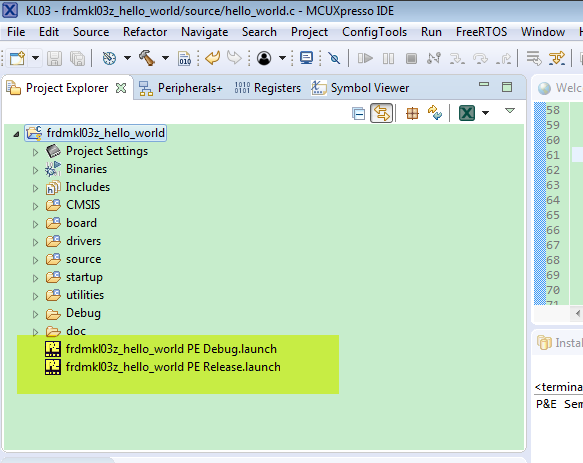
The following is my multlink universal download information
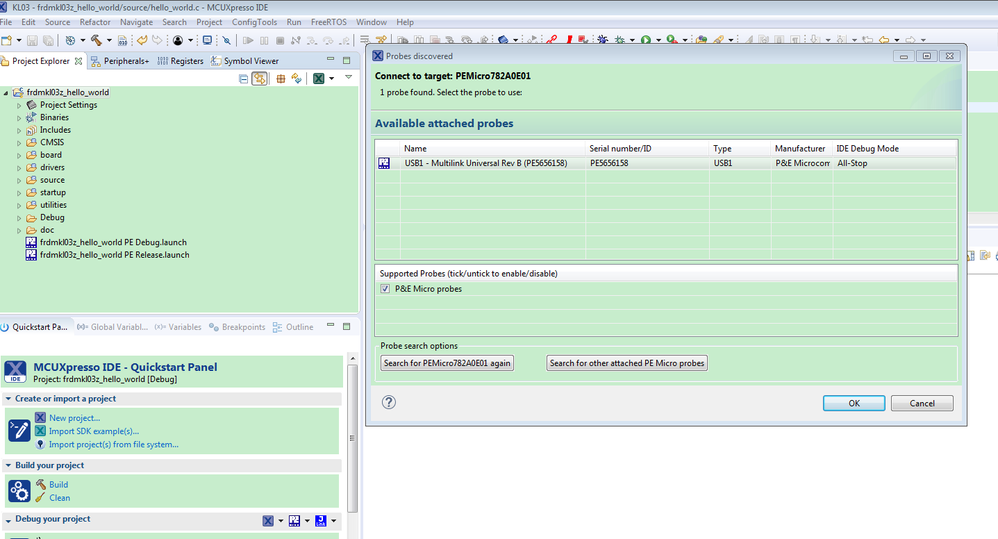
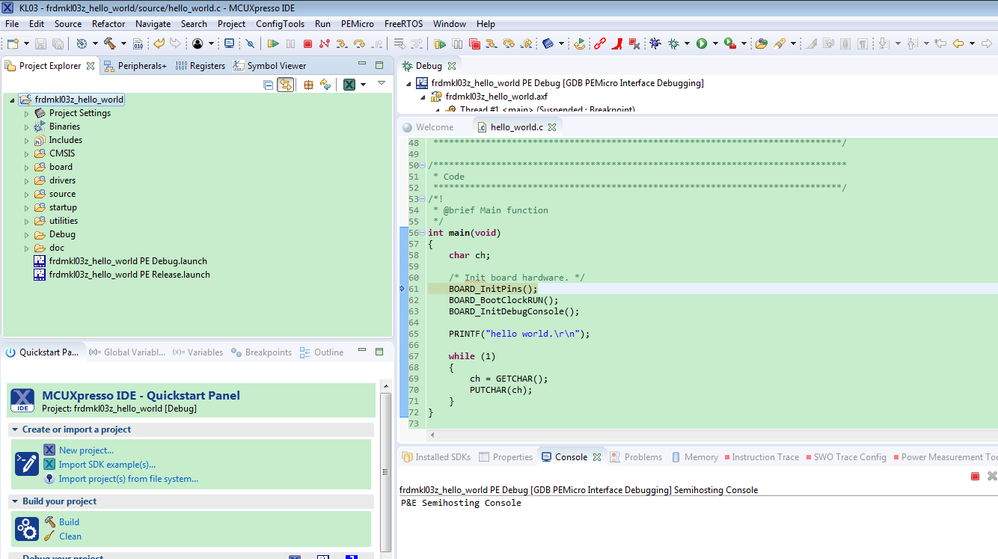
You must make sure your multilink SWD interface is connect correctly to the customer's KL03 board.
Wish it helps you.
Have a great day,
Kerry
-----------------------------------------------------------------------------------------------------------------------
Note: If this post answers your question, please click the Correct Answer button. Thank you!
-----------------------------------------------------------------------------------------------------------------------
