
- Forums
- Product Forums
- General Purpose MicrocontrollersGeneral Purpose Microcontrollers
- i.MX Forumsi.MX Forums
- QorIQ Processing PlatformsQorIQ Processing Platforms
- Identification and SecurityIdentification and Security
- Power ManagementPower Management
- Wireless ConnectivityWireless Connectivity
- RFID / NFCRFID / NFC
- Advanced AnalogAdvanced Analog
- Neural Processing UnitsNeural Processing Units
- MCX Microcontrollers
- S32G
- S32K
- S32V
- MPC5xxx
- Other NXP Products
- S12 / MagniV Microcontrollers
- Powertrain and Electrification Analog Drivers
- Sensors
- Vybrid Processors
- Digital Signal Controllers
- 8-bit Microcontrollers
- ColdFire/68K Microcontrollers and Processors
- PowerQUICC Processors
- OSBDM and TBDML
- S32M
- S32Z/E
-
- Solution Forums
- Software Forums
- MCUXpresso Software and ToolsMCUXpresso Software and Tools
- CodeWarriorCodeWarrior
- MQX Software SolutionsMQX Software Solutions
- Model-Based Design Toolbox (MBDT)Model-Based Design Toolbox (MBDT)
- FreeMASTER
- eIQ Machine Learning Software
- Embedded Software and Tools Clinic
- S32 SDK
- S32 Design Studio
- GUI Guider
- Zephyr Project
- Voice Technology
- Application Software Packs
- Secure Provisioning SDK (SPSDK)
- Processor Expert Software
- Generative AI & LLMs
-
- Topics
- Mobile Robotics - Drones and RoversMobile Robotics - Drones and Rovers
- NXP Training ContentNXP Training Content
- University ProgramsUniversity Programs
- Rapid IoT
- NXP Designs
- SafeAssure-Community
- OSS Security & Maintenance
- Using Our Community
-
- Cloud Lab Forums
-
- Knowledge Bases
- ARM Microcontrollers
- i.MX Processors
- Identification and Security
- Model-Based Design Toolbox (MBDT)
- QorIQ Processing Platforms
- S32 Automotive Processing Platform
- Wireless Connectivity
- CodeWarrior
- MCUXpresso Suite of Software and Tools
- MQX Software Solutions
- RFID / NFC
- Advanced Analog
- Neural Processing Units
-
- NXP Tech Blogs
- Home
- :
- 汎用マイクロコントローラ
- :
- Kinetisマイクロコントローラ
- :
- Re: Hello There, according to MKL26Z sub-family datasheet, maximum clock is limited to 48MHz but in the KDS/PE I was able to set MCG Out to 49.99999MHz!!! I was wondering if setup is not done correctly. Thanks,
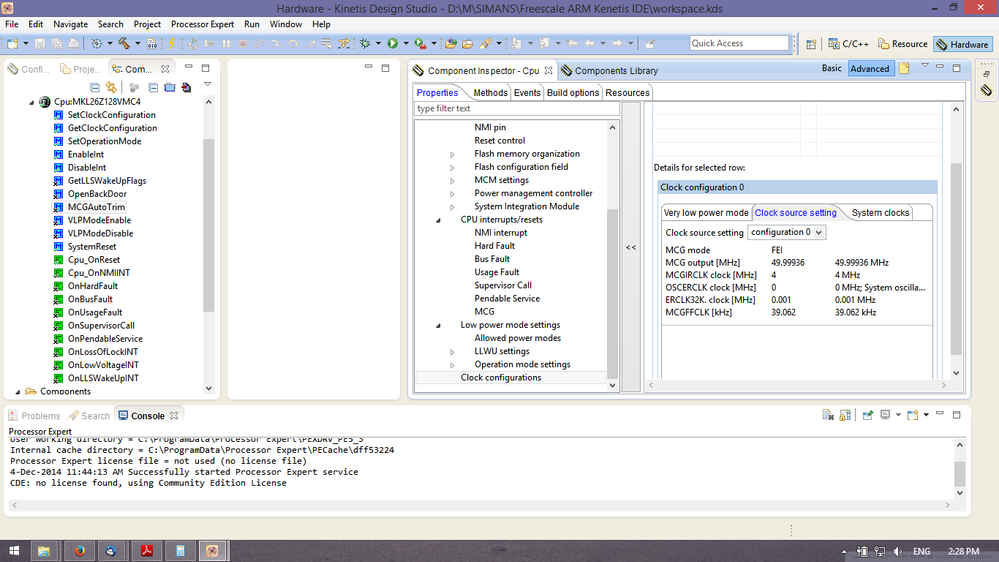
Hello There, according to MKL26Z sub-family datasheet, maximum clock is limited to 48MHz but in the KDS/PE I was able to set MCG Out to 49.99999MHz!!! I was wondering if setup is not done correctly. Thanks,
- RSS フィードを購読する
- トピックを新着としてマーク
- トピックを既読としてマーク
- このトピックを現在のユーザーにフロートします
- ブックマーク
- 購読
- ミュート
- 印刷用ページ

- 新着としてマーク
- ブックマーク
- 購読
- ミュート
- RSS フィードを購読する
- ハイライト
- 印刷
- 不適切なコンテンツを報告
Hello There, according to MKL26Z sub-family datasheet, maximum clock is limited to 48MHz but in the KDS/PE I was able to set MCG Out to 49.99999MHz!!! I was wondering if setup is not done correctly.
Thanks,
解決済! 解決策の投稿を見る。

 adriancano
- 新着としてマーク
- ブックマーク
- 購読
- ミュート
- RSS フィードを購読する
- ハイライト
- 印刷
- 不適切なコンテンツを報告
Hi,
The device is designed to operate up to 48 MHz, but the Processor Expert configurations just check if the values you are setting are possible. The reason why the 49.99936 MHz is possible is because the value for the MCGFFCLK [kHz] is 39.062 kHz. For FEI mode the MCGFFCLK is driven from the Slow internal reference clock that has a value of 32 KHz. There are two internal reference clock options like the Reference Manual mentions:
24.4.3 MCG Internal Reference Clocks
This module supports two internal reference clocks with nominal frequencies of 32 kHz
(slow IRC) and 4 MHz (fast IRC). The fast IRC frequency can be divided down by
programming of the FCRDIV to produce a frequency range of 32 kHz to 4 MHz.
The default value in the Processor Expert configurations for the Slow internal reference clock is 32.768 and this will allow a frequency of 47.97 for the MCG OUT.
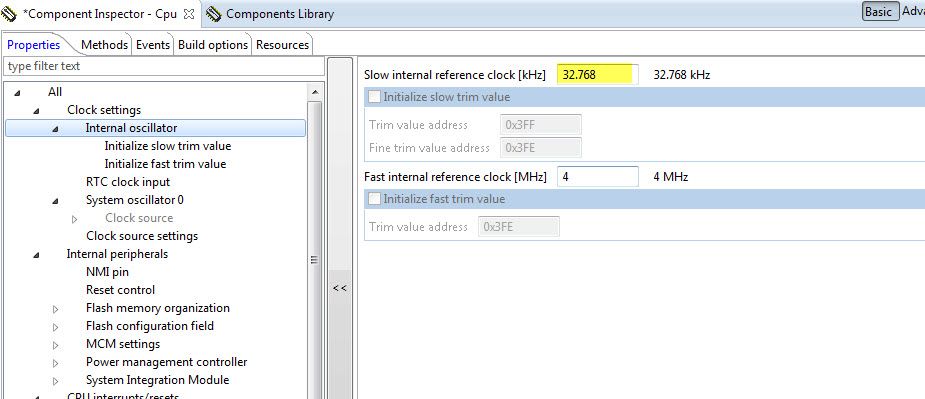
Please check your configurations to match the picture.
Hope this information can help you.
Best Regards,
Adrian Sanchez Cano
Technical Support Engineer
-----------------------------------------------------------------------------------------------------------------------
Note: If this post answers your question, please click the Correct Answer button. Thank you!
-----------------------------------------------------------------------------------------------------------------------
adriancano
- 新着としてマーク
- ブックマーク
- 購読
- ミュート
- RSS フィードを購読する
- ハイライト
- 印刷
- 不適切なコンテンツを報告
Hi,
The device is designed to operate up to 48 MHz, but the Processor Expert configurations just check if the values you are setting are possible. The reason why the 49.99936 MHz is possible is because the value for the MCGFFCLK [kHz] is 39.062 kHz. For FEI mode the MCGFFCLK is driven from the Slow internal reference clock that has a value of 32 KHz. There are two internal reference clock options like the Reference Manual mentions:
24.4.3 MCG Internal Reference Clocks
This module supports two internal reference clocks with nominal frequencies of 32 kHz
(slow IRC) and 4 MHz (fast IRC). The fast IRC frequency can be divided down by
programming of the FCRDIV to produce a frequency range of 32 kHz to 4 MHz.
The default value in the Processor Expert configurations for the Slow internal reference clock is 32.768 and this will allow a frequency of 47.97 for the MCG OUT.
Please check your configurations to match the picture.
Hope this information can help you.
Best Regards,
Adrian Sanchez Cano
Technical Support Engineer
-----------------------------------------------------------------------------------------------------------------------
Note: If this post answers your question, please click the Correct Answer button. Thank you!
-----------------------------------------------------------------------------------------------------------------------
- 新着としてマーク
- ブックマーク
- 購読
- ミュート
- RSS フィードを購読する
- ハイライト
- 印刷
- 不適切なコンテンツを報告
Hi Adrian and thanks for your reply. Actually I found what was the issue or at least this is what I think. On the datasheet it was mentioned that slow internal reference clock is 32KHz but I believe that must be 32.768KHz as also you mentioned. I entered that and it shows 47.97MHz which is correct.
Thanks again!
adriancano
- 新着としてマーク
- ブックマーク
- 購読
- ミュート
- RSS フィードを購読する
- ハイライト
- 印刷
- 不適切なコンテンツを報告
Hi,
Yes actually the default value for the Slow internal clock is 32.768KHz which is the real value of the internal clock, if you change that all the configurations will change.
Hope this information can help you.
Best Regards,
Adrian Sanchez Cano
Technical Support Engineer
-----------------------------------------------------------------------------------------------------------------------
:smileyinfo:Note: If this post answers your question, please click the Correct Answer button. Thank you!
-----------------------------------------------------------------------------------------------------------------------
- 新着としてマーク
- ブックマーク
- 購読
- ミュート
- RSS フィードを購読する
- ハイライト
- 印刷
- 不適切なコンテンツを報告
Thanks again Adrian and I was wondering if you could tell me what "Clock source setting" <configuration> means and where I can find info related to that. I am looking at datasheet and couldn't find any.
Regards,
Manuchehr
adriancano
- 新着としてマーク
- ブックマーク
- 購読
- ミュート
- RSS フィードを購読する
- ハイライト
- 印刷
- 不適切なコンテンツを報告
Hi,
For more information related the clock source for the KL26 device you can refer to the Reference Manual KL26P121M48SF4RM. The chapter 5 Clock Distribution has all the information about clocks and frequency modes.
Also, you can find a Processor Expert User's guide in the KDS installation folder following this path: <install_folder>\KDS_1.1.1\eclipse\ProcessorExpert\Help the PEXDRVSPEXUG.pdf file includes all the information to use the Processor Expert tool. Refer to the Clock Configuration Support (p. 66) there the Clock configurations in Processor Expert are explained.
Hope this information can help you.
Regards,
Adrian Sanchez Cano
Technical Support Engineer
- 新着としてマーク
- ブックマーク
- 購読
- ミュート
- RSS フィードを購読する
- ハイライト
- 印刷
- 不適切なコンテンツを報告
Thanks Adrian, didn't see configurations on the Reference Manual KL26P121M48SF4RM and right I am checking the KDS User Guide folder under the PE. No worries there by default configuration 0 was selected and all others (i.e 1, 2 ...,7) were marked Red. So I have to stay with configuration 0.
Regards,
Manuchehr
