
- Forums
- Product Forums
- General Purpose MicrocontrollersGeneral Purpose Microcontrollers
- i.MX Forumsi.MX Forums
- QorIQ Processing PlatformsQorIQ Processing Platforms
- Identification and SecurityIdentification and Security
- Power ManagementPower Management
- Wireless ConnectivityWireless Connectivity
- RFID / NFCRFID / NFC
- Advanced AnalogAdvanced Analog
- Neural Processing UnitsNeural Processing Units
- MCX Microcontrollers
- S32G
- S32K
- S32V
- MPC5xxx
- Other NXP Products
- S12 / MagniV Microcontrollers
- Powertrain and Electrification Analog Drivers
- Sensors
- Vybrid Processors
- Digital Signal Controllers
- 8-bit Microcontrollers
- ColdFire/68K Microcontrollers and Processors
- PowerQUICC Processors
- OSBDM and TBDML
- S32M
- S32Z/E
-
- Solution Forums
- Software Forums
- MCUXpresso Software and ToolsMCUXpresso Software and Tools
- CodeWarriorCodeWarrior
- MQX Software SolutionsMQX Software Solutions
- Model-Based Design Toolbox (MBDT)Model-Based Design Toolbox (MBDT)
- FreeMASTER
- eIQ Machine Learning Software
- Embedded Software and Tools Clinic
- S32 SDK
- S32 Design Studio
- GUI Guider
- Zephyr Project
- Voice Technology
- Application Software Packs
- Secure Provisioning SDK (SPSDK)
- Processor Expert Software
- Generative AI & LLMs
-
- Topics
- Mobile Robotics - Drones and RoversMobile Robotics - Drones and Rovers
- NXP Training ContentNXP Training Content
- University ProgramsUniversity Programs
- Rapid IoT
- NXP Designs
- SafeAssure-Community
- OSS Security & Maintenance
- Using Our Community
-
- Cloud Lab Forums
-
- Knowledge Bases
- ARM Microcontrollers
- i.MX Processors
- Identification and Security
- Model-Based Design Toolbox (MBDT)
- QorIQ Processing Platforms
- S32 Automotive Processing Platform
- Wireless Connectivity
- CodeWarrior
- MCUXpresso Suite of Software and Tools
- MQX Software Solutions
- RFID / NFC
- Advanced Analog
- Neural Processing Units
-
- NXP Tech Blogs
- Home
- :
- General Purpose Microcontrollers
- :
- Kinetis Microcontrollers
- :
- Re: Conditionally setup FTM Output Compare
Conditionally setup FTM Output Compare
- Subscribe to RSS Feed
- Mark Topic as New
- Mark Topic as Read
- Float this Topic for Current User
- Bookmark
- Subscribe
- Mute
- Printer Friendly Page
Conditionally setup FTM Output Compare

- Mark as New
- Bookmark
- Subscribe
- Mute
- Subscribe to RSS Feed
- Permalink
- Report Inappropriate Content
I am trying to use Output Compare to set (and clear) an FTM channel as a square-wave output, synchronized to a direct digital synthesis (DDS) waveform being generated by the same FTM module.
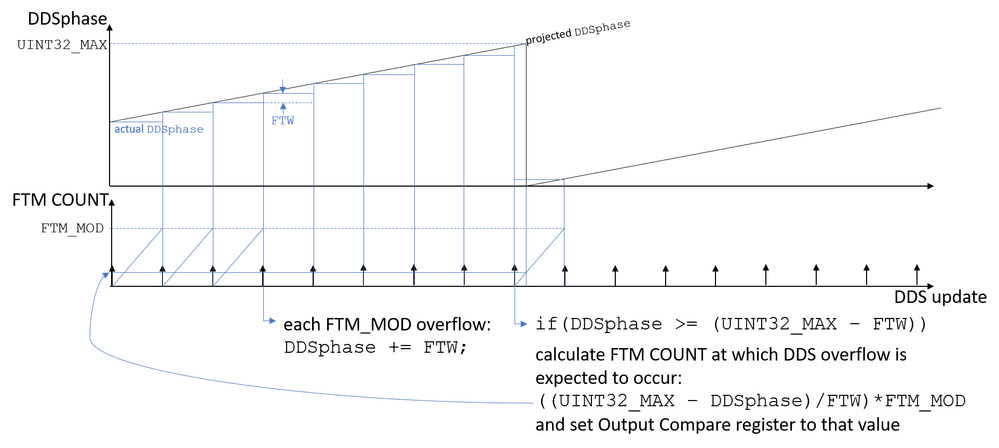
The FTM_MOD determines the update frequency of the 32-bit DDS phase accumulator. On each FTM overflow, the DDSphase accumulator is incremented by the frequency tuning word (FTW). When the phase accumulator is within a single FTW of overflowing, I calculate the FTM Count at which the projected DDS phase is expected to overflow, and set the Output Compare register to this value. (I am using the FTM_SetupOutputCompare() function from the fsl_ftm.c driver module to do so).
Strangely, when I observe the relative timing of the DDS update and the Output Compare "set", they are always separated by some fixed delay, and not by the value I have calculated. This fixed delay occurs regardless of the FTW (i.e. the DDS output frequency). The fixed delay also occurs if I manually set the Output Compare value to some fixed number less than FTM_MOD, instead of using the formula from the above figure. (For concreteness, the measured delay is almost one full FTM_MOD period).
Is there some reason that the Output Compare register would not be updated immediately?
- Mark as New
- Bookmark
- Subscribe
- Mute
- Subscribe to RSS Feed
- Permalink
- Report Inappropriate Content
Newbie here, sorry for stupid question, how did you able to show the GUI for FTM?
- Mark as New
- Bookmark
- Subscribe
- Mute
- Subscribe to RSS Feed
- Permalink
- Report Inappropriate Content
This is part of the MCUXpresso Config Tools application. You can either run that program directly, or from the MCUXpresso IDE click Window > Perspective > Open Perspective > Other > Peripherals. You should then see all the peripherals listed. If you double click on an FTM module in the Peripherals list, it will open the GUI configuration for that module.
- Mark as New
- Bookmark
- Subscribe
- Mute
- Subscribe to RSS Feed
- Permalink
- Report Inappropriate Content
Hello, I find that the Peripherals gui is not present and supported on KV46 as shown below.

Is it also stated in another website shown below.
https://mcuoneclipse.com/2019/06/16/new-nxp-mcuxpresso-ide-v11-0/#comment-157708
Can you confirm this limitations on KV4 and KV5?
Or there is something I am missing. If so, this needs to study "very deep" into the API for a new comer like me.

 Hui_Ma
- Mark as New
- Bookmark
- Subscribe
- Mute
- Subscribe to RSS Feed
- Permalink
- Report Inappropriate Content
Hi,
Please you provide the FTM register value for double check.
Do you using the K64 chip?
From the MCUXpresso Config tool, the Channel setting provides pin function selection, such as "Output compare":

Have a great day,
Mike
-----------------------------------------------------------------------------------------------------------------------
Note: If this post answers your question, please click the Correct Answer button. Thank you!
-----------------------------------------------------------------------------------------------------------------------
