
- Forums
- Product Forums
- General Purpose MicrocontrollersGeneral Purpose Microcontrollers
- i.MX Forumsi.MX Forums
- QorIQ Processing PlatformsQorIQ Processing Platforms
- Identification and SecurityIdentification and Security
- Power ManagementPower Management
- Wireless ConnectivityWireless Connectivity
- RFID / NFCRFID / NFC
- Advanced AnalogAdvanced Analog
- Neural Processing UnitsNeural Processing Units
- MCX Microcontrollers
- S32G
- S32K
- S32V
- MPC5xxx
- Other NXP Products
- S12 / MagniV Microcontrollers
- Powertrain and Electrification Analog Drivers
- Sensors
- Vybrid Processors
- Digital Signal Controllers
- 8-bit Microcontrollers
- ColdFire/68K Microcontrollers and Processors
- PowerQUICC Processors
- OSBDM and TBDML
- S32M
- S32Z/E
-
- Solution Forums
- Software Forums
- MCUXpresso Software and ToolsMCUXpresso Software and Tools
- CodeWarriorCodeWarrior
- MQX Software SolutionsMQX Software Solutions
- Model-Based Design Toolbox (MBDT)Model-Based Design Toolbox (MBDT)
- FreeMASTER
- eIQ Machine Learning Software
- Embedded Software and Tools Clinic
- S32 SDK
- S32 Design Studio
- GUI Guider
- Zephyr Project
- Voice Technology
- Application Software Packs
- Secure Provisioning SDK (SPSDK)
- Processor Expert Software
- Generative AI & LLMs
-
- Topics
- Mobile Robotics - Drones and RoversMobile Robotics - Drones and Rovers
- NXP Training ContentNXP Training Content
- University ProgramsUniversity Programs
- Rapid IoT
- NXP Designs
- SafeAssure-Community
- OSS Security & Maintenance
- Using Our Community
-
- Cloud Lab Forums
-
- Knowledge Bases
- ARM Microcontrollers
- i.MX Processors
- Identification and Security
- Model-Based Design Toolbox (MBDT)
- QorIQ Processing Platforms
- S32 Automotive Processing Platform
- Wireless Connectivity
- CodeWarrior
- MCUXpresso Suite of Software and Tools
- MQX Software Solutions
- RFID / NFC
- Advanced Analog
- Neural Processing Units
-
- NXP Tech Blogs
- Home
- :
- MCUXpressoソフトウェアとツール
- :
- Kinetisデザインスタジオ
- :
- Segger SystemView FRDM-K64F
Segger SystemView FRDM-K64F
- RSS フィードを購読する
- トピックを新着としてマーク
- トピックを既読としてマーク
- このトピックを現在のユーザーにフロートします
- ブックマーク
- 購読
- ミュート
- 印刷用ページ
Segger SystemView FRDM-K64F

- 新着としてマーク
- ブックマーク
- 購読
- ミュート
- RSS フィードを購読する
- ハイライト
- 印刷
- 不適切なコンテンツを報告
Hi all,
Just received my FRDM-K64F and i am trying to get the the Segger SystemView working. The OpenSDA is installed and the debug works fine. I followed this guide:
Segger SystemView: Realtime Analysis and Visualization for FreeRTOS | MCU on Eclipse
But it wont connect. I am trying to run in debug mode. Is that wrong? Any ideas? Thanks !
- 新着としてマーク
- ブックマーク
- 購読
- ミュート
- RSS フィードを購読する
- ハイライト
- 印刷
- 不適切なコンテンツを報告
Hi Erich,
I guess i should have start with "i'm on a mac" lol. I was able to get it working in Windows, however i'm still having trouble on my Mac. I see this in the console, which leads to believe i have the openSDA set up correctly. Whenever i run the SystemView and select the Target to start recording, i select USB, my target device, SWD and Auto detect. But i receive a "Could not connect".
SEGGER J-Link GDB Server V5.10n Command Line Version
JLinkARM.dll V5.10n (DLL compiled Feb 19 2016 18:41:43)
-----GDB Server start settings-----
GDBInit file: none
GDB Server Listening port: 2331
SWO raw output listening port: 2332
Terminal I/O port: 2333
Accept remote connection: localhost only
Generate logfile: off
Verify download: on
Init regs on start: on
Silent mode: off
Single run mode: on
Target connection timeout: 0 ms
------J-Link related settings------
J-Link Host interface: USB
J-Link script: none
J-Link settings file: none
------Target related settings------
Target device: MK64FN1M0xxx12
Target interface: SWD
Target interface speed: 1000kHz
Target endian: little
Connecting to J-Link...
J-Link is connected.
Firmware: J-Link OpenSDA 2 compiled Feb 14 2017 15:54:11
Hardware: V1.00
S/N: 621000000
Checking target voltage...
Target voltage: 3.30 V
Listening on TCP/IP port 2331
Connecting to target...Connected to target
Waiting for GDB connection...Connected to 127.0.0.1
Reading all registers
Read 4 bytes @ address 0x00000000 (Data = 0x20030000)
Target interface speed set to 30 kHz
Resetting target
Halting target CPU...
...Target halted (PC = 0x00000D90)

 BlackNight
- 新着としてマーク
- ブックマーク
- 購読
- ミュート
- RSS フィードを購読する
- ハイライト
- 印刷
- 不適切なコンテンツを報告
Hi Walter,
Just to make sure:
a) you need a Segger J-Link or the J-Link firmware on the openSDA of the FRDM board
b) make sure you are using the same J-Link version both in KDS and the one used by Segger (mismatch of DLLs can have strange side effects). If you install the Segger software, it does ask you to update the version in KDS (use KDS v3.2.0)
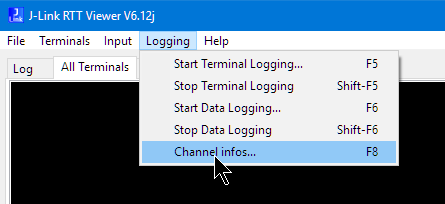
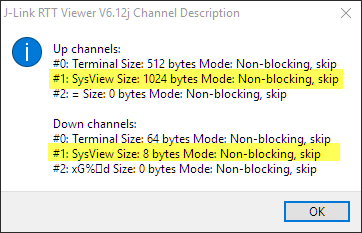
c) Check if the RTT is properly initialized. You can do with the SEGGER RTT Viewer channel infos menu:
Here you have to see the SysView channels:
I have an example project for the FRDM-K64F on GitHub (mcuoneclipse/Examples/KDS/FRDM-K64F120M/FRDM-K64F_Demo at master · ErichStyger/mcuoneclipse · GitHub ) which uses the Segger RTT with SystemView. I have attached the project to this reply as well, so you can try that project.
I hope this helps,
Erich
