
- Forums
- Product Forums
- General Purpose MicrocontrollersGeneral Purpose Microcontrollers
- i.MX Forumsi.MX Forums
- QorIQ Processing PlatformsQorIQ Processing Platforms
- Identification and SecurityIdentification and Security
- Power ManagementPower Management
- Wireless ConnectivityWireless Connectivity
- RFID / NFCRFID / NFC
- Advanced AnalogAdvanced Analog
- Neural Processing UnitsNeural Processing Units
- MCX Microcontrollers
- S32G
- S32K
- S32V
- MPC5xxx
- Other NXP Products
- S12 / MagniV Microcontrollers
- Powertrain and Electrification Analog Drivers
- Sensors
- Vybrid Processors
- Digital Signal Controllers
- 8-bit Microcontrollers
- ColdFire/68K Microcontrollers and Processors
- PowerQUICC Processors
- OSBDM and TBDML
- S32M
- S32Z/E
-
- Solution Forums
- Software Forums
- MCUXpresso Software and ToolsMCUXpresso Software and Tools
- CodeWarriorCodeWarrior
- MQX Software SolutionsMQX Software Solutions
- Model-Based Design Toolbox (MBDT)Model-Based Design Toolbox (MBDT)
- FreeMASTER
- eIQ Machine Learning Software
- Embedded Software and Tools Clinic
- S32 SDK
- S32 Design Studio
- GUI Guider
- Zephyr Project
- Voice Technology
- Application Software Packs
- Secure Provisioning SDK (SPSDK)
- Processor Expert Software
- Generative AI & LLMs
-
- Topics
- Mobile Robotics - Drones and RoversMobile Robotics - Drones and Rovers
- NXP Training ContentNXP Training Content
- University ProgramsUniversity Programs
- Rapid IoT
- NXP Designs
- SafeAssure-Community
- OSS Security & Maintenance
- Using Our Community
-
- Cloud Lab Forums
-
- Knowledge Bases
- ARM Microcontrollers
- i.MX Processors
- Identification and Security
- Model-Based Design Toolbox (MBDT)
- QorIQ Processing Platforms
- S32 Automotive Processing Platform
- Wireless Connectivity
- CodeWarrior
- MCUXpresso Suite of Software and Tools
- MQX Software Solutions
- RFID / NFC
- Advanced Analog
- Neural Processing Units
-
- NXP Tech Blogs
- Home
- :
- MCUXpresso软件和工具
- :
- Kinetis Design Studio
- :
- Kinetis Design Studio Update 3.1.0 failed
Kinetis Design Studio Update 3.1.0 failed
Kinetis Design Studio Update 3.1.0 failed

I tried to update the KDS 3.0.0 as described in the NXP Newsletter without success.
The downloaded file is:


Extracted locally and choosen by local:
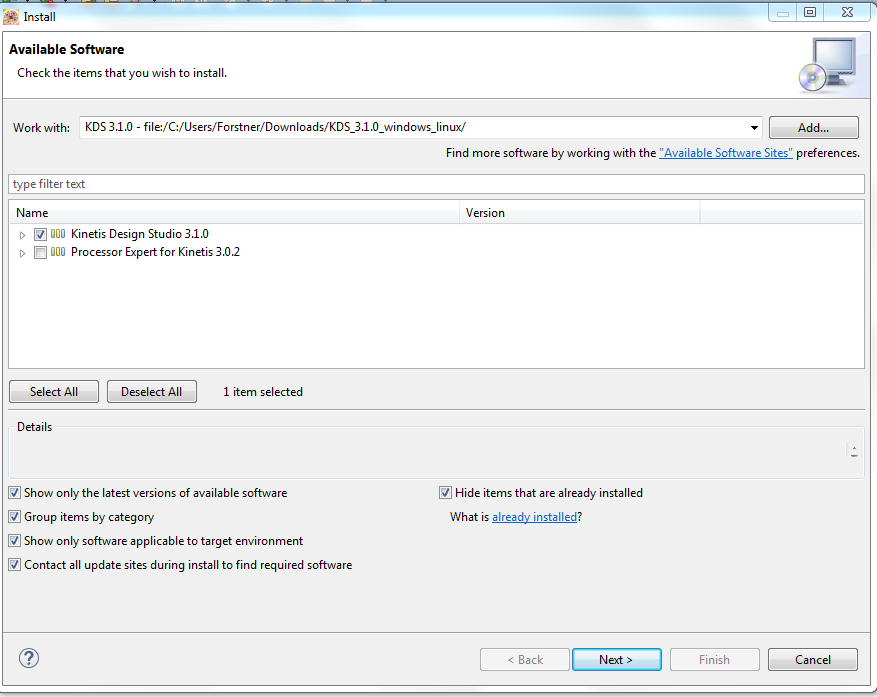
And the result is always:
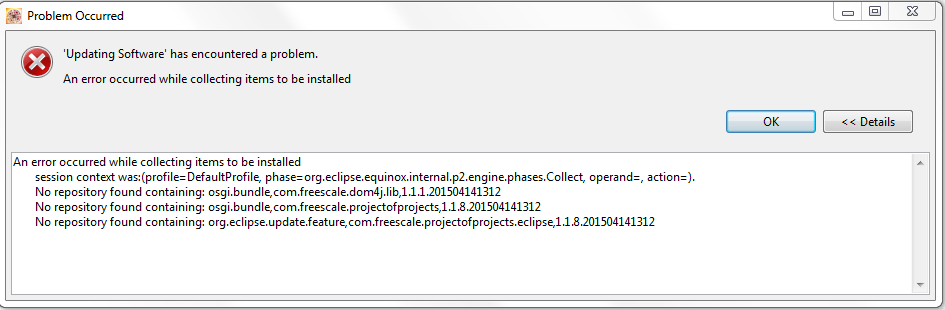
Did anyone know the reason?
I already re-installed the KDS 3.0.0 without any change
Thanks in advance.

 MarekTrmac
You can find installation instructions release notes included in the ZIP file you downloaded. It is recommended to use "Check for updates" instead of "Install new software". Installation instructions contains step-by-step process:
1. Run KDS 3.0.0
2. Select Window > Preferences
3. Select Install/Update > Available Software Sites
4. Add a new install site using the Add... button
5. Type name of the install site into the Name field (e.g. KDS 3.1.0).
6. Click on the Archive... button and find the KDS_3.1.0.zip.
7. Confirm site addition by clicking on OK button.
8. Close Preferences windows by clicking on OK button.
9. Select Help > Check for Updates
10. Continue with the wizard. Accept the license agreement during the installation process.
11. Restart KDS.
