
- Forums
- Product Forums
- General Purpose MicrocontrollersGeneral Purpose Microcontrollers
- i.MX Forumsi.MX Forums
- QorIQ Processing PlatformsQorIQ Processing Platforms
- Identification and SecurityIdentification and Security
- Power ManagementPower Management
- Wireless ConnectivityWireless Connectivity
- RFID / NFCRFID / NFC
- Advanced AnalogAdvanced Analog
- Neural Processing UnitsNeural Processing Units
- MCX Microcontrollers
- S32G
- S32K
- S32V
- MPC5xxx
- Other NXP Products
- S12 / MagniV Microcontrollers
- Powertrain and Electrification Analog Drivers
- Sensors
- Vybrid Processors
- Digital Signal Controllers
- 8-bit Microcontrollers
- ColdFire/68K Microcontrollers and Processors
- PowerQUICC Processors
- OSBDM and TBDML
- S32M
- S32Z/E
-
- Solution Forums
- Software Forums
- MCUXpresso Software and ToolsMCUXpresso Software and Tools
- CodeWarriorCodeWarrior
- MQX Software SolutionsMQX Software Solutions
- Model-Based Design Toolbox (MBDT)Model-Based Design Toolbox (MBDT)
- FreeMASTER
- eIQ Machine Learning Software
- Embedded Software and Tools Clinic
- S32 SDK
- S32 Design Studio
- GUI Guider
- Zephyr Project
- Voice Technology
- Application Software Packs
- Secure Provisioning SDK (SPSDK)
- Processor Expert Software
- Generative AI & LLMs
-
- Topics
- Mobile Robotics - Drones and RoversMobile Robotics - Drones and Rovers
- NXP Training ContentNXP Training Content
- University ProgramsUniversity Programs
- Rapid IoT
- NXP Designs
- SafeAssure-Community
- OSS Security & Maintenance
- Using Our Community
-
- Cloud Lab Forums
-
- Knowledge Bases
- ARM Microcontrollers
- i.MX Processors
- Identification and Security
- Model-Based Design Toolbox (MBDT)
- QorIQ Processing Platforms
- S32 Automotive Processing Platform
- Wireless Connectivity
- CodeWarrior
- MCUXpresso Suite of Software and Tools
- MQX Software Solutions
- RFID / NFC
- Advanced Analog
- Neural Processing Units
-
- NXP Tech Blogs
- Home
- :
- Software Forums
- :
- FreeMASTER
- :
- No communication between board and pc
No communication between board and pc
- Subscribe to RSS Feed
- Mark Topic as New
- Mark Topic as Read
- Float this Topic for Current User
- Bookmark
- Subscribe
- Mute
- Printer Friendly Page

- Mark as New
- Bookmark
- Subscribe
- Mute
- Subscribe to RSS Feed
- Permalink
- Report Inappropriate Content
I am using an frdm-k22f board, but even if the device is connected and visible to the pc it does not work with freeMaster.
I have followed the instructions on the website for getting started with freeMaster but I did not manage to make it work.
Is there something not reported there that I should do the enable communications in the freeMaster aplication? Some other suggestions?
thank you in advance.
Solved! Go to Solution.

 MichalH
- Mark as New
- Bookmark
- Subscribe
- Mute
- Subscribe to RSS Feed
- Permalink
- Report Inappropriate Content
Dear Federico,
there are some FreeMASTER demo applications included in the ISSDK middleware of the MCUXpresso SDK. I was not able to find a demo for FXLS8974CF, but I have found this support thread which seems to address this issue: https://community.nxp.com/t5/Sensors/Can-not-found-a-working-ISSDK-for-FXLS8974CF/m-p/1357935#M6721
Please start a new support thread in the Sensors forum if not successful. You can mark this one as resolved.
Thanks,
Michal
MichalH
- Mark as New
- Bookmark
- Subscribe
- Mute
- Subscribe to RSS Feed
- Permalink
- Report Inappropriate Content
Dear Federico,
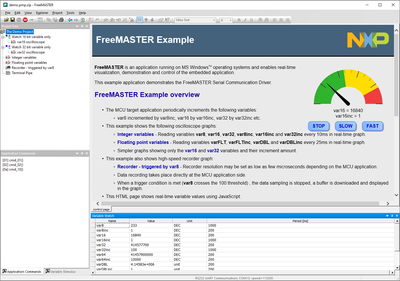
just to make sure your board and connection is okay, you can follow these steps to make it working:
- Visit https://mcuxpresso.nxp.com/ and get the SDK package version 2.10 built for FRDM-K22F.
- Don't forget to include the FreeMASTER middleware in the package and also select your favourite toolchain.
- Download and unzip the SDK package. In case of MCUXpresso IDE, import the SDK package to the IDE.
- Import the boards/frdmk22f/freemaster_examples/fmstr_uart demo project into your IDE.
- Build and run on board.
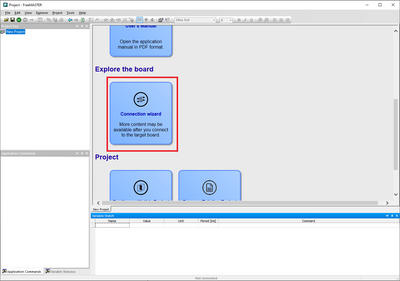
- Connect with FreeMASTER and run the "Connection Wizard" available at the welcome page.
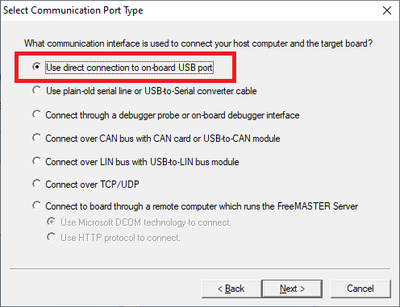
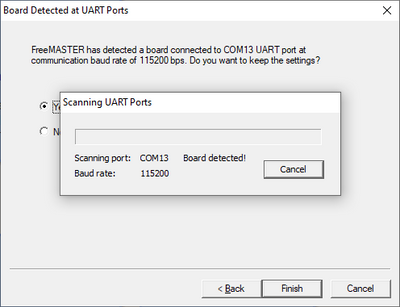
- Select serial communication and scan the COM ports of your PC. The board should be detected.
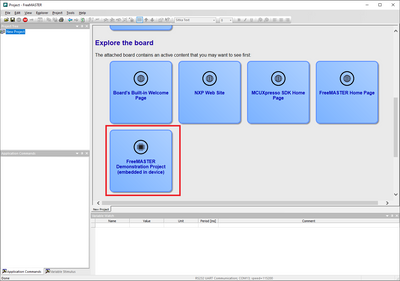
- Open the "FreeMASTER Demonstration Project".
The screenshots should give you some guidance. If you have any more specific issue, please describe your setup.

- Mark as New
- Bookmark
- Subscribe
- Mute
- Subscribe to RSS Feed
- Permalink
- Report Inappropriate Content
Thank you.
I managed to make it work and now everything seems correct.
My next step would be using the nfrdm-k22f to evaluate the FXLS8974CF accelerometer model.
Is there a suggested demo on freeMaster?
Federico Pantanella
MichalH
- Mark as New
- Bookmark
- Subscribe
- Mute
- Subscribe to RSS Feed
- Permalink
- Report Inappropriate Content
Dear Federico,
there are some FreeMASTER demo applications included in the ISSDK middleware of the MCUXpresso SDK. I was not able to find a demo for FXLS8974CF, but I have found this support thread which seems to address this issue: https://community.nxp.com/t5/Sensors/Can-not-found-a-working-ISSDK-for-FXLS8974CF/m-p/1357935#M6721
Please start a new support thread in the Sensors forum if not successful. You can mark this one as resolved.
Thanks,
Michal
