
- Forums
- Product Forums
- General Purpose MicrocontrollersGeneral Purpose Microcontrollers
- i.MX Forumsi.MX Forums
- QorIQ Processing PlatformsQorIQ Processing Platforms
- Identification and SecurityIdentification and Security
- Power ManagementPower Management
- Wireless ConnectivityWireless Connectivity
- RFID / NFCRFID / NFC
- Advanced AnalogAdvanced Analog
- Neural Processing UnitsNeural Processing Units
- MCX Microcontrollers
- S32G
- S32K
- S32V
- MPC5xxx
- Other NXP Products
- S12 / MagniV Microcontrollers
- Powertrain and Electrification Analog Drivers
- Sensors
- Vybrid Processors
- Digital Signal Controllers
- 8-bit Microcontrollers
- ColdFire/68K Microcontrollers and Processors
- PowerQUICC Processors
- OSBDM and TBDML
- S32M
- S32Z/E
-
- Solution Forums
- Software Forums
- MCUXpresso Software and ToolsMCUXpresso Software and Tools
- CodeWarriorCodeWarrior
- MQX Software SolutionsMQX Software Solutions
- Model-Based Design Toolbox (MBDT)Model-Based Design Toolbox (MBDT)
- FreeMASTER
- eIQ Machine Learning Software
- Embedded Software and Tools Clinic
- S32 SDK
- S32 Design Studio
- GUI Guider
- Zephyr Project
- Voice Technology
- Application Software Packs
- Secure Provisioning SDK (SPSDK)
- Processor Expert Software
- Generative AI & LLMs
-
- Topics
- Mobile Robotics - Drones and RoversMobile Robotics - Drones and Rovers
- NXP Training ContentNXP Training Content
- University ProgramsUniversity Programs
- Rapid IoT
- NXP Designs
- SafeAssure-Community
- OSS Security & Maintenance
- Using Our Community
-
- Cloud Lab Forums
-
- Knowledge Bases
- ARM Microcontrollers
- i.MX Processors
- Identification and Security
- Model-Based Design Toolbox (MBDT)
- QorIQ Processing Platforms
- S32 Automotive Processing Platform
- Wireless Connectivity
- CodeWarrior
- MCUXpresso Suite of Software and Tools
- MQX Software Solutions
- RFID / NFC
- Advanced Analog
- Neural Processing Units
-
- NXP Tech Blogs
- Home
- :
- Software Forums
- :
- FreeMASTER
- :
- Multiple instances using ActiveX in VB
Multiple instances using ActiveX in VB
- Subscribe to RSS Feed
- Mark Topic as New
- Mark Topic as Read
- Float this Topic for Current User
- Bookmark
- Subscribe
- Mute
- Printer Friendly Page

- Mark as New
- Bookmark
- Subscribe
- Mute
- Subscribe to RSS Feed
- Permalink
- Report Inappropriate Content
I have two Freedom boards attached to my computer each using Segger/JLink Comm Plugin (with different serial numbers). I have a Freemaster project for each of these boards (ProjectFile1, ProjectFile2), and I can run both projects at the same time and communicate with board boards with no issues.
I also have a working VB program that uses the FreeMASTER ActiveX library (3.1.1.6) to open one of these projects and communicate with one of the boards:
pcm1 = New McbPcmLib.McbPcm
pcm1.OpenProject(ProjectFile1)
and this works perfectly.
However, if I add another instance:
pcm2 = New McbPcmLib.McbPcm
pcm2.OpenProject(projfile2)
it replaces the first instance of Freemaster with the second one.
Is there a way to start the second instance from the VB program without loosing the first one?
Solved! Go to Solution.

 MichalH
- Mark as New
- Bookmark
- Subscribe
- Mute
- Subscribe to RSS Feed
- Permalink
- Report Inappropriate Content
Dear Barry,
thank you for your effort when testing this case in your Visual Basic application. Let me summarize the features of the MCB.MULT object and what is working and what is not working in FreeMASTER 3.1.2:
- Both FreeMASTER and the MULT object need to registered as COM reference in VB project before use.
- McbPcmLib can be located as “FreeMASTER ActiveX Type Library”.
- McbMultLib must be located in mmaster.dll file in FreeMASTER installation.
- The VB project must be compiled for x86 platform.
- The MULT object is created as “new McbMultLib.McbMult” object.
- The GetAppObject() works well to fetch the named running instances of FreeMASTER.
- When the required instance is not running, it can be automatically launched by using 2nd parameter value of the GetAppObject().
- Launching the new instance may sometimes be slower than expected and the GetAppObject() returns a null value prematurely. An extra timeout loop may be needed as provided in the example VB code below.
- Working with FreeMASTER object returned by GetAppObject() is then without any issues. Refer to FreeMASTER User Guide for a complete reference of the ActiveX interface.
The same experiment with Visual Basic for Applications (VBA) in Excel shows that the MCB.MULT access to system’s Running Object Table is limited in this framework. VBA apparently cannot fetch the objects registered under so-called “objref monikers”. This is the reason the VB code below will NOT work in VBA with FreeMASTER 3.1.2.
Changes to be included in FreeMASTER 3.1.3:
- Support for 64bit applications will be added by new mmaster64.dll and by new 64bit proxy-stub libraries wrapping the FreeMASTER object. The FreeMASTER will remain to be 32bit application.
- VBA language will be supported in Excel and other similar environments. The FreeMASTER instances will also use another method to register themselves in system’s ROT which will be compatible with VBA. The MULT object will be updated to try both ways to fetch the object.
Below, you can see a screenshot of a simple VB project edited in Visual Studio 2019. Pay special attention to highlighted parts. The full code snippet is also copied below.
Thank you again for your cooperation,
Michal
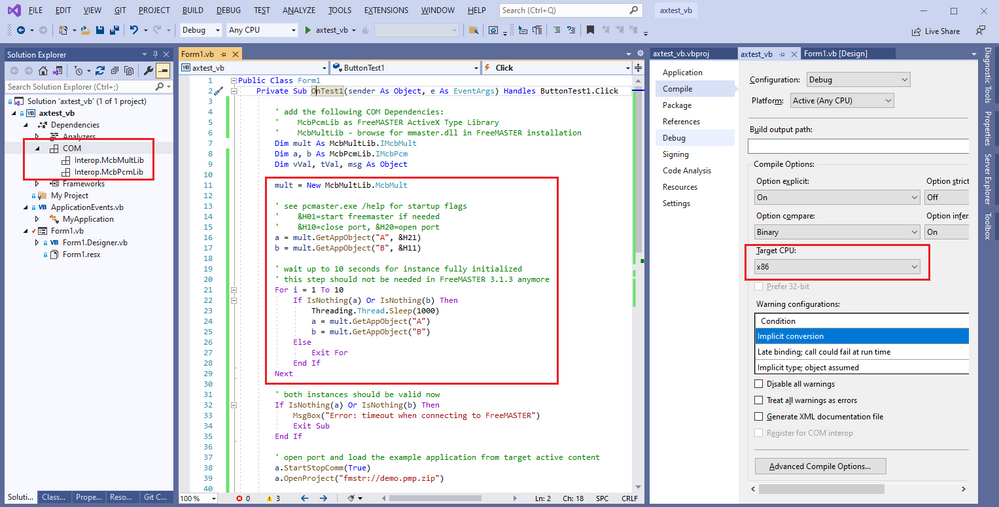
    Private Sub OnTest1(sender As Object, e As EventArgs) Handles ButtonTest1.Click

        ' add the following COM Dependencies:
        '    McbPcmLib as FreeMASTER ActiveX Type Library
        '    McbMultLib - browse for mmaster.dll in FreeMASTER installation
        Dim mult As McbMultLib.IMcbMult
        Dim a, b As McbPcmLib.IMcbPcm
        Dim vVal, tVal, msg As Object

        mult = New McbMultLib.McbMult

        ' see pcmaster.exe /help for startup flags
        '    &H01=start freemaster if needed
        '    &H10=close port, &H20=open port
        a = mult.GetAppObject("A", &H21)
        b = mult.GetAppObject("B", &H11)

        ' wait up to 10 seconds for instance fully initialized
        ' this step should not be needed in FreeMASTER 3.1.3 anymore
        For i = 1 To 10
            If IsNothing(a) Or IsNothing(b) Then
                Threading.Thread.Sleep(1000)
                a = mult.GetAppObject("A")
                b = mult.GetAppObject("B")
            Else
                Exit For
            End If
        Next

        ' both instances should be valid now
        If IsNothing(a) Or IsNothing(b) Then
            MsgBox("Error: timeout when connecting to FreeMASTER")
            Exit Sub
        End If

        ' open port and load example project (assuming fmstr_uart default demo app)
        a.StartStopComm(True)
        a.OpenProject("fmstr://demo.pmp.zip")

        ' read variable from the running instance
        If a.ReadVariable("var16", vVal, tVal, msg) <> 0 Then
            MsgBox("From instance a " + tVal)
        Else
            MsgBox(msg)
        End If

        ' exit both instances
        a.Exit()
        b.Exit()

    End Sub
MichalH
- Mark as New
- Bookmark
- Subscribe
- Mute
- Subscribe to RSS Feed
- Permalink
- Report Inappropriate Content
Hello,
yes, the COM+/ActiveX object creation always looks up the first running instance so there is no direct way how to specify that you want a different one. Actually, there are two solutions.
The first and a recommended one is to use JSON-RPC interface instead of ActiveX (refer to user documentation and online webinars for more information). When you start the FreeMASTER process (pcmaster.exe), you can specify a TCP/WebSocket port it will listen on using /rpcs PORT command-line option. The default port is 41000. You would assign a different port to your 2nd instance and your two JSON-RPC clients would then connect to each server individually.
The 2nd solution enables to stay with an ActiveX technology so it is more suitable for VB and VBA, but using it is quite tricky. This is also a reason why it remains as an experimental feature and is only partly documented - see User Guide section 6.9. Also, the official release currently only supports 32bit clients (like Internet Explorer). We have the 64bit support ready internally, I can share it with you if needed. But let me give you the whole story first:
- The FreeMASTER (pcmaster.exe) can be started with a /sharex NAME option. This registers an object reference (objref) moniker of the FreeMASTER object’s class factory into Windows Running Object Table. This way, you can start multiple instances and assign them a different names.
- Then, you can use a McbMult COM+ object (clsid:A8E26DF5-85A1-4552-AD0E-6C8AA10641EA) which is implemented in mmaster.dll and is available in the FreeMASTER installation folder. This object has a GetAppObject() method which is able to look-up the named running FreeMASTER instance and create a new ActiveX object from it. This object then behaves as a normal McbPcm object.
- This can be tested in Internet Explorer using this HTML code:
<OBJECT id="mult" name="mult" height="1" width="1"
classid="clsid:A8E26DF5-85A1-4552-AD0E-6C8AA10641EA">
</OBJECT>
<script>
pcmA = mult.GetAppObject(“A”);
pcmB = mult.GetAppObject(“B”);
</script>
- Note that there are some additional parameters in GetAppObject which can start the named FreeMASTER instance (if not yet running) and also load an initial project file.
Issues and limitations:
- The mmaster.dll is a 32bit object which can be instantiated from Internet Explorer and other 32bit applications. 64bit version is available internally but it never made it into the release.
- From some still unknown reason, the objref moniker references do not resolve properly from Excel VBA. The objref monikers are actually not visible in Windows Running Object Table when accessed from VBA. I’m just guessing this is one of the undocumented MS Office security features.
- I have not tested it from a standard VB framework, it is possible it would work normally there. I did test it from a C/C++ native environment and it works properly. So it indeed seems that it is some extra secure protection of VBA.
- If it would work
, the following is a theoretical simple VBA code which could be used to access two instances A and B:
Sub mmult_test()
    Dim a As McbPcm
    Dim b As McbPcm
    Dim mult As McbMult

    Set mult = New McbMult
    Set a = mult.GetAppObject("A")
    Set b = mult.GetAppObject("B")

    If a.ReadVariable("var16", v1, t1, m1) Then
        MsgBox ("Variable from instance A " + t1)
    Else
        MsgBox ("Error reading from instance A: " + m1)
    End If

    If b.ReadVariable("var16", v2, t2, m2) Then
        MsgBox ("Variable from instance B " + t2)
    Else
        MsgBox ("Error reading from instance B: " + m2)
    End If
End Sub
- As part of a quick exercise, I have done a workaround for the VBA issue which enables this scenario by using an extra item moniker registered by FreeMASTER for the same object in addition to the problematic objref moniker. I have verified that Excel VBA is able to resolve this new moniker type and gets access to the object – so the script above works as expected.
- I’m okay to cooperate with you and get the solutions tested in your VB environment. If you are interested, reach out to me directly at [email protected]. Otherwise, we will make some of the internal work available in the upcoming version 3.1.3.
Regards,
Michal
MichalH
- Mark as New
- Bookmark
- Subscribe
- Mute
- Subscribe to RSS Feed
- Permalink
- Report Inappropriate Content
Dear Barry,
thank you for your effort when testing this case in your Visual Basic application. Let me summarize the features of the MCB.MULT object and what is working and what is not working in FreeMASTER 3.1.2:
- Both FreeMASTER and the MULT object need to registered as COM reference in VB project before use.
- McbPcmLib can be located as “FreeMASTER ActiveX Type Library”.
- McbMultLib must be located in mmaster.dll file in FreeMASTER installation.
- The VB project must be compiled for x86 platform.
- The MULT object is created as “new McbMultLib.McbMult” object.
- The GetAppObject() works well to fetch the named running instances of FreeMASTER.
- When the required instance is not running, it can be automatically launched by using 2nd parameter value of the GetAppObject().
- Launching the new instance may sometimes be slower than expected and the GetAppObject() returns a null value prematurely. An extra timeout loop may be needed as provided in the example VB code below.
- Working with FreeMASTER object returned by GetAppObject() is then without any issues. Refer to FreeMASTER User Guide for a complete reference of the ActiveX interface.
The same experiment with Visual Basic for Applications (VBA) in Excel shows that the MCB.MULT access to system’s Running Object Table is limited in this framework. VBA apparently cannot fetch the objects registered under so-called “objref monikers”. This is the reason the VB code below will NOT work in VBA with FreeMASTER 3.1.2.
Changes to be included in FreeMASTER 3.1.3:
- Support for 64bit applications will be added by new mmaster64.dll and by new 64bit proxy-stub libraries wrapping the FreeMASTER object. The FreeMASTER will remain to be 32bit application.
- VBA language will be supported in Excel and other similar environments. The FreeMASTER instances will also use another method to register themselves in system’s ROT which will be compatible with VBA. The MULT object will be updated to try both ways to fetch the object.
Below, you can see a screenshot of a simple VB project edited in Visual Studio 2019. Pay special attention to highlighted parts. The full code snippet is also copied below.
Thank you again for your cooperation,
Michal
    Private Sub OnTest1(sender As Object, e As EventArgs) Handles ButtonTest1.Click

        ' add the following COM Dependencies:
        '    McbPcmLib as FreeMASTER ActiveX Type Library
        '    McbMultLib - browse for mmaster.dll in FreeMASTER installation
        Dim mult As McbMultLib.IMcbMult
        Dim a, b As McbPcmLib.IMcbPcm
        Dim vVal, tVal, msg As Object

        mult = New McbMultLib.McbMult

        ' see pcmaster.exe /help for startup flags
        '    &H01=start freemaster if needed
        '    &H10=close port, &H20=open port
        a = mult.GetAppObject("A", &H21)
        b = mult.GetAppObject("B", &H11)

        ' wait up to 10 seconds for instance fully initialized
        ' this step should not be needed in FreeMASTER 3.1.3 anymore
        For i = 1 To 10
            If IsNothing(a) Or IsNothing(b) Then
                Threading.Thread.Sleep(1000)
                a = mult.GetAppObject("A")
                b = mult.GetAppObject("B")
            Else
                Exit For
            End If
        Next

        ' both instances should be valid now
        If IsNothing(a) Or IsNothing(b) Then
            MsgBox("Error: timeout when connecting to FreeMASTER")
            Exit Sub
        End If

        ' open port and load example project (assuming fmstr_uart default demo app)
        a.StartStopComm(True)
        a.OpenProject("fmstr://demo.pmp.zip")

        ' read variable from the running instance
        If a.ReadVariable("var16", vVal, tVal, msg) <> 0 Then
            MsgBox("From instance a " + tVal)
        Else
            MsgBox(msg)
        End If

        ' exit both instances
        a.Exit()
        b.Exit()

    End Sub
- Mark as New
- Bookmark
- Subscribe
- Mute
- Subscribe to RSS Feed
- Permalink
- Report Inappropriate Content
Michal,
Thank you very much for your quick and thorough responses. I have it working now and I am looking forward to the new releases.
Barry
