- Forums
- Product Forums
- General Purpose MicrocontrollersGeneral Purpose Microcontrollers
- i.MX Forumsi.MX Forums
- QorIQ Processing PlatformsQorIQ Processing Platforms
- Identification and SecurityIdentification and Security
- Power ManagementPower Management
- Wireless ConnectivityWireless Connectivity
- RFID / NFCRFID / NFC
- Advanced AnalogAdvanced Analog
- Neural Processing UnitsNeural Processing Units
- MCX Microcontrollers
- S32G
- S32K
- S32V
- MPC5xxx
- Other NXP Products
- S12 / MagniV Microcontrollers
- Powertrain and Electrification Analog Drivers
- Sensors
- Vybrid Processors
- Digital Signal Controllers
- 8-bit Microcontrollers
- ColdFire/68K Microcontrollers and Processors
- PowerQUICC Processors
- OSBDM and TBDML
- S32M
- S32Z/E
-
- Solution Forums
- Software Forums
- MCUXpresso Software and ToolsMCUXpresso Software and Tools
- CodeWarriorCodeWarrior
- MQX Software SolutionsMQX Software Solutions
- Model-Based Design Toolbox (MBDT)Model-Based Design Toolbox (MBDT)
- FreeMASTER
- eIQ Machine Learning Software
- Embedded Software and Tools Clinic
- S32 SDK
- S32 Design Studio
- GUI Guider
- Zephyr Project
- Voice Technology
- Application Software Packs
- Secure Provisioning SDK (SPSDK)
- Processor Expert Software
- Generative AI & LLMs
-
- Topics
- Mobile Robotics - Drones and RoversMobile Robotics - Drones and Rovers
- NXP Training ContentNXP Training Content
- University ProgramsUniversity Programs
- Rapid IoT
- NXP Designs
- SafeAssure-Community
- OSS Security & Maintenance
- Using Our Community
-
- Cloud Lab Forums
-
- Knowledge Bases
- ARM Microcontrollers
- i.MX Processors
- Identification and Security
- Model-Based Design Toolbox (MBDT)
- QorIQ Processing Platforms
- S32 Automotive Processing Platform
- Wireless Connectivity
- CodeWarrior
- MCUXpresso Suite of Software and Tools
- MQX Software Solutions
- RFID / NFC
- Advanced Analog
- Neural Processing Units
-
- NXP Tech Blogs
- Home
- :
- CodeWarrior
- :
- CodeWarrior for QorIQ
- :
- Re: Re: Problems with 'Erase Whole Device'
Problems with 'Erase Whole Device'
- Subscribe to RSS Feed
- Mark Topic as New
- Mark Topic as Read
- Float this Topic for Current User
- Bookmark
- Subscribe
- Mute
- Printer Friendly Page
Problems with 'Erase Whole Device'

- Mark as New
- Bookmark
- Subscribe
- Mute
- Subscribe to RSS Feed
- Permalink
- Report Inappropriate Content
I am using CodeWarrior V10.3 with a board of our own design (called UBER).
This board is based on the P1020RDB development board..has a P1020 processor with NOR flash.
The flash is a Spansion S29GL512S (64 MByte) .
I have not been able to successfully "Erase Whole Device" from the Simple Flash Utility.
I have created a Flash device xml configuration file "UBER_NOR-FLASH.xml" in Support/TargetTask/Flash_Programmer/QorIQ_P1.
<?xml version="1.0" encoding="UTF-8"?>
<TargetTaskFramework GroupFullPath="Root">
<Element Type="TargetTask">
<TargetTask ContextIndex="1" ExecutionContextName="Active Debug Context" ProviderIndex="1" TaskName="UBER_NOR_FLASH.xml" TaskProvider="Flash Programmer">
<TaskConfiguration Actions_Count="0" Buffer_Address="8192" Buffer_Size="196608" Flash_Base_Address_0="4227858432" Flash_Device_Name_0="S29GL512P" Flash_Device_Organization_0="32Mx16x1" Flash_Devices_Count="1" Flash_Top_Address_0="4294967295" Verify_Memory_Writes="false"/>
</TargetTask>
</Element>
</TargetTaskFramework>
I am able to successfully program Uboot to the flash in the last 4 sectors. The output from console when flashing uboot:
fl::target -lc "LC for Simple Flash (3)"
fl::target -b 0x2000 0x30000
fl::target -v off -l off
cmdwin::fl::device -d "S29GL512P" -o "32Mx16x1" -a 0xfc000000 0xffffffff
cmdwin::fl::protect all off
Beginning Operation ...
-------------------------
Performing target initialization ...
Downloading Flash Diagnostics Driver ...
Reading flash ID ...
Unprotecting all sectors...
Unprotecting ...
Unprotect Command Succeeded
cmdwin::fl::image -f "/home/vogel/QorIQ-SDK-V1.4-20130625-yocto/uboot/u-boot.bin" -t "Auto Detect" -re on -r 0xfc000000 0xffffffff -oe on -o 0xfff80000
cmdwin::fl::erase image
-------------------------
Auto-detection is successful.
File is of type Binary/Raw Format.
Downloading Flash Device Driver ...
Reading flash ID ...
Erasing Sector 0xFFF80000 to 0xFFF9FFFF
Erasing Sector 0xFFFA0000 to 0xFFFBFFFF
Erasing Sector 0xFFFC0000 to 0xFFFDFFFF
Erasing Sector 0xFFFE0000 to 0xFFFFFFFF
Erasing ....
Erase Command Succeeded
cmdwin::fl::write
Beginning Operation ...
-------------------------
Using restricted address range 0xFC000000 to 0xFFFFFFFF
Programming file /home/vogel/QorIQ-SDK-V1.4-20130625-yocto/uboot/u-boot.bin
Auto-detection is successful.
File is of type Binary/Raw Format.
Downloading Flash Device Driver ...
Reading flash ID ...
Auto-detection is successful.
File is of type Binary/Raw Format.
Downloading 0x00010000 bytes to be programmed at 0xFFF80000
Downloading 0x00010000 bytes to be programmed at 0xFFF90000
Executing program ....
Program Command Succeeded
Downloading 0x00010000 bytes to be programmed at 0xFFFA0000
Downloading 0x00010000 bytes to be programmed at 0xFFFB0000
Executing program ....
Program Command Succeeded
Downloading 0x00010000 bytes to be programmed at 0xFFFC0000
Downloading 0x00010000 bytes to be programmed at 0xFFFD0000
Executing program ....
Program Command Succeeded
Downloading 0x00010000 bytes to be programmed at 0xFFFE0000
Downloading 0x00010000 bytes to be programmed at 0xFFFF0000
Executing program ....
Program Command Succeeded
When I select 'Erase Whole Device' from the Simple Flash Programmer, I get this:
fl::target -lc "LC for Simple Flash (3)"
fl::target -b 0x2000 0x30000
fl::target -v off -l off
cmdwin::fl::device -d "S29GL512P" -o "32Mx16x1" -a 0xfc000000 0xffffffff
cmdwin::fl::erase all
Beginning Operation ...
-------------------------
Performing target initialization ...
Downloading Flash Device Driver ...
Reading flash ID ...
Erasing entire flash ...
Erasing ...
Erase Command Succeeded
cmdwin::fl::blankcheck all
Beginning Operation ...
-------------------------
Downloading Flash Utility Driver ...
Performing Blank Check from 0xFC000000 to 0xFFFFFFFF ...
Blank Checking ...
Error: Blank Check failed.
Could not restore context from exception
[CCS last error: Invalid handle ](CCSProtocolPlugin)
Error: Blank Check failed.
The "Erase Command Succeeded" response comes back immediately. The flash is not erased as Uboot is still present after I reboot.
I have checked the chip erase command sequence for S29GL512P vs S29GL512S and they appear to be the same.
There are some differences with regards to how the status of the chip erase is determined:
S29GL512P -> The system can determine the status by using DQ7 or DQ6/DQ2 (Data Polling).
S29GL512S -> The system can determine the status by using RY/BY#, the Status Register or using Data Polling.

 addiyi
- Mark as New
- Bookmark
- Subscribe
- Mute
- Subscribe to RSS Feed
- Permalink
- Report Inappropriate Content
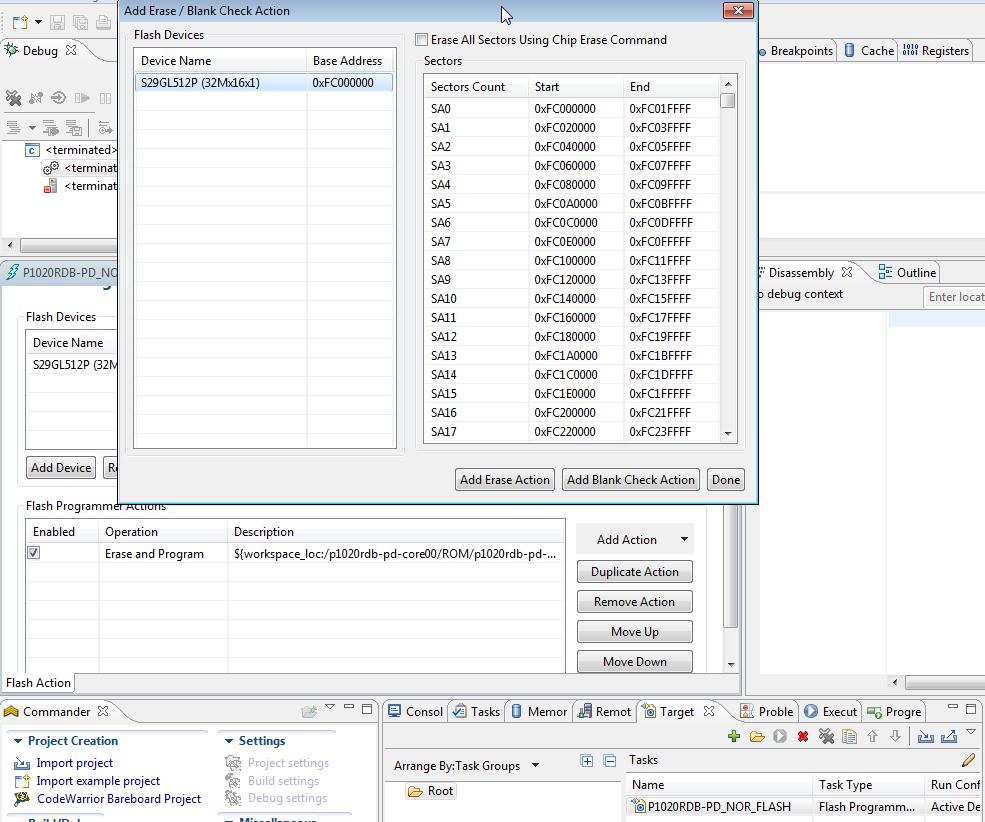
Could you please try to erase only one sector? If this works, then you should select all the sectors (Ctrl + A) instead of selecting Erase All Sectors Using Chip Erase Command. It is possible that the erase algorithm for S29GL512P have some issue for erase all chip operation when is used for S29GL512S.
Adrian
- Mark as New
- Bookmark
- Subscribe
- Mute
- Subscribe to RSS Feed
- Permalink
- Report Inappropriate Content
Adrian,
I am not sure where the select all the sectors (Ctrl + A) option is. I do not see this option in the simple flash programmer.
To erase sector by sector, I edited the S29GL512P.xml file. Changed the 'chiperase' option to false.
<chiperase>false</chiperase>
Now, when I select 'Erase Whole Device' I get:
fl::target -lc "LC for Simple Flash (3)"
fl::target -b 0x2000 0x30000
fl::target -v off -l off
cmdwin::fl::device -d "S29GL512P" -o "32Mx16x1" -a 0xfc000000 0xffffffff
cmdwin::fl::erase all
Beginning Operation ...
-------------------------
Chip erase not supported. Erasing sector by sector.
Performing target initialization ...
Downloading Flash Device Driver ...
Reading flash ID ...
Erasing Sector 0xFC000000 to 0xFC01FFFF
Erasing Sector 0xFC020000 to 0xFC03FFFF
Erasing Sector 0xFC040000 to 0xFC05FFFF
Erasing Sector 0xFC060000 to 0xFC07FFFF
Erasing Sector 0xFC080000 to 0xFC09FFFF
...... All 512 sectors in here........
Erasing Sector 0xFFFE0000 to 0xFFFFFFFF
Erasing ...
Error: Erase failed.
Could not restore context from exception(CCSProtocolPlugin)
The Error message 'Erase Failed' appears instantly after 'Erasing...'
I should note that I am able to successfully erase all sectors of the flash using the uboot commands.
Uboot erases sector by sector, I have not yet tried implementing the chip erase command.
This is a bit of a puzzler. The data sheet for S29GL512S seem to indicate that it should be compatible with S29GL512P.
addiyi
- Mark as New
- Bookmark
- Subscribe
- Mute
- Subscribe to RSS Feed
- Permalink
- Report Inappropriate Content
When you add an Erase/Blank Check Action, instead of selecting the Erase All Sectors Using option, you can select all the sectors. In this mode, you avoid the erase all chip option, but all sectors will be deleted one-by-one.
- Mark as New
- Bookmark
- Subscribe
- Mute
- Subscribe to RSS Feed
- Permalink
- Report Inappropriate Content
I seem to be missing something. The Simple Flash Programmer dialog I have looks like this:
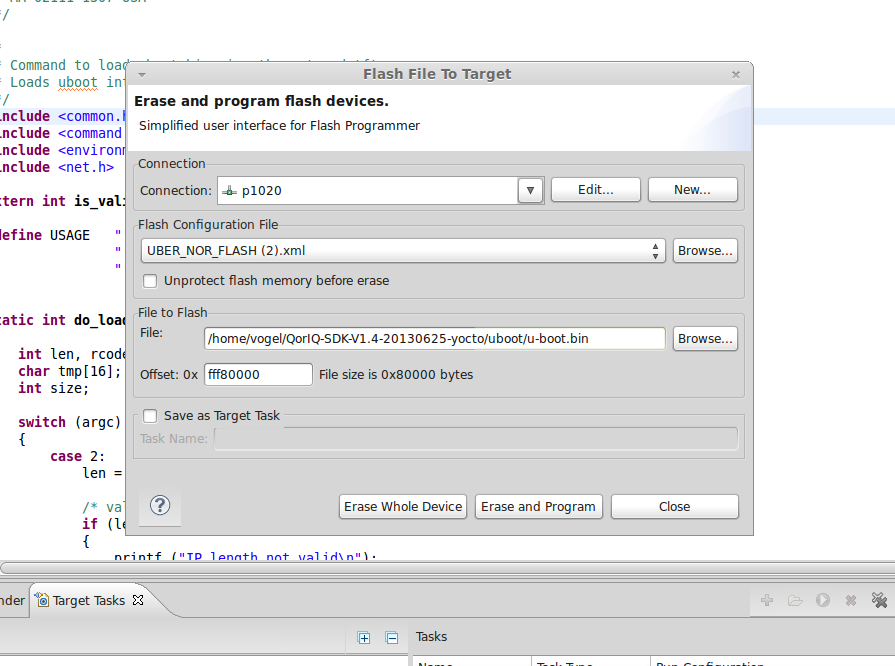
My only options are 'Erase Whole Device' or 'Erase and Program'.
addiyi
- Mark as New
- Bookmark
- Subscribe
- Mute
- Subscribe to RSS Feed
- Permalink
- Report Inappropriate Content
I referred to the second way of using Flash Programmer. Once you are in debug, go to Target Task view, import .xml file and open the task. Then add an Erase/Blank Check Action and instead of selecting Erase All Sectors Using Chip Erase Command, you can manually select all sectors.