- Forums
- Product Forums
- General Purpose MicrocontrollersGeneral Purpose Microcontrollers
- i.MX Forumsi.MX Forums
- QorIQ Processing PlatformsQorIQ Processing Platforms
- Identification and SecurityIdentification and Security
- Power ManagementPower Management
- Wireless ConnectivityWireless Connectivity
- RFID / NFCRFID / NFC
- Advanced AnalogAdvanced Analog
- Neural Processing UnitsNeural Processing Units
- MCX Microcontrollers
- S32G
- S32K
- S32V
- MPC5xxx
- Other NXP Products
- S12 / MagniV Microcontrollers
- Powertrain and Electrification Analog Drivers
- Sensors
- Vybrid Processors
- Digital Signal Controllers
- 8-bit Microcontrollers
- ColdFire/68K Microcontrollers and Processors
- PowerQUICC Processors
- OSBDM and TBDML
- S32M
- S32Z/E
-
- Solution Forums
- Software Forums
- MCUXpresso Software and ToolsMCUXpresso Software and Tools
- CodeWarriorCodeWarrior
- MQX Software SolutionsMQX Software Solutions
- Model-Based Design Toolbox (MBDT)Model-Based Design Toolbox (MBDT)
- FreeMASTER
- eIQ Machine Learning Software
- Embedded Software and Tools Clinic
- S32 SDK
- S32 Design Studio
- GUI Guider
- Zephyr Project
- Voice Technology
- Application Software Packs
- Secure Provisioning SDK (SPSDK)
- Processor Expert Software
- Generative AI & LLMs
-
- Topics
- Mobile Robotics - Drones and RoversMobile Robotics - Drones and Rovers
- NXP Training ContentNXP Training Content
- University ProgramsUniversity Programs
- Rapid IoT
- NXP Designs
- SafeAssure-Community
- OSS Security & Maintenance
- Using Our Community
-
- Cloud Lab Forums
-
- Knowledge Bases
- ARM Microcontrollers
- i.MX Processors
- Identification and Security
- Model-Based Design Toolbox (MBDT)
- QorIQ Processing Platforms
- S32 Automotive Processing Platform
- Wireless Connectivity
- CodeWarrior
- MCUXpresso Suite of Software and Tools
- MQX Software Solutions
- RFID / NFC
- Advanced Analog
- Neural Processing Units
-
- NXP Tech Blogs
- Home
- :
- CodeWarrior
- :
- QorIQ用CodeWarrior
- :
- Re: LS1043A_JTAG_CONNECT
LS1043A_JTAG_CONNECT
- RSS フィードを購読する
- トピックを新着としてマーク
- トピックを既読としてマーク
- このトピックを現在のユーザーにフロートします
- ブックマーク
- 購読
- ミュート
- 印刷用ページ
LS1043A_JTAG_CONNECT

- 新着としてマーク
- ブックマーク
- 購読
- ミュート
- RSS フィードを購読する
- ハイライト
- 印刷
- 不適切なコンテンツを報告
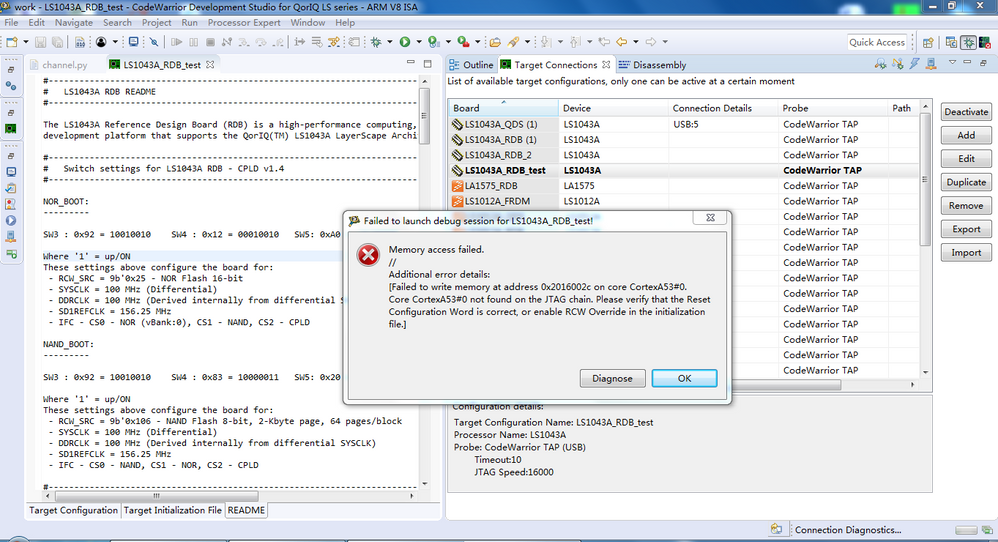
When we connect our board with the CodeWarrior TAP tool, we will display the error as shown in the figure. The TX/RX green light flashes on the CodeWarrior TAP tool, and the RUN/PAUSE red is steady. The JTAG connection is connected. What kind of reason will this kind of error be caused?
 yipingwang
- 新着としてマーク
- ブックマーク
- 購読
- ミュート
- RSS フィードを購読する
- ハイライト
- 印刷
- 不適切なコンテンツを報告
Hello 晓 刘,
Please configure CodeWarrior initialization script to use hard-coded RCW.
Please configure target launch connection from Run->Debug Configurations->GDB Hardware Debugging-><project>->Debugger->Configure target connection, duplicate LS1043A_RDB target configuration and modify the target Init File as the following.
# In order to connect to a board with a broken RCW, set the following variable to True
# Override RCW using a safe hard-coded RCW option
USE_SAFE_RCW = True
Please select one hard-coded RCW option according to your target board.
###################################################################
# Reset
###################################################################
def Reset():
if USE_SAFE_RCW:
# Please make sure SERDES REF CLK is set to 100 MHz (SW3[4] = 0)
# Set rcw_src to the hard-coded RCW option matching the board's DIP SW
# regarding SYSCLK and differential/single-ended clock source
# use this when SYSCLK = 66 MHz, single-ended clock source
# gdb.execute("monitor rcw source set 0x9A")
# use this when SYSCLK = 66 MHz, differential clock source
# gdb.execute("monitor rcw source set 0x9B")
# use this when SYSCLK = 100 MHz, single-ended clock source
# gdb.execute("monitor rcw source set 0x9E")
# use this when SYSCLK = 100 MHz, differential clock source
gdb.execute("monitor rcw source set 0x9F")
Have a great day,
TIC
-----------------------------------------------------------------------------------------------------------------------
Note: If this post answers your question, please click the Correct Answer button. Thank you!
-----------------------------------------------------------------------------------------------------------------------
- 新着としてマーク
- ブックマーク
- 購読
- ミュート
- RSS フィードを購読する
- ハイライト
- 印刷
- 不適切なコンテンツを報告
Hi
I have the same problem for LS1043,it shows "failed to run target initialization script",do you have any sollution to resolve it?Thank you
- 新着としてマーク
- ブックマーク
- 購読
- ミュート
- RSS フィードを購読する
- ハイライト
- 印刷
- 不適切なコンテンツを報告
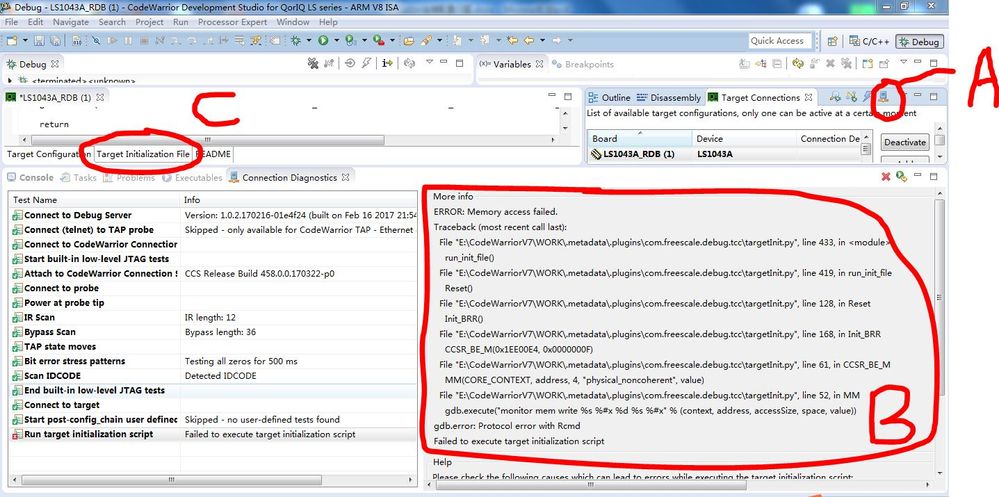
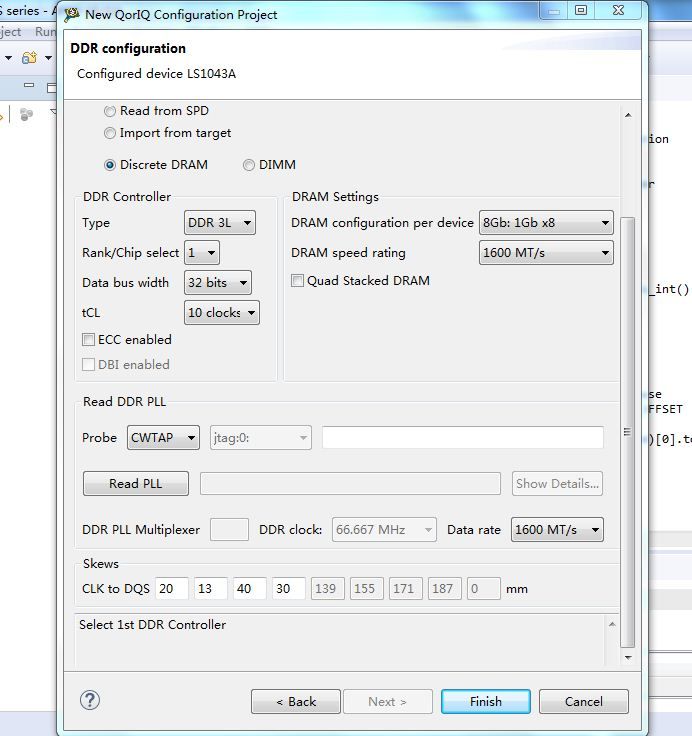
According to the above-mentioned modification target initialization file, after clicking the A button in the figure, there is still an error, can you help us to modify a complete target initialization file (as shown in Figure C), our DDR parameters are configured as shown below, we hope RAM Boot using CodeWarrior on LS1043ARDB, and we have a bug in hardware design, CFG_RCW_SRC0-8 are floating.
thank you very much!