
- Forums
- Product Forums
- General Purpose MicrocontrollersGeneral Purpose Microcontrollers
- i.MX Forumsi.MX Forums
- QorIQ Processing PlatformsQorIQ Processing Platforms
- Identification and SecurityIdentification and Security
- Power ManagementPower Management
- Wireless ConnectivityWireless Connectivity
- RFID / NFCRFID / NFC
- Advanced AnalogAdvanced Analog
- Neural Processing UnitsNeural Processing Units
- MCX Microcontrollers
- S32G
- S32K
- S32V
- MPC5xxx
- Other NXP Products
- S12 / MagniV Microcontrollers
- Powertrain and Electrification Analog Drivers
- Sensors
- Vybrid Processors
- Digital Signal Controllers
- 8-bit Microcontrollers
- ColdFire/68K Microcontrollers and Processors
- PowerQUICC Processors
- OSBDM and TBDML
- S32M
- S32Z/E
-
- Solution Forums
- Software Forums
- MCUXpresso Software and ToolsMCUXpresso Software and Tools
- CodeWarriorCodeWarrior
- MQX Software SolutionsMQX Software Solutions
- Model-Based Design Toolbox (MBDT)Model-Based Design Toolbox (MBDT)
- FreeMASTER
- eIQ Machine Learning Software
- Embedded Software and Tools Clinic
- S32 SDK
- S32 Design Studio
- GUI Guider
- Zephyr Project
- Voice Technology
- Application Software Packs
- Secure Provisioning SDK (SPSDK)
- Processor Expert Software
- Generative AI & LLMs
-
- Topics
- Mobile Robotics - Drones and RoversMobile Robotics - Drones and Rovers
- NXP Training ContentNXP Training Content
- University ProgramsUniversity Programs
- Rapid IoT
- NXP Designs
- SafeAssure-Community
- OSS Security & Maintenance
- Using Our Community
-
- Cloud Lab Forums
-
- Knowledge Bases
- ARM Microcontrollers
- i.MX Processors
- Identification and Security
- Model-Based Design Toolbox (MBDT)
- QorIQ Processing Platforms
- S32 Automotive Processing Platform
- Wireless Connectivity
- CodeWarrior
- MCUXpresso Suite of Software and Tools
- MQX Software Solutions
- RFID / NFC
- Advanced Analog
- Neural Processing Units
-
- NXP Tech Blogs
- Home
- :
- CodeWarrior
- :
- CodeWarrior for QorIQ
- :
- FRDM LS1012 CW startup problems
FRDM LS1012 CW startup problems
- Subscribe to RSS Feed
- Mark Topic as New
- Mark Topic as Read
- Float this Topic for Current User
- Bookmark
- Subscribe
- Mute
- Printer Friendly Page
FRDM LS1012 CW startup problems

- Mark as New
- Bookmark
- Subscribe
- Mute
- Subscribe to RSS Feed
- Permalink
- Report Inappropriate Content
support-
I am trying to connect to a FRDM LS1012 using CW for ARMv8; I created a bareboard hello world using the c++ stationary in CW. I am using a CW ethernet TAP . I get an intitial JTAG? error then try DIAGNOSE. If the JTAG is slowed down to 8 Mhz then the JTAG will find the IR and bypass lengths. It also finds the DAP and LS1012 ID codes.
I followed all the steps outlined in CW targeting help files.
I am using the default initialization file for the FRDM LS1012 board in CW. It fails as follows:
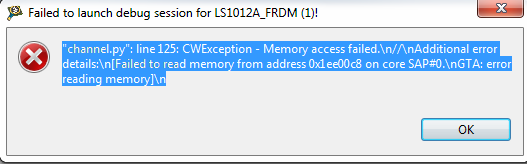
Error: Memory Access failed
....
Failed to read memory from address 0x1ee00c8 on core SAP#0
GTA: error reading memory.
in the init file i set the use RCW safe parameter to true.
Please advise.
thanks,
Robert

- Mark as New
- Bookmark
- Subscribe
- Mute
- Subscribe to RSS Feed
- Permalink
- Report Inappropriate Content
I am attempting to connect to my Freedom board using GDB (/c/Freescale/CW4NET_v2018.01/CW_ARMv8/ARMv8/gdb/bin/aarch64-fsl-gdb.exe) and the init file ../../gdb_extension/flash/cwflash.py. The cwflash.py is modified from that which came with the CW install:
$ diff cwflash-orig.py cwflash.py
34c34
< BOARD_TYPE = "RDB"
---
> BOARD_TYPE = "FRDM"
37c37
< FLASH_TYPE = "nor"
---
> FLASH_TYPE = "qspi"
47c47
< SOC_NAME = "LS2085A"
---
> SOC_NAME = "LS1012A"
I am getting the same error message. The full output of the attempt is in the attached text file.
I need this to recover a board on which I apparently wrote a bad RCW. However, I am getting this same failure on a second board that is still working with the pre-installed firmware.
Would be great to get a response and some help.
Thanks!
.Tim
layerscape #ls1012afrdm
 yipingwang
- Mark as New
- Bookmark
- Subscribe
- Mute
- Subscribe to RSS Feed
- Permalink
- Report Inappropriate Content
Hello All,
Please refer to the procedure provided in https://community.nxp.com/thread/439034?commentID=852508#comment-852508 to do LS1012 target board recovery, which I have verified on demo boards.
Have a great day,
TIC
-----------------------------------------------------------------------------------------------------------------------
Note: If this post answers your question, please click the Correct Answer button. Thank you!
-----------------------------------------------------------------------------------------------------------------------
- Mark as New
- Bookmark
- Subscribe
- Mute
- Subscribe to RSS Feed
- Permalink
- Report Inappropriate Content
yipingwang - Thank you for the response. I had reviewed that thread and have attempted to populate R50. However, I am experiencing the same failure (noted in my previous post) on both "good" and "bad" boards- that is, I get the same failure running the cwflash.py script on the "bricked" board (with a 4.7Kohm resistor on R50) as on a board that has a working RCW and boots up with no problem.
Can you confirm the resistor value that should be used on R50?
Can you confirm that a board with a working RCW should allow the TAP connection to succeed without R50 being populated?
Thank you.
yipingwang
- Mark as New
- Bookmark
- Subscribe
- Mute
- Subscribe to RSS Feed
- Permalink
- Report Inappropriate Content
Hello Tim Hammer,
To use hardcoded RCW, set cfg_rcw_src = 0, for signal CFG_RCW_SRC1(R50) connection, please download LS1012A Data Sheet from QorIQ® Layerscape 1012A|NXP, please refer to point 4 description in page 23 after the pin list.
The procedure described in https://community.nxp.com/thread/439034?commentID=852508#comment-852508 is used to recovery the empty target board without RCW. For LS1012A platform, there is limitation in the current CodeWarrior IDE to enable hard-coded RCW to connect to the target board to do flash programming then.
If there is valid RCW on the target board(no need to use hardcoded RCW), you could refer to the this document Use CodeWarrior for ARMv8 to Debug U-boot and Linux Kernel and Bring up Bare Boards to create a bareboard project to connect to the target board to do flash programming in CodeWarrior IDE.
If the connection problem remains, before connecting to the target board, please refer to the following to enable CCS protocol logging , then connect to the target board and capture the "Protocol logging Console".
You can do this by going to Window > Preferences > Target Connection Configuration > Logging Configuration > Logging level : Debug, Enable logging to Eclipse console.
Have a great day,
TIC
-----------------------------------------------------------------------------------------------------------------------
Note: If this post answers your question, please click the Correct Answer button. Thank you!
-----------------------------------------------------------------------------------------------------------------------
- Mark as New
- Bookmark
- Subscribe
- Mute
- Subscribe to RSS Feed
- Permalink
- Report Inappropriate Content
yipingwang - Thank you for the additional information. I followed the steps in CodeWarrior for ARMv8 Using in u.pdf to create and build the bare metal hello world project. I get a pop-up:
I have the logging level set as you suggest:
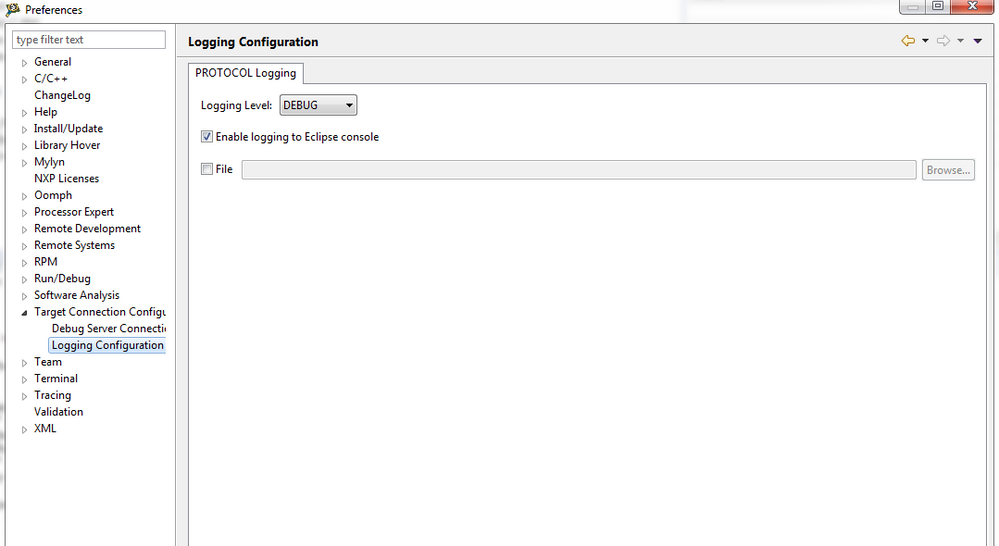
but there is no additional output in the Eclipse Console window.
The code shown in the editor window for channel.py is:
def _raise_error_info(self):
"""
Obtain extended error information and raise a CWException if there's such
information.
"""
try:
err = self.cmd_exec('errorinfo')
except:
# "monitor errorinfo" does not return error, unless not connected to GDB server
err = "Not connected to GDB server."
if err is not None and len(err) > 0:
raise CWException(err)
This appears to be the same final source location as I captured in the gdb output shown in my earlier attachment.
Any more ideas?
.Tim
- Mark as New
- Bookmark
- Subscribe
- Mute
- Subscribe to RSS Feed
- Permalink
- Report Inappropriate Content
yipingwang - thank you for all of the information that you provided. After my last failed attempt, I decided to look again at the board JTAG header wondering if I had somehow connected the cable backwards. Apparently when I first looked at the board, I did not notice the "JTAG" on the silkscreen but did see what appears to be a "1" at the other end of the header. Looking again now, I see that there is definitely a "1" next to the "JTAG" and plugging the cable in that orientation, I get connected properly.
I apologize for the interruptions and appreciate your help.
.Tim
