
- Forums
- Product Forums
- General Purpose MicrocontrollersGeneral Purpose Microcontrollers
- i.MX Forumsi.MX Forums
- QorIQ Processing PlatformsQorIQ Processing Platforms
- Identification and SecurityIdentification and Security
- Power ManagementPower Management
- Wireless ConnectivityWireless Connectivity
- RFID / NFCRFID / NFC
- Advanced AnalogAdvanced Analog
- Neural Processing UnitsNeural Processing Units
- MCX Microcontrollers
- S32G
- S32K
- S32V
- MPC5xxx
- Other NXP Products
- S12 / MagniV Microcontrollers
- Powertrain and Electrification Analog Drivers
- Sensors
- Vybrid Processors
- Digital Signal Controllers
- 8-bit Microcontrollers
- ColdFire/68K Microcontrollers and Processors
- PowerQUICC Processors
- OSBDM and TBDML
- S32M
- S32Z/E
-
- Solution Forums
- Software Forums
- MCUXpresso Software and ToolsMCUXpresso Software and Tools
- CodeWarriorCodeWarrior
- MQX Software SolutionsMQX Software Solutions
- Model-Based Design Toolbox (MBDT)Model-Based Design Toolbox (MBDT)
- FreeMASTER
- eIQ Machine Learning Software
- Embedded Software and Tools Clinic
- S32 SDK
- S32 Design Studio
- GUI Guider
- Zephyr Project
- Voice Technology
- Application Software Packs
- Secure Provisioning SDK (SPSDK)
- Processor Expert Software
- Generative AI & LLMs
-
- Topics
- Mobile Robotics - Drones and RoversMobile Robotics - Drones and Rovers
- NXP Training ContentNXP Training Content
- University ProgramsUniversity Programs
- Rapid IoT
- NXP Designs
- SafeAssure-Community
- OSS Security & Maintenance
- Using Our Community
-
- Cloud Lab Forums
-
- Knowledge Bases
- ARM Microcontrollers
- i.MX Processors
- Identification and Security
- Model-Based Design Toolbox (MBDT)
- QorIQ Processing Platforms
- S32 Automotive Processing Platform
- Wireless Connectivity
- CodeWarrior
- MCUXpresso Suite of Software and Tools
- MQX Software Solutions
- RFID / NFC
- Advanced Analog
- Neural Processing Units
-
- NXP Tech Blogs
- Home
- :
- CodeWarrior
- :
- MCU用CodeWarrior
- :
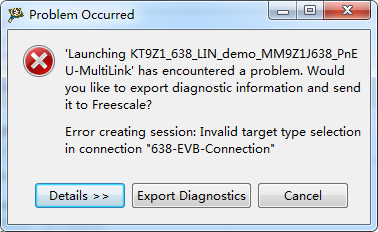
- Error creating session: Invalid target type selection in connection "638-EVB-Connection"
Error creating session: Invalid target type selection in connection "638-EVB-Connection"
- RSS フィードを購読する
- トピックを新着としてマーク
- トピックを既読としてマーク
- このトピックを現在のユーザーにフロートします
- ブックマーク
- 購読
- ミュート
- 印刷用ページ
Error creating session: Invalid target type selection in connection "638-EVB-Connection"

- 新着としてマーク
- ブックマーク
- 購読
- ミュート
- RSS フィードを購読する
- ハイライト
- 印刷
- 不適切なコンテンツを報告
Hi all,
I come across a problem when i run the project it occur this condition ,could you tell me the problem?
thank you

 RadekS
- 新着としてマーク
- ブックマーク
- 購読
- ミュート
- RSS フィードを購読する
- ハイライト
- 印刷
- 不適切なコンテンツを報告
I never meet with that error message yet.
It seems, that there is probably some wrong setting in your connection settings.
Few recommendations:
Please clean your project and build again. Menu-Project-Clean…
If you use more than one PEmicro BDM interfaces (like OSBDM and Multilink Universal), please let just one connected to the PC.
Please check whether your connection settings are correct.
Menu-Run-Debug configuration-C/C++ application-Please check whether correct elf file is referenced
Menu-Run-Debug configuration-Target settings-Edit-Target-Edit-Please check whether correct Target type is selected.
Menu-Run-Debug configuration-Target settings-Edit-Please check BDM interface configuration and detected Port.
The debug connection settings are stored in ReferencedRSESystems.xml file in the root of your project.
The creating new target configuration is nicely described for example here:
https://mcuoneclipse.com/2012/04/30/flashing-with-a-button-and-a-magic-wand/
I hope it helps you.
Have a great day,
Radek
-----------------------------------------------------------------------------------------------------------------------
Note: If this post answers your question, please click the Correct Answer button. Thank you!
-----------------------------------------------------------------------------------------------------------------------
- 新着としてマーク
- ブックマーク
- 購読
- ミュート
- RSS フィードを購読する
- ハイライト
- 印刷
- 不適切なコンテンツを報告
Hi Radek Sestak,
I forgot to tell you I use the demo which you supply for us,I use the LIN project.
Is there any problems with the demo or no problem?
thank you you replication!
Dawei
RadekS
- 新着としてマーク
- ブックマーク
- 購読
- ミュート
- RSS フィードを購読する
- ハイライト
- 印刷
- 不適切なコンテンツを報告
Hi Dewei,
Thank you for more details.
Unfortunately, we don’t have this demo here (only KIT9Z1J638EVM board). However, we are not aware of any specific problem with that demo.
There may be some issue with paths when a project was not cleared prior moving to another PC.
I suppose that you downloaded SW project from our web site (that you get the last version). Correct?
From HW point of view:
I suppose, that you provide the 12V power supply for the MCU (The Multilink interfaces typically do not provide the power supply for MCU). Correct?
Please check also BDM interface connector orientation.
I hope it helps you.
Have a great day,
Radek
-----------------------------------------------------------------------------------------------------------------------
Note: If this post answers your question, please click the Correct Answer button. Thank you!
-----------------------------------------------------------------------------------------------------------------------
- 新着としてマーク
- ブックマーク
- 購読
- ミュート
- RSS フィードを購読する
- ハイライト
- 印刷
- 不適切なコンテンツを報告
Hi Radek,
Thank you for your replication.
I do download the latest demo version from your website,but I used the OSBDM to download the software.I use the 12V power supply for the MCU.
I used the KIT9Z1J638EVM board, I really wonder the reason why I can't download it.
thank you!
Dawei
- 新着としてマーク
- ブックマーク
- 購読
- ミュート
- RSS フィードを購読する
- ハイライト
- 印刷
- 不適切なコンテンツを報告
Hi Radek,
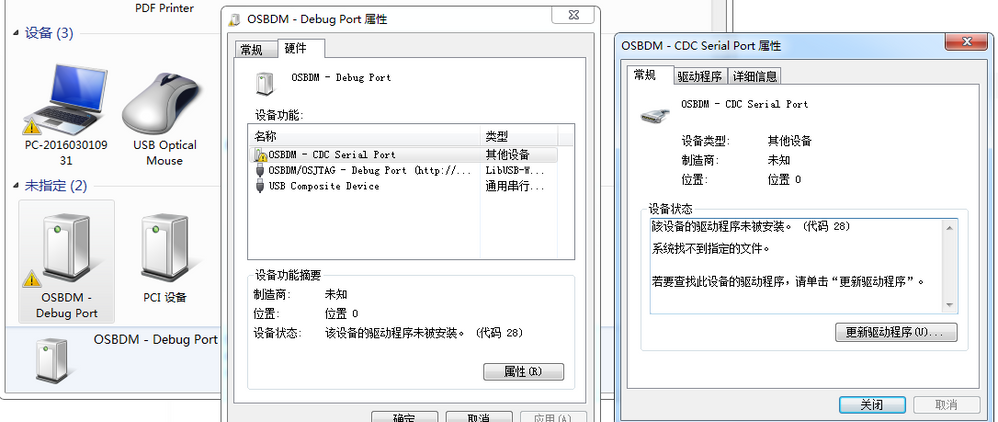
Maybe I found the question as follows:
Dawei
RadekS
- 新着としてマーク
- ブックマーク
- 購読
- ミュート
- RSS フィードを購読する
- ハイライト
- 印刷
- 不適切なコンテンツを報告
Hi Dewei,
Please try to download and install current PEmicro drivers:
P&E Hardware Interface Drivers, Version 12 (Win XP/Vista/7/8/10) (9828 KB)
http://www.pemicro.com/downloads/download_file.cfm?download_id=53
The OSBDM and PEmicro Multilink BDM interfaces share the same ID. If you connect both interfaces, the Multilink BDM interface is typically preferred and OSBDM does not work correctly.
If you use KIT9Z1J638EVM board, please check S1 switch position per KIT9Z1J638EVM QSG (Figure 3. Switch S1 Settings):
http://www.nxp.com/assets/documents/data/en/quick-start-guide/KT9Z1J638QSG.pdf
I hope it helps you.
Have a great day,
Radek
-----------------------------------------------------------------------------------------------------------------------
Note: If this post answers your question, please click the Correct Answer button. Thank you!
-----------------------------------------------------------------------------------------------------------------------
