
- Forums
- Product Forums
- General Purpose MicrocontrollersGeneral Purpose Microcontrollers
- i.MX Forumsi.MX Forums
- QorIQ Processing PlatformsQorIQ Processing Platforms
- Identification and SecurityIdentification and Security
- Power ManagementPower Management
- Wireless ConnectivityWireless Connectivity
- RFID / NFCRFID / NFC
- Advanced AnalogAdvanced Analog
- Neural Processing UnitsNeural Processing Units
- MCX Microcontrollers
- S32G
- S32K
- S32V
- MPC5xxx
- Other NXP Products
- S12 / MagniV Microcontrollers
- Powertrain and Electrification Analog Drivers
- Sensors
- Vybrid Processors
- Digital Signal Controllers
- 8-bit Microcontrollers
- ColdFire/68K Microcontrollers and Processors
- PowerQUICC Processors
- OSBDM and TBDML
- S32M
- S32Z/E
-
- Solution Forums
- Software Forums
- MCUXpresso Software and ToolsMCUXpresso Software and Tools
- CodeWarriorCodeWarrior
- MQX Software SolutionsMQX Software Solutions
- Model-Based Design Toolbox (MBDT)Model-Based Design Toolbox (MBDT)
- FreeMASTER
- eIQ Machine Learning Software
- Embedded Software and Tools Clinic
- S32 SDK
- S32 Design Studio
- GUI Guider
- Zephyr Project
- Voice Technology
- Application Software Packs
- Secure Provisioning SDK (SPSDK)
- Processor Expert Software
- Generative AI & LLMs
-
- Topics
- Mobile Robotics - Drones and RoversMobile Robotics - Drones and Rovers
- NXP Training ContentNXP Training Content
- University ProgramsUniversity Programs
- Rapid IoT
- NXP Designs
- SafeAssure-Community
- OSS Security & Maintenance
- Using Our Community
-
- Cloud Lab Forums
-
- Knowledge Bases
- ARM Microcontrollers
- i.MX Processors
- Identification and Security
- Model-Based Design Toolbox (MBDT)
- QorIQ Processing Platforms
- S32 Automotive Processing Platform
- Wireless Connectivity
- CodeWarrior
- MCUXpresso Suite of Software and Tools
- MQX Software Solutions
- RFID / NFC
- Advanced Analog
- Neural Processing Units
-
- NXP Tech Blogs
- Home
- :
- CodeWarrior
- :
- CodeWarrior Development Tools
- :
- suppress registration popup at IDE start
suppress registration popup at IDE start
- Subscribe to RSS Feed
- Mark Topic as New
- Mark Topic as Read
- Float this Topic for Current User
- Bookmark
- Subscribe
- Mute
- Printer Friendly Page

- Mark as New
- Bookmark
- Subscribe
- Mute
- Subscribe to RSS Feed
- Permalink
- Report Inappropriate Content
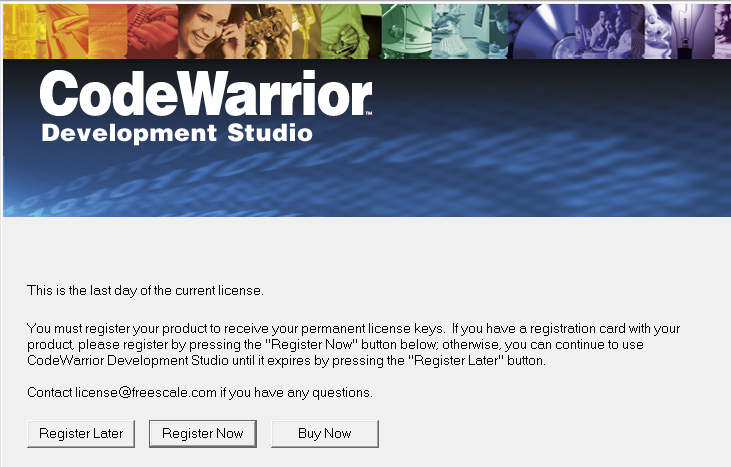
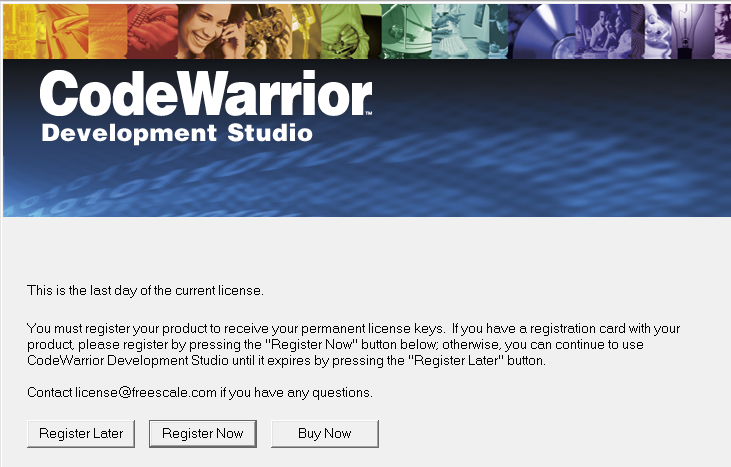
How do I suppress the CodeWarrior registration popup (see attached image) when I invoke the CW IDE?
Am using a valid license but apparently have a timing or other communication glitch with license server that always
causes this popup. Normally, this is merely an annoyance, and I dismiss the popup by clicking "Register Later". Now
I'm trying to automate CW using the OLE interface via Perl, and this popup is getting in my way.
I invoke the IDE from Perl here:
use strict;
use warnings;
use Win32::OLE;
use constant cwAppName => qw(CodeWarrior.CodeWarriorApp);
#Create an instance of CodeWarrior
printf("Creating instance of \"%s\"\n", cwAppName);
my $CW = Win32::OLE->new(cwAppName);
If I invoke the IDE minimized via the '/f n' command line option, the popup does not appear. I know this
because when I click on the minimized app, the popup is not there and the CW app is ready to use. So
is there a way I can tweak the above Perl code to either invoke it minimized or to dismiss the popup
via the "Register Later" button?
Solved! Go to Solution.

 trytohelp
- Mark as New
- Bookmark
- Subscribe
- Mute
- Subscribe to RSS Feed
- Permalink
- Report Inappropriate Content
Hi,
We've some problem with classic tools under Windows 7.
There are some FlexLM compatibility drivers under Win 7.
This is the case for the IDE delivered on some product which is locked on USBDongle ID for instance.
Don't care about this message.
To remove it you can add the following feature to your license file:
FEATURE Win32_CWIDE_Limited metrowks 5.5 permanent uncounted \
00E825C5615A HOSTID=ANY TS_OK
Have a great day,
Pascal
Freescale Technical Support
-----------------------------------------------------------------------------------------------------------------------
Note: If this post answers your question, please click the Correct Answer button. Thank you!
-----------------------------------------------------------------------------------------------------------------------
trytohelp
- Mark as New
- Bookmark
- Subscribe
- Mute
- Subscribe to RSS Feed
- Permalink
- Report Inappropriate Content
Hi,
We've some problem with classic tools under Windows 7.
There are some FlexLM compatibility drivers under Win 7.
This is the case for the IDE delivered on some product which is locked on USBDongle ID for instance.
Don't care about this message.
To remove it you can add the following feature to your license file:
FEATURE Win32_CWIDE_Limited metrowks 5.5 permanent uncounted \
00E825C5615A HOSTID=ANY TS_OK
Have a great day,
Pascal
Freescale Technical Support
-----------------------------------------------------------------------------------------------------------------------
Note: If this post answers your question, please click the Correct Answer button. Thank you!
-----------------------------------------------------------------------------------------------------------------------
- Mark as New
- Bookmark
- Subscribe
- Mute
- Subscribe to RSS Feed
- Permalink
- Report Inappropriate Content
Thanks, Pascal. This did the trick!
Regards,
Clint
