
- Forums
- Product Forums
- General Purpose MicrocontrollersGeneral Purpose Microcontrollers
- i.MX Forumsi.MX Forums
- QorIQ Processing PlatformsQorIQ Processing Platforms
- Identification and SecurityIdentification and Security
- Power ManagementPower Management
- Wireless ConnectivityWireless Connectivity
- RFID / NFCRFID / NFC
- Advanced AnalogAdvanced Analog
- Neural Processing UnitsNeural Processing Units
- MCX Microcontrollers
- S32G
- S32K
- S32V
- MPC5xxx
- Other NXP Products
- S12 / MagniV Microcontrollers
- Powertrain and Electrification Analog Drivers
- Sensors
- Vybrid Processors
- Digital Signal Controllers
- 8-bit Microcontrollers
- ColdFire/68K Microcontrollers and Processors
- PowerQUICC Processors
- OSBDM and TBDML
- S32M
- S32Z/E
-
- Solution Forums
- Software Forums
- MCUXpresso Software and ToolsMCUXpresso Software and Tools
- CodeWarriorCodeWarrior
- MQX Software SolutionsMQX Software Solutions
- Model-Based Design Toolbox (MBDT)Model-Based Design Toolbox (MBDT)
- FreeMASTER
- eIQ Machine Learning Software
- Embedded Software and Tools Clinic
- S32 SDK
- S32 Design Studio
- GUI Guider
- Zephyr Project
- Voice Technology
- Application Software Packs
- Secure Provisioning SDK (SPSDK)
- Processor Expert Software
- Generative AI & LLMs
-
- Topics
- Mobile Robotics - Drones and RoversMobile Robotics - Drones and Rovers
- NXP Training ContentNXP Training Content
- University ProgramsUniversity Programs
- Rapid IoT
- NXP Designs
- SafeAssure-Community
- OSS Security & Maintenance
- Using Our Community
-
- Cloud Lab Forums
-
- Knowledge Bases
- ARM Microcontrollers
- i.MX Processors
- Identification and Security
- Model-Based Design Toolbox (MBDT)
- QorIQ Processing Platforms
- S32 Automotive Processing Platform
- Wireless Connectivity
- CodeWarrior
- MCUXpresso Suite of Software and Tools
- MQX Software Solutions
- RFID / NFC
- Advanced Analog
- Neural Processing Units
-
- NXP Tech Blogs
- Home
- :
- CodeWarrior
- :
- CodeWarrior开发工具
- :
- CW 10.6 PE is multiply defining __thumb_startup and __iar_program_start in its startup code--how do I prevent that?
CW 10.6 PE is multiply defining __thumb_startup and __iar_program_start in its startup code--how do I prevent that?

I have created a Processor Expert project in CW 10.6, for the FRDM-KE06Z board. My only component so far is the processor, MKE06Z128VLK4. When I build the project for FLASH, CW reports multiple definitions of __thumb_startup and __iar_program_start, first in startup.c and then again in __arm_start.c. Since it's in the generated code, any changes I make to the code directly will be overwritten the next time the project is built, correct? How do I prevent CW PE from generating erroneous startup code?
已解决! 转到解答。

 Jorge_Gonzalez
Hello Nancy:
I think that console output shows the problem. For some reason the build system or the project wizard is calling files from Processor Expert Driver Suite (standalone version).

Did you install PEx Driver Suite 10.4 after installing CW for MCU 10.6, or the other way around?
I am not sure what causes this, but some ideas off the top of my head:
1) Make sure that you are not sharing a workspace folder for both CodeWarrior and PEx Driver Suite. This would cause problems. Please confirm this.
2) From CodeWarrior go to Window -> Preferences -> Processor Expert -> Paths and verify that the path is pointing to CW installation:
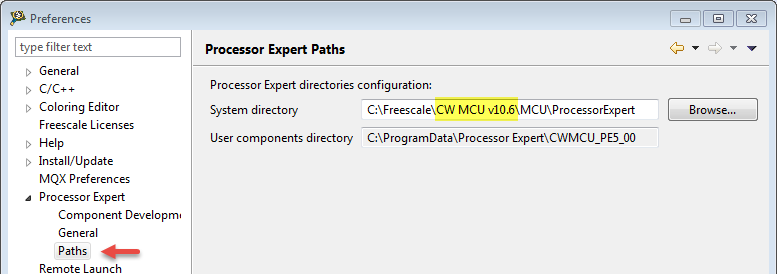
Regards!,
Jorge Gonzalez
-----------------------------------------------------------------------------------------------------------------------
Note: If this post answers your question, please click the Correct Answer button. Thank you!
-----------------------------------------------------------------------------------------------------------------------
 TICS_Fiona
How did you create the project? I created a new project from File Menu->New->Bareboard project, then choose Kinetis E Series->KE0x Family->KE06(48MHz) Family-> MKE06Z128, then click on next to use the default settings, on the last step, enable the ‘Processor Expert’ option. Then build the project, no error or warning is prompted.
I attached the new bareboard project.
In addition, please install CW10.6.3 update from CodeWarrior "Help" Menu->Check for Updates.
Please review the link below for how to install the new update for CodeWarrior v10.6:
https://community.freescale.com/docs/DOC-103415
Fiona Kuang
Technical Information & Commercial Support
-----------------------------------------------------------------------------------------------------------------------
Note: If this post answers your question, please click the Correct Answer button. Thank you!
-----------------------------------------------------------------------------------------------------------------------
Hi Fiona,
Thank you for your reply. The sequence of steps you describe, however, is exactly how I've been creating my projects. I've attached a file with a series of screen captures that show what I've done, and the error messages that result when I build the project (after selecting a processor).
I think that the zip file you attached is incomplete--when I unzipped it, it wasn't a complete project.
Another problem I'm consistently having is that my builds never produce a memory configuration file--the .mem file that should be in Project Settings\Debugger. The lack of this file blocked download of the firmware to the board until I turned off memory in the debugger, but that doesn't seem like a good work-around.
I installed the updates via Help | Check for Updates -- this was apparently successful. Trying to install update 3 from the link you provided resulted in numerous errors and conflicts, and finally ending with not being able to find a component (see the smaller screen shot attached). After installing the updates from "Check for Updates", the results of my builds are exactly the same--duplicate definitions of __thumb_startup() and __iar_program_start(), and no memory configuration file (see larger .png file)
Can you help further or should I put in a service request?
Thanks,
Nancy

 Jorge_Gonzalez
Hello Nancy:
Your picture shows the "Problems" view. Could you post the console output in a text file or copied here?
This may give us a better idea of what is wrong.
Regards!
Jorge Gonzalez
Jorge_Gonzalez
Hello Nancy:
I think that console output shows the problem. For some reason the build system or the project wizard is calling files from Processor Expert Driver Suite (standalone version).
Did you install PEx Driver Suite 10.4 after installing CW for MCU 10.6, or the other way around?
I am not sure what causes this, but some ideas off the top of my head:
1) Make sure that you are not sharing a workspace folder for both CodeWarrior and PEx Driver Suite. This would cause problems. Please confirm this.
2) From CodeWarrior go to Window -> Preferences -> Processor Expert -> Paths and verify that the path is pointing to CW installation:
Regards!,
Jorge Gonzalez
-----------------------------------------------------------------------------------------------------------------------
Note: If this post answers your question, please click the Correct Answer button. Thank you!
-----------------------------------------------------------------------------------------------------------------------
Thank you Jorge!! That not only fixed the duplicate function definitions, it also is now producing a memory configuration file, which it wasn't before.
Since you know about these things, what is the PEx Driver Suite for? I installed it (I don't remember the sequence) in order to generate drivers for components because I'm trying to create Simulink blocks that are device drivers for the KE06Z. (MathWorks doesn't have a hardware support package for that board and we need a board with a CAN bus.) Should I be working with or without the PEx Driver Suite to generate stand-alone code that I can build into a Simulink function block?
Thanks.
Nancy
Jorge_Gonzalez
Hello Nancy:
Great, I am glad my response helped!. Can I ask you which was the winner, my suggestion (1) or (2)?
About PEx Driver Suite, it is suitable for generating peripheral drivers, but it does not contain a toolchain, so the projects cannot be compiled. In practical terms PEx Driver Suite only generates code for you to use it in your desired IDE or toolchain.
So about your simulink requirement, it sounds like the way to go. Just pay attention that the generated code includes some low level code adapted for different IDEs/toolchains (IAR, Keil, GCC) depending on the selection from the New Project Wizard. You should ignore such kind of code and only take the c code corresponding to the peripheral drivers.
Regards!
Jorge Gonzalez
Option 2 worked. I didn't know how to check on 1) so I just tried 2 first and it worked. (I'm a newbie with CW for MCUs, obviously. I appreciate the help.)
Thanks for the info on the PEx Driver Suite. I'll create a separate workspace to work with it--that should prevent problems.
Thanks again!
Nancy
