
- Forums
- Product Forums
- General Purpose MicrocontrollersGeneral Purpose Microcontrollers
- i.MX Forumsi.MX Forums
- QorIQ Processing PlatformsQorIQ Processing Platforms
- Identification and SecurityIdentification and Security
- Power ManagementPower Management
- Wireless ConnectivityWireless Connectivity
- RFID / NFCRFID / NFC
- Advanced AnalogAdvanced Analog
- MCX Microcontrollers
- S32G
- S32K
- S32V
- MPC5xxx
- Other NXP Products
- S12 / MagniV Microcontrollers
- Powertrain and Electrification Analog Drivers
- Sensors
- Vybrid Processors
- Digital Signal Controllers
- 8-bit Microcontrollers
- ColdFire/68K Microcontrollers and Processors
- PowerQUICC Processors
- OSBDM and TBDML
- S32M
- S32Z/E
-
- Solution Forums
- Software Forums
- MCUXpresso Software and ToolsMCUXpresso Software and Tools
- CodeWarriorCodeWarrior
- MQX Software SolutionsMQX Software Solutions
- Model-Based Design Toolbox (MBDT)Model-Based Design Toolbox (MBDT)
- FreeMASTER
- eIQ Machine Learning Software
- Embedded Software and Tools Clinic
- S32 SDK
- S32 Design Studio
- GUI Guider
- Zephyr Project
- Voice Technology
- Application Software Packs
- Secure Provisioning SDK (SPSDK)
- Processor Expert Software
- Generative AI & LLMs
-
- Topics
- Mobile Robotics - Drones and RoversMobile Robotics - Drones and Rovers
- NXP Training ContentNXP Training Content
- University ProgramsUniversity Programs
- Rapid IoT
- NXP Designs
- SafeAssure-Community
- OSS Security & Maintenance
- Using Our Community
-
- Cloud Lab Forums
-
- Knowledge Bases
- ARM Microcontrollers
- i.MX Processors
- Identification and Security
- Model-Based Design Toolbox (MBDT)
- QorIQ Processing Platforms
- S32 Automotive Processing Platform
- Wireless Connectivity
- CodeWarrior
- MCUXpresso Suite of Software and Tools
- MQX Software Solutions
- RFID / NFC
- Advanced Analog
-
- NXP Tech Blogs
- Home
- :
- MCUXpresso Software and Tools
- :
- Kinetis Software Development Kit
- :
- Re: I can not create a new KDS 2.0 project for MK22FN1M0xxx12 with Kinetis SDK support.
I can not create a new KDS 2.0 project for MK22FN1M0xxx12 with Kinetis SDK support.
- Subscribe to RSS Feed
- Mark Topic as New
- Mark Topic as Read
- Float this Topic for Current User
- Bookmark
- Subscribe
- Mute
- Printer Friendly Page
I can not create a new KDS 2.0 project for MK22FN1M0xxx12 with Kinetis SDK support.

- Mark as New
- Bookmark
- Subscribe
- Mute
- Subscribe to RSS Feed
- Permalink
- Report Inappropriate Content
I notice that I can not create a new KDS 2.0 project for MK22FN1M0xxx12 with Kinetis SDK support.
The Kinetis SDK v1.1.0 release notes do not list the MK22FN1M0xxx12 among the supported MCU devices.
Will the Kinetis SDK support the MK22FN1M0xxx12 any time soon?

 Alice_Yang
- Mark as New
- Bookmark
- Subscribe
- Mute
- Subscribe to RSS Feed
- Permalink
- Report Inappropriate Content
Hi Jeffrey,
Yes, KSDK will include it , while the release time have not sure.
And at this time ,you can use the Processor Expert on KDS, like this
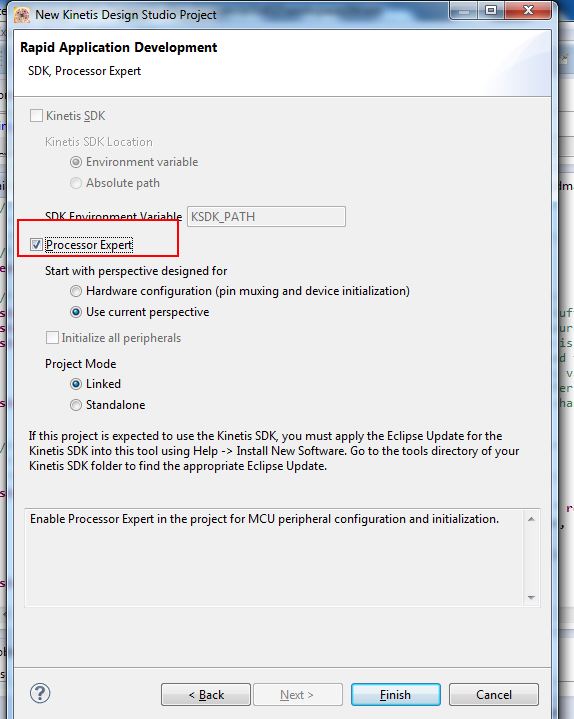
Hope it helps
Alice
- Mark as New
- Bookmark
- Subscribe
- Mute
- Subscribe to RSS Feed
- Permalink
- Report Inappropriate Content
When I create a new project, the option to include kinetis SDK is greyed out just like it's shown above.
I did install the SDK v1.1 as well as did the update in eclipse but nothing is changing.
I'm using a K60 board.
What is the issue here?
 DavidS
- Mark as New
- Bookmark
- Subscribe
- Mute
- Subscribe to RSS Feed
- Permalink
- Report Inappropriate Content
Hi Steevo and Jeffrey,
I recently helped a customer with this kind of issue.
He had a new Win7 64-bit machine so you think it would work great but....the corporate IT had installed and older version of Java to support a internal custom application for that company. A update to the Java resolved the problem.
I will make a recommendation back to our KDS/KSDK team to see if the installer can check what version of Java it detects and generate appropriate error or warning to user.
To learn what Java is required please read/review:
C:\Freescale\KDS_2.0.0\eclipse\readme\readme_eclipse.html
To check your Win 7 64-bit machine:
Open Control Panel. Search for "Java" and open the Java 32-bit app. The new Window will have Title " Java Control Panel".
Click the "About..." button.
You should see following:
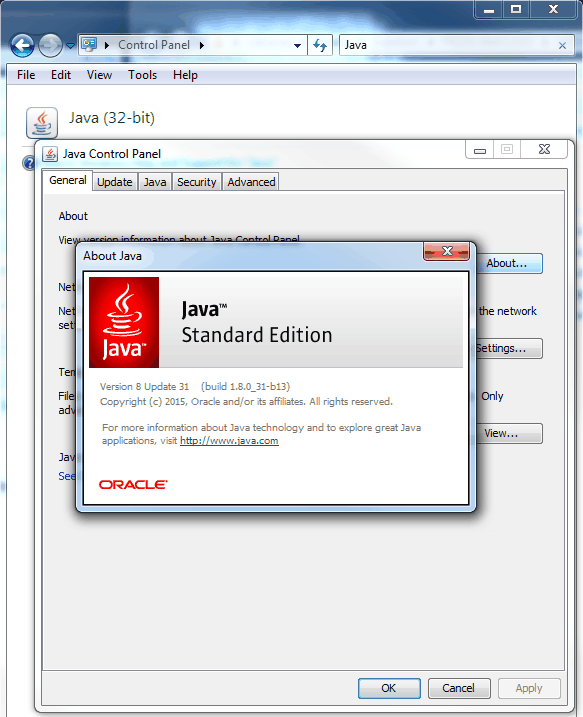
Regards,
David
- Mark as New
- Bookmark
- Subscribe
- Mute
- Subscribe to RSS Feed
- Permalink
- Report Inappropriate Content
David and Iva,
I have checked the Java version and I have the same version that is shown above in Davids post however,
When I create a new project and exand the tree to choose a board, I don't See my K60D100M in there like Iva has as an option,
My list is much shorter with only 5 options not including what I need... any ideas?
 ivadorazinova
- Mark as New
- Bookmark
- Subscribe
- Mute
- Subscribe to RSS Feed
- Permalink
- Report Inappropriate Content
Hi steeevo,
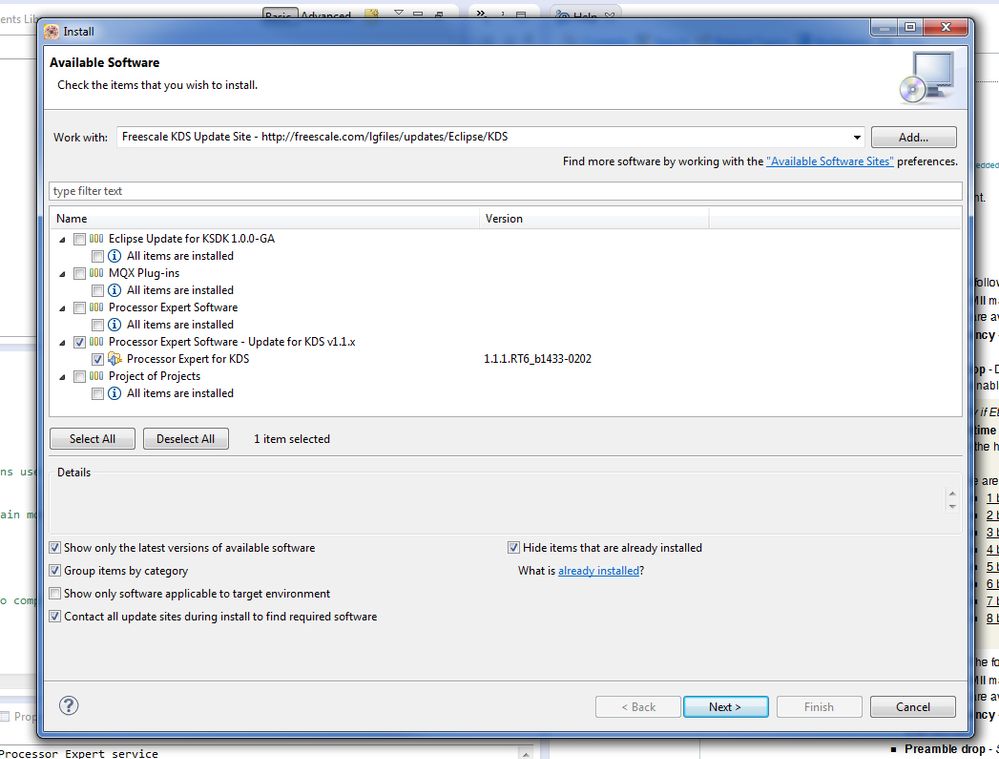
ok - never mind, please try to install new software.
You can find it in KDS -> Help -> Install new software
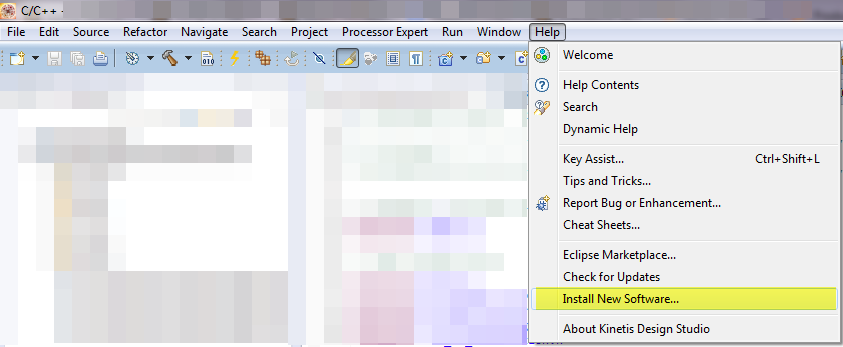
and choose the option Freescale KDS Update Site and install it, please.
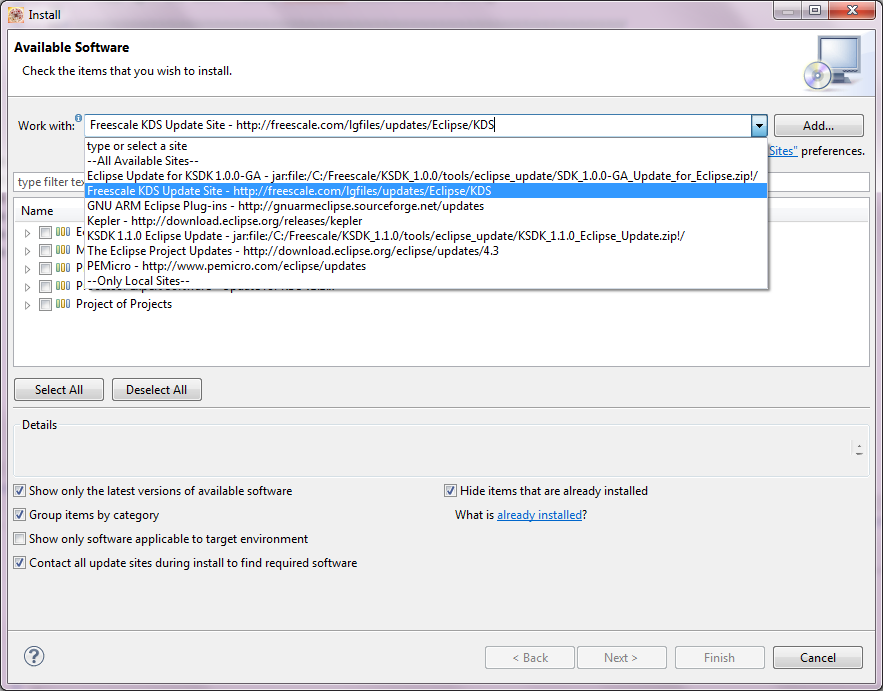
If does not help, we find another solution.
Best Regards,
Iva
- Mark as New
- Bookmark
- Subscribe
- Mute
- Subscribe to RSS Feed
- Permalink
- Report Inappropriate Content
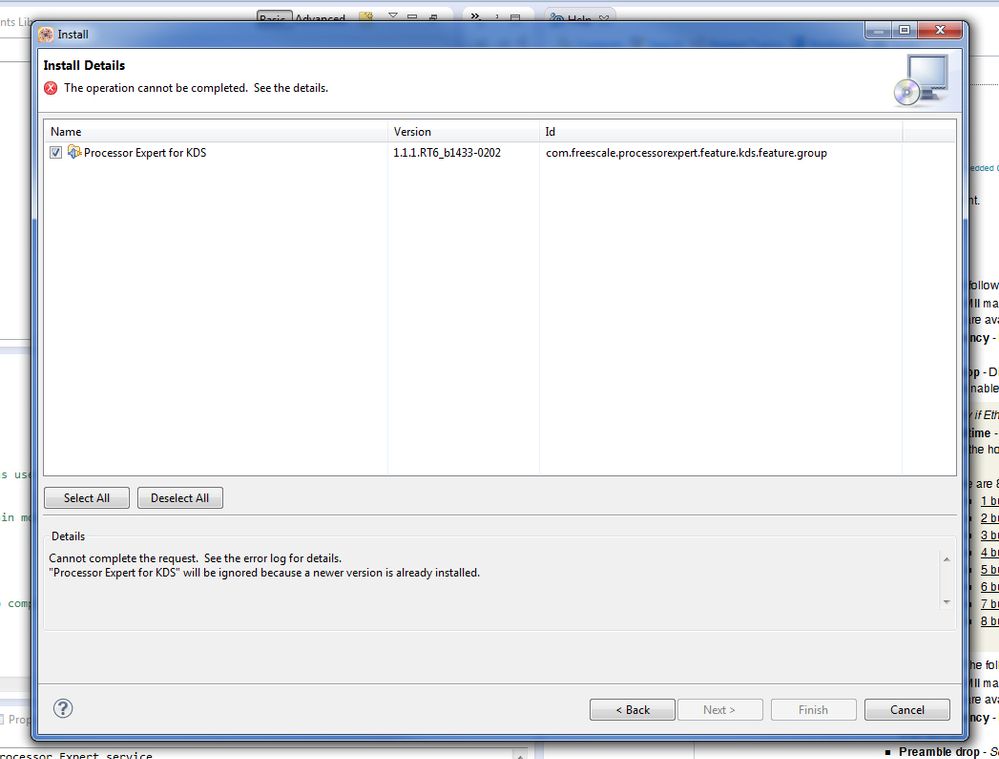
All of the updates are done except for the version of processor expert that gets installed via the eclipse installer.
as you can see it won't install because I have a newer version of PE already installed.
What should I check next?
 ivadorazinova
- Mark as New
- Bookmark
- Subscribe
- Mute
- Subscribe to RSS Feed
- Permalink
- Report Inappropriate Content
Hello,
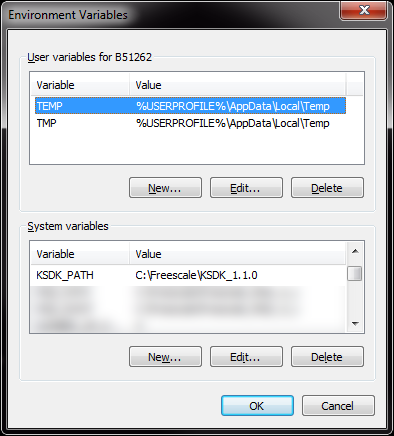
please, check your KSDK_PATH in your Environment Variables.
We will be sure what version are you actually using.
Best Regards,
Iva
 Jorge_Gonzalez
- Mark as New
- Bookmark
- Subscribe
- Mute
- Subscribe to RSS Feed
- Permalink
- Report Inappropriate Content
Hi Steeevo:
The update you have to install is the one for KSDK v1.1.0, which is not in the KDS server, but rather inside the KSDK folder. The one in your picture is for the earlier version v1.0.0.
If you already have the latest KSDK v1.1.0, then install the Eclipse Update as in the attached PDF guide.
Actually, if it still does not work, I have seen that having the earlier version of the update (v1.0.0) causes some problems when installing the latest (v1.1.0), so you may need to reinstall KDS to have just the latest update installed.
Regards!,
Jorge Gonzalez
ivadorazinova
- Mark as New
- Bookmark
- Subscribe
- Mute
- Subscribe to RSS Feed
- Permalink
- Report Inappropriate Content
Hi steeevo,
there is actually support for these boards:
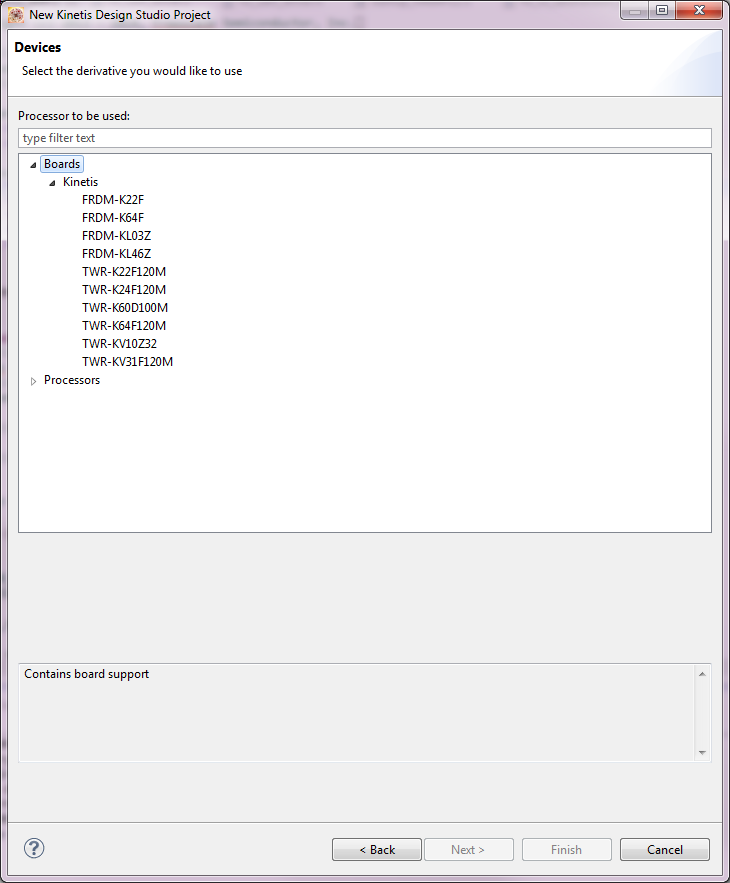
Please, check the updates for your KDS.
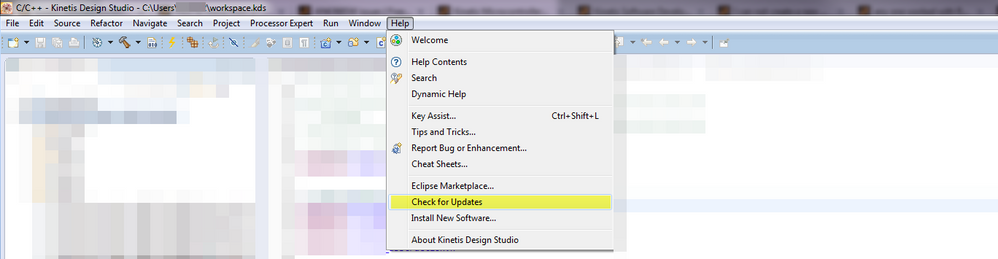
I hope this helps,
Best Regards,
Iva
