
- Forums
- Product Forums
- General Purpose MicrocontrollersGeneral Purpose Microcontrollers
- i.MX Forumsi.MX Forums
- QorIQ Processing PlatformsQorIQ Processing Platforms
- Identification and SecurityIdentification and Security
- Power ManagementPower Management
- Wireless ConnectivityWireless Connectivity
- RFID / NFCRFID / NFC
- Advanced AnalogAdvanced Analog
- Neural Processing UnitsNeural Processing Units
- MCX Microcontrollers
- S32G
- S32K
- S32V
- MPC5xxx
- Other NXP Products
- S12 / MagniV Microcontrollers
- Powertrain and Electrification Analog Drivers
- Sensors
- Vybrid Processors
- Digital Signal Controllers
- 8-bit Microcontrollers
- ColdFire/68K Microcontrollers and Processors
- PowerQUICC Processors
- OSBDM and TBDML
- S32M
- S32Z/E
-
- Solution Forums
- Software Forums
- MCUXpresso Software and ToolsMCUXpresso Software and Tools
- CodeWarriorCodeWarrior
- MQX Software SolutionsMQX Software Solutions
- Model-Based Design Toolbox (MBDT)Model-Based Design Toolbox (MBDT)
- FreeMASTER
- eIQ Machine Learning Software
- Embedded Software and Tools Clinic
- S32 SDK
- S32 Design Studio
- GUI Guider
- Zephyr Project
- Voice Technology
- Application Software Packs
- Secure Provisioning SDK (SPSDK)
- Processor Expert Software
- Generative AI & LLMs
-
- Topics
- Mobile Robotics - Drones and RoversMobile Robotics - Drones and Rovers
- NXP Training ContentNXP Training Content
- University ProgramsUniversity Programs
- Rapid IoT
- NXP Designs
- SafeAssure-Community
- OSS Security & Maintenance
- Using Our Community
-
- Cloud Lab Forums
-
- Knowledge Bases
- ARM Microcontrollers
- i.MX Processors
- Identification and Security
- Model-Based Design Toolbox (MBDT)
- QorIQ Processing Platforms
- S32 Automotive Processing Platform
- Wireless Connectivity
- CodeWarrior
- MCUXpresso Suite of Software and Tools
- MQX Software Solutions
- RFID / NFC
- Advanced Analog
- Neural Processing Units
-
- NXP Tech Blogs
- Home
- :
- Product Forums
- :
- MPC5xxx
- :
- Motor position sensor MPC5604P
Motor position sensor MPC5604P
- Subscribe to RSS Feed
- Mark Topic as New
- Mark Topic as Read
- Float this Topic for Current User
- Bookmark
- Subscribe
- Mute
- Printer Friendly Page
Motor position sensor MPC5604P

- Mark as New
- Bookmark
- Subscribe
- Mute
- Subscribe to RSS Feed
- Permalink
- Report Inappropriate Content
Hello,
I am planning to use a motor position sensor which has sin cos output and can be used at end of the shaft. I want to observe the difference between the outputs of resolver and motor position sensor. Instead of the resolver signals i want to use the signals from the motor position sensor. So the output from the sensor i use should go as an input to the micro controller (PHASE A and PHASE B). Is there any particular pin i can use for this."
From the tests i found the output of resolver is a modulated signal and the demodulated signal is named as PHASE A and PHASE B. The signals from the motor position sensor is a demodulated PHASE A and PHASE B signal. So i would like to know how it can be possible?

 davidtosenovjan
- Mark as New
- Bookmark
- Subscribe
- Mute
- Subscribe to RSS Feed
- Permalink
- Report Inappropriate Content
Hi, looking to following kit
3-phase PMSM Development Kit with MPC5604P | NXP
and its documentation (AN4561) speaks about using of encoder or resolver.
I guess it is would be best to ask HELLA which type are their Motor Position Sensors. I am not completely sure if this is equal to standard resolver solution. Is it?
- Mark as New
- Bookmark
- Subscribe
- Mute
- Subscribe to RSS Feed
- Permalink
- Report Inappropriate Content
Hi, thanks for the reply!
Its not equal to standard resolver solution, the outputs of the sensor are sin and cos signals. I have mainly two doubts:
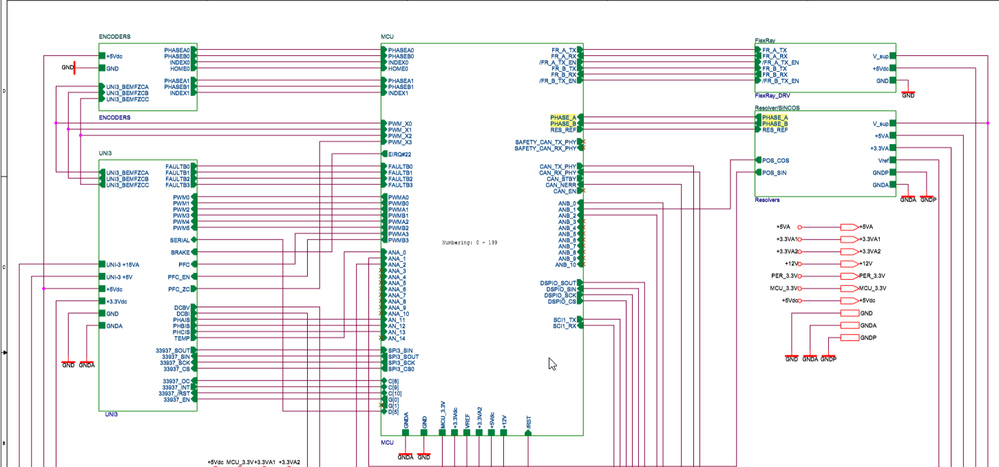
1. From the documentation of µC board(MPC5604PMCBUG),it seen that the output of resolver , PHASE_A and PHASE_B goes to µC (fig). The signals from the motor position sensors are same as these signal, so is it possible to input the signal from motor position sensor to µC through these pins.
2. If the above is not possible, then i would like to know which all are the configurable pins of the µC board so that i can input my sensor signals there.
Regards
Aparna
tomasfedor
- Mark as New
- Bookmark
- Subscribe
- Mute
- Subscribe to RSS Feed
- Permalink
- Report Inappropriate Content
Hi Aparna,
Connector J207 on MPC5604P controller board is Resolver and SinCos Sensor Interface. It is possible to use it also for SinCos sensor with appropriate settings.
I recommend MPC5604P Controller Board User’s Guide document.
https://www.nxp.com/docs/en/user-guide/MPC5604PMCBUG.pdf
Chapter 4.5 describes interface and appropriate schematics.
Best regards,
Tomas Fedor
- Mark as New
- Bookmark
- Subscribe
- Mute
- Subscribe to RSS Feed
- Permalink
- Report Inappropriate Content
Thanks for the reply Tomas Fedor!
If its okay can you please elaborate the term "appropriate settings". Did you mean making changes in program code.
Regards
Aparna
tomasfedor
- Mark as New
- Bookmark
- Subscribe
- Mute
- Subscribe to RSS Feed
- Permalink
- Report Inappropriate Content
Hi Aparna,
All settings depend on your sensor and your app requirements.
From HW perspective:
Jumpers J203, J204, J205, J206, JP200 (and potentiometer R221) is needed to be setup accord your requirements.
If you use offset for analog signal processing you can adjust offset by R209 potentiometer.
If you need to change OAMPS gain in analog signal processing it is possible to do by replacing appropriate resistors.
Jumpers description and schematic are in
https://www.nxp.com/docs/en/user-guide/MPC5604PMCBUG.pdf
From SW perspective:
Application flow, peripheral settings, resolver interface sw processing and sampling rate setting are described in:
https://www.nxp.com/docs/en/application-note/AN4561.pdf
Best regards,
Tomas Fedor.
- Mark as New
- Bookmark
- Subscribe
- Mute
- Subscribe to RSS Feed
- Permalink
- Report Inappropriate Content
Thank you very much for your reply. I was able to integrate my sensor with the system. But here i find an issue that the motor pole pair is 3, resolver pole pair is 1 and the pole pair of our newly integrated sensor is 4. The motor is controlled by default using Speed FOC which for the case of resolver uses an Angle Tracking Observer (ATO) to execute speed and position control. So this function is written for resolver with 1 pole pair. But in the code this function is called from an external library, so it cannot be edited by user. So is it possible to control the motor using the newly added sensor with 4 pole pairs ?
tomasfedor
- Mark as New
- Bookmark
- Subscribe
- Mute
- Subscribe to RSS Feed
- Permalink
- Report Inappropriate Content
Hi Aparna,
I apologize for later answer but I was on sick leave.
Yes it is possible to control the motor with 4 pole pairs sensor, but some changes are needed for code.
As you mentioned AMCLIB_TrackObsrv_F32 function is solid function from the library and it is not possible to edit the function, but you can find implementation details in library documentation MPC560XPMCLUG.pdf (this document is in folder where the library is installed)
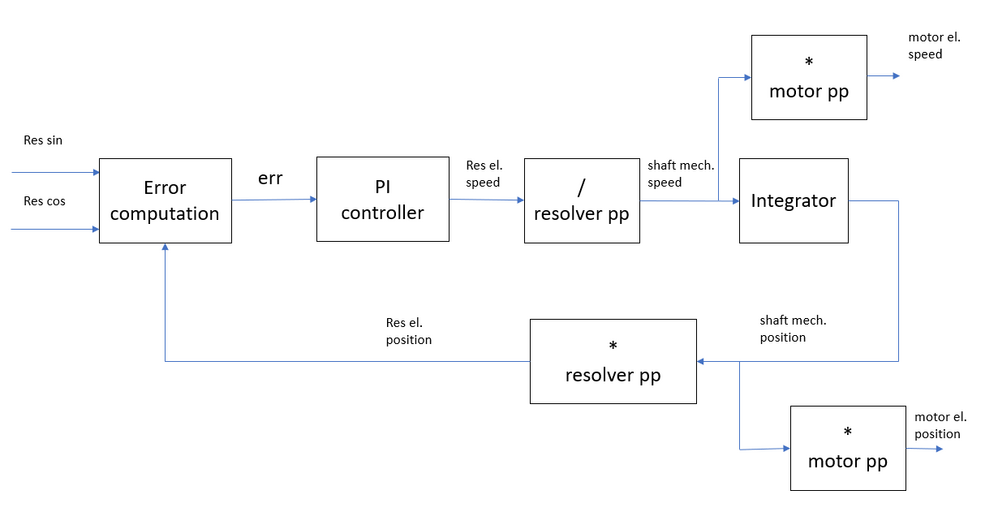
All basic blocks needed for Angle Tracking Observer (like PI controller, integrator … ) are part of the library too so you can build your own customized Angle Tracking Observer and you can use it in POSPE_GetPositionElRes function instead of AMCLIB_TrackObsrv_F32 to get shaft mechanical speed and position and then you can compute motor electrical speed and position.
I'm adding simplified block diagram to explain the idea (in real implementation all expressions must respect fraction arithmetic and appropriate scaling).
Best regards,
Tomas Fedor.
- Mark as New
- Bookmark
- Subscribe
- Mute
- Subscribe to RSS Feed
- Permalink
- Report Inappropriate Content
Thank you very much for the answer Tomas!
I went through MPC560XPMCLUG.pdf, but unfortunately i could not find any implementation details of AMCLIB_TrackObsrv_F32. And could you please explain what the symbols / and * represent in the block diagram. Are they normal multiplication and division?
tomasfedor
- Mark as New
- Bookmark
- Subscribe
- Mute
- Subscribe to RSS Feed
- Permalink
- Report Inappropriate Content
Hi Aparna,
"/" is division. For example (/ resolver pp) is division by number of resolver pole pairs.
"*" is multiplication. For example (* motor pp) is multiplication by number of motor pole pairs.
But as I mentioned before all blocks and math operations must respect fraction arithmetic and appropriate scaling.
Chapter 3.7 in MPC560XPMCLUG.pdf describes angle tracking observer.
Chapter 3.7.1 describes observer in general and chapters 3.7.3 and 3.7.4 describes Fix 32 and Fix 16 implementation.
Equations and commentary are used for functionality and coefficients explanations. Usage is shown in code example in the end of the chapter.
Best regards,
Tomas Fedor.
- Mark as New
- Bookmark
- Subscribe
- Mute
- Subscribe to RSS Feed
- Permalink
- Report Inappropriate Content
Hello Tomas,
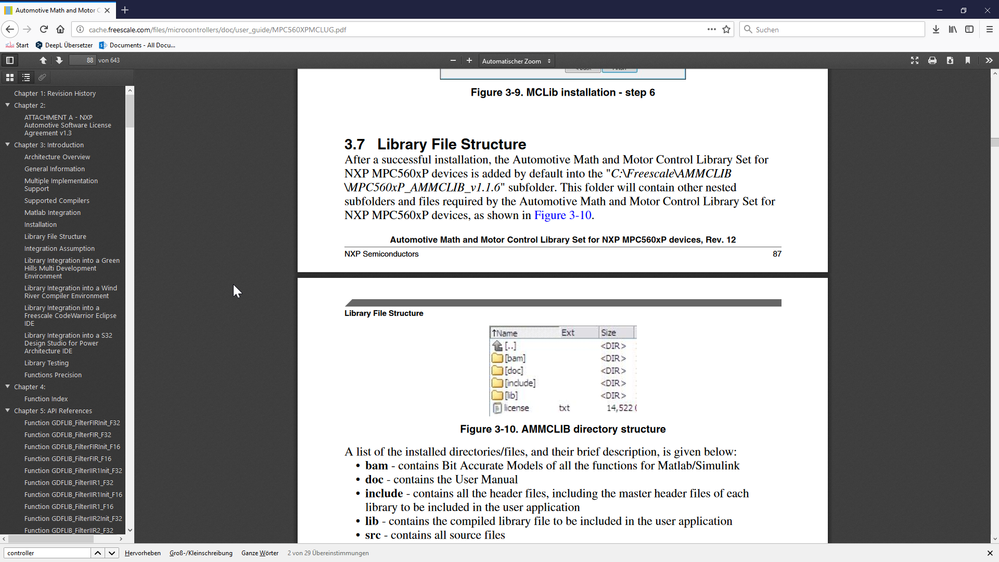
I think there was a small misunderstanding from my side about the document. I had downloaded document MPC560XPMCLUG.pdf available in (http://cache.freescale.com/files/microcontrollers/doc/user_guide/MPC560XPMCLUG.pdf ) and it showed another details. Sorry for the confusion.
Thank you very much. I shall try to implement what you have suggested.
 tomasfedor
- Mark as New
- Bookmark
- Subscribe
- Mute
- Subscribe to RSS Feed
- Permalink
- Report Inappropriate Content
You are welcome.
- Mark as New
- Bookmark
- Subscribe
- Mute
- Subscribe to RSS Feed
- Permalink
- Report Inappropriate Content
Hello Tomas,
I tried as you suggested. But i find some parts of the code difficult to understand.
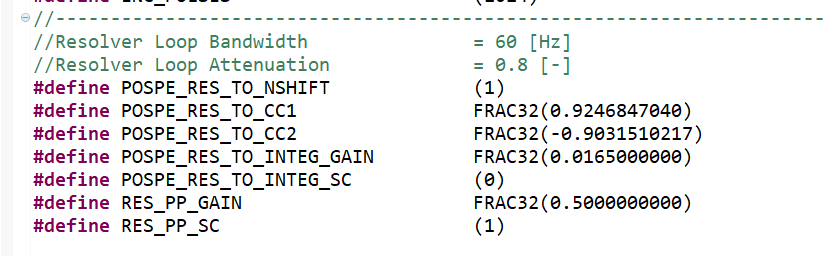
So as per my understanding, in MPC5604P_POSPE_BSP.c the electrical position (f32ThetaEl) is obtained when mechanical position (f32ThetaMech) is multiplied with motor pole pair number (pp). But in the code, the variables f32MechElScale
(FRAC32(0.75)) and u8MechElScaleShift (2) is used. Can you please explain me how does this variables are used instead of multiplication with pole pair number.
And I see that, both f32MechElScale and u8MechElScaleShift are initialised in PMSM_appconfig.h as MOTOR_PP_GAIN and MOTOR_PP_SHIFT. And I see that similar variables are there for resolver too (RES_PP_GAIN, RES_PP_SC), so I thought I could use these variables for ATO modification instead of multiplying directly with Resolver pole pair number. But I really not sure how does it work. So can you pleas explain me about this.

 tomasfedor
- Mark as New
- Bookmark
- Subscribe
- Mute
- Subscribe to RSS Feed
- Permalink
- Report Inappropriate Content
Hi Aparna,
yes electrical position (f32ThetaEl) is obtained when mechanical position (f32ThetaMech) is multiplied with motor pole pair number (pp). But this multiplication is done in fraction arithmetic. In this case motor pole pair number is 3. Fixed point 32 bit fractional numbers are in range <-1,1). You can find in MPC560XPMCLUG.pdf chapter 2.2. Motor pole pair number is split into f32MechElScale =FRAC32(0.75)) and u8MechElScaleShift =2.
0.75*(2^2) = 3
x*2^2=LeftShift(x,2)
so multiplication is done in 2 steps.
Step1: Multiplication of Fraction numbers f32MechElScale and f32ThetaMech. Booth numbers are in range <-1,1) as well as result.
Step2: Left shift.
ptr->f32ThetaEl = MLIB_ShL((MLIB_Mul(ptr->f32MechElScale,ptr->f32ThetaMech)),(ptr->u8MechElScaleShift));
Moreover wrapping is ensured by this approach.
Best regards,
Tomas Fedor.
- Mark as New
- Bookmark
- Subscribe
- Mute
- Subscribe to RSS Feed
- Permalink
- Report Inappropriate Content
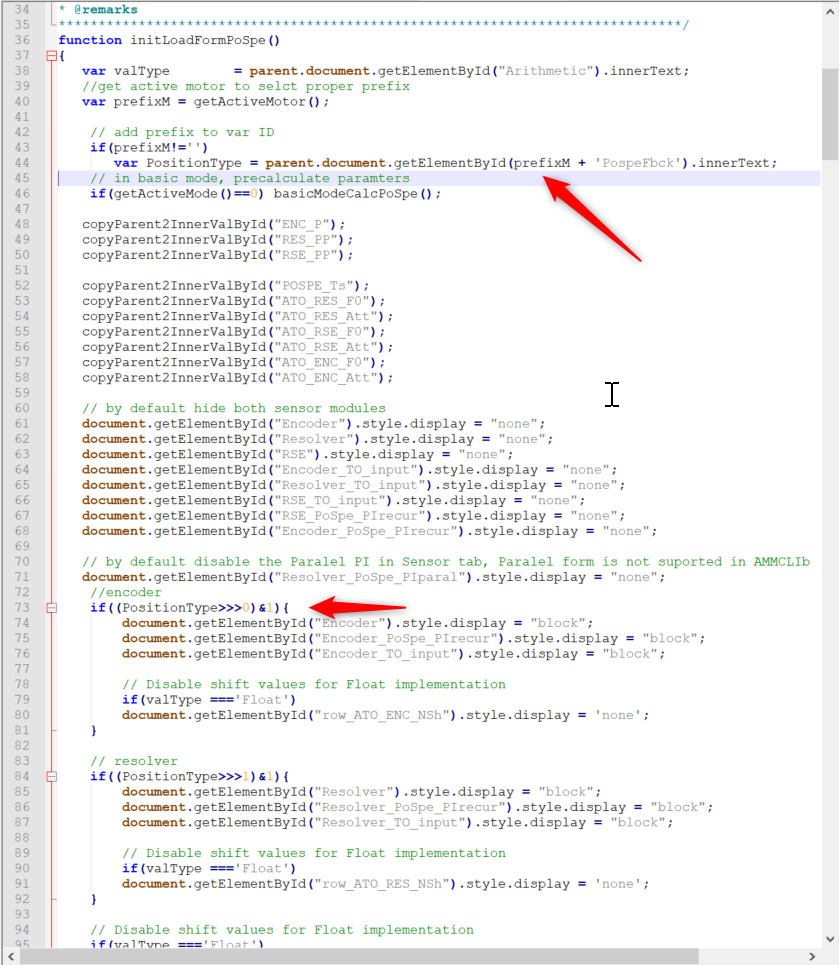
Thank you Tomas, I derived this by trial and error in the meantime and i was able to get output for both speed and angle signal from our newly added sensor. But only when i select resolver in Freemaster. So i created a new variable in JavaScript for the new sensor and was added to each page . I then found a variable "PositionType" which is used in many .js functions in the "if" condition to select sensor. I couldn't find what it stands for. I tried using "Typeof" operator and it shows the type as "undefined". Could you please check on this and let me know what variable is that and how is it possible to add new sensor to it.
 tomasfedor
- Mark as New
- Bookmark
- Subscribe
- Mute
- Subscribe to RSS Feed
- Permalink
- Report Inappropriate Content
Hi Aparna,
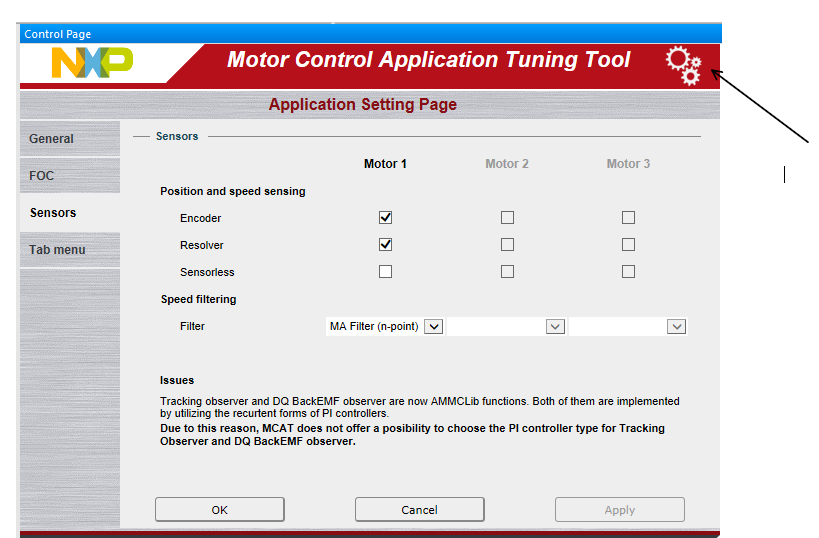
Lines 73 and 84 test whether encoder and resolver are selected. You can open application setting by pressing settings button.
But what is the motivation of editing pages and JavaScript files?
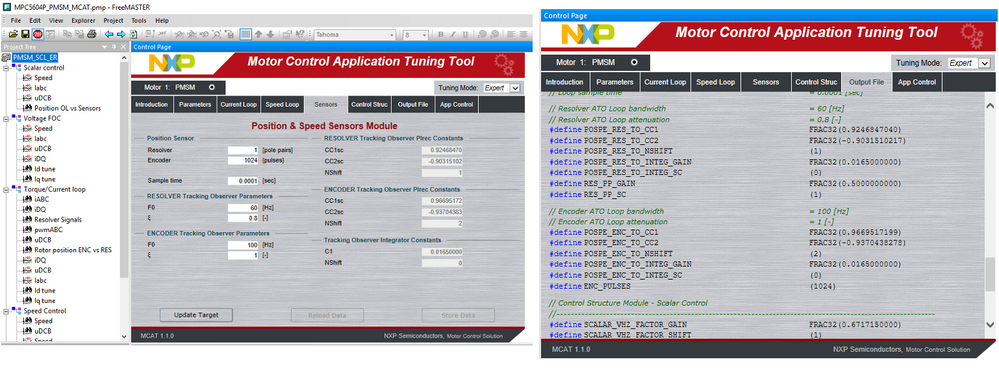
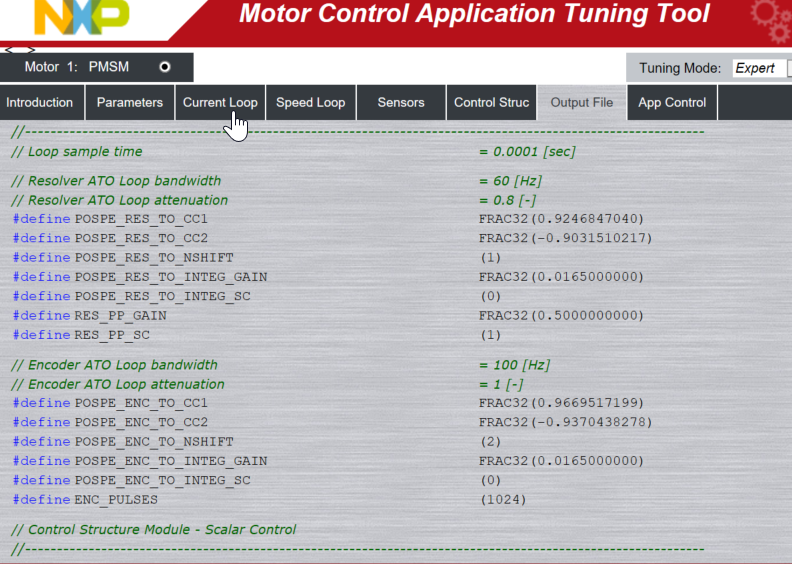
You can use sensors tab for constants calculation and you can use these constants (stored in output file) in your application.
Best regards,
Tomas Fedor.
- Mark as New
- Bookmark
- Subscribe
- Mute
- Subscribe to RSS Feed
- Permalink
- Report Inappropriate Content
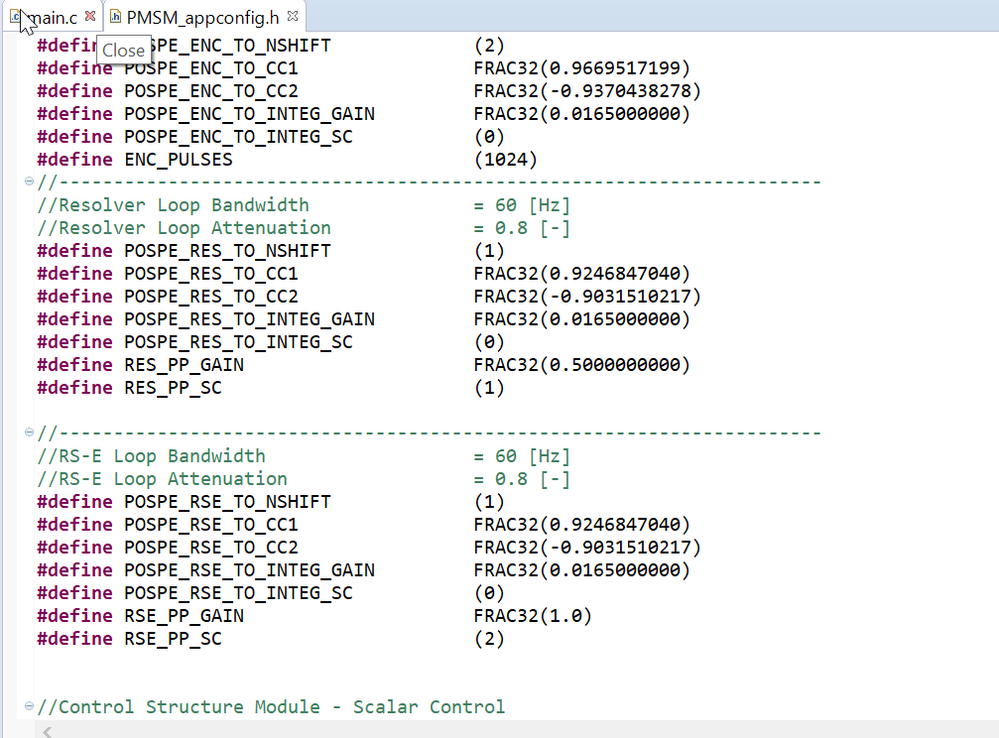
Thanks for the reply Tomas. The reason why i thought of changing js files is that even after adding new sensor in S32 design studio- PMSM_appconfig.h the values for newly added sensor was not seen in freemaster. Is this has to do something with the js files? I thought i might have to make changes there as well and i found it has only 2 sensors everywhere and i may have to make changes to add the new sensor.
 tomasfedor
- Mark as New
- Bookmark
- Subscribe
- Mute
- Subscribe to RSS Feed
- Permalink
- Report Inappropriate Content
Hi Aparna,
if you press store data button constants will be stored to "output file" tab and when you press "Generate configuration file" button constants from "output file" tab will be stored to PMSM_appconfing.h file and you can use them in your Design Studio project.

Best regards,
Tomas Fedor.
- Mark as New
- Bookmark
- Subscribe
- Mute
- Subscribe to RSS Feed
- Permalink
- Report Inappropriate Content
Hi Tomas, Yes, i understand what you are saying, this could be done if we have just 2 sensors. I have added a third sensor externally and want to compare it with output of resolver. So the details of third sensor is not present in Freemaster. So does it automatically get updated in Freemaster or should i make changes in js, html or xml files.
tomasfedor
- Mark as New
- Bookmark
- Subscribe
- Mute
- Subscribe to RSS Feed
- Permalink
- Report Inappropriate Content
Hi Aparna,
yes MCAT doesn't offer possibility of having 2 resolvers for one motor. But you could use a workaround.
It is possible to add second motor by selecting "dual motor" in Application setting page->general->number of motors and add resolver to second motor.
There will be 2 motors in MCAT and it will generate (by pressing "Generate Configuration File" in "output file" tab for every motor) M1_PMSM_appconfig.h and M2_PMSM_appconfig.h instead of one PMSM_appconfig.h .
You can use generated constants for new sensor from M2_PMSM_appconfig.h.
Waveform visualization is task of Freemaster (Mcat is for constants calculation and tunning).
You can use scope or recorder for waveform visualization. Any global variable from the Design Studio project can be added as freemaster variable and you can see its value in Variable Watch, recorder or scope. You can find more details in freemaster user guide. Pdf document is installed with your Freemaster.
MCAT can update some variables during run time by pressing "Update Target" button. It is good feature for online tuning.
Relation between MCAT and Freemaster variables is given by FM_params_list.xml and generated constants naming is given by Header_file_constant_list.xml.
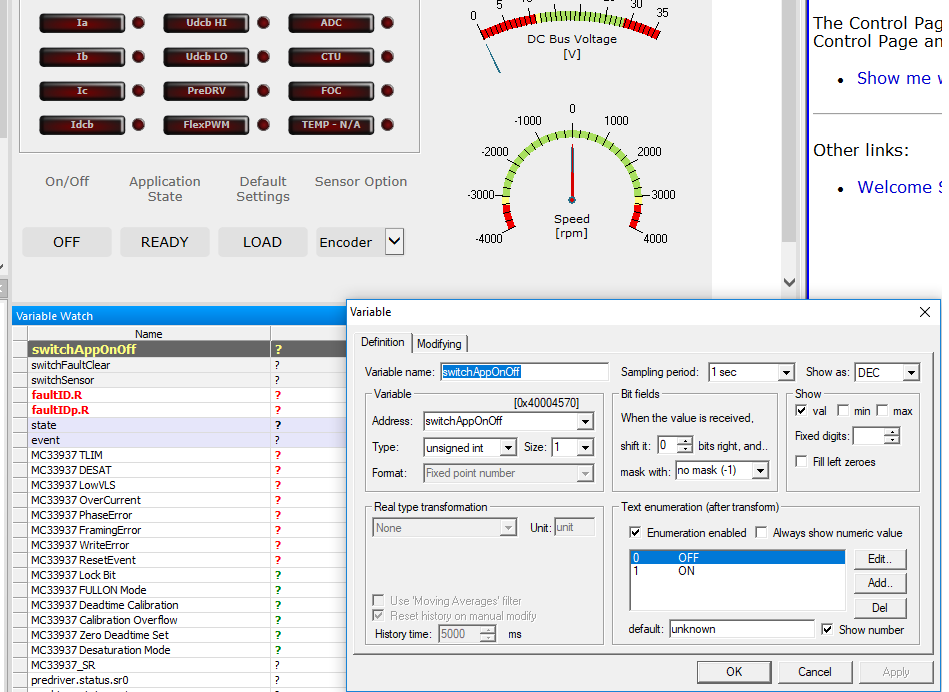
Example of on/off button in app control tab:
You can find line in FM_params_list.xml:
<M1_onoff>switchAppOnOff</M1_onoff><!-- Main application switch of MOTOR1 -->
what means MCAT onoff for motor 1 controls Freemaster variable switchAppOnOff.
Freemaster variable switchAppOnOf covers embedded variable switchAppOnOf (address 0x40004570).
Best regards,
Tomas Fedor.
