解决双击eww文件无法同时打开多个IAR工程的问题

cancel
Showing results for 
Show  only  | Search instead for 
Did you mean: 

解决双击eww文件无法同时打开多个IAR工程的问题

解决双击eww文件无法同时打开多个IAR工程的问题

        IAR使用过程中有一点不太方便的是:当我们打开一个工程之后,如果再直接双击其他eww文件试图打开另外的工程,那么原来的工程就会被覆盖。解决这个问题的方法是:

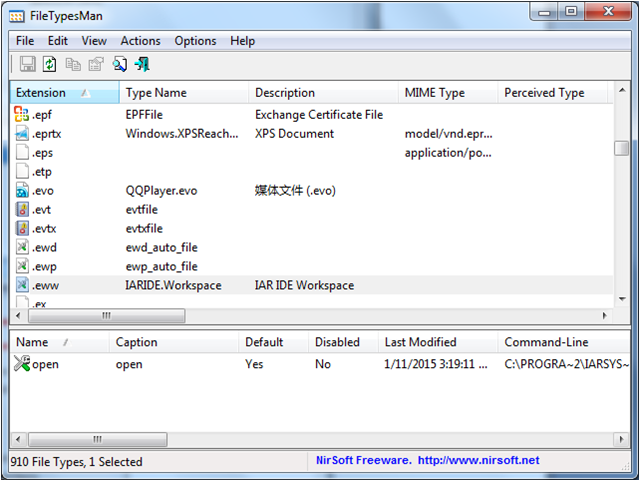
       1. 双击FileTypesMan.exe(该软件见附件,32位系统请解压filetypesman_x86.zip文件,64位系统请解压filetypesman_x64.zip文件)。打开该软件之后,找到.eww 格式并单击一下,显示界面如下图所示:
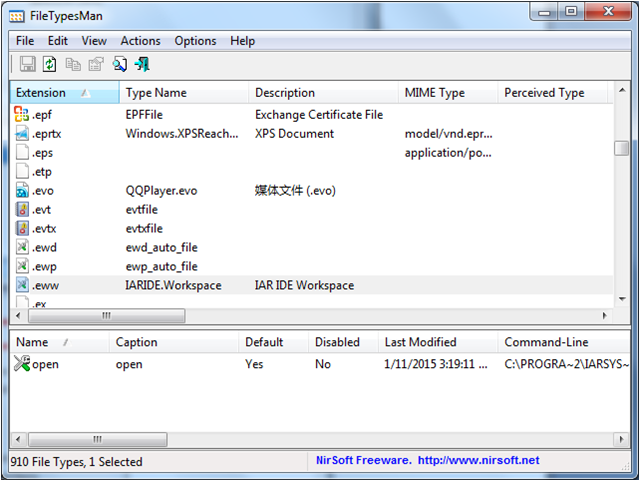
       18690_18690.png1.png

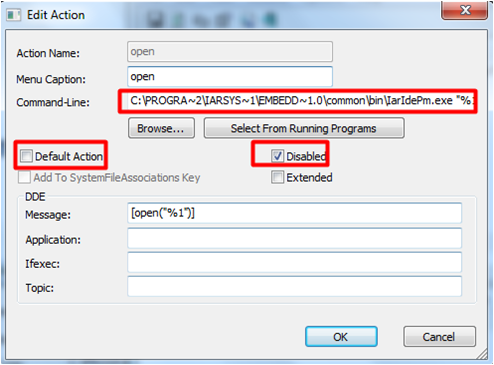
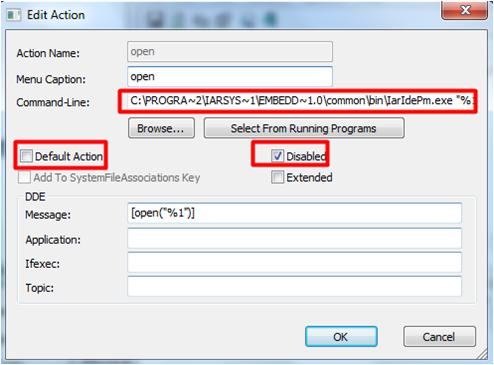
     2. 双击open 所在行,对此条目进行更改,将Command-Line 中的内容:C:\PROGRA~2\IARSYS~1\EMBEDD~1.0\common\bin\IarIdePm.exe "%1" 先复制出来,Default Action 不选,Disable勾选,如下图所示:
    18691_18691.png2.png

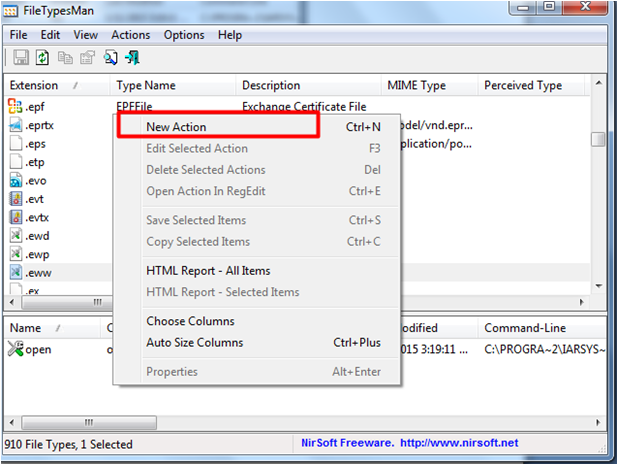
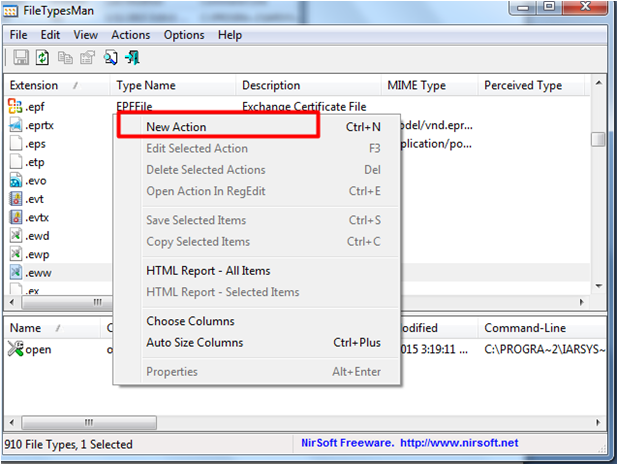
  3.在FileTypesMan界面的下方区域点击右键,选择New Action,如下图所示:
 

    18692_18692.png3.png


   4.新建action 如下图所示,Action Name和Menu Caption 可随便命名,Command-Line 将上一步复制的内容粘贴过来即可。Default Action 勾选,Disable不选。
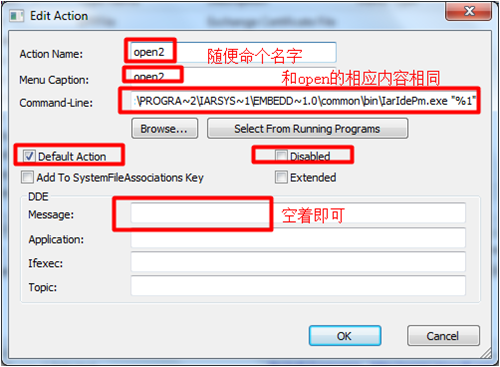
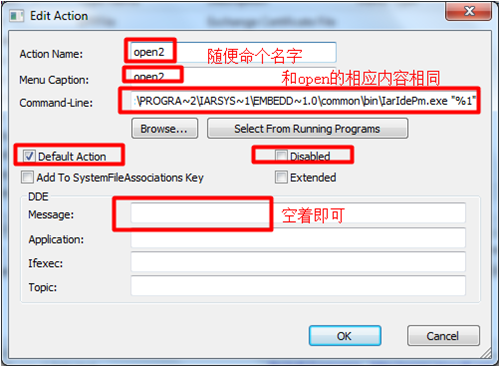
  18693_18693.png4.png


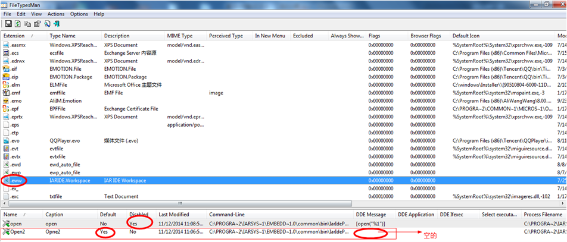
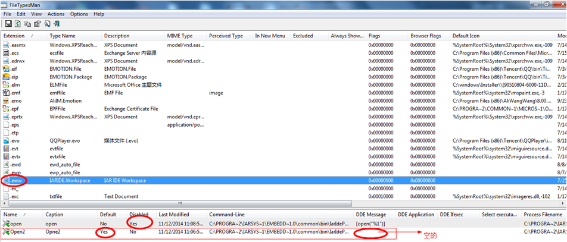
     5. 最后配置如下图所示:

   18694_18694.pnguntitled.png

   经过以上简单设置之后,就可以通过直接双击eww文件打开多个工程了。


Original Attachment has been moved to: filetypesman_x64.zip

Original Attachment has been moved to: filetypesman_x86.zip

Tags (1)
Comments

其实还有个比较简单的双开IAR的方法:

1. 双击桌面的IAR图标然后拖把eww的文件拖拽到IAR中,打开第一个工程。

2. 再双击桌面的IAR图标,系统会自动打开第二个IAR环境,然后把需要打开的第二个eww工程拖进该IAR。

这个方法也挺方便。:smileylaugh:

比较有用。虽然能同时打开两个工程文件,但打开的第二个工程文件中点击变量的定义索引就不起作用了。不知道这是为什么

%3CLINGO-SUB%20id%3D%22lingo-sub-1119046%22%20slang%3D%22zh-CN%22%20mode%3D%22CREATE%22%3ESolve%20the%20problem%20that%20double-clicking%20the%20eww%20file%20cannot%20open%20multiple%20IAR%20projects%20at%20the%20same%20time%3C%2FLINGO-SUB%3E%3CLINGO-BODY%20id%3D%22lingo-body-1119046%22%20slang%3D%22zh-CN%22%20mode%3D%22CREATE%22%3E%26lt%3Bmeta%20http-equiv%3D%22Content-Type%22%20content%3D%22text%2Fhtml%3B%20charset%3Dutf-8%22%20%2F%26gt%3B%0A%3CP%3E%3CSPAN%20style%3D%22font-size%3A%2012pt%3B%22%3EOne%20inconvenience%20in%20using%20IAR%20is%20that%20after%20opening%20a%20project%2C%20if%20we%20double-click%20another%20eww%20file%20to%20try%20to%20open%20another%20project%2C%20the%20original%20project%20will%20be%20overwritten.%20The%20solution%20to%20this%20problem%20is%3A%3C%2FSPAN%3E%3C%2FP%3E%3CP%3E%3CSPAN%20style%3D%22font-size%3A%2012pt%3B%22%3E1.%20Double-click%20FileTypesMan.exe%20(see%20the%20attachment%20for%20the%20software.%20For%2032-bit%20systems%2C%20please%20unzip%20the%20filetypesman_x86.zip%20file.%20For%2064-bit%20systems%2C%20please%20unzip%20the%20filetypesman_x64.zip%20file).%20After%20opening%20the%20software%2C%20find%20.eww%20Format%20and%20click%20once%2C%20the%20interface%20will%20be%20displayed%20as%20shown%20below%3A%3C%2FSPAN%3E%3C%2FP%3E%3CP%3E%3CSPAN%20style%3D%22font-size%3A%2012pt%3B%22%3E%26nbsp%3B%26nbsp%3B%26nbsp%3B%26nbsp%3B%26nbsp%3B%26nbsp%3B%20%3CSPAN%20class%3D%22lia-inline-image-display-wrapper%22%20image-alt%3D%2218690_18690.png%22%3E%3Cspan%20class%3D%22lia-inline-image-display-wrapper%22%20image-alt%3D%2218690_18690.png%22%20style%3D%22width%3A%20640px%3B%22%3E%3Cimg%20src%3D%22https%3A%2F%2Fcommunity.nxp.com%2Ft5%2Fimage%2Fserverpage%2Fimage-id%2F118298i5A22C88CB090FE9B%2Fimage-size%2Flarge%3Fv%3Dv2%26amp%3Bpx%3D999%22%20role%3D%22button%22%20title%3D%2218690_18690.png%22%20alt%3D%2218690_18690.png%22%20%2F%3E%3C%2Fspan%3E%3C%2FSPAN%3E%3CSPAN%20class%3D%22lia-inline-image-display-wrapper%22%20image-alt%3D%221.png%22%3E%3Cspan%20class%3D%22lia-inline-image-display-wrapper%22%20image-alt%3D%221.png%22%20style%3D%22width%3A%20640px%3B%22%3E%3Cimg%20src%3D%22https%3A%2F%2Fcommunity.nxp.com%2Ft5%2Fimage%2Fserverpage%2Fimage-id%2F111157i5D0FB7899D9ECBBD%2Fimage-size%2Flarge%3Fv%3Dv2%26amp%3Bpx%3D999%22%20role%3D%22button%22%20title%3D%221.png%22%20alt%3D%221.png%22%20%2F%3E%3C%2Fspan%3E%3C%2FSPAN%3E%3C%2FSPAN%3E%3C%2FP%3E%3CP%3E%3CSPAN%20style%3D%22font-size%3A%2012pt%3B%22%3E2.%20Double-click%20the%20line%20where%20open%20is%20located%2C%20modify%20this%20entry%2C%20copy%20the%20content%20in%20Command-Line%3A%20C%3A%5CPROGRA~2%5CIARSYS~1%5CEMBEDD~1.0%5Ccommon%5Cbin%5CIarIdePm.exe%20%22%251%22%20first%2C%20uncheck%20Default%20Action%20and%20check%20Disable%2C%20as%20shown%20below%3A%3C%2FSPAN%3E%3C%2FP%3E%3CP%3E%3CSPAN%20style%3D%22font-size%3A%2012pt%3B%22%3E%26nbsp%3B%26nbsp%3B%26nbsp%3B%20%3CSPAN%20class%3D%22lia-inline-image-display-wrapper%22%20image-alt%3D%2218691_18691.png%22%3E%3Cspan%20class%3D%22lia-inline-image-display-wrapper%22%20image-alt%3D%2218691_18691.png%22%20style%3D%22width%3A%20494px%3B%22%3E%3Cimg%20src%3D%22https%3A%2F%2Fcommunity.nxp.com%2Ft5%2Fimage%2Fserverpage%2Fimage-id%2F118299i5EFBA68ECB7F794C%2Fimage-size%2Flarge%3Fv%3Dv2%26amp%3Bpx%3D999%22%20role%3D%22button%22%20title%3D%2218691_18691.png%22%20alt%3D%2218691_18691.png%22%20%2F%3E%3C%2Fspan%3E%3C%2FSPAN%3E%3CSPAN%20class%3D%22lia-inline-image-display-wrapper%22%20image-alt%3D%222.png%22%3E%3Cspan%20class%3D%22lia-inline-image-display-wrapper%22%20image-alt%3D%222.png%22%20style%3D%22width%3A%20494px%3B%22%3E%3Cimg%20src%3D%22https%3A%2F%2Fcommunity.nxp.com%2Ft5%2Fimage%2Fserverpage%2Fimage-id%2F111158i92C976ABD3AA005D%2Fimage-size%2Flarge%3Fv%3Dv2%26amp%3Bpx%3D999%22%20role%3D%22button%22%20title%3D%222.png%22%20alt%3D%222.png%22%20%2F%3E%3C%2Fspan%3E%3C%2FSPAN%3E%3C%2FSPAN%3E%3C%2FP%3E%3CP%3E%3CSPAN%20style%3D%22font-size%3A%2012pt%3B%22%3E3.%20Right-click%20in%20the%20lower%20area%20of%20the%20FileTypesMan%20interface%20and%20select%20New%20Action%2C%20as%20shown%20below%3A%3C%2FSPAN%3E%3C%2FP%3E%3CP%20style%3D%22min-height%3A%208pt%3B%20padding%3A%200px%3B%22%3E%20%26nbsp%3B%3C%2FP%3E%3CP%3E%3CSPAN%20style%3D%22font-size%3A%2012pt%3B%22%3E%26nbsp%3B%26nbsp%3B%26nbsp%3B%20%3CSPAN%20class%3D%22lia-inline-image-display-wrapper%22%20image-alt%3D%2218692_18692.png%22%3E%3Cspan%20class%3D%22lia-inline-image-display-wrapper%22%20image-alt%3D%2218692_18692.png%22%20style%3D%22width%3A%20618px%3B%22%3E%3Cimg%20src%3D%22https%3A%2F%2Fcommunity.nxp.com%2Ft5%2Fimage%2Fserverpage%2Fimage-id%2F118300i5D0614218CDBD2DF%2Fimage-size%2Flarge%3Fv%3Dv2%26amp%3Bpx%3D999%22%20role%3D%22button%22%20title%3D%2218692_18692.png%22%20alt%3D%2218692_18692.png%22%20%2F%3E%3C%2Fspan%3E%3C%2FSPAN%3E%3CSPAN%20class%3D%22lia-inline-image-display-wrapper%22%20image-alt%3D%223.png%22%3E%3Cspan%20class%3D%22lia-inline-image-display-wrapper%22%20image-alt%3D%223.png%22%20style%3D%22width%3A%20618px%3B%22%3E%3Cimg%20src%3D%22https%3A%2F%2Fcommunity.nxp.com%2Ft5%2Fimage%2Fserverpage%2Fimage-id%2F22323iE0E91F611704239F%2Fimage-size%2Flarge%3Fv%3Dv2%26amp%3Bpx%3D999%22%20role%3D%22button%22%20title%3D%223.png%22%20alt%3D%223.png%22%20%2F%3E%3C%2Fspan%3E%3C%2FSPAN%3E%3C%2FSPAN%3E%3C%2FP%3E%3CP%20style%3D%22min-height%3A%208pt%3B%20padding%3A%200px%3B%22%3E%20%26nbsp%3B%3C%2FP%3E%3CP%3E%3CSPAN%20style%3D%22font-size%3A%2012pt%3B%22%3E4.%20Create%20a%20new%20action%20as%20shown%20below.%20You%20can%20name%20the%20Action%20Name%20and%20Menu%20Caption%20as%20you%20like.%20Use%20Command-Line%20to%20paste%20the%20content%20copied%20in%20the%20previous%20step.%20Check%20Default%20Action%20and%20uncheck%20Disable.%3C%2FSPAN%3E%3C%2FP%3E%3CP%3E%3CSPAN%20style%3D%22font-size%3A%2012pt%3B%22%3E%26nbsp%3B%20%3CSPAN%20class%3D%22lia-inline-image-display-wrapper%22%20image-alt%3D%2218693_18693.png%22%3E%3Cspan%20class%3D%22lia-inline-image-display-wrapper%22%20image-alt%3D%2218693_18693.png%22%20style%3D%22width%3A%20500px%3B%22%3E%3Cimg%20src%3D%22https%3A%2F%2Fcommunity.nxp.com%2Ft5%2Fimage%2Fserverpage%2Fimage-id%2F118301i9E7BA15D31D56CB2%2Fimage-size%2Flarge%3Fv%3Dv2%26amp%3Bpx%3D999%22%20role%3D%22button%22%20title%3D%2218693_18693.png%22%20alt%3D%2218693_18693.png%22%20%2F%3E%3C%2Fspan%3E%3C%2FSPAN%3E%3CSPAN%20class%3D%22lia-inline-image-display-wrapper%22%20image-alt%3D%224.png%22%3E%3Cspan%20class%3D%22lia-inline-image-display-wrapper%22%20image-alt%3D%224.png%22%20style%3D%22width%3A%20500px%3B%22%3E%3Cimg%20src%3D%22https%3A%2F%2Fcommunity.nxp.com%2Ft5%2Fimage%2Fserverpage%2Fimage-id%2F22269iE46FC988F528A684%2Fimage-size%2Flarge%3Fv%3Dv2%26amp%3Bpx%3D999%22%20role%3D%22button%22%20title%3D%224.png%22%20alt%3D%224.png%22%20%2F%3E%3C%2Fspan%3E%3C%2FSPAN%3E%3C%2FSPAN%3E%3C%2FP%3E%3CP%20style%3D%22min-height%3A%208pt%3B%20padding%3A%200px%3B%22%3E%20%26nbsp%3B%3C%2FP%3E%3CP%3E%3CSPAN%20style%3D%22font-size%3A%2012pt%3B%22%3E5.%20%3CSPAN%20lang%3D%22ZH-CN%22%20style%3D%22font-family%3A%20%E5%AE%8B%E4%BD%93%3B%22%3EThe%20final%20configuration%20is%20shown%20in%20the%20figure%20below%3A%3C%2FSPAN%3E%3C%2FSPAN%3E%3C%2FP%3E%3CP%3E%3CSPAN%20style%3D%22font-size%3A%2012pt%3B%22%3E%26nbsp%3B%26nbsp%3B%20%3CSPAN%20class%3D%22lia-inline-image-display-wrapper%22%20image-alt%3D%2218694_18694.png%22%3E%3Cspan%20class%3D%22lia-inline-image-display-wrapper%22%20image-alt%3D%2218694_18694.png%22%20style%3D%22width%3A%20567px%3B%22%3E%3Cimg%20src%3D%22https%3A%2F%2Fcommunity.nxp.com%2Ft5%2Fimage%2Fserverpage%2Fimage-id%2F118302i6508BD6879A68E9F%2Fimage-size%2Flarge%3Fv%3Dv2%26amp%3Bpx%3D999%22%20role%3D%22button%22%20title%3D%2218694_18694.png%22%20alt%3D%2218694_18694.png%22%20%2F%3E%3C%2Fspan%3E%3C%2FSPAN%3E%3CSPAN%20class%3D%22lia-inline-image-display-wrapper%22%20image-alt%3D%22untitled.png%22%3E%3Cspan%20class%3D%22lia-inline-image-display-wrapper%22%20image-alt%3D%22untitled.png%22%20style%3D%22width%3A%20567px%3B%22%3E%3Cimg%20src%3D%22https%3A%2F%2Fcommunity.nxp.com%2Ft5%2Fimage%2Fserverpage%2Fimage-id%2F111159iC2C47EAED4383D1F%2Fimage-size%2Flarge%3Fv%3Dv2%26amp%3Bpx%3D999%22%20role%3D%22button%22%20title%3D%22untitled.png%22%20alt%3D%22untitled.png%22%20%2F%3E%3C%2Fspan%3E%3C%2FSPAN%3E%3C%2FSPAN%3E%3C%2FP%3E%3CP%3E%3CSPAN%20style%3D%22font-size%3A%2012pt%3B%22%3EAfter%20the%20above%20simple%20settings%2C%20you%20can%20%3CSPAN%20lang%3D%22ZH-CN%22%20style%3D%22font-family%3A%20%E5%AE%8B%E4%BD%93%3B%22%3Eopen%20multiple%20projects%20by%20directly%20double-clicking%20the%20eww%20file.%3C%2FSPAN%3E%3C%2FSPAN%3E%3C%2FP%3E%3CP%3E%3CSPAN%20style%3D%22font-size%3A%2012pt%3B%22%3E%26nbsp%3B%20%3C%2FSPAN%3E%3C%2FP%3E%3CP%20style%3D%22min-height%3A%208pt%3B%20padding%3A%200px%3B%22%3E%20%26nbsp%3B%3C%2FP%3E%3CP%20style%3D%22min-height%3A%208pt%3B%20padding%3A%200px%3B%22%3E%20%26nbsp%3B%3C%2FP%3E%3CP%20style%3D%22min-height%3A%208pt%3B%20padding%3A%200px%3B%22%3E%20%26nbsp%3B%3C%2FP%3E%3CP%20style%3D%22min-height%3A%208pt%3B%20padding%3A%200px%3B%22%3E%26nbsp%3B%3C%2FP%3E%3CP%3E%3CSPAN%20style%3D%22font-size%3A%2012pt%3B%22%3E%26nbsp%3B%26nbsp%3B%26nbsp%3B%26nbsp%3B%20%3C%2FSPAN%3E%3C%2FP%3E%3CP%20style%3D%22min-height%3A%208pt%3B%20padding%3A%200px%3B%22%3E%26nbsp%3B%3C%2FP%3E%3CP%3E%3CSTRONG%3EOriginal%20Attachment%20has%20been%20moved%20to%3A%20%3CA%20_jive_internal%3D%22true%22%20href%3D%22https%3A%2F%2Fcommunity.nxp.com%2Fdocs%2FDOC-339665%22%20target%3D%22_blank%22%3Efiletypesman_x64.zip%3C%2FA%3E%3C%2FSTRONG%3E%3C%2FP%3E%3CP%3E%3CSTRONG%3EOriginal%20Attachment%20has%20been%20moved%20to%3A%20%3CA%20_jive_internal%3D%22true%22%20href%3D%22https%3A%2F%2Fcommunity.nxp.com%2Fdocs%2FDOC-339665%22%20target%3D%22_blank%22%3Efiletypesman_x86.zip%3C%2FA%3E%3C%2FSTRONG%3E%3C%2FP%3E%3C%2FLINGO-BODY%3E%3CLINGO-SUB%20id%3D%22lingo-sub-1119049%22%20slang%3D%22zh-CN%22%20mode%3D%22CREATE%22%3ERe%3A%20Solve%20the%20problem%20that%20double%20clicking%20eww%20file%20cannot%20open%20multiple%20IAR%20projects%20at%20the%20same%20time%3C%2FLINGO-SUB%3E%3CLINGO-BODY%20id%3D%22lingo-body-1119049%22%20slang%3D%22zh-CN%22%20mode%3D%22CREATE%22%3E%26lt%3Bmeta%20http-equiv%3D%22Content-Type%22%20content%3D%22text%2Fhtml%3B%20charset%3Dutf-8%22%20%2F%26gt%3B%0A%3CP%3EIt%20is%20quite%20useful.%20Although%20two%20project%20files%20can%20be%20opened%20at%20the%20same%20time%2C%20clicking%20the%20definition%20index%20of%20the%20variable%20in%20the%20second%20project%20file%20does%20not%20work.%20I%20don't%20know%20why%20this%20is%3C%2FP%3E%3C%2FLINGO-BODY%3E%3CLINGO-SUB%20id%3D%22lingo-sub-1119048%22%20slang%3D%22zh-CN%22%20mode%3D%22CREATE%22%3ERe%3A%20Solve%20the%20problem%20that%20double%20clicking%20eww%20file%20cannot%20open%20multiple%20IAR%20projects%20at%20the%20same%20time%3C%2FLINGO-SUB%3E%3CLINGO-BODY%20id%3D%22lingo-body-1119048%22%20slang%3D%22zh-CN%22%20mode%3D%22CREATE%22%3E%26lt%3Bmeta%20http-equiv%3D%22Content-Type%22%20content%3D%22text%2Fhtml%3B%20charset%3Dutf-8%22%20%2F%26gt%3B%0A%3CP%3EThis%20method%20is%20also%20very%20convenient.%20%3Asmileylaugh%3A%3C%2FP%3E%3C%2FLINGO-BODY%3E%3CLINGO-SUB%20id%3D%22lingo-sub-1119047%22%20slang%3D%22zh-CN%22%20mode%3D%22CREATE%22%3ERe%3A%20Solve%20the%20problem%20that%20double%20clicking%20eww%20file%20cannot%20open%20multiple%20IAR%20projects%20at%20the%20same%20time%3C%2FLINGO-SUB%3E%3CLINGO-BODY%20id%3D%22lingo-body-1119047%22%20slang%3D%22zh-CN%22%20mode%3D%22CREATE%22%3E%26lt%3Bmeta%20http-equiv%3D%22Content-Type%22%20content%3D%22text%2Fhtml%3B%20charset%3Dutf-8%22%20%2F%26gt%3B%0A%3CP%3EIn%20fact%2C%20there%20is%20a%20relatively%20simple%20method%20to%20open%20IAR%20twice%3A%3C%2FP%3E%3CP%3E1.%20Double-click%20the%20IAR%20icon%20on%20the%20desktop%20and%20drag%20the%20eww%20file%20into%20IAR%20to%20open%20the%20first%20project.%3C%2FP%3E%3CP%3E2.%20Double-click%20the%20IAR%20icon%20on%20the%20desktop%2C%20the%20system%20will%20automatically%20open%20the%20second%20IAR%20environment%2C%20and%20then%20drag%20the%20second%20eww%20project%20to%20be%20opened%20into%20the%20IAR.%3C%2FP%3E%3C%2FLINGO-BODY%3E
No ratings
Version history
Last update:
‎01-15-2015 09:24 AM
Updated by: