
- Forums
- Product Forums
- General Purpose MicrocontrollersGeneral Purpose Microcontrollers
- i.MX Forumsi.MX Forums
- QorIQ Processing PlatformsQorIQ Processing Platforms
- Identification and SecurityIdentification and Security
- Power ManagementPower Management
- Wireless ConnectivityWireless Connectivity
- RFID / NFCRFID / NFC
- Advanced AnalogAdvanced Analog
- Neural Processing UnitsNeural Processing Units
- MCX Microcontrollers
- S32G
- S32K
- S32V
- MPC5xxx
- Other NXP Products
- S12 / MagniV Microcontrollers
- Powertrain and Electrification Analog Drivers
- Sensors
- Vybrid Processors
- Digital Signal Controllers
- 8-bit Microcontrollers
- ColdFire/68K Microcontrollers and Processors
- PowerQUICC Processors
- OSBDM and TBDML
- S32M
- S32Z/E
-
- Solution Forums
- Software Forums
- MCUXpresso Software and ToolsMCUXpresso Software and Tools
- CodeWarriorCodeWarrior
- MQX Software SolutionsMQX Software Solutions
- Model-Based Design Toolbox (MBDT)Model-Based Design Toolbox (MBDT)
- FreeMASTER
- eIQ Machine Learning Software
- Embedded Software and Tools Clinic
- S32 SDK
- S32 Design Studio
- GUI Guider
- Zephyr Project
- Voice Technology
- Application Software Packs
- Secure Provisioning SDK (SPSDK)
- Processor Expert Software
- Generative AI & LLMs
-
- Topics
- Mobile Robotics - Drones and RoversMobile Robotics - Drones and Rovers
- NXP Training ContentNXP Training Content
- University ProgramsUniversity Programs
- Rapid IoT
- NXP Designs
- SafeAssure-Community
- OSS Security & Maintenance
- Using Our Community
-
- Cloud Lab Forums
-
- Knowledge Bases
- ARM Microcontrollers
- i.MX Processors
- Identification and Security
- Model-Based Design Toolbox (MBDT)
- QorIQ Processing Platforms
- S32 Automotive Processing Platform
- Wireless Connectivity
- CodeWarrior
- MCUXpresso Suite of Software and Tools
- MQX Software Solutions
- RFID / NFC
- Advanced Analog
- Neural Processing Units
-
- NXP Tech Blogs
- Home
- :
- General Purpose Microcontrollers
- :
- LPC Microcontrollers
- :
- How do I retrieve the binary data from Flash?
How do I retrieve the binary data from Flash?
- Subscribe to RSS Feed
- Mark Topic as New
- Mark Topic as Read
- Float this Topic for Current User
- Bookmark
- Subscribe
- Mute
- Printer Friendly Page

- Mark as New
- Bookmark
- Subscribe
- Mute
- Subscribe to RSS Feed
- Permalink
- Report Inappropriate Content
How do I retrieve the binary data from the flash on the chip?
IDE is LPCXpresso 7.0.0 and chip is LPC1763.
I need to maintain old product but there is no source and binary file are backed up, so before I load the new binary on the flash, I wanted to retrieve the data from the flash in case.
Regards
Solved! Go to Solution.

 Alexis_A
- Mark as New
- Bookmark
- Subscribe
- Mute
- Subscribe to RSS Feed
- Permalink
- Report Inappropriate Content
Hello [email protected],
To do this please follow these steps:
Using ISP:
- Connect a USB2Serial Converter to the pins P0.2 and P0.3
- Enable the ISP mode putting the pin P2.10 to ground.
- Using the flash magic (link to download here) in the ISP section you can use the read option to dump the flash memory in a file:
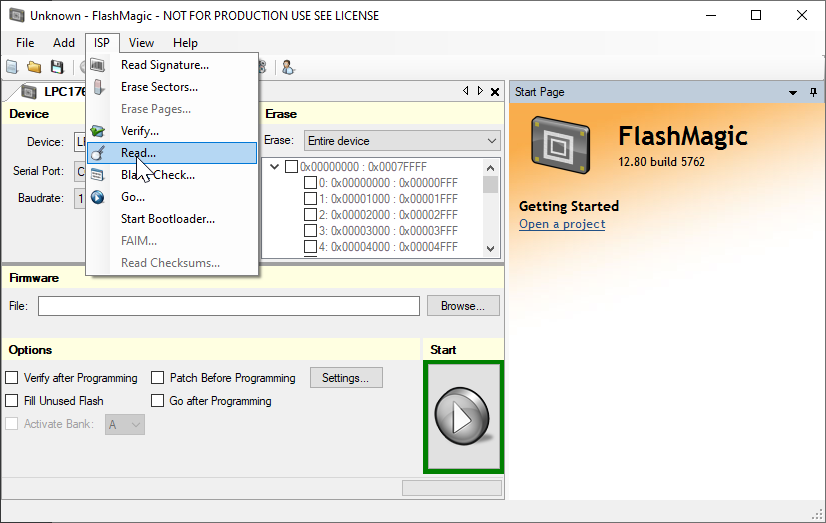
Also, depending on the debugger you're using there's some additional option. For example, if you have a Segger debugger you can use the J-Link commander and use the command savebin to dump the memory in a binary file.
I hope this helps you.
Best Regards,
Alexis Andalon
Alexis_A
- Mark as New
- Bookmark
- Subscribe
- Mute
- Subscribe to RSS Feed
- Permalink
- Report Inappropriate Content
Hello [email protected],
To do this please follow these steps:
Using ISP:
- Connect a USB2Serial Converter to the pins P0.2 and P0.3
- Enable the ISP mode putting the pin P2.10 to ground.
- Using the flash magic (link to download here) in the ISP section you can use the read option to dump the flash memory in a file:
Also, depending on the debugger you're using there's some additional option. For example, if you have a Segger debugger you can use the J-Link commander and use the command savebin to dump the memory in a binary file.
I hope this helps you.
Best Regards,
Alexis Andalon
- Mark as New
- Bookmark
- Subscribe
- Mute
- Subscribe to RSS Feed
- Permalink
- Report Inappropriate Content
Hi Alexis,
I did it!
As I mentioned in my previous comment, I'm using LPC-Link2 with J-Link F/W.
Regarding flash tool, I'm using and J-Flash, and this combination works fine.
Thank you for your support!
Regards,
- Mark as New
- Bookmark
- Subscribe
- Mute
- Subscribe to RSS Feed
- Permalink
- Report Inappropriate Content
Hi Alexis,
Thank you for your reply and apologize for late response.
Since I'm trapped with the other tasks, I have not tried the solutions you recommended, but I'll do the second solution first with my LPC-Link2.
I'll let you know the result soon.
Regards,
