
- Forums
- Product Forums
- General Purpose MicrocontrollersGeneral Purpose Microcontrollers
- i.MX Forumsi.MX Forums
- QorIQ Processing PlatformsQorIQ Processing Platforms
- Identification and SecurityIdentification and Security
- Power ManagementPower Management
- Wireless ConnectivityWireless Connectivity
- RFID / NFCRFID / NFC
- Advanced AnalogAdvanced Analog
- Neural Processing UnitsNeural Processing Units
- MCX Microcontrollers
- S32G
- S32K
- S32V
- MPC5xxx
- Other NXP Products
- S12 / MagniV Microcontrollers
- Powertrain and Electrification Analog Drivers
- Sensors
- Vybrid Processors
- Digital Signal Controllers
- 8-bit Microcontrollers
- ColdFire/68K Microcontrollers and Processors
- PowerQUICC Processors
- OSBDM and TBDML
- S32M
- S32Z/E
-
- Solution Forums
- Software Forums
- MCUXpresso Software and ToolsMCUXpresso Software and Tools
- CodeWarriorCodeWarrior
- MQX Software SolutionsMQX Software Solutions
- Model-Based Design Toolbox (MBDT)Model-Based Design Toolbox (MBDT)
- FreeMASTER
- eIQ Machine Learning Software
- Embedded Software and Tools Clinic
- S32 SDK
- S32 Design Studio
- GUI Guider
- Zephyr Project
- Voice Technology
- Application Software Packs
- Secure Provisioning SDK (SPSDK)
- Processor Expert Software
- Generative AI & LLMs
-
- Topics
- Mobile Robotics - Drones and RoversMobile Robotics - Drones and Rovers
- NXP Training ContentNXP Training Content
- University ProgramsUniversity Programs
- Rapid IoT
- NXP Designs
- SafeAssure-Community
- OSS Security & Maintenance
- Using Our Community
-
- Cloud Lab Forums
-
- Knowledge Bases
- ARM Microcontrollers
- i.MX Processors
- Identification and Security
- Model-Based Design Toolbox (MBDT)
- QorIQ Processing Platforms
- S32 Automotive Processing Platform
- Wireless Connectivity
- CodeWarrior
- MCUXpresso Suite of Software and Tools
- MQX Software Solutions
- RFID / NFC
- Advanced Analog
- Neural Processing Units
-
- NXP Tech Blogs
- Home
- :
- Product Forums
- :
- MPC5xxx
- :
- How do I start the MPC5675K in Lockstep Mode?
How do I start the MPC5675K in Lockstep Mode?
- Subscribe to RSS Feed
- Mark Topic as New
- Mark Topic as Read
- Float this Topic for Current User
- Bookmark
- Subscribe
- Mute
- Printer Friendly Page
How do I start the MPC5675K in Lockstep Mode?

- Mark as New
- Bookmark
- Subscribe
- Mute
- Subscribe to RSS Feed
- Permalink
- Report Inappropriate Content
Is there something special I need to do in order to run the MPC5675K EVB in lockstep mode? I'm trying to run the example code that comes with Codewarrior (both MCU 10.5 and the Special Ed that comes with the board) for the MPC5675K in both Decoupled (DPM) and Lockstep (LSM) modes. These projects are created with the project wizards with BookE and the SPFP options as well. The code basically goes through the start up code, then drops into an infinite for loop. In the DPM version the code works as expected, including initializing the P1 core. But in LSM, I'm immediately through into the following exception vector:
ivor_branch_table_p0.c:
.align SIXTEEN_BYTES
IVOR1trap: b IVOR1trap /* Machine check / (NMI) interrupt handler */
I've not made any modifications to either code base on either edition of CodeWarrior. Why doesn't the example code work?
Matt

- Mark as New
- Bookmark
- Subscribe
- Mute
- Subscribe to RSS Feed
- Permalink
- Report Inappropriate Content
Dear all,
I know this was already answered in this thread, that was very useful, but I felt the need for a straighter forward and updated approach on how to change the approach the Machine Check problem, so here is my step-by-step solution and understanding (many steps were taken from the AUT-F0403):
1 - The MPC5675K came from factory in DPM mode, it means that bit 9 (LSM) on NVUSRO is not set, as stated here:
S2 1420_3E10FFFFFFFFFFFFFFFFFFBFFFFFFFFFFFFFCD
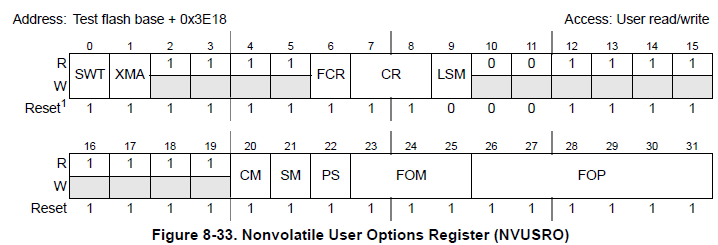
This register is located in the shadow flash sector in 21420_3E10 and has the S2 S-record format:
S2xxyyyyyyzzzzcs
- S = one character start code
- 2 = one character record type
- xx = two hex digits indicating the number of bytes (hex digit pairs) for address, data, and checksum fields
- yyyyyy = in an S2 s-record 6 hex digits specifying the memory location of the first data byte
- zzzz = 0-64 pairs of hex characters specifying the data bytes
- cs = 2 hex digits checksum character
So, if you are running the example set to LSM, the FCCU will cause the Machine Check exception, meaning you have to change to LSM.
2 - Download the P&E micro toolset 64K Power Architecture 55xx Starter C Development Kit for MPC5675k;
3 - Install and run progppcnexus.exe and ensure MCU is powered and Multilink Connected (I´m using FX), choose the right Interface and press Connect(Reset);
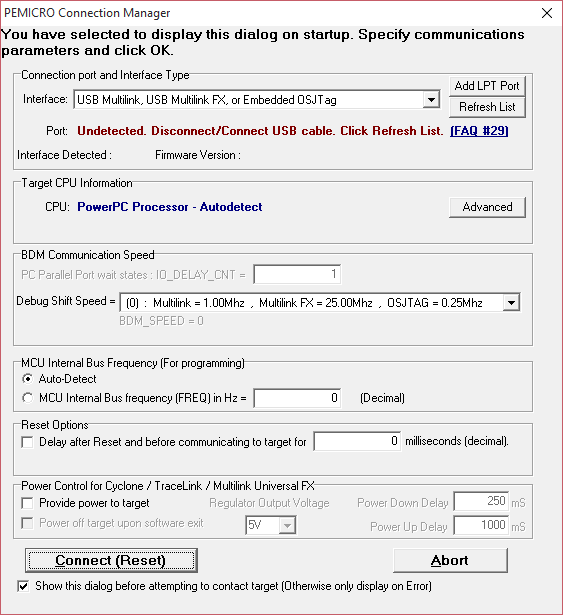
4 - As soon as your MCU is detected you will be prompted to specify the programming algorithm to use, choose Freescale_MPC5675K_1x32x4k_shadow0.PCP on c:\PEMicro\PKGPPCNEXUSSTARTER\Algorithms\shadow\
5 - Press the Upload button and type a file name to dump the S-Record;
6 - open the file on a text editor, and search for position S214203E10, where the S-Record shall be changed as follows:
- For DPM-> S214203E10FFFFFFFFFFFFFFFFFFBFFFFFFFFFFFFFCD
- For LSM -> S214203E10FFFFFFFFFFFFFFFFFFFFFFFFFFFFFFFF8D

7 - Save the file;
8 - Erase the shadow flash by pressing Erase Module Button -> BE VERY CAREFULL, DO NOT POWER CYCLE, it may damage the MPC and it will never come alive again.
9 - Specify the file by pressing the Specify Object File Button and selecting the updated s-record;
10 - Download the s-record into the Shadow flash by pressing the Program Module Button and verify by pressing the Verify Button;
11 - Power cycle the EVB to cause it to restart in the new configuration.
12 - start the P&E debugger (ICDPPCNEXUS.EXE) and connect to the MCU as before. The programmer and debugger use the same connection utility. The status window, shown below, will confirm what mode the processor is operating in. Check that it matches with your shadow flash configuration.
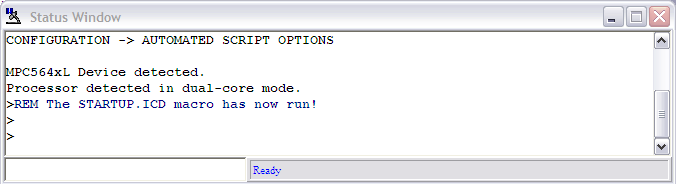
13 - now you can run the examples and even Motor Control toolkit without any problem, just remember to change the mode on shadow flash every time you wish to change from LSM to DPM.
Thanks and happy coding!!!

- Mark as New
- Bookmark
- Subscribe
- Mute
- Subscribe to RSS Feed
- Permalink
- Report Inappropriate Content
#Hi,
I am currently working with Development board KT33908MB with KTMPC5643DB (mother board and daughter board). I am trying to create a base code to switch on the led's on the mother board , operating the controller in LSM and DPM mode. I used "CW for MPC55xx and MPC56xx 2.10" to generate a code for DPM and LSM separately. In the DPM project, i configured the ports and wrote a simple code to toggle the led.
Now when i established the connection to the daughter board (PE Multi-link Universal JTAG and icdppcnexeus) i could see the message, "Processor detected in lockstep mode". I followed all the steps mentioned in these posts to change between LSM and DPM mode.
1. Used progppcnexus to upload the s-record file and modified the value at addr 0xFFFE10(modified.s19). Erased the module, programmed it with the new s19 file, verified and Powered down the board. (script - Freescale_MPC5643L_1x32x4k_Shadow_Blk_Freescale_C90FL_Driver_031.PCP)
2. Now used the icdppcnexus to connect to the board. Again got the same message, "Processor detected in lockstep mode"(pic 1). And when i loaded the object file of my DPM project (RAM.elf), and gave GO, i got the below response(pic 2) (script : mpc5643l_vle.mac)
3. When i programmed the already existing s19(attached here) and then flashed my code, the code worked as expected. It checked for a switch press and toggled the pin on switch press.(pic 3)
Kindly help me in understand what am i missing here.
(Note:I have kept the daughter board boot selection to Single Chip mode FAB - Gnd, ABS0,2 -Gnd ).
pic1:
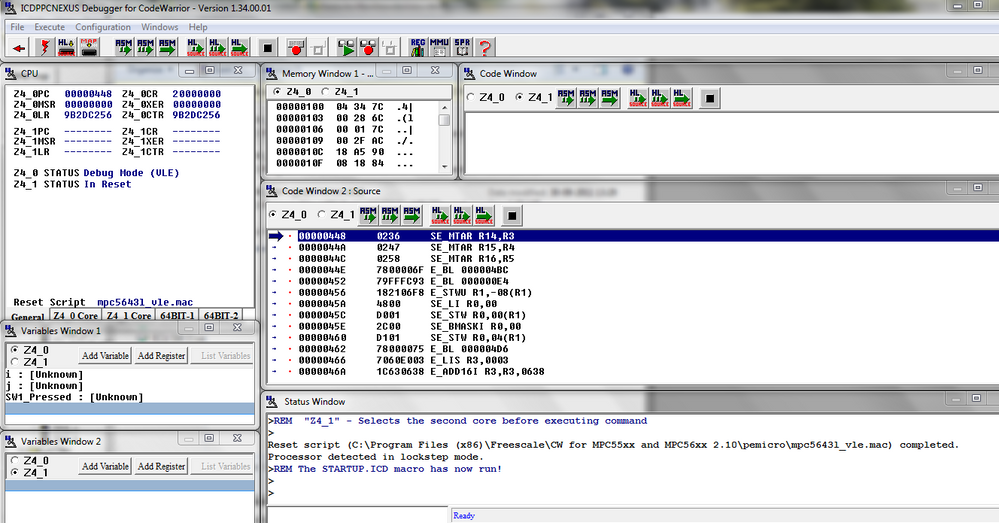
pic 2:
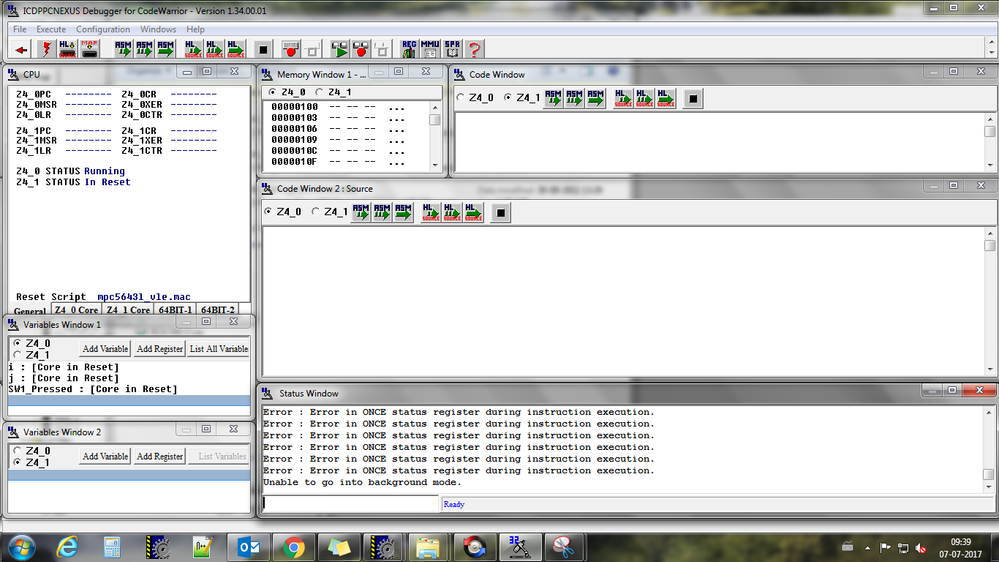
pic 3:
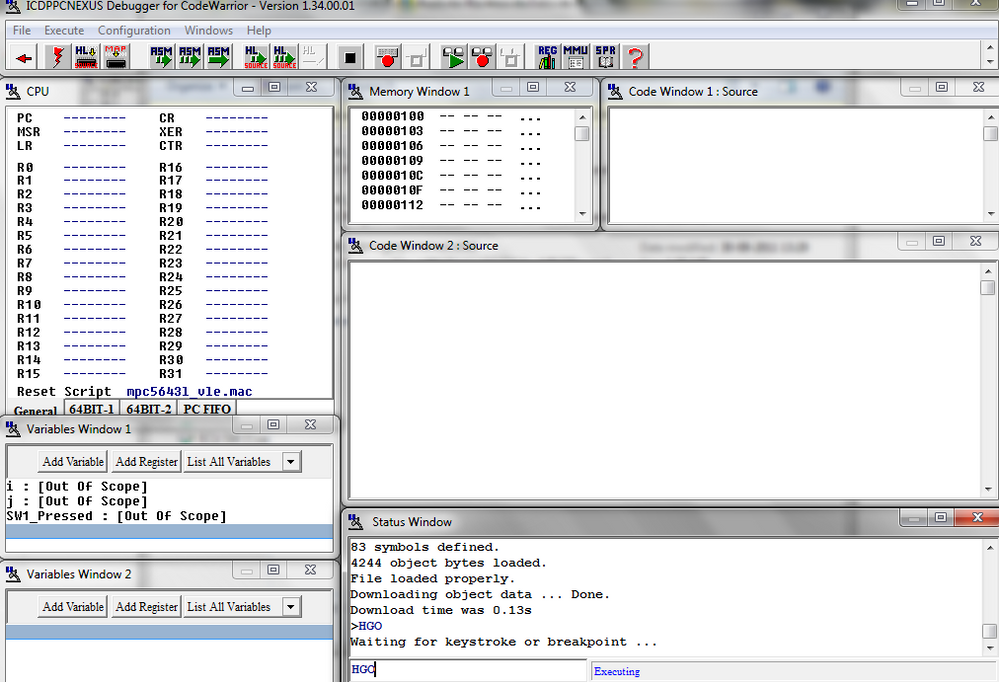
MPC5xxx mpc5643l dual-mode lock-step mpc56xx

 PetrS
PetrS
- Mark as New
- Bookmark
- Subscribe
- Mute
- Subscribe to RSS Feed
- Permalink
- Report Inappropriate Content
Hi,
It could be due to FCCU error. On startup you should check the RGM for FCCU errors, if some occurs, you should do some action. In the attached example FCCU errors are just cleared.
The example is created in CW2.10. The RAM and flash target works properly on the MPC5675K EVB.
It is assumed the LSM mode is selected within a shadow flash, see Nonvolatile User Options Register (NVUSRO) within a Reference Manual.
Hope it helps.
- Mark as New
- Bookmark
- Subscribe
- Mute
- Subscribe to RSS Feed
- Permalink
- Report Inappropriate Content
Peter,
I've only been able to fire up this board since you gave me the ZIP file, but I'm having the same issue as Sean. I trap at IVOR1trap as well. If I use the debugger and ASM step, this is the last instruction I see:
__restore_gpr_30_exit C071 SW_LWZ R7,00(R1)
Can you help me understand what the malfunction is? I compile your zip project w/o any chances, so I'm at a loss why it's bailing.
Thanks,
Matt
PetrS
- Mark as New
- Bookmark
- Subscribe
- Mute
- Subscribe to RSS Feed
- Permalink
- Report Inappropriate Content
Matt,
are you sure that your MCU is set for LSM?
The LSM or DPM mode is selected within a shadow flash, see Nonvolatile User Options Register (NVUSRO) within a Reference Manual.
Sean's MCU was programmed for DPM (NVUSRO = 0xFFBFFFFF, indicating that DPM is still set).
If you need to change the mode, please refer to the following presentation for the DPM and LSM setting on the MPC5643L,
http://cache.freescale.com/files/ftf_2010/Americas/FTF10_AUT_F0403_PDF.pdf.
You may follow the steps on your MPC5675K, just select proper programming algorithm (Freescale_MPC5675K_1x32x4k_shadow0.PCP) and keep in mind different address location.
Hope it helps.
Regards,
Petr
- Mark as New
- Bookmark
- Subscribe
- Mute
- Subscribe to RSS Feed
- Permalink
- Report Inappropriate Content
Petr,
Thanks, I'll give it a shot. I've run into the same problem with your code, as well as a blank project created by the CodeWarrior wizard when it asks for the Board (MPC5675K), the mode (LSM), C, VLE, SPE-EFPU. I've not made any modifications outside some breakpoints I've in inserted, so I'm a little perplexed why this code isn't working out of the box.
Matt
- Mark as New
- Bookmark
- Subscribe
- Mute
- Subscribe to RSS Feed
- Permalink
- Report Inappropriate Content
Petr,
I looked at the SSCM_UOPS register, which kicked back a value of 0xFFBF_FFFF when I hit the trap. So I'm assuming I have to program the board to start up in LSM mode, which I'm trying to to as per the FTF10_AUT_F0403_PDF.pdf file you mention. I get up to the "upload module" step using Freescale_MPC5675K_1x32x4k_shadow0.PCP but when I enter a file name, it simply will not appear in my explorer that I can view or modify, even though if enter the same file name, it'll ask me if I want to overwrite it. I'd appreciate some guidance. Thanks!
Matt
- Mark as New
- Bookmark
- Subscribe
- Mute
- Subscribe to RSS Feed
- Permalink
- Report Inappropriate Content
I've been able to successfully reprogram my board's shadow flash as per the PDF cited above so now I can run in Lock-Step mode (LSM) :smileyhappy:
For the MPC5675K EVB, I had to make the following tweaks to the PDF:
1) The PCP file I had to use was
...\pemicro\algorithms\shadow\Freescale_MPC5675K_1x32x4k_shadow0.PCP
2) Address to be changed is at 0x0020_3E18, with bit 0x0040_0000 set for LSM and cleared for DPM. My S19 record file changes from:
S214203E10FFFFFFFFFFFFFFFFFFBFFFFFFFFFFFFFCD
to
S214203E10FFFFFFFFFFFFFFFFFFFFFFFFFFFFFFFF8D
Otherwise, the steps in the PDF are as specified.
Matt
- Mark as New
- Bookmark
- Subscribe
- Mute
- Subscribe to RSS Feed
- Permalink
- Report Inappropriate Content
Hi Petr/ Matthew,
I have been facing similar issues on MPC5675K, struck at trap,
the link to pdf suggested above is broken,
Please provide inputs.
PetrS
- Mark as New
- Bookmark
- Subscribe
- Mute
- Subscribe to RSS Feed
- Permalink
- Report Inappropriate Content
look at these examples:
https://community.freescale.com/docs/DOC-102769 and https://community.freescale.com/docs/DOC-104549
attached is the pdf you mentioned.
Regards,
Petr
- Mark as New
- Bookmark
- Subscribe
- Mute
- Subscribe to RSS Feed
- Permalink
- Report Inappropriate Content
Hi Petr,
Thank you for the response and example project. However, when I run your example on my demo board (MPC5675KEVB473), I am still getting stuck at IVOR1trap. The call just before the jump to the IVOR1trap is __restore_gpr_30_exit at address 0x00000474. I see that your example tries to clear the FCCU errors, but I am unable to make it to the main() function to even try to clear the FCCU. I did check SCCM UOPS to see what the NVUSRO is set to, and it is at the default value of 0xFFBFFFFF, indicating that DPM is still set. I added the following instructions to my usr_init() function to try to set LSM mode and I get "Error : Error in ONCE status register during instruction execution. Unable to go into background mode.":
lis r4, 0xFFFF
ori r4, r4, 0xFFFF
lis r5, 0x3E18
stw r4, 0(r5)
What does that error mean and how do I program the NVUSRO register?
Thanks,
Sean
- Mark as New
- Bookmark
- Subscribe
- Mute
- Subscribe to RSS Feed
- Permalink
- Report Inappropriate Content
I'm having the same issue as you Matt. Hoping for a response from Freescale...
