i.MX31 ADS Board Flashing

cancel
Showing results for 
Show  only  | Search instead for 
Did you mean: 

i.MX31 ADS Board Flashing

i.MX31 ADS Board Flashing

ATK (Advanced Toolkit)

ATK (Advanced Toolkit) is a Windows software for programming the flash memory of i.MX boards.

Using ATK

This section will describe the procedure to erase the flash memory and program the bootloader.

1 - Connect a serial cable between PC and i.MX board.

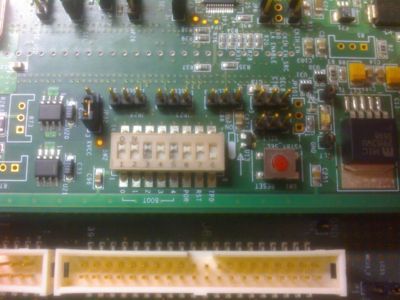
2 - Some hardware configurations (switches) must be done to flash the board.

  Set SW2 switch as below: Switch SW2 -> 11111 

400px-Internal_boot_imx31_ads.jpg


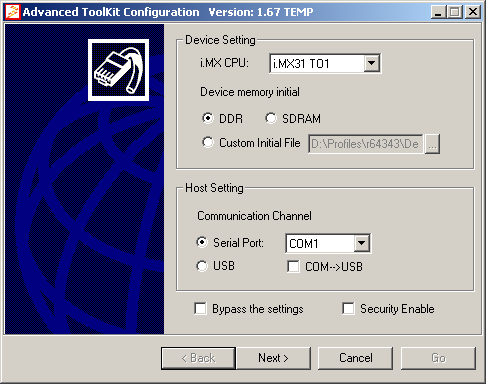
3 - Run ATK going to Start -> Programs -> AdvancedToolKit -> AdvancedToolKit
Atk1_imx31_ads.PNG

  Set the options:
  Device memory -> DDR; Custom Initial File -> (keep it unmarked)
  Communication Channel -> Serial Port (Usually COM1)

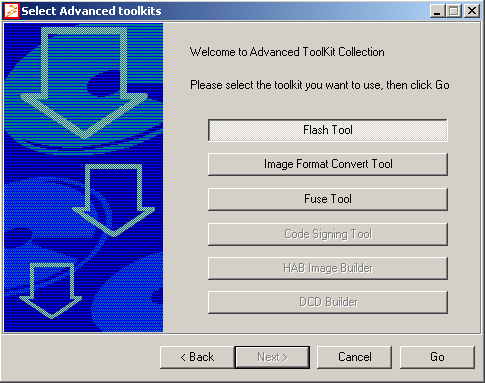
4 - Click on Flash Tools to erase, program or dump the the flash memory and click GO
Atk2_imx31_ads.PNG

h4> Flash Programming

The next step is to program the bootloader image into the board's Flash following the steps below.

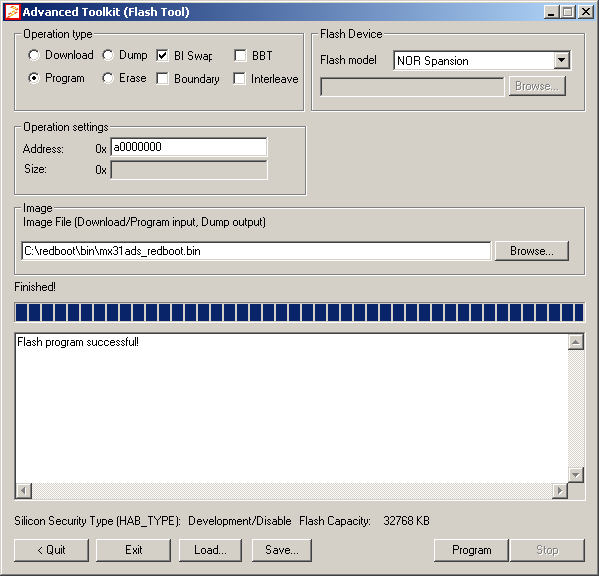
1 - Select the parameters as shown in the figure below and press Program.

The bootloader binary image file can be found into your Board Support Package 
Set Program, NOR Spansion
Atk5_imx31_ads.PNG

2 - Add it on Image File field and press Program.

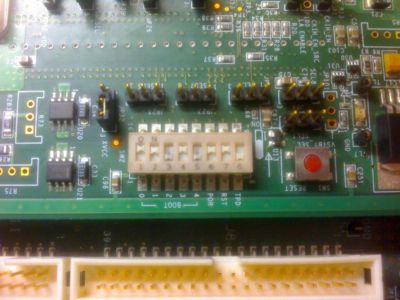
3 - Close ATK, turn off the board and set switch back as shown in the picture below.

Set SW2 switch as below:
Switch SW2 -> 11010 
400px-External_boot_imx31_ads.jpg


Installing ATK on Linux

Download ATK:

Download.

Extract ATK:

# unzip ATK_1_41_STD_installer.zip

Execute the default install process:

# wine SETUP.EXE

Get mfc42.dll and msvcp60.dll from a Windows Machine (C:\Windows\System32) and copy to wine system32 (/root/.wine/drive_c/windows/system32)

Run ATK:

# wine ADSToolkit_std.exe
Tags (2)
%3CLINGO-SUB%20id%3D%22lingo-sub-1118451%22%20slang%3D%22en-US%22%20mode%3D%22CREATE%22%3Ei.MX31%20ADS%20Board%20Flashing%3C%2FLINGO-SUB%3E%3CLINGO-BODY%20id%3D%22lingo-body-1118451%22%20slang%3D%22en-US%22%20mode%3D%22CREATE%22%3E%3CH1%20id%3D%22toc-hId-381650824%22%20id%3D%22toc-hId-381650824%22%20id%3D%22toc-hId-1297632654%22%3E%3CSPAN%20class%3D%22mw-headline%22%3EATK%20(Advanced%20Toolkit)%20%3C%2FSPAN%3E%3C%2FH1%3E%3CP%3EATK%20(Advanced%20Toolkit)%20is%20a%20Windows%20software%20for%20programming%20the%20flash%20memory%20of%20i.MX%20boards.%3C%2FP%3E%3CH3%20id%3D%22toc-hId--724739061%22%20id%3D%22toc-hId--724739061%22%20id%3D%22toc-hId-191242769%22%3E%3C%2FH3%3E%3CH3%20id%3D%22toc-hId-1762773772%22%20id%3D%22toc-hId-1762773772%22%20id%3D%22toc-hId--1616211694%22%3E%3CSPAN%20class%3D%22mw-headline%22%3EUsing%20ATK%20%3C%2FSPAN%3E%3C%2FH3%3E%3CP%3EThis%20section%20will%20describe%20the%20procedure%20to%20erase%20the%20flash%20memory%20and%20program%20the%20bootloader.%3C%2FP%3E%3CP%3E1%20-%20Connect%20a%20serial%20cable%20between%20PC%20and%20i.MX%20board.%3C%2FP%3E%3CP%3E2%20-%20Some%20hardware%20configurations%20(switches)%20must%20be%20done%20to%20flash%20the%20board.%3C%2FP%3E%3CPRE%20class%3D%22jive-pre%22%3E%26nbsp%3B%20Set%20SW2%20switch%20as%20below%3A%20Switch%20SW2%20-%26gt%3B%2011111%20%3C%2FPRE%3E%3CP%3E%3CSPAN%20class%3D%22mce_paste_marker%22%3E%3CBR%20%2F%3E%3C%2FSPAN%3E%3C%2FP%3E%3CP%3E%3CSPAN%20class%3D%22mce_paste_marker%22%3E%3CSPAN%20class%3D%22lia-inline-image-display-wrapper%22%20image-alt%3D%22400px-Internal_boot_imx31_ads.jpg%22%3E%3Cspan%20class%3D%22lia-inline-image-display-wrapper%22%20image-alt%3D%22400px-Internal_boot_imx31_ads.jpg%22%20style%3D%22width%3A%20400px%3B%22%3E%3Cimg%20src%3D%22https%3A%2F%2Fcommunity.nxp.com%2Ft5%2Fimage%2Fserverpage%2Fimage-id%2F37823i51A3A58AABC13E46%2Fimage-size%2Flarge%3Fv%3Dv2%26amp%3Bpx%3D999%22%20role%3D%22button%22%20title%3D%22400px-Internal_boot_imx31_ads.jpg%22%20alt%3D%22400px-Internal_boot_imx31_ads.jpg%22%20%2F%3E%3C%2Fspan%3E%3C%2FSPAN%3E%3C%2FSPAN%3E%3C%2FP%3E%3CP%3E%3CSPAN%20class%3D%22mce_paste_marker%22%3E%3CBR%20%2F%3E%3C%2FSPAN%3E%3C%2FP%3E%3CP%3E3%20-%20Run%20ATK%20going%20to%20Start%20-%26gt%3B%20Programs%20-%26gt%3B%20AdvancedToolKit%20-%26gt%3B%20AdvancedToolKit%3C%2FP%3E%3CP%3E%3C%2FP%3E%3CP%3E%3CSPAN%20class%3D%22lia-inline-image-display-wrapper%22%20image-alt%3D%22Atk1_imx31_ads.PNG%22%3E%3Cspan%20class%3D%22lia-inline-image-display-wrapper%22%20image-alt%3D%22Atk1_imx31_ads.PNG%22%20style%3D%22width%3A%20486px%3B%22%3E%3Cimg%20src%3D%22https%3A%2F%2Fcommunity.nxp.com%2Ft5%2Fimage%2Fserverpage%2Fimage-id%2F37804iC26C3350B05FB9E7%2Fimage-size%2Flarge%3Fv%3Dv2%26amp%3Bpx%3D999%22%20role%3D%22button%22%20title%3D%22Atk1_imx31_ads.PNG%22%20alt%3D%22Atk1_imx31_ads.PNG%22%20%2F%3E%3C%2Fspan%3E%3C%2FSPAN%3E%3C%2FP%3E%3CPRE%20class%3D%22jive-pre%22%3E%26nbsp%3B%20Set%20the%20options%3A%0A%26nbsp%3B%20Device%20memory%20-%26gt%3B%20DDR%3B%20Custom%20Initial%20File%20-%26gt%3B%20(keep%20it%20unmarked)%0A%26nbsp%3B%20Communication%20Channel%20-%26gt%3B%20Serial%20Port%20(Usually%20COM1)%0A%3C%2FPRE%3E%3CP%3E4%20-%20Click%20on%20Flash%20Tools%20to%20erase%2C%20program%20or%20dump%20the%20the%20flash%20memory%20and%20click%20GO%3C%2FP%3E%3CP%3E%3C%2FP%3E%3CP%3E%3CSPAN%20class%3D%22lia-inline-image-display-wrapper%22%20image-alt%3D%22Atk2_imx31_ads.PNG%22%3E%3Cspan%20class%3D%22lia-inline-image-display-wrapper%22%20image-alt%3D%22Atk2_imx31_ads.PNG%22%20style%3D%22width%3A%20485px%3B%22%3E%3Cimg%20src%3D%22https%3A%2F%2Fcommunity.nxp.com%2Ft5%2Fimage%2Fserverpage%2Fimage-id%2F37829i6E454983BF28794B%2Fimage-size%2Flarge%3Fv%3Dv2%26amp%3Bpx%3D999%22%20role%3D%22button%22%20title%3D%22Atk2_imx31_ads.PNG%22%20alt%3D%22Atk2_imx31_ads.PNG%22%20%2F%3E%3C%2Fspan%3E%3C%2FSPAN%3E%3C%2FP%3E%3CP%3Eh4%26gt%3B%20%3CSPAN%20class%3D%22mw-headline%22%3E%20Flash%20Programming%20%3C%2FSPAN%3E%3C%2FP%3E%3CP%3EThe%20next%20step%20is%20to%20program%20the%20bootloader%20image%20into%20the%20board's%20Flash%20following%20the%20steps%20below.%3C%2FP%3E%3CP%3E1%20-%20Select%20the%20parameters%20as%20shown%20in%20the%20figure%20below%20and%20press%20Program.%3C%2FP%3E%3CPRE%20class%3D%22jive-pre%22%3EThe%20bootloader%20binary%20image%20file%20can%20be%20found%20into%20your%20Board%20Support%20Package%20%0ASet%20Program%2C%20NOR%20Spansion%0A%3C%2FPRE%3E%3CP%3E%3C%2FP%3E%3CP%3E%3C%2FP%3E%3CP%3E%3CSPAN%20class%3D%22lia-inline-image-display-wrapper%22%20image-alt%3D%22Atk5_imx31_ads.PNG%22%3E%3Cspan%20class%3D%22lia-inline-image-display-wrapper%22%20image-alt%3D%22Atk5_imx31_ads.PNG%22%20style%3D%22width%3A%20599px%3B%22%3E%3Cimg%20src%3D%22https%3A%2F%2Fcommunity.nxp.com%2Ft5%2Fimage%2Fserverpage%2Fimage-id%2F37805iE09D22DE4BF137E0%2Fimage-size%2Flarge%3Fv%3Dv2%26amp%3Bpx%3D999%22%20role%3D%22button%22%20title%3D%22Atk5_imx31_ads.PNG%22%20alt%3D%22Atk5_imx31_ads.PNG%22%20%2F%3E%3C%2Fspan%3E%3C%2FSPAN%3E%3C%2FP%3E%3CP%3E2%20-%20Add%20it%20on%20Image%20File%20field%20and%20press%20Program.%3C%2FP%3E%3CP%3E3%20-%20Close%20ATK%2C%20turn%20off%20the%20board%20and%20set%20switch%20back%20as%20shown%20in%20the%20picture%20below.%3C%2FP%3E%3CPRE%20class%3D%22jive-pre%22%3ESet%20SW2%20switch%20as%20below%3A%0ASwitch%20SW2%20-%26gt%3B%2011010%20%0A%3C%2FPRE%3E%3CP%3E%3C%2FP%3E%3CP%3E%3CSPAN%20class%3D%22lia-inline-image-display-wrapper%22%20image-alt%3D%22400px-External_boot_imx31_ads.jpg%22%3E%3Cspan%20class%3D%22lia-inline-image-display-wrapper%22%20image-alt%3D%22400px-External_boot_imx31_ads.jpg%22%20style%3D%22width%3A%20400px%3B%22%3E%3Cimg%20src%3D%22https%3A%2F%2Fcommunity.nxp.com%2Ft5%2Fimage%2Fserverpage%2Fimage-id%2F37842iA02E229E5497060E%2Fimage-size%2Flarge%3Fv%3Dv2%26amp%3Bpx%3D999%22%20role%3D%22button%22%20title%3D%22400px-External_boot_imx31_ads.jpg%22%20alt%3D%22400px-External_boot_imx31_ads.jpg%22%20%2F%3E%3C%2Fspan%3E%3C%2FSPAN%3E%3C%2FP%3E%3CH2%20id%3D%22toc-hId-1752270668%22%20id%3D%22toc-hId-1752270668%22%20id%3D%22toc-hId--1626714798%22%3E%3CSPAN%20class%3D%22mw-headline%22%3E%3CBR%20%2F%3E%3C%2FSPAN%3E%3C%2FH2%3E%3CH2%20id%3D%22toc-hId--55183795%22%20id%3D%22toc-hId--55183795%22%20id%3D%22toc-hId-860798035%22%3E%3CSPAN%20class%3D%22mw-headline%22%3EInstalling%20ATK%20on%20Linux%20%3C%2FSPAN%3E%3C%2FH2%3E%3CP%3EDownload%20ATK%3A%3C%2FP%3E%3CPRE%20class%3D%22jive-pre%22%3E%3CA%20class%3D%22text%20external%22%20href%3D%22http%3A%2F%2Fwww.freescale.com%2Fwebapp%2Fsps%2Fsite%2Fprod_summary.jsp%3Fcode%3Di.MX31%26amp%3BnodeId%3D0162468rH311432973ZrDR%26amp%3Bfpsp%3D1%26amp%3Btab%3DDesign_Tools_Tab%22%20rel%3D%22nofollow%20noopener%20noreferrer%22%20target%3D%22_blank%22%3EDownload.%3C%2FA%3E%3C%2FPRE%3E%3CP%3EExtract%20ATK%3A%3C%2FP%3E%3CPRE%20class%3D%22jive-pre%22%3E%23%20unzip%20ATK_1_41_STD_installer.zip%0A%3C%2FPRE%3E%3CP%3EExecute%20the%20default%20install%20process%3A%3C%2FP%3E%3CPRE%20class%3D%22jive-pre%22%3E%23%20wine%20SETUP.EXE%0A%3C%2FPRE%3E%3CP%3EGet%20mfc42.dll%20and%20msvcp60.dll%20from%20a%20Windows%20Machine%20(C%3A%5CWindows%5CSystem32)%20and%20copy%20to%20wine%20system32%20(%2Froot%2F.wine%2Fdrive_c%2Fwindows%2Fsystem32)%3C%2FP%3E%3CP%3ERun%20ATK%3A%3C%2FP%3E%3CPRE%20class%3D%22jive-pre%22%3E%23%20wine%20ADSToolkit_std.exe%3C%2FPRE%3E%3C%2FLINGO-BODY%3E
No ratings
Version history
Last update:
‎09-10-2020 02:40 AM
Updated by: