
- Forums
- Product Forums
- General Purpose MicrocontrollersGeneral Purpose Microcontrollers
- i.MX Forumsi.MX Forums
- QorIQ Processing PlatformsQorIQ Processing Platforms
- Identification and SecurityIdentification and Security
- Power ManagementPower Management
- Wireless ConnectivityWireless Connectivity
- RFID / NFCRFID / NFC
- Advanced AnalogAdvanced Analog
- MCX Microcontrollers
- S32G
- S32K
- S32V
- MPC5xxx
- Other NXP Products
- S12 / MagniV Microcontrollers
- Powertrain and Electrification Analog Drivers
- Sensors
- Vybrid Processors
- Digital Signal Controllers
- 8-bit Microcontrollers
- ColdFire/68K Microcontrollers and Processors
- PowerQUICC Processors
- OSBDM and TBDML
- S32M
- S32Z/E
-
- Solution Forums
- Software Forums
- MCUXpresso Software and ToolsMCUXpresso Software and Tools
- CodeWarriorCodeWarrior
- MQX Software SolutionsMQX Software Solutions
- Model-Based Design Toolbox (MBDT)Model-Based Design Toolbox (MBDT)
- FreeMASTER
- eIQ Machine Learning Software
- Embedded Software and Tools Clinic
- S32 SDK
- S32 Design Studio
- GUI Guider
- Zephyr Project
- Voice Technology
- Application Software Packs
- Secure Provisioning SDK (SPSDK)
- Processor Expert Software
- Generative AI & LLMs
-
- Topics
- Mobile Robotics - Drones and RoversMobile Robotics - Drones and Rovers
- NXP Training ContentNXP Training Content
- University ProgramsUniversity Programs
- Rapid IoT
- NXP Designs
- SafeAssure-Community
- OSS Security & Maintenance
- Using Our Community
-
- Cloud Lab Forums
-
- Knowledge Bases
- ARM Microcontrollers
- i.MX Processors
- Identification and Security
- Model-Based Design Toolbox (MBDT)
- QorIQ Processing Platforms
- S32 Automotive Processing Platform
- Wireless Connectivity
- CodeWarrior
- MCUXpresso Suite of Software and Tools
- MQX Software Solutions
- RFID / NFC
- Advanced Analog
-
- NXP Tech Blogs
- Home
- :
- ワイヤレス接続
- :
- Wireless MCU
- :
- How to configure Mesh Network Topology using ZPS Configuration?
How to configure Mesh Network Topology using ZPS Configuration?
- RSS フィードを購読する
- トピックを新着としてマーク
- トピックを既読としてマーク
- このトピックを現在のユーザーにフロートします
- ブックマーク
- 購読
- ミュート
- 印刷用ページ
How to configure Mesh Network Topology using ZPS Configuration?

- 新着としてマーク
- ブックマーク
- 購読
- ミュート
- RSS フィードを購読する
- ハイライト
- 印刷
- 不適切なコンテンツを報告
Hello Everyone,
I am using AN-1229 Application note, from this application note i am able to communicate from Sleeping End Device to Coordinator.
Also i check range which i got 30+ meter.
But now i want to increase this range using router as well as using Mesh Network Topology.
Can anybody explain me how do Mesh Network topology using ZPS Configuration.
Please reply ASAP
Best Regards,
Dheeraj

 mario_castaneda
- 新着としてマーク
- ブックマーク
- 購読
- ミュート
- RSS フィードを購読する
- ハイライト
- 印刷
- 不適切なコンテンツを報告
Hi Dheeraj,
Please refer to the 5.2.2 Forming or Joining a Distributed Network Zigbee 3.0 Light Bulb Documentation JN-AN-1218.
Using the Control Bridge as the coordinator, I recommended to set up the Permit Join for a few time.

The documentation mentions: in this case Dimmable Light Router:
• On a light device (from this Application Note) that is already part of this network, press the RST/RESET button 3 times at one-second intervals, or press DIO8/GPIO4 once.
This will cause a Management Permit Join Request to be broadcast to the network to open the Permit Join status for a period of 180 seconds.
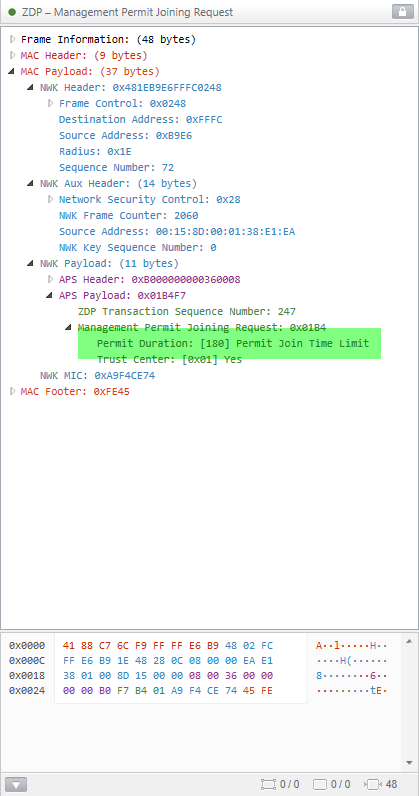
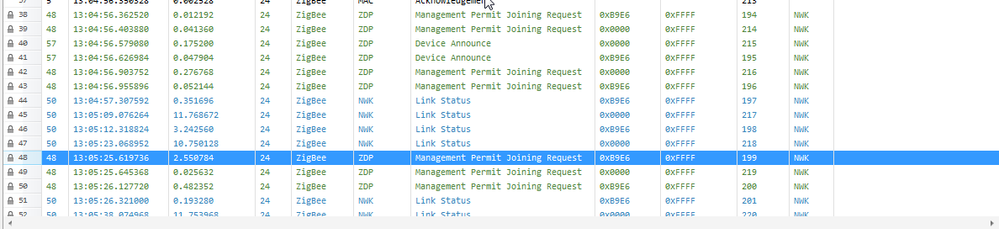
And the end device could be the JN-AN-1219.
5.2.3 Joining a Network
The switch device is an End Device and, as such, must join an existing ZigBee network. The network join process is as follows:
1. Start Network Steering on the switch by pressing any button on the DR1199 Generic Expansion Board. As soon as a button-press is detected, the device will search for a suitable network to join. The LED pair LED1+LED3 and LED2 will flash alternately during this state.
