
- Forums
- Product Forums
- General Purpose MicrocontrollersGeneral Purpose Microcontrollers
- i.MX Forumsi.MX Forums
- QorIQ Processing PlatformsQorIQ Processing Platforms
- Identification and SecurityIdentification and Security
- Power ManagementPower Management
- Wireless ConnectivityWireless Connectivity
- RFID / NFCRFID / NFC
- Advanced AnalogAdvanced Analog
- Neural Processing UnitsNeural Processing Units
- MCX Microcontrollers
- S32G
- S32K
- S32V
- MPC5xxx
- Other NXP Products
- S12 / MagniV Microcontrollers
- Powertrain and Electrification Analog Drivers
- Sensors
- Vybrid Processors
- Digital Signal Controllers
- 8-bit Microcontrollers
- ColdFire/68K Microcontrollers and Processors
- PowerQUICC Processors
- OSBDM and TBDML
- S32M
- S32Z/E
-
- Solution Forums
- Software Forums
- MCUXpresso Software and ToolsMCUXpresso Software and Tools
- CodeWarriorCodeWarrior
- MQX Software SolutionsMQX Software Solutions
- Model-Based Design Toolbox (MBDT)Model-Based Design Toolbox (MBDT)
- FreeMASTER
- eIQ Machine Learning Software
- Embedded Software and Tools Clinic
- S32 SDK
- S32 Design Studio
- GUI Guider
- Zephyr Project
- Voice Technology
- Application Software Packs
- Secure Provisioning SDK (SPSDK)
- Processor Expert Software
- Generative AI & LLMs
-
- Topics
- Mobile Robotics - Drones and RoversMobile Robotics - Drones and Rovers
- NXP Training ContentNXP Training Content
- University ProgramsUniversity Programs
- Rapid IoT
- NXP Designs
- SafeAssure-Community
- OSS Security & Maintenance
- Using Our Community
-
- Cloud Lab Forums
-
- Knowledge Bases
- ARM Microcontrollers
- i.MX Processors
- Identification and Security
- Model-Based Design Toolbox (MBDT)
- QorIQ Processing Platforms
- S32 Automotive Processing Platform
- Wireless Connectivity
- CodeWarrior
- MCUXpresso Suite of Software and Tools
- MQX Software Solutions
- RFID / NFC
- Advanced Analog
- Neural Processing Units
-
- NXP Tech Blogs
- Home
- :
- 製品フォーラム
- :
- OSBDMとTBDML
- :
- Re: PGO USBDM Driver 1.0.1 Install Problem on XP 32bit
PGO USBDM Driver 1.0.1 Install Problem on XP 32bit
- RSS フィードを購読する
- トピックを新着としてマーク
- トピックを既読としてマーク
- このトピックを現在のユーザーにフロートします
- ブックマーク
- 購読
- ミュート
- 印刷用ページ
PGO USBDM Driver 1.0.1 Install Problem on XP 32bit

- 新着としてマーク
- ブックマーク
- 購読
- ミュート
- RSS フィードを購読する
- ハイライト
- 印刷
- 不適切なコンテンツを報告
Just bought 2 Wytek USBDM-1-JS16. Firmware V4.10.
Followed instructions on http://www.evbplus.com/freescale_usbdm_osbdm/usbdm_osbdm_bdm_multilink.html
Downloaded & installed drivers from http://sourceforge.net/projects/usbdm/files/Version%204.10.3/Installation/USBDM_Drivers_1_0_1_Win_x3...
Plugged in Wytek BDM and did the Found New Hardware Wizard, specifying where to find the drivers, "C:\Program Files\pgo\USBDM Drivers 1.0.1". Also tried "C:\Program Files\pgo\USBDM Drivers 1.0.1\Drivers\JS16_driver"
The driver installation fails: "Cannot Start this Hardware, There was a problem installing this hardware: USBDM BDM Interface, Windows cannot load the device driver for this hardware. The driver may be corrupted or missing. (Code 39)."
I've tried this repeatedly, on 2 different PCs, both are Windows XP-Pro 32bit. Same results on both PCs.
Device Manager Driver Details shows 3 files:
C:\WINDOWS\system32\DRIVERS\WinUSB.sys
C:\WINDOWS\system32WdfCoInstaller01011.dll
C:\WINDOWS\system32\WinUSBCoInstaller2.dll
I will be very grateful for any help on this.

- 新着としてマーク
- ブックマーク
- 購読
- ミュート
- RSS フィードを購読する
- ハイライト
- 印刷
- 不適切なコンテンツを報告
Hi Karl,
I think the instructions you are using are out of date.
You should just install the MSI file and then plug in the BDM. The drivers files are installed in the windows driver area somewhere and should install automatically - just OK the default selections.
Please try the following:
- With the BDM removed
- Use add/remove programs to uninstall the drivers (look for USBDM drivers)
- Re-install the driver .msi file. This should clean out any incompatible driver files.
- Plug in the BDM - The new hardware wizard should appear
- Select the default (Install the software automatically)
- Click Next and the driver should install
bye
- 新着としてマーク
- ブックマーク
- 購読
- ミュート
- RSS フィードを購読する
- ハイライト
- 印刷
- 不適切なコンテンツを報告
Dear pgo,
Thank you for the quick reply. I'm new to this forum. I've been doing embedded systems designs with Motorola/Freescale parts since 1983, lots of 9S12 & 9S08 projects in the last 10 years using an old PE Micro parallel port BDM & newer USB Multilink BDM. I recently damaged the Multilink BDM, hence my purchase of 2 Wytek USBDMs. I've been using CodeWarrior V6.1 with the PE USB Multilink for a year just fine. Also a Freescale DEMOACKIT for the 9S08AC which has a PE Micro "equivalent" USB BDM built into the DEMOACKIT PCB.
I uninstalled the USBDM Drivers, rebooted, reinstalled USBDM_Drivers_1_0_1_Win_x32.msi, then plugged in the Wytek USBDM, let the Found New Hardware Wizard do the install automatically, but got the same error as before, on both XP machines. I haven't installed your USBDM_4_10_3_Win.msi. Is that required before installing USBDM_Drivers_1_0_1_Win_x32.msi?
Between my 1st post and your reply, I tried a Windows 7 Pro 32bit PC, did the USBDM_Drivers_1_0_1_Win_x32.msi install, plugged in the Wytek USBDM and it installed OK (went fast and didn't prompt for input the way XP does, so I didn't get a chance to intervene). The green light on the Wytek lit up & the USBDM show up in Device Manager as expected. That's some progress.
However, I can't connect to my 9S08 target board. The Wytek USBDM is providing 5V power to the target and the board is running fine, just no BDM comm to the CodeWarrior debugger. Apart from selecting "HCS08 Open Source BDM" in the project window, what else must I do? When I use the DEMOACKIT and select "P&E Multilink/Cyclone Pro" in the project window, I can connect to the target board just fine. I think I saw an app note about needing to reactivate some Open Source BDM DLLs after installing some CodeWarrior service packs, but that appeared to be for the Eclipse based CodeWarrior 10.1.
My apologies for the long reply. Prehaps you can point me to a tutorial for beginners. I will be greatly in your debt.
Sincerely,
Karl O
- 新着としてマーク
- ブックマーク
- 購読
- ミュート
- RSS フィードを購読する
- ハイライト
- 印刷
- 不適切なコンテンツを報告
Hi Karl,
The driver installation should be independent of the software install however, you can't do anything useful without both. AFAIK order of installation should have no effect. They are both required for Codewarrior.
I don't know what could be causing the problem with Win-XP. I downloaded and checked the posted file on an XP machine and the drivers installed fine. Very puzzling. Could you post some details of the machine (AMD, Intel etc)?
On the Win-7 machine, after installing the drivers and USBDM, run the firmware updater and see if the BDM firmware will update.
After doing this try the stand-alone HCS08 programmer and check if it works. If so I would expect it to work OK with codewarrior.
bye

- 新着としてマーク
- ブックマーク
- 購読
- ミュート
- RSS フィードを購読する
- ハイライト
- 印刷
- 不適切なコンテンツを報告
I get the identical problem, two different Windows XP boxes, 1.0.1 driver and USBDM 4.10.4. Reinstalling as per pgo's suggestion removes the Code 39 message (Code 18 instead and shriek next to device in Device Manager. Under Debian Linux the USBDM installs without a hitch, but I need these devices to work under Windows.
- 新着としてマーク
- ブックマーク
- 購読
- ミュート
- RSS フィードを購読する
- ハイライト
- 印刷
- 不適切なコンテンツを報告
Hi Tim,
I've just encountered this problem for the first time on a machine that I have access to. Apparently there is a problem introduced with some combinations of fixpacks and updates by Microsoft. This prevents the winusb drivers working correctly with libusb.
At the moment the solution is to install an earlier version of the linusbx drivers on windows-XP machines.
Please install the libusbx driver using zadig available on this page (WinXp specific version).
http://sourceforge.net/projects/libwdi/files/zadig/zadig_xp_v2.0.1.160.7z/download
Please let me know if it solves the problem.
Unfortunately the machine having this problem also appears to have two USB ports that don't work with USBDM at all. I've been unable to find a reason for this.
Hopefully this isn't the case with your machine.
Update:
I've uploaded some XP specific drivers installation files to sourceforge that incorporate the back-leveled files which may be easier than using zadig. It is necessary to unistall any existing drivers using the add/remove programs in the control panel.
USBDM - Browse /Version 4.10.5/Installation at SourceForge.net
bye
- 新着としてマーク
- ブックマーク
- 購読
- ミュート
- RSS フィードを購読する
- ハイライト
- 印刷
- 不適切なコンテンツを報告
Hi pgo
Thank you very much for your reply. I tried zadig without really understanding what was happening at first, and ended up with the libusbK drivers installed and working. Can you clarify, are libusbx and libusbK essentially alternative equally good drivers for the USBDM? Is the preferred first thing to try still http://sourceforge.net/projects/usbdm/files/Version%204.10.3/Installation/USBDM_Drivers_1_0_1_Win_x3...oads
(I am putting together some instructions for reprogramming a board using USBDM under Windows and at the moment am a bit confused myself on what to say regarding installing the software/drivers).
Thanks for your help
Tim
- 新着としてマーク
- ブックマーク
- 購読
- ミュート
- RSS フィードを購読する
- ハイライト
- 印刷
- 不適切なコンテンツを報告
Dear Tim,
Since posting the advice to use zadig, I have updated the driver installers and created a XP-specific version that I hope will work with any XP system. I suggest you try this installer as it will be more straightforward to do.
Please see the latest upload on Sourceforge:
http://sourceforge.net/projects/usbdm/files/Version%204.10.5/Software/
bye
- 新着としてマーク
- ブックマーク
- 購読
- ミュート
- RSS フィードを購読する
- ハイライト
- 印刷
- 不適切なコンテンツを報告
Hi pgo
Are you using libusbK underneath? Uninstalling the original libusbK drivers in Device Manager, and reinstalling from C:\Program Files\pgo\USBDM Drivers 1.1.0\Drivers, driver details then reports file version 3.0.5.16 built by WinDDK, listing libusbK.sys libusb0.dll, libusbK.dll WdfCoInstaller01009.dll driver files. If these are the ones from 1.1.0 then everything is working fine, but I'm a bit suspicious this is the old libusbK drivers I've removed.
Thanks
Tim
- 新着としてマーク
- ブックマーク
- 購読
- ミュート
- RSS フィードを購読する
- ハイライト
- 印刷
- 不適切なコンテンツを報告
Hi Tim,
USBDM uses libusbx but this is actually a thin layer on microsoft winusb.
The drivers should appear as in this screen shot (a later version of WdfCoInstaller01009.dll file should appear on non-XP systems).
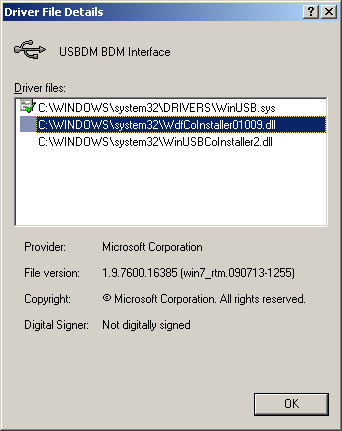
There is no sign of the libusbx since it is a interface DLL on top of Winusb.
Please try installing the drivers as follows:
- Install the drivers from the msi file (XP version only!) - Uninstall previous version if necessary.
- Plug in the BDM
- It should detect as a new device. If so let it automatically select the driver. Do not manually select it. Do not browse to the USBDM directory as the install will have placed the correct drivers in the Windows system directory. Manually selecting the driver from the USBDM directory should work but I make no guarantees. These are really just left overs from the driver install and may not be complete. Doing it in this way will also mean that the drivers will be uninstalled if new drivers are installed from a new msi file.
- If you are prompted with multiple drivers choose the one with manufacturer=pgo (this should only occur if there are old drivers that have been manually installed)
If it doesn't detect the BDM as a new device then do the following:
- Go to hardware manager and uninstall any existing driver (unless it agrees with the above!)
- Remove & replace the BDM
- Allow it to automatically select the driver
- Check the driver after the install.
I'm sorry this is so long winded - On a new install it should only be necessary to install the drivers and then just allow the automatic selection. Previous incorrect driver installs usually don't affect this but the above should solve any issues..
bye
- 新着としてマーク
- ブックマーク
- 購読
- ミュート
- RSS フィードを購読する
- ハイライト
- 印刷
- 不適切なコンテンツを報告
Hi pgo
Followed your instructions (although I had done this same sequence of steps previously). USBDM is definitely detected as a new device on plugging in, but even after the drivers are reinstalled I still see this in Device Manager:
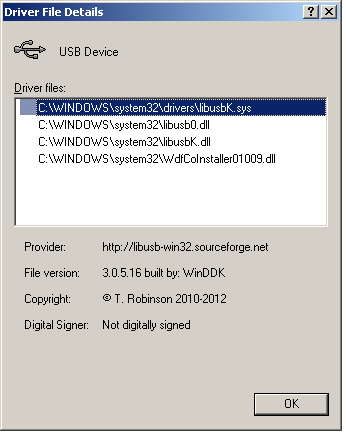
i.e. the libusbK drivers are still showing, even after previously uninstalling them from Device Manager and installing yours and yours detecting the hardware.
Although these libusbK drivers actually work fine, it would have been nice to test your new install, but at the moment libusbK seems to have dug in for the long haul on my machine!
Thanks
Tim
- 新着としてマーク
- ブックマーク
- 購読
- ミュート
- RSS フィードを購読する
- ハイライト
- 印刷
- 不適切なコンテンツを報告
Hi Jim,
I'm really surprised.
Anyway if it works don't break it.
I've never actually looked at libusbK so I don't know much about it. I'll have to have a look when time permits.
bye
