
- Forums
- Product Forums
- General Purpose MicrocontrollersGeneral Purpose Microcontrollers
- i.MX Forumsi.MX Forums
- QorIQ Processing PlatformsQorIQ Processing Platforms
- Identification and SecurityIdentification and Security
- Power ManagementPower Management
- Wireless ConnectivityWireless Connectivity
- RFID / NFCRFID / NFC
- Advanced AnalogAdvanced Analog
- Neural Processing UnitsNeural Processing Units
- MCX Microcontrollers
- S32G
- S32K
- S32V
- MPC5xxx
- Other NXP Products
- S12 / MagniV Microcontrollers
- Powertrain and Electrification Analog Drivers
- Sensors
- Vybrid Processors
- Digital Signal Controllers
- 8-bit Microcontrollers
- ColdFire/68K Microcontrollers and Processors
- PowerQUICC Processors
- OSBDM and TBDML
- S32M
- S32Z/E
-
- Solution Forums
- Software Forums
- MCUXpresso Software and ToolsMCUXpresso Software and Tools
- CodeWarriorCodeWarrior
- MQX Software SolutionsMQX Software Solutions
- Model-Based Design Toolbox (MBDT)Model-Based Design Toolbox (MBDT)
- FreeMASTER
- eIQ Machine Learning Software
- Embedded Software and Tools Clinic
- S32 SDK
- S32 Design Studio
- GUI Guider
- Zephyr Project
- Voice Technology
- Application Software Packs
- Secure Provisioning SDK (SPSDK)
- Processor Expert Software
- Generative AI & LLMs
-
- Topics
- Mobile Robotics - Drones and RoversMobile Robotics - Drones and Rovers
- NXP Training ContentNXP Training Content
- University ProgramsUniversity Programs
- Rapid IoT
- NXP Designs
- SafeAssure-Community
- OSS Security & Maintenance
- Using Our Community
-
- Cloud Lab Forums
-
- Knowledge Bases
- ARM Microcontrollers
- i.MX Processors
- Identification and Security
- Model-Based Design Toolbox (MBDT)
- QorIQ Processing Platforms
- S32 Automotive Processing Platform
- Wireless Connectivity
- CodeWarrior
- MCUXpresso Suite of Software and Tools
- MQX Software Solutions
- RFID / NFC
- Advanced Analog
- Neural Processing Units
-
- NXP Tech Blogs
- Home
- :
- General Purpose Microcontrollers
- :
- Kinetis Motor Suite
- :
- Re: Problem With Motion Sequence
Problem With Motion Sequence
- Subscribe to RSS Feed
- Mark Topic as New
- Mark Topic as Read
- Float this Topic for Current User
- Bookmark
- Subscribe
- Mute
- Printer Friendly Page

- Mark as New
- Bookmark
- Subscribe
- Mute
- Subscribe to RSS Feed
- Permalink
- Report Inappropriate Content
Hello,
I'm using KMS and I've already done all the basics configurations.
So now I'd like to build a motion sequence for an ebike.
I'd like to have 3 main states: Coast, Run and Brake.
How could I change from Run (motor spining) to Coast (All fases open)?
Or Run to Brake (Regenerative)?
Thanks,
Regards,
João Paulo.
Solved! Go to Solution.

 renato_kiss
- Mark as New
- Bookmark
- Subscribe
- Mute
- Subscribe to RSS Feed
- Permalink
- Report Inappropriate Content
Hi João Paulo,
I will try to explain the way you can select brake and modes in your stand alone program (running without KMS GUI). Please ask any question you want about it.
The best way to run a example out of KMS is following "Kinetis Motor Suite Lab Guide.pdf"
In KMS, open VIEW menu and clock on Documents. Select KMS Lab Guide (as in picture below) and click ok.
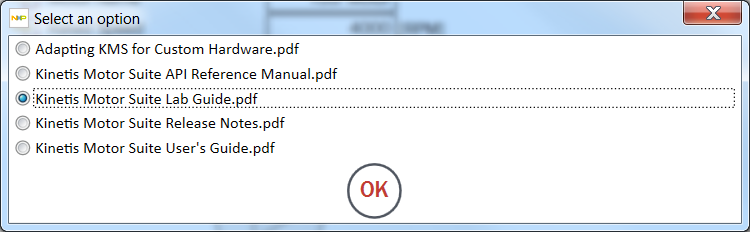
Follow Labs, specially 3.1.7 and 3.1.8 section.
After that, as demo of how to Run and Brake, you can can create a new button command, just after SW2 GPIO done in LAB Guide, like:
//Adding State switch between BRAKE and RUN
/* Switch is active Low but we want active high logic */
if (GPIO_DRV_ReadPinInput(kGpioSW3) == 0)
{
if (user.state==0x08)
{
user.state=USER_BRAKE;
}
else
{
user.state=USER_RUN_PLAN;
}
}
Remember (as showed in LAB Guide) to add extern USER_t user;
Now using SW3, you can switch from Run to Brake and then Run again (don't forget to press sw2 to spin it again).
In order to change how KMS will brake motor, you need to declare a new variable (main or global, depends upon your code), like:
BRAKE_config_t newbrakeCfg;
And in your code, do the selection of brake method you want to use:
newbrakeCfg = flashSysParamsHeader.brakeCfg; //Load the default values to your config variable
newbrakeCfg.brakingType = BRAKE_REGEN; // Change the Brake method as you desire
USER_cfgBrake(&newbrakeCfg); // Update brake configuration
brakingType can be any of following enum values (from brake.h):
typedef enum
{
BRAKE_ZERO_VECTOR = 0, /**< Zero Vector braking (High sides OFF, Low side ON) (default) */
BRAKE_REGEN, /**< Regenerative (FOC) braking */
BRAKE_COAST, /**< Coast to stop braking (all PWM's disabled) */
BRAKE_DC_INJECTION, /**< DC Injection braking */
} BRAKE_type_e;
I believe it is all you need to Spin (and now Brake) your motor using KMS in stand alone application.
Let me know if you have any comment.
Best Regards,
Renato Kiss
renato_kiss
- Mark as New
- Bookmark
- Subscribe
- Mute
- Subscribe to RSS Feed
- Permalink
- Report Inappropriate Content
Hi João Paulo,
Motion Sequence Builder was made for testing motor speeds and transitions between different speeds but all in Run Mode. Brake commands are not available in Motion Sequence Builder.
You can change Acc Limit and Jerk in some states and change speed to zero in order to let motor acceleration decrease slowly, like a coast, for example, but you can't emulate Coast due to lack of control in FET. The same happens with Regenerative Brake, you can't command it from Motion Builder.
In order to command what you intend to due, a better way is you create your own state machine, using the setup you wish for braking and Run mode.
In chapter 5 of KMS API Reference Guide (rev 1.1.0) you have brake configuration. You can test all parameters in Watch Window and then write your code.
In page 28 of this same document, you can check the user states for select RUN or BRAKE mode.
Below is an example of Variables you can change in Watch window to test what do you want:

user.state and brake.config.brakingType are the ones you need to change from RUN to Brake States and brake.config, is the one you can select the way brake will act.
Thanks a lot.
Best Regards,
Renato Kiss
- Mark as New
- Bookmark
- Subscribe
- Mute
- Subscribe to RSS Feed
- Permalink
- Report Inappropriate Content
Hello Renato,
Is there any example code or a step by step that teaches how to do this change from Run to Brake (Coast)?
Thanks,
Regards,
João Paulo
renato_kiss
- Mark as New
- Bookmark
- Subscribe
- Mute
- Subscribe to RSS Feed
- Permalink
- Report Inappropriate Content
Hi João Paulo,
I will try to explain the way you can select brake and modes in your stand alone program (running without KMS GUI). Please ask any question you want about it.
The best way to run a example out of KMS is following "Kinetis Motor Suite Lab Guide.pdf"
In KMS, open VIEW menu and clock on Documents. Select KMS Lab Guide (as in picture below) and click ok.
Follow Labs, specially 3.1.7 and 3.1.8 section.
After that, as demo of how to Run and Brake, you can can create a new button command, just after SW2 GPIO done in LAB Guide, like:
//Adding State switch between BRAKE and RUN
/* Switch is active Low but we want active high logic */
if (GPIO_DRV_ReadPinInput(kGpioSW3) == 0)
{
if (user.state==0x08)
{
user.state=USER_BRAKE;
}
else
{
user.state=USER_RUN_PLAN;
}
}
Remember (as showed in LAB Guide) to add extern USER_t user;
Now using SW3, you can switch from Run to Brake and then Run again (don't forget to press sw2 to spin it again).
In order to change how KMS will brake motor, you need to declare a new variable (main or global, depends upon your code), like:
BRAKE_config_t newbrakeCfg;
And in your code, do the selection of brake method you want to use:
newbrakeCfg = flashSysParamsHeader.brakeCfg; //Load the default values to your config variable
newbrakeCfg.brakingType = BRAKE_REGEN; // Change the Brake method as you desire
USER_cfgBrake(&newbrakeCfg); // Update brake configuration
brakingType can be any of following enum values (from brake.h):
typedef enum
{
BRAKE_ZERO_VECTOR = 0, /**< Zero Vector braking (High sides OFF, Low side ON) (default) */
BRAKE_REGEN, /**< Regenerative (FOC) braking */
BRAKE_COAST, /**< Coast to stop braking (all PWM's disabled) */
BRAKE_DC_INJECTION, /**< DC Injection braking */
} BRAKE_type_e;
I believe it is all you need to Spin (and now Brake) your motor using KMS in stand alone application.
Let me know if you have any comment.
Best Regards,
Renato Kiss
- Mark as New
- Bookmark
- Subscribe
- Mute
- Subscribe to RSS Feed
- Permalink
- Report Inappropriate Content
Hello Renato,
I did it and it's working!
Thanks very much,
Best Regards,
João Paulo
