Getting started with the eGUI (a.k.a. D4D)

cancel
Showing results for 
Show  only  | Search instead for 
Did you mean: 

Getting started with the eGUI (a.k.a. D4D)

Getting started with the eGUI (a.k.a. D4D)

On behalf of EarlOrlando

Hello community,

This document is intended to be a basic guide to get started with the eGUI. If you need a closer view about what this driver is, it is recommended to take a look into the eGUI Introduction document. Before starting, it is needed to download the library from the NXP eGUI website and it is recommended to take a look into the eGUI Reference Manual.

For this document, a demo included in the eGUI drivers will be run and then modified to toggle a LED in the TWR-K70F120M board from the eGUI interface displayed in the TWR-LCD-RGB board.
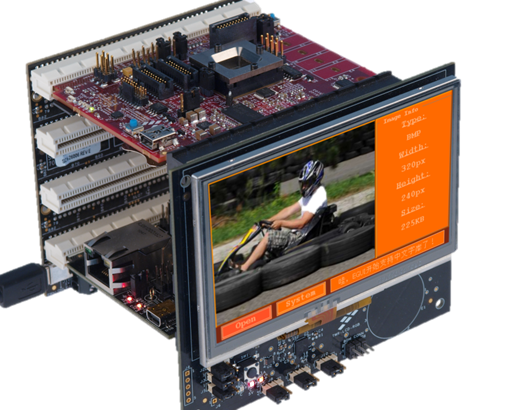
pastedImage_3.png

Contents.

Introduction.

1. About this document.

2. Running the K70 demo on IAR.

a. Compiling the TWR-K70F120M MQX libraries.

b. Adding the SD card content.

c. Download the application to the MCU.

3. Modifying the eGUI demo.

a. Creating a new screen.

i. Adding a new source file for the new screen.

ii. Adding the screen header files.

iii. Adding some macro definitions.

iv. Defining screen attributes.

v. Declaring the screen.

vi. Defining a new string.

vii. Adding the screen interfaces

b. Opening the new screen.

c. Creating a new button.

d. Toggling the LED.

4. Conclusion.

I hope you find this guide useful. Enjoy this guide, any feedback is welcome!

Attachments
Comments

Hi Carlos:

Thank you for posting this guide. It is very useful :smileyhappy:.

Regards!

Jorge Gonzalez

%3CLINGO-SUB%20id%3D%22lingo-sub-1124160%22%20slang%3D%22en-US%22%20mode%3D%22CREATE%22%3EGetting%20started%20with%20the%20eGUI%20(a.k.a.%20D4D)%3C%2FLINGO-SUB%3E%3CLINGO-BODY%20id%3D%22lingo-body-1124160%22%20slang%3D%22en-US%22%20mode%3D%22CREATE%22%3E%3CP%3EOn%20behalf%20of%20%3CA%20class%3D%22jx-jive-macro-user%22%20href%3D%22https%3A%2F%2Fcommunity.nxp.com%2Fpeople%2FEarlOrlando%22%20target%3D%22_blank%22%3EEarlOrlando%3C%2FA%3E%E2%80%8B%3C%2FP%3E%3CP%3E%3C%2FP%3E%3CP%3EHello%20community%2C%3C%2FP%3E%3CP%20style%3D%22margin-bottom%3A%200.0001pt%3B%20text-align%3A%20justify%3B%20text-indent%3A%200.5in%3B%22%3E%3C%2FP%3E%3CP%20style%3D%22margin-bottom%3A%200.0001pt%3B%20text-align%3A%20justify%3B%20text-indent%3A%200.5in%3B%22%3E%3CSPAN%20style%3D%22font-family%3A%20'Arial'%2Csans-serif%3B%22%3EThis%20document%20is%20intended%20to%20be%20a%20basic%20guide%20to%20get%20started%20with%20the%20eGUI.%20If%20you%20need%20a%20closer%20view%20about%20what%20this%20driver%20is%2C%20it%20is%20recommended%20to%20take%20a%20look%20into%20the%20%3C%2FSPAN%3E%3CA%20href%3D%22http%3A%2F%2Fcache.nxp.com%2Ffiles%2Fmicrocontrollers%2Fdoc%2Freports_presentations%2FEGUIPRE.ppt%3Ffpsp%3D1%26amp%3BWT_TYPE%3DReports%2520or%2520Presentations%26amp%3BWT_VENDOR%3DFREESCALE%26amp%3BWT_FILE_FORMAT%3Dppt%26amp%3BWT_ASSET%3DDocumentation%26amp%3BfileExt%3D.ppt%22%20rel%3D%22nofollow%20noopener%20noreferrer%22%20target%3D%22_blank%22%3E%3CSPAN%20style%3D%22font-family%3A%20'Arial'%2Csans-serif%3B%22%3EeGUI%20Introduction%3C%2FSPAN%3E%3C%2FA%3E%3CSPAN%20style%3D%22font-family%3A%20'Arial'%2Csans-serif%3B%22%3E%20document.%20Before%20starting%2C%20it%20is%20needed%20to%20download%20the%20library%20from%20the%20%3C%2FSPAN%3E%3CA%20href%3D%22http%3A%2F%2Fwww.nxp.com%2FeGUI%22%20rel%3D%22nofollow%20noopener%20noreferrer%22%20target%3D%22_blank%22%3E%3CSPAN%20style%3D%22font-family%3A%20'Arial'%2Csans-serif%3B%22%3ENXP%20eGUI%20website%3C%2FSPAN%3E%3C%2FA%3E%3CSPAN%20style%3D%22font-family%3A%20'Arial'%2Csans-serif%3B%22%3E%20and%20it%20is%20recommended%20to%20take%20a%20look%20into%20the%20%3C%2FSPAN%3E%3CA%20href%3D%22http%3A%2F%2Fgargy007.github.io%2Fegui_doc%2F%22%20rel%3D%22nofollow%20noopener%20noreferrer%22%20target%3D%22_blank%22%3E%3CSPAN%20style%3D%22font-family%3A%20'Arial'%2Csans-serif%3B%22%3EeGUI%20Reference%20Manual%3C%2FSPAN%3E%3C%2FA%3E%3CSPAN%20style%3D%22font-family%3A%20'Arial'%2Csans-serif%3B%22%3E.%3C%2FSPAN%3E%3C%2FP%3E%3CP%20style%3D%22margin-top%3A%2012pt%3B%20margin-bottom%3A%200.0001pt%3B%20text-align%3A%20justify%3B%20text-indent%3A%200.5in%3B%22%3E%3CSPAN%20style%3D%22font-family%3A%20'Arial'%2Csans-serif%3B%22%3EFor%20this%20document%2C%20a%20demo%20included%20in%20the%20eGUI%20drivers%20will%20be%20run%20and%20then%20modified%20to%20toggle%20a%20LED%20in%20the%20TWR-K70F120M%20board%20from%20the%20eGUI%20interface%20displayed%20in%20the%20TWR-LCD-RGB%20board.%3C%2FSPAN%3E%3C%2FP%3E%3CP%3E%3C%2FP%3E%3CP%3E%3CSPAN%20class%3D%22lia-inline-image-display-wrapper%22%20image-alt%3D%22pastedImage_3.png%22%3E%3Cspan%20class%3D%22lia-inline-image-display-wrapper%22%20image-alt%3D%22pastedImage_3.png%22%20style%3D%22width%3A%20507px%3B%22%3E%3Cimg%20src%3D%22https%3A%2F%2Fcommunity.nxp.com%2Ft5%2Fimage%2Fserverpage%2Fimage-id%2F56179i05A6D147E818FC8D%2Fimage-size%2Flarge%3Fv%3Dv2%26amp%3Bpx%3D999%22%20role%3D%22button%22%20title%3D%22pastedImage_3.png%22%20alt%3D%22pastedImage_3.png%22%20%2F%3E%3C%2Fspan%3E%3C%2FSPAN%3E%3C%2FP%3E%3CP%3E%3C%2FP%3E%3CP%3E%3C%2FP%3E%3CH2%20id%3D%22toc-hId--1414499031%22%20id%3D%22toc-hId--500060379%22%3E%3CSTRONG%3EContents.%3C%2FSTRONG%3E%3C%2FH2%3E%3CP%3E%3C%2FP%3E%3CP%3E%3CSPAN%20style%3D%22font-family%3A%20'Arial'%2Csans-serif%3B%22%3E%3CSTRONG%3EIntroduction%3C%2FSTRONG%3E%3C%2FSPAN%3E%3CSPAN%20style%3D%22color%3A%20windowtext%3B%22%3E.%3C%2FSPAN%3E%3C%2FP%3E%3CP%3E%3CSTRONG%3E%3CSPAN%20style%3D%22font-family%3A%20'Arial'%2Csans-serif%3B%22%3E1.%3C%2FSPAN%3E%20%3CSPAN%20style%3D%22font-family%3A%20'Arial'%2Csans-serif%3B%22%3EAbout%20this%20document%3C%2FSPAN%3E%3CSPAN%20style%3D%22color%3A%20windowtext%3B%22%3E.%20%3C%2FSPAN%3E%3C%2FSTRONG%3E%3C%2FP%3E%3CP%3E%3CSPAN%20style%3D%22font-family%3A%20'Arial'%2Csans-serif%3B%22%3E%3CSTRONG%3E2.%20%3C%2FSTRONG%3E%3C%2FSPAN%3E%3CSPAN%20style%3D%22font-family%3A%20'Arial'%2Csans-serif%3B%22%3E%3CSTRONG%3ERunning%20the%20K70%20demo%20on%20IAR%3C%2FSTRONG%3E%3C%2FSPAN%3E%3CSPAN%20style%3D%22color%3A%20windowtext%3B%22%3E.%3C%2FSPAN%3E%3C%2FP%3E%3CP%20style%3D%22padding-left%3A%2030px%3B%22%3E%3CSPAN%20style%3D%22font-family%3A%20'Arial'%2Csans-serif%3B%22%3E%3CSTRONG%3Ea.%20%3C%2FSTRONG%3E%3C%2FSPAN%3E%3CSPAN%20style%3D%22font-family%3A%20'Arial'%2Csans-serif%3B%22%3E%3CSTRONG%3ECompiling%20the%20TWR-K70F120M%20MQX%20libraries%3C%2FSTRONG%3E%3C%2FSPAN%3E%3CSPAN%20style%3D%22color%3A%20windowtext%3B%22%3E.%20%3C%2FSPAN%3E%3C%2FP%3E%3CP%20style%3D%22padding-left%3A%2030px%3B%22%3E%3CSPAN%20style%3D%22font-family%3A%20'Arial'%2Csans-serif%3B%22%3E%3CSTRONG%3Eb.%20%3C%2FSTRONG%3E%3C%2FSPAN%3E%3CSPAN%20style%3D%22font-family%3A%20'Arial'%2Csans-serif%3B%22%3E%3CSTRONG%3EAdding%20the%20SD%20card%20content%3C%2FSTRONG%3E%3C%2FSPAN%3E%3CSPAN%20style%3D%22color%3A%20windowtext%3B%22%3E.%20%3C%2FSPAN%3E%3C%2FP%3E%3CP%20style%3D%22padding-left%3A%2030px%3B%22%3E%3CSPAN%20style%3D%22font-family%3A%20'Arial'%2Csans-serif%3B%22%3E%3CSTRONG%3Ec.%20%3C%2FSTRONG%3E%3C%2FSPAN%3E%3CSPAN%20style%3D%22font-family%3A%20'Arial'%2Csans-serif%3B%22%3E%3CSTRONG%3EDownload%20the%20application%20to%20the%20MCU%3C%2FSTRONG%3E%3C%2FSPAN%3E%3CSPAN%20style%3D%22color%3A%20windowtext%3B%22%3E.%3C%2FSPAN%3E%3C%2FP%3E%3CP%3E%3CSPAN%20style%3D%22font-family%3A%20'Arial'%2Csans-serif%3B%22%3E%3CSTRONG%3E3.%20%3C%2FSTRONG%3E%3C%2FSPAN%3E%3CSPAN%20style%3D%22font-family%3A%20'Arial'%2Csans-serif%3B%22%3E%3CSTRONG%3EModifying%20the%20eGUI%20demo%3C%2FSTRONG%3E%3C%2FSPAN%3E%3CSPAN%20style%3D%22color%3A%20windowtext%3B%22%3E.%3C%2FSPAN%3E%3C%2FP%3E%3CP%20style%3D%22padding-left%3A%2030px%3B%22%3E%3CSPAN%20style%3D%22font-family%3A%20'Arial'%2Csans-serif%3B%22%3E%3CSTRONG%3Ea.%20%3C%2FSTRONG%3E%3C%2FSPAN%3E%3CSPAN%20style%3D%22font-family%3A%20'Arial'%2Csans-serif%3B%22%3E%3CSTRONG%3ECreating%20a%20new%20screen%3C%2FSTRONG%3E%3C%2FSPAN%3E%3CSPAN%20style%3D%22color%3A%20windowtext%3B%22%3E.%3C%2FSPAN%3E%3C%2FP%3E%3CP%20style%3D%22padding-left%3A%2060px%3B%22%3E%3CSPAN%20style%3D%22font-family%3A%20'Arial'%2Csans-serif%3B%22%3E%3CSTRONG%3Ei.%20%3C%2FSTRONG%3E%3C%2FSPAN%3E%3CSPAN%20style%3D%22font-family%3A%20'Arial'%2Csans-serif%3B%22%3E%3CSTRONG%3EAdding%20a%20new%20source%20file%20for%20the%20new%20screen%3C%2FSTRONG%3E%3C%2FSPAN%3E%3CSPAN%20style%3D%22color%3A%20windowtext%3B%22%3E.%3C%2FSPAN%3E%3C%2FP%3E%3CP%20style%3D%22padding-left%3A%2060px%3B%22%3E%3CSPAN%20style%3D%22font-family%3A%20'Arial'%2Csans-serif%3B%22%3E%3CSTRONG%3Eii.%20%3C%2FSTRONG%3E%3C%2FSPAN%3E%3CSPAN%20style%3D%22font-family%3A%20'Arial'%2Csans-serif%3B%22%3E%3CSTRONG%3EAdding%20the%20screen%20header%20files%3C%2FSTRONG%3E%3C%2FSPAN%3E%3CSPAN%20style%3D%22color%3A%20windowtext%3B%22%3E.%20%3C%2FSPAN%3E%3C%2FP%3E%3CP%20style%3D%22padding-left%3A%2060px%3B%22%3E%3CSPAN%20style%3D%22font-family%3A%20'Arial'%2Csans-serif%3B%22%3E%3CSTRONG%3Eiii.%20%3C%2FSTRONG%3E%3C%2FSPAN%3E%3CSPAN%20style%3D%22font-family%3A%20'Arial'%2Csans-serif%3B%22%3E%3CSTRONG%3EAdding%20some%20macro%20definitions%3C%2FSTRONG%3E%3C%2FSPAN%3E%3CSPAN%20style%3D%22color%3A%20windowtext%3B%22%3E.%20%3C%2FSPAN%3E%3C%2FP%3E%3CP%20style%3D%22padding-left%3A%2060px%3B%22%3E%3CSPAN%20style%3D%22font-family%3A%20'Arial'%2Csans-serif%3B%22%3E%3CSTRONG%3Eiv.%20%3C%2FSTRONG%3E%3C%2FSPAN%3E%3CSPAN%20style%3D%22font-family%3A%20'Arial'%2Csans-serif%3B%22%3E%3CSTRONG%3EDefining%20screen%20attributes%3C%2FSTRONG%3E%3C%2FSPAN%3E%3CSPAN%20style%3D%22color%3A%20windowtext%3B%22%3E.%20%3C%2FSPAN%3E%3C%2FP%3E%3CP%20style%3D%22padding-left%3A%2060px%3B%22%3E%3CSPAN%20style%3D%22font-family%3A%20'Arial'%2Csans-serif%3B%22%3E%3CSTRONG%3Ev.%20%3C%2FSTRONG%3E%3C%2FSPAN%3E%3CSPAN%20style%3D%22font-family%3A%20'Arial'%2Csans-serif%3B%22%3E%3CSTRONG%3EDeclaring%20the%20screen%3C%2FSTRONG%3E%3C%2FSPAN%3E%3CSPAN%20style%3D%22color%3A%20windowtext%3B%22%3E.%3C%2FSPAN%3E%3C%2FP%3E%3CP%20style%3D%22padding-left%3A%2060px%3B%22%3E%3CSPAN%20style%3D%22font-family%3A%20'Arial'%2Csans-serif%3B%22%3E%3CSTRONG%3Evi.%20%3C%2FSTRONG%3E%3C%2FSPAN%3E%3CSPAN%20style%3D%22font-family%3A%20'Arial'%2Csans-serif%3B%22%3E%3CSTRONG%3EDefining%20a%20new%20string%3C%2FSTRONG%3E%3C%2FSPAN%3E%3CSPAN%20style%3D%22color%3A%20windowtext%3B%22%3E.%3C%2FSPAN%3E%3C%2FP%3E%3CP%20style%3D%22padding-left%3A%2060px%3B%22%3E%3CSPAN%20style%3D%22font-family%3A%20'Arial'%2Csans-serif%3B%22%3E%3CSTRONG%3Evii.%20%3C%2FSTRONG%3E%3C%2FSPAN%3E%3CSPAN%20style%3D%22font-family%3A%20'Arial'%2Csans-serif%3B%22%3E%3CSTRONG%3EAdding%20the%20screen%20interfaces%3C%2FSTRONG%3E%3C%2FSPAN%3E%3C%2FP%3E%3CP%20style%3D%22padding-left%3A%2030px%3B%22%3E%3CSPAN%20style%3D%22font-family%3A%20'Arial'%2Csans-serif%3B%22%3E%3CSTRONG%3Eb.%3C%2FSTRONG%3E%3C%2FSPAN%3E%20%3CSPAN%20style%3D%22font-family%3A%20'Arial'%2Csans-serif%3B%22%3E%3CSTRONG%3EOpening%20the%20new%20screen%3C%2FSTRONG%3E%3C%2FSPAN%3E%3CSPAN%20style%3D%22color%3A%20windowtext%3B%22%3E.%3C%2FSPAN%3E%3C%2FP%3E%3CP%20style%3D%22padding-left%3A%2030px%3B%22%3E%3CSPAN%20style%3D%22font-family%3A%20'Arial'%2Csans-serif%3B%22%3E%3CSTRONG%3Ec.%3C%2FSTRONG%3E%3C%2FSPAN%3E%20%3CSPAN%20style%3D%22font-family%3A%20'Arial'%2Csans-serif%3B%22%3E%3CSTRONG%3ECreating%20a%20new%20button%3C%2FSTRONG%3E%3C%2FSPAN%3E%3CSPAN%20style%3D%22color%3A%20windowtext%3B%22%3E.%3C%2FSPAN%3E%3C%2FP%3E%3CP%20style%3D%22padding-left%3A%2030px%3B%22%3E%3CSPAN%20style%3D%22font-family%3A%20'Arial'%2Csans-serif%3B%22%3E%3CSTRONG%3Ed.%3C%2FSTRONG%3E%3C%2FSPAN%3E%20%3CSPAN%20style%3D%22font-family%3A%20'Arial'%2Csans-serif%3B%22%3E%3CSTRONG%3EToggling%20the%20LED%3C%2FSTRONG%3E%3C%2FSPAN%3E%3CSPAN%20style%3D%22color%3A%20windowtext%3B%22%3E.%3C%2FSPAN%3E%3C%2FP%3E%3CP%20style%3D%22padding-left%3A%2030px%3B%22%3E%3CSPAN%20style%3D%22font-family%3A%20'Arial'%2Csans-serif%3B%22%3E%3CSTRONG%3E4.%3C%2FSTRONG%3E%3C%2FSPAN%3E%20%3CSPAN%20style%3D%22font-family%3A%20'Arial'%2Csans-serif%3B%22%3E%3CSTRONG%3EConclusion%3C%2FSTRONG%3E%3C%2FSPAN%3E%3CSPAN%20style%3D%22color%3A%20windowtext%3B%22%3E.%3C%2FSPAN%3E%3C%2FP%3E%3CP%3E%3C%2FP%3E%3CP%3E%3C%2FP%3E%3CP%3EI%20hope%20you%20find%20this%20guide%20useful.%20Enjoy%20this%20guide%2C%20any%20feedback%20is%20welcome!%3C%2FP%3E%3C%2FLINGO-BODY%3E%3CLINGO-SUB%20id%3D%22lingo-sub-1124161%22%20slang%3D%22en-US%22%20mode%3D%22CREATE%22%3ERe%3A%20Getting%20started%20with%20the%20eGUI%20(a.k.a.%20D4D)%3C%2FLINGO-SUB%3E%3CLINGO-BODY%20id%3D%22lingo-body-1124161%22%20slang%3D%22en-US%22%20mode%3D%22CREATE%22%3E%3CP%3EHi%20Carlos%3A%3C%2FP%3E%3CP%3E%3C%2FP%3E%3CP%3EThank%20you%20for%20posting%20this%20guide.%20It%20is%20very%20useful%20%3CIMG%20id%3D%22smileyhappy%22%20class%3D%22emoticon%20emoticon-smileyhappy%22%20src%3D%22https%3A%2F%2Fcommunity.nxp.com%2Fi%2Fsmilies%2F16x16_smiley-happy.png%22%20alt%3D%22Smiley%20Happy%22%20title%3D%22Smiley%20Happy%22%20%2F%3E.%3C%2FP%3E%3CP%3E%3C%2FP%3E%3CP%3ERegards!%3C%2FP%3E%3CP%3EJorge%20Gonzalez%3C%2FP%3E%3C%2FLINGO-BODY%3E
No ratings
Version history
Last update:
‎03-02-2016 05:03 PM
Updated by: