
- Forums
- Product Forums
- General Purpose MicrocontrollersGeneral Purpose Microcontrollers
- i.MX Forumsi.MX Forums
- QorIQ Processing PlatformsQorIQ Processing Platforms
- Identification and SecurityIdentification and Security
- Power ManagementPower Management
- Wireless ConnectivityWireless Connectivity
- RFID / NFCRFID / NFC
- Advanced AnalogAdvanced Analog
- Neural Processing UnitsNeural Processing Units
- MCX Microcontrollers
- S32G
- S32K
- S32V
- MPC5xxx
- Other NXP Products
- S12 / MagniV Microcontrollers
- Powertrain and Electrification Analog Drivers
- Sensors
- Vybrid Processors
- Digital Signal Controllers
- 8-bit Microcontrollers
- ColdFire/68K Microcontrollers and Processors
- PowerQUICC Processors
- OSBDM and TBDML
- S32M
- S32Z/E
-
- Solution Forums
- Software Forums
- MCUXpresso Software and ToolsMCUXpresso Software and Tools
- CodeWarriorCodeWarrior
- MQX Software SolutionsMQX Software Solutions
- Model-Based Design Toolbox (MBDT)Model-Based Design Toolbox (MBDT)
- FreeMASTER
- eIQ Machine Learning Software
- Embedded Software and Tools Clinic
- S32 SDK
- S32 Design Studio
- GUI Guider
- Zephyr Project
- Voice Technology
- Application Software Packs
- Secure Provisioning SDK (SPSDK)
- Processor Expert Software
- Generative AI & LLMs
-
- Topics
- Mobile Robotics - Drones and RoversMobile Robotics - Drones and Rovers
- NXP Training ContentNXP Training Content
- University ProgramsUniversity Programs
- Rapid IoT
- NXP Designs
- SafeAssure-Community
- OSS Security & Maintenance
- Using Our Community
-
- Cloud Lab Forums
-
- Knowledge Bases
- ARM Microcontrollers
- i.MX Processors
- Identification and Security
- Model-Based Design Toolbox (MBDT)
- QorIQ Processing Platforms
- S32 Automotive Processing Platform
- Wireless Connectivity
- CodeWarrior
- MCUXpresso Suite of Software and Tools
- MQX Software Solutions
- RFID / NFC
- Advanced Analog
- Neural Processing Units
-
- NXP Tech Blogs
- Home
- :
- i.MX Processors
- :
- i.MX Processors Knowledge Base
- :
- All Boards Java
All Boards Java
- Subscribe to RSS Feed
- Mark as New
- Mark as Read
- Bookmark
- Subscribe
- Printer Friendly Page
- Report Inappropriate Content
All Boards Java
All Boards Java
JAVA on i.MX
Sun Microsystems has pre-built versions of Java Virtual Machine for ARM Processors. It's possible to download them at: http://java.sun.com/javase/downloads/embedded.jsp
All pre-built software mentioned on site above are distributed as evaluation software. For more information about use and license, please contact Sun Microsystems
i.MX31 PDK will be used as an example to describe installation, compilation and execution procedures. It can be easily done for other i.MX platforms
Installing Sun Java on i.MX
For i.MX31, i.MX35, download the following version:
| Usage | Headful | Binary Version |
| Non-Graphical Applications | ARMv6 Linux - Headless (Early Access) | EABI, glibc 2.5, Hard Float (VFP), Little Endian |
| Graphical Applications | ARMv6 Linux - Headful (Early Access) | EABI, glibc 2.5, Hard Float (VFP), Little Endian |
For i.MX21, i.MX25, i.MX27, download the following version:
| Usage | Headful | Binary Version |
| Non-Graphical Applications | ARMv5 Linux - Headless (Early Access) | EABI, glibc 2.5, Soft Float, Little Endian |
| Graphical Applications | ARMv5 Linux - Headful (Early Access) | EABI, glibc 2.5, Soft Float, Little Endian |
On following example, a graphical application will be compiled, the headful version will be used.
This example uses X11 as graphical server. On LTIB, select X11 and also the package libXtst and libXi.
Extract the downloaded package (in this case "ejre-1_6_0_10-ea-b39-linux-armv6-vfp-eabi-min-eval-30_jul_2009.tar.gz")
tar xzvf ejre-1_6_0_10-ea-b39-linux-armv6-vfp-eabi-min-eval-30_jul_2009.tar.gz
Create a new folder on <LTIB Directory>/rootfs/ called ejre1.6.0_10
cd rootfs sudo mkdir ejre1.6.0_10
Copy all files and folders located inside the extracted package to <LTIB Directory>/rootfs/ejre1.6.0_10/
cd rootfs/ejre1.6.0_10
cp -a ../../ejre1.6.0_10/* .
Include the bin folder to the PATH:
export PATH=$PATH:/ejre1.6.0_10/bin/
In this example the X11 will be used as graphical server. Add the display environment variable:
export DISPLAY=:0
Running a simple program
Compiling and testing on Host PC
Let's first compile and test a simple program on Host Machine (PC).
Create a file called Example1.java and add the following code:
import java.awt.*;

public class Example1 extends java.applet.Applet
{
   public void init()
   {
        add(new Button("One"));
        add(new Button("Two"));
   }

   public Dimension preferredSize()
   {
        return new Dimension(480, 640);
   }

   public static void main(String [] args)
   {
        Frame f = new Frame("Example 1");

        Example1 ex = new Example1();

        ex.init();

        f.add("Center", ex);

        f.pack();
        f.show();
   }
}
On terminal, compile the source code using ecj:
$ ecj Example1.java
ecj Java Compiler is needed to compile this example. To install ecj on Debian based OS, install the packages: sudo apt-get install ecj ecj-gcj libecj-java libecj-java-gcj
Now it's possible to test the compiled program. Just type on host:
$ java Example1
The following window will be shown:
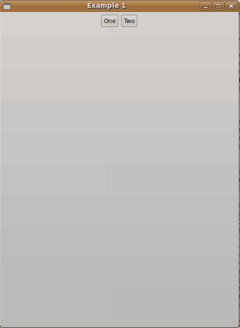
Running on i.MX
Copy the file Example1.class to <LTIB Directory>/rootfs/home
cp Example1.class rootfs/home
On i.MX Linux, start Xfbdev in background:
$ Xfbdev &
Run Example1:
$ java Example1
The following screen will be shown on LCD:
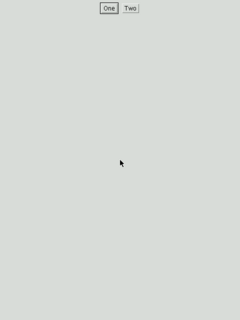

- Mark as Read
- Mark as New
- Bookmark
- Permalink
- Report Inappropriate Content
Hi,
I'm using i.MX6Q Sabrelite and freescale linux. I installed the standard edition of java and could compile and execute all programs but the ones that use java.awt. When I tried executing the above Example1.java, I got a linker error. Please find the error below.
Exception in thread "main" java.lang.UnsatisfiedLinkError: /usr/sejdk7/jdk1.7.0_
10/jre/lib/arm/xawt/libmawt.so: libXtst.so.6: cannot open shared object file: No
such file or directory
at java.lang.ClassLoader$NativeLibrary.load(Native Method)
at java.lang.ClassLoader.loadLibrary1(ClassLoader.java:1939)
at java.lang.ClassLoader.loadLibrary0(ClassLoader.java:1864)
at java.lang.ClassLoader.loadLibrary(ClassLoader.java:1825)
at java.lang.Runtime.load0(Runtime.java:792)
at java.lang.System.load(System.java:1059)
at java.lang.ClassLoader$NativeLibrary.load(Native Method)
at java.lang.ClassLoader.loadLibrary1(ClassLoader.java:1939)
at java.lang.ClassLoader.loadLibrary0(ClassLoader.java:1864)
at java.lang.ClassLoader.loadLibrary(ClassLoader.java:1846)
at java.lang.Runtime.loadLibrary0(Runtime.java:845)
at java.lang.System.loadLibrary(System.java:1084)
at sun.security.action.LoadLibraryAction.run(LoadLibraryAction.java:67)
at sun.security.action.LoadLibraryAction.run(LoadLibraryAction.java:47)
at java.security.AccessController.doPrivileged(Native Method)
at java.awt.Toolkit.loadLibraries(Toolkit.java:1648)
at java.awt.Toolkit.<clinit>(Toolkit.java:1670)
at java.awt.Component.<clinit>(Component.java:595)
Any help in resolving this error is very much appreciated. Thanks in advance,
Iype
- Mark as Read
- Mark as New
- Bookmark
- Permalink
- Report Inappropriate Content
Has this issue been resolved? The Document from the i.MX Community entitled, "All Boards Java", has a hyperlink to http://www.imxdev.org/wiki/images/9/91/Libxtst_libxi_specs.tar.gz. Clicking on this link just reloads the i.MX community page.
Can the community please update the link? We are evaluating the i.MX 6 platform, and, without Java, we will have to consider another platform.
Thanks,
Regards,
Phil Kahler
The Boeing Co.
Everett, WA.
- Mark as Read
- Mark as New
- Bookmark
- Permalink
- Report Inappropriate Content
In fact, all requests to www.imxdev.org, no matter the path, redirects to the community. Deactivated user, any idea about this tarball?

- Mark as Read
- Mark as New
- Bookmark
- Permalink
- Report Inappropriate Content
Unfortunately we lost some files in the migration from imxdev.org - sorry for the inconvenience. We'll keep this document as being useful as an example for loading and running the JVM.
- Mark as Read
- Mark as New
- Bookmark
- Permalink
- Report Inappropriate Content
Hello, can anybody help me? Is there something new about http://www.imxdev.org/wiki/images/9/91/Libxtst_libxi_specs.tar.gz, and how can I get this files?
