FRDM-K22F: Debugging with P&E OpenSDAv2.1 Firmware

cancel
Showing results for 
Show  only  | Search instead for 
Did you mean: 

FRDM-K22F: Debugging with P&E OpenSDAv2.1 Firmware

FRDM-K22F: Debugging with P&E OpenSDAv2.1 Firmware

This document explains how you can debug the FRDM-K22F board with the P&E OpenSDAv2.1 Firmware and the Kinetis Design Studio V1.1.0.


Applicable to:

  • OpenSDAv2.1 boards (FRDM-K22F for now)
  • Kinetis Design Studio V1.1.0


13843_13843.pngpastedImage_0.png


Outline

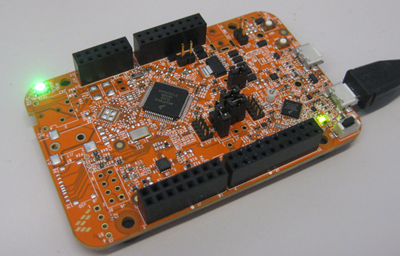
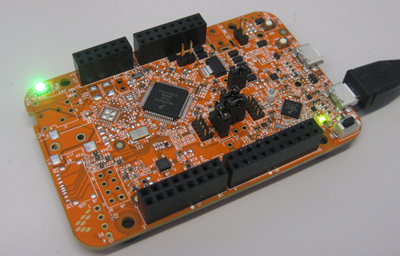
The FRDM-K22F board (FRDM-K22F|Freedom Development Board|Kinetis|Freescale) comes with OpenSDAv2.1 programmed on it, and has the CMSIS-DAP debug firmware on it by default.

(see 'Technical Details' at the end about the OpenSDA differences)


OpenOCD with CMSIS-DAP for FRDM-K22F is not supported in KDS V1.1.0. Trying to debug the FRDM-K22F board with KDS V1.1.0 and OpenOCD/CMSIS-DAP results in an error in the Console View and is currently not possible, until OpenSDA gets updated (see Kinetis Design Studio V1.1.0: Release Notes and News).


One solution is to use the P&E OpenSDAv2.1 firmware to debug the board.

(Another solution is to use the Segger J-Link OpenSDAv2.1 firmware, see FRDM-K22F: Debugging with Segger J-Link OpenSDAv2.1 Firmware)


Update KDS from P&E Update Web Site

For KDS V1.1.0, you need to install an update throught an Eclipse update. The update is from www.pemicro.com/eclipse/updates within the Install New Updates dialog under the Eclipse Help menu.

!!!! Please note that there is a known issue in KDS V1.1.0 which requires  to remove and add a link to P&E's update site in order for installation procedure to work in KDS v1.02. Please see description below:


Issue: The default P&E update site included in KDS v1.02 (PEMicro -
http://www.pemicro.com/eclipse/updates)  will not allow a user to properly update the P&E plugin on a freshly installed KDS 1.02 layout.
Workaround: 
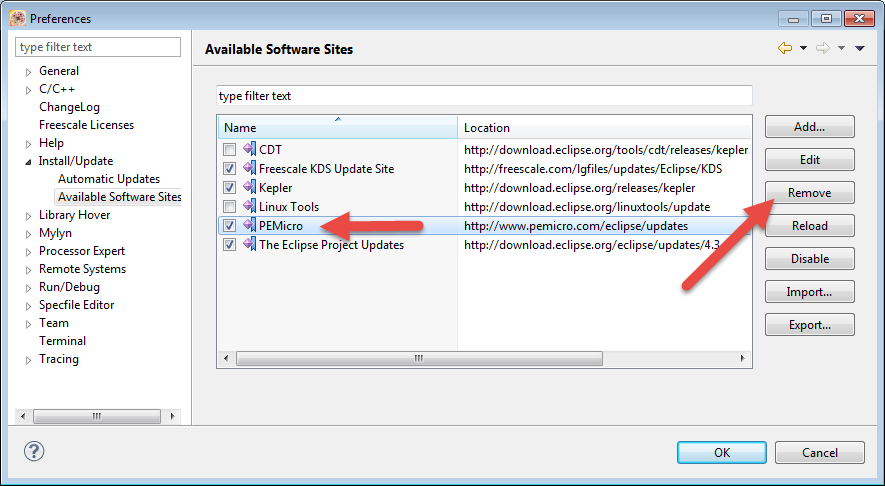
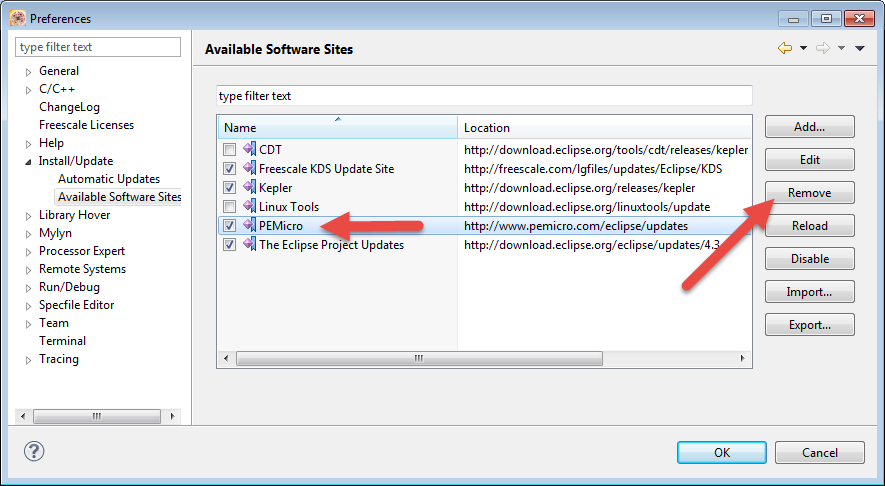
a. Remove the PEMicro -
http://www.pemicro.com/eclipse/updates update site from the list of available update sites. Use the menu Help > Perferences > Install/Updates > Available Software Sites and Remove the PEMicro entry:
13856_13856.pngpastedImage_6.png
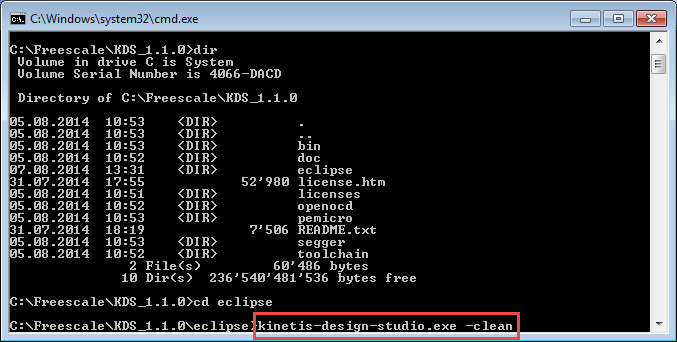
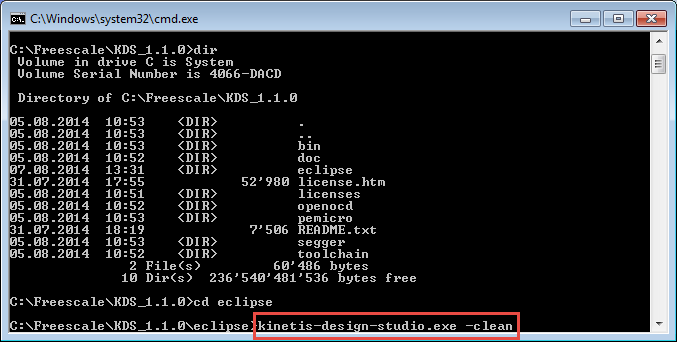
b. Exit the KDS Eclipse IDE and restart it from the command line with the  -clean parameter. On Windows start Eclipes from the cmd.exe (DOS shell) with the -clean parameter:
13857_13857.pngpastedImage_7.png
c. In Eclipse, add the PEMicro -
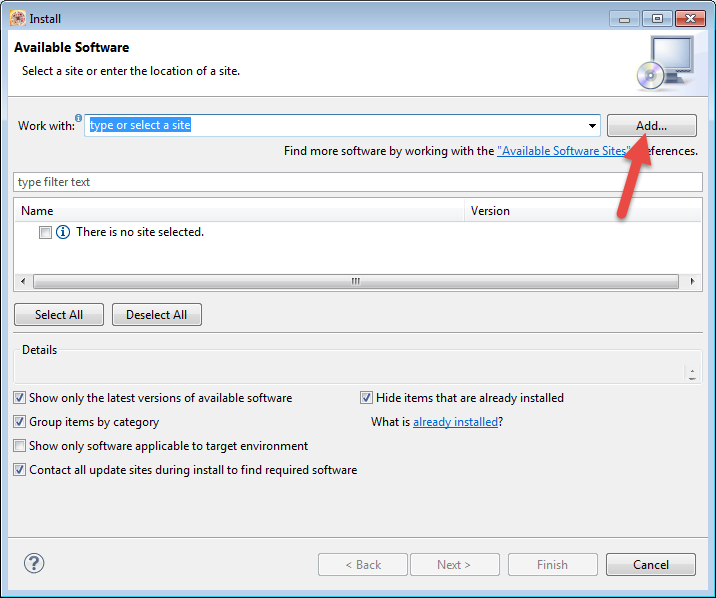
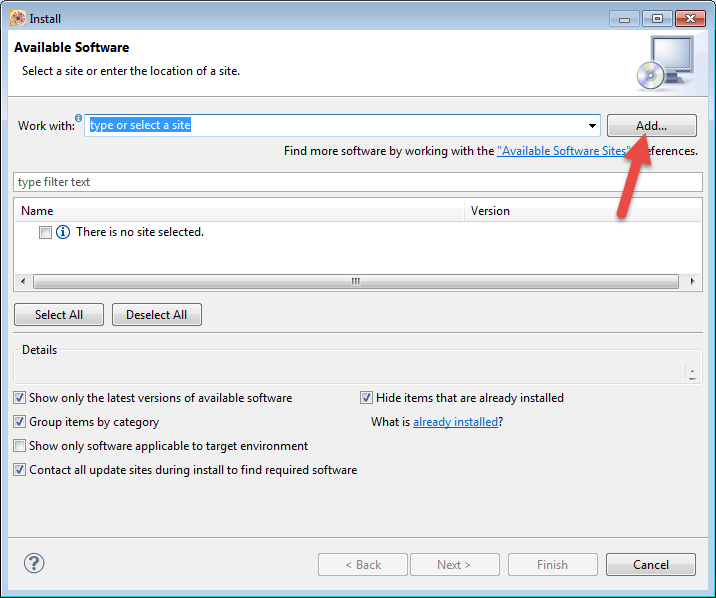
http://www.pemicro.com/eclipse/updates update site. Use the menu Help > Install New Software and press the Add button:
13858_13858.pngpastedImage_8.png

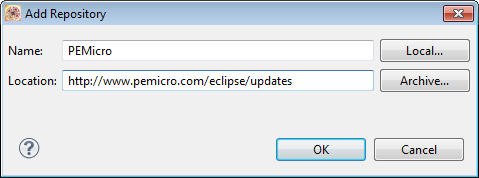
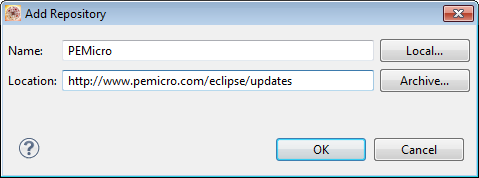
d) Enter http://www.pemicro.com/eclipse/updates as update Location and press OK:
13859_13859.pngpastedImage_9.png

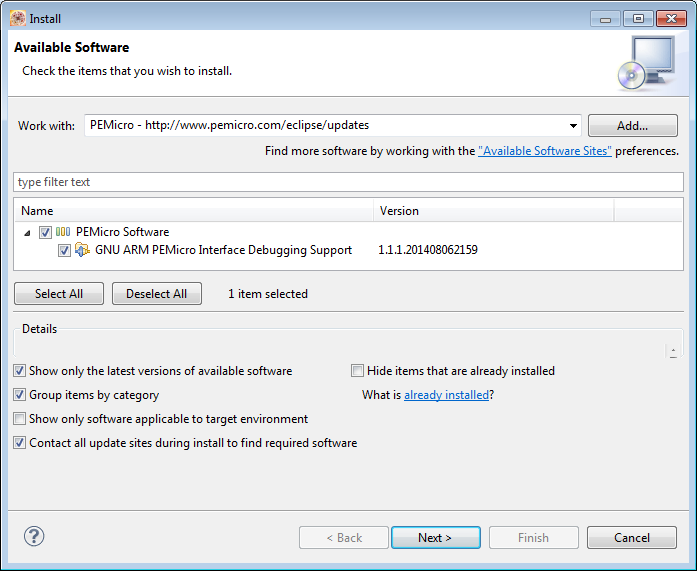
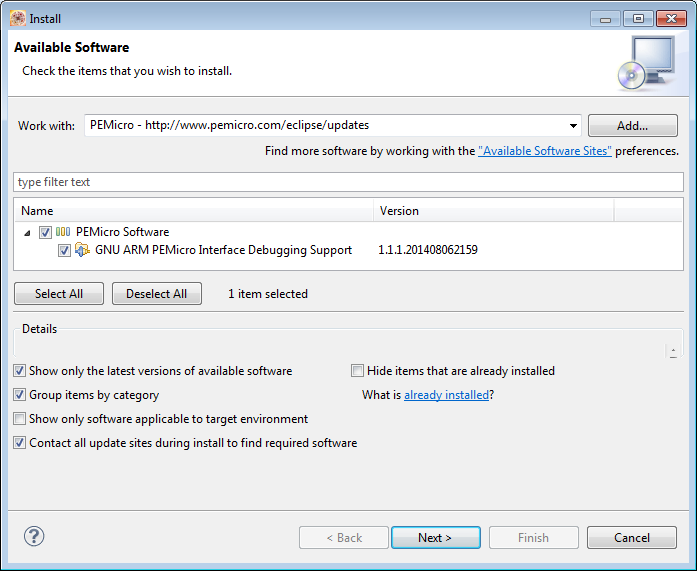
e) Then update from P&E's website:

13861_13861.pngpastedImage_13.png


Installation of P&E OpenSDA V2.1 Firmware

You need to install the P&E OpenSDAv2.1 firmware on the board, and you only need to do this once (unless you change the firmware again).


  1. Go to http://www.pemicro.com/opensda/ and download the OpenSDA Firmware Apps file (zip file) (requires registration at P&E)
  2. Unzip the firmware files to a folder on your harddisk.
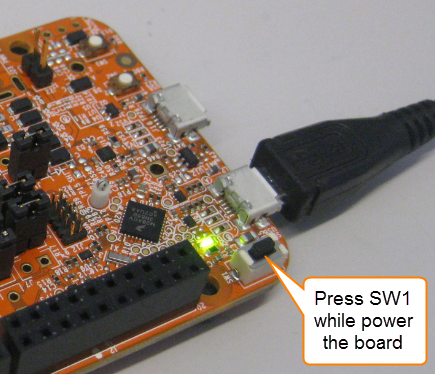
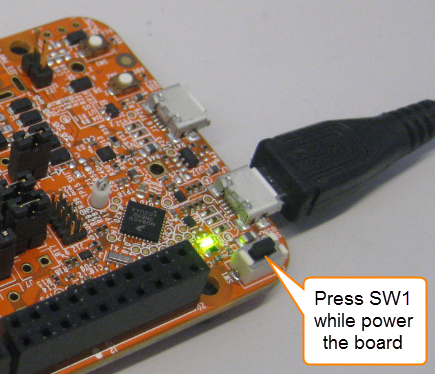
  3. Power the board/Plug in the USB cable with the OpenSDA USB port, while having the Reset/SW1 pressed.
    13844_13844.pngpastedImage_6.png
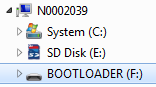
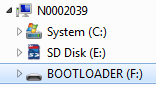
  4. The device should enumerate BOOTLOADER: device on your host. You are now in bootloader mode.
    13845_13845.pngpastedImage_8.png
  5. Copy the the correct firmware file (DEBUG-FRDM-K22F_Pemicro_v108b_for_OpenSDA_v2.1.bin) to the BOOTLOADER device. Wait a few seconds to complete the operation.
  6. Unplug the board, and now power it normally (without SW1 pressed)
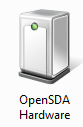
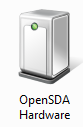
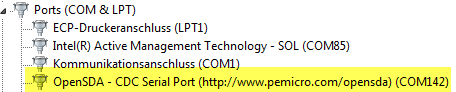
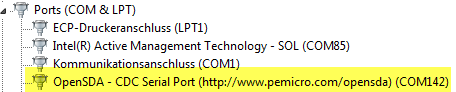
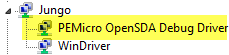
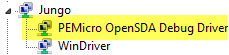
  7. The board should now show up as OpenSDA device, a virtual COM port and as PEMicro OpenSDA Debug Driver:
    13840_13840.pngpastedImage_5.png13841_13841.pngpastedImage_7.png13842_13842.pngpastedImage_8.png
  8. You are ready to use to debug the FRDM-K22F as if you would use a P&E Multilink :-)
 

Debugging with P&E OpenSDAv2.1

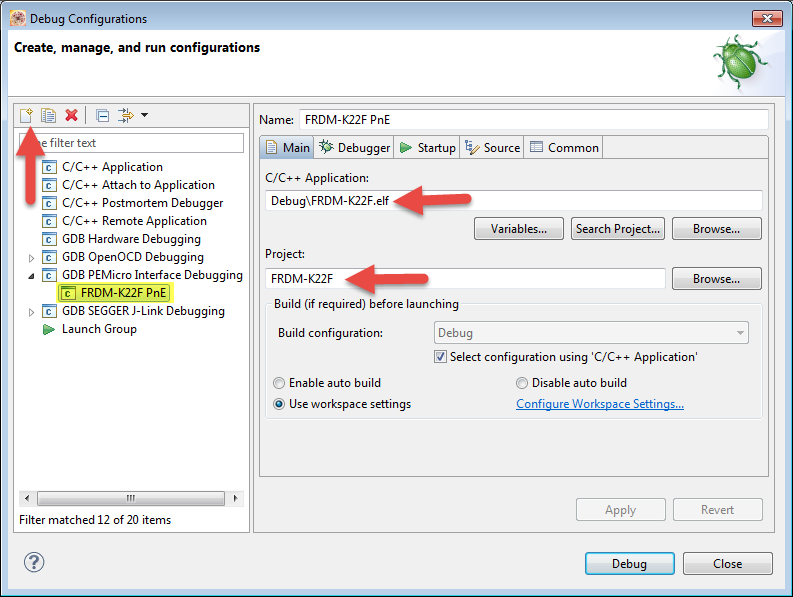
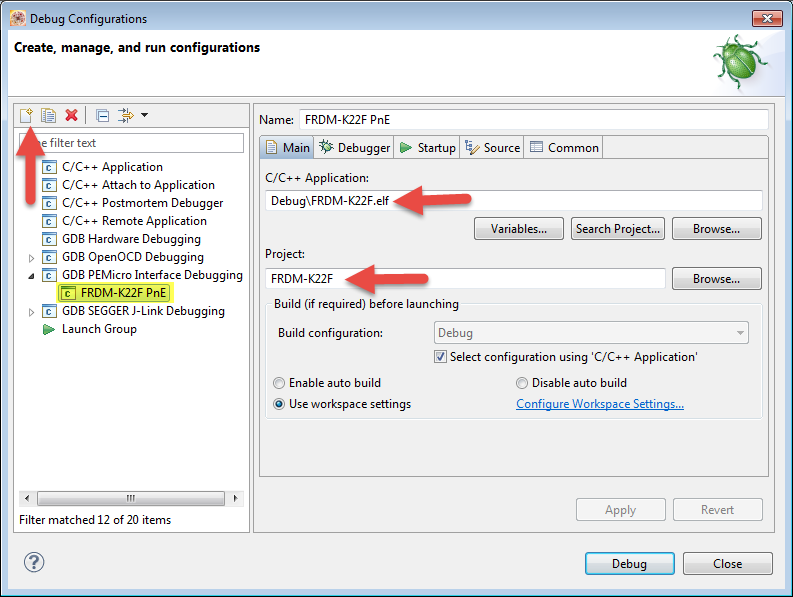
Create a new debug/launch configuration: Select your project, then use the menu Run > Debug Configurations.

Use the 'new' Icon to create a new configuration for your application and project (Main tab):
13851_13851.pngpastedImage_0.png


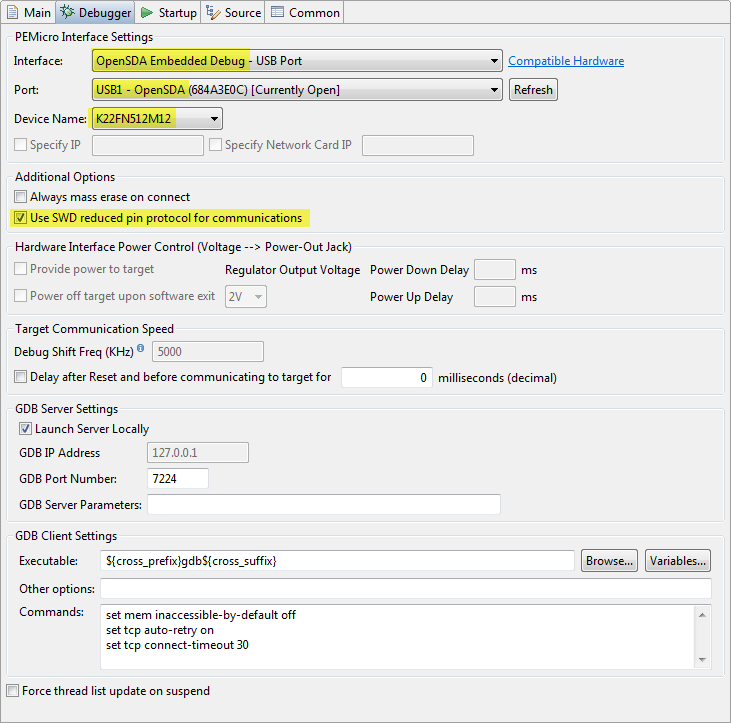
In the Debugger tab, specify OpenSDA Embedded Debug as Interface, select the OpenSDA device as Port, and select the K22FN512M12 as device, and make sure 'SWD' is selected:
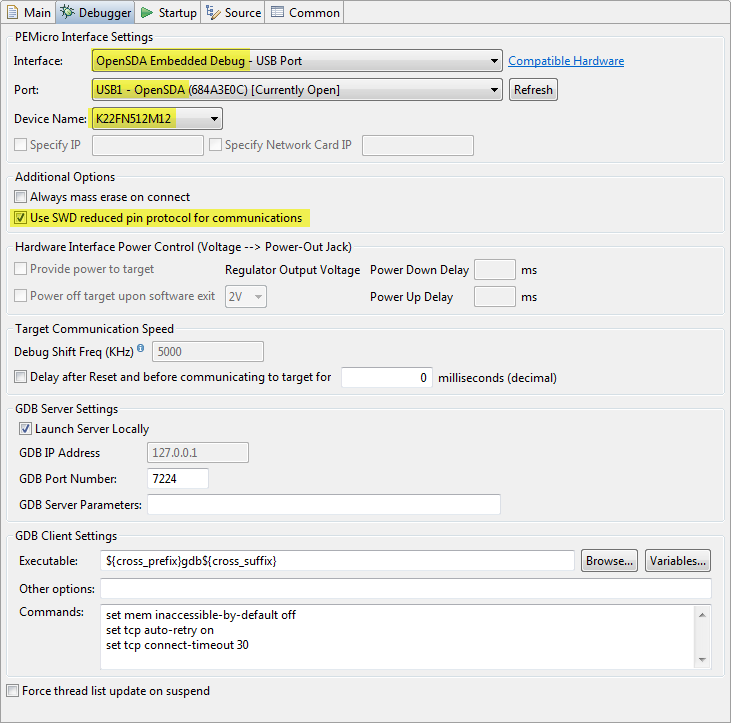
13852_13852.pngpastedImage_1.png


That's it. Now you can debug your application with P&E OpenSDA V2.1 firmware on the board :-).

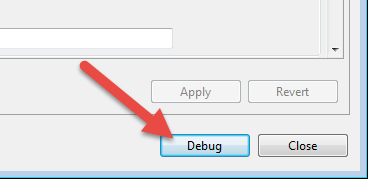
You can use the 'Debug' button in the launch configuration:
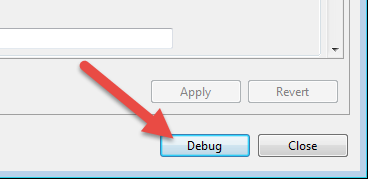
13849_13849.pngpastedImage_1.png

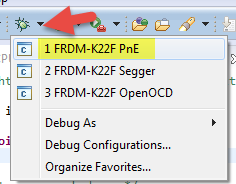
Or use the debug icon drop-down list:
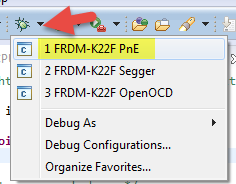
13853_13853.pngpastedImage_3.png

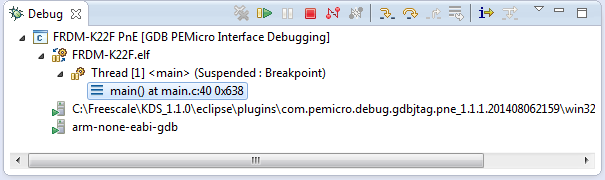
And then I'm debugging the FRDM-K22 with the P&E OpenSDAv2.1:
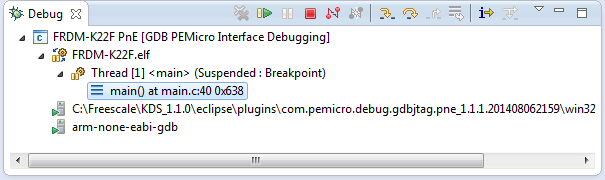
13862_13862.pngpastedImage_0.png

Happy Debugging :-)


Technical Details

There are so far three versions of the OpenSDA available:

  1. OpenSDAv1.0: this one is on all the FRDM boards like FRDM-KL25Z, FRDM-KL26Z, FRDM-KL46Z, FRDM-K20, ... (prior FRDM-K64F). The bootloader on these boards is protected and cannot be erased and supports P&E, Segger and CMSIS-DAP debug applications (*.sda).
  2. OpenSDAv2.0: This version was released at FTF 2014 with the FRDM-K64F board. This is an open source bootloader, and the bootloader can be replaced by the user. It supports *.bin files and P&E, Segger and CMSIS-DAP debug applications.
  3. OpenSDAv2.1: This version is released with the FRDM-K22F board. It is the same as

The debug circuit on the board is the same for all OpenSDA versions (Kinetis K20 microcontroller): the difference is what bootloader is programmed on the K20: the bootloader on the OpenSDAv1.0 cannot be erased/changed. The bootloader on OpenSDAv2.x can be erased/changed, and the difference between the OpenSDAv2.0 and v2.1 is the address where the debug application starts: for OpenSDAv2.0 it expects the application at address 0x5000, while OpenSDAv2.1 expects the application to start at address 0x8000.


See also: OpenSDAv2

Labels (1)
%3CLINGO-SUB%20id%3D%22lingo-sub-1112478%22%20slang%3D%22en-US%22%20mode%3D%22CREATE%22%3EFRDM-K22F%3A%20Debugging%20with%20P%26amp%3BE%20OpenSDAv2.1%20Firmware%3C%2FLINGO-SUB%3E%3CLINGO-BODY%20id%3D%22lingo-body-1112478%22%20slang%3D%22en-US%22%20mode%3D%22CREATE%22%3E%3CP%3EThis%20document%20explains%20how%20you%20can%20debug%20the%20FRDM-K22F%20board%20with%20the%20%3CSTRONG%3EP%26amp%3BE%20OpenSDAv2.1%3C%2FSTRONG%3E%20Firmware%20and%20the%20%3CSTRONG%3EKinetis%20Design%20Studio%20V1.1.0%3C%2FSTRONG%3E.%3C%2FP%3E%3CP%20style%3D%22min-height%3A%208pt%3B%20padding%3A%200px%3B%22%3E%26nbsp%3B%3C%2FP%3E%3CP%3EApplicable%20to%3A%3C%2FP%3E%3CUL%3E%3CLI%3EOpenSDAv2.1%20boards%20(FRDM-K22F%20for%20now)%3C%2FLI%3E%3CLI%3EKinetis%20Design%20Studio%20V1.1.0%3C%2FLI%3E%3C%2FUL%3E%3CP%20style%3D%22min-height%3A%208pt%3B%20padding%3A%200px%3B%22%3E%26nbsp%3B%3C%2FP%3E%3CP%3E%3CSPAN%20class%3D%22lia-inline-image-display-wrapper%22%20image-alt%3D%2213843_13843.png%22%3E%3Cspan%20class%3D%22lia-inline-image-display-wrapper%22%20image-alt%3D%2213843_13843.png%22%20style%3D%22width%3A%20400px%3B%22%3E%3Cimg%20src%3D%22https%3A%2F%2Fcommunity.nxp.com%2Ft5%2Fimage%2Fserverpage%2Fimage-id%2F117548i453613657F55EB1B%2Fimage-size%2Flarge%3Fv%3Dv2%26amp%3Bpx%3D999%22%20role%3D%22button%22%20title%3D%2213843_13843.png%22%20alt%3D%2213843_13843.png%22%20%2F%3E%3C%2Fspan%3E%3C%2FSPAN%3E%3CSPAN%20class%3D%22lia-inline-image-display-wrapper%22%20image-alt%3D%22pastedImage_0.png%22%3E%3Cspan%20class%3D%22lia-inline-image-display-wrapper%22%20image-alt%3D%22pastedImage_0.png%22%20style%3D%22width%3A%20400px%3B%22%3E%3Cimg%20src%3D%22https%3A%2F%2Fcommunity.nxp.com%2Ft5%2Fimage%2Fserverpage%2Fimage-id%2F45455i56CC83A902265407%2Fimage-size%2Flarge%3Fv%3Dv2%26amp%3Bpx%3D999%22%20role%3D%22button%22%20title%3D%22pastedImage_0.png%22%20alt%3D%22pastedImage_0.png%22%20%2F%3E%3C%2Fspan%3E%3C%2FSPAN%3E%3C%2FP%3E%3CP%20style%3D%22min-height%3A%208pt%3B%20padding%3A%200px%3B%22%3E%26nbsp%3B%3C%2FP%3E%3CH3%20id%3D%22toc-hId-1082536725%22%20id%3D%22toc-hId-1998700182%22%3EOutline%3C%2FH3%3E%3CP%3EThe%20FRDM-K22F%20board%20(%3CA%20_jive_internal%3D%22true%22%20href%3D%22https%3A%2F%2Fcommunity.nxp.com%2Fexternal-link.jspa%3Furl%3Dhttp%253A%252F%252Fwww.freescale.com%252Fwebapp%252Fsps%252Fsite%252Fprod_summary.jsp%253Fcode%253DFRDM-K22F%22%20target%3D%22_blank%22%3EFRDM-K22F%7CFreedom%20Development%20Board%7CKinetis%7CFreescale%3C%2FA%3E)%20comes%20with%20OpenSDAv2.1%20programmed%20on%20it%2C%20and%20has%20the%20CMSIS-DAP%20debug%20firmware%20on%20it%20by%20default.%3C%2FP%3E%3CP%3E(see%20'Technical%20Details'%20at%20the%20end%20about%20the%20OpenSDA%20differences)%3C%2FP%3E%3CP%20style%3D%22min-height%3A%208pt%3B%20padding%3A%200px%3B%22%3E%26nbsp%3B%3C%2FP%3E%3CP%3EOpenOCD%20with%20CMSIS-DAP%20for%20FRDM-K22F%20is%20%3CSTRONG%3Enot%3C%2FSTRONG%3E%20supported%20in%20KDS%20V1.1.0.%20Trying%20to%20debug%20the%20FRDM-K22F%20board%20with%20KDS%20V1.1.0%20and%20OpenOCD%2FCMSIS-DAP%20results%20in%20an%20error%20in%20the%20Console%20View%20and%20is%20currently%20not%20possible%2C%20until%20OpenSDA%20gets%20updated%20(see%20%3CA%20_jive_internal%3D%22true%22%20data-containerid%3D%2211213%22%20data-containertype%3D%2214%22%20data-objectid%3D%22101761%22%20data-objecttype%3D%22102%22%20href%3D%22https%3A%2F%2Fcommunity.nxp.com%2Fdocs%2FDOC-101761%22%20target%3D%22_blank%22%3EKinetis%20Design%20Studio%20V1.1.0%3A%20Release%20Notes%20and%20News%3C%2FA%3E).%3C%2FP%3E%3CP%20style%3D%22min-height%3A%208pt%3B%20padding%3A%200px%3B%22%3E%26nbsp%3B%3C%2FP%3E%3CP%3EOne%20solution%20is%20to%20use%20the%20%3CSTRONG%3EP%26amp%3BE%20OpenSDAv2.1%20firmware%3C%2FSTRONG%3E%20to%20debug%20the%20board.%3C%2FP%3E%3CP%3E%3CEM%3E(Another%20solution%20is%20to%20use%20the%20Segger%20J-Link%20OpenSDAv2.1%20firmware%2C%20see%20%3CA%20_jive_internal%3D%22true%22%20data-containerid%3D%2211213%22%20data-containertype%3D%2214%22%20data-objectid%3D%22101790%22%20data-objecttype%3D%22102%22%20href%3D%22https%3A%2F%2Fcommunity.nxp.com%2Fdocs%2FDOC-101790%22%20target%3D%22_blank%22%3EFRDM-K22F%3A%20Debugging%20with%20Segger%20J-Link%20OpenSDAv2.1%20Firmware%3C%2FA%3E)%3C%2FEM%3E%3C%2FP%3E%3CP%20style%3D%22min-height%3A%208pt%3B%20padding%3A%200px%3B%22%3E%26nbsp%3B%3C%2FP%3E%3CH3%20id%3D%22toc-hId--724917738%22%20id%3D%22toc-hId-191245719%22%3EUpdate%20KDS%20from%20P%26amp%3BE%20Update%20Web%20Site%3C%2FH3%3E%3CP%20style%3D%22margin-bottom%3A%2012pt%3B%22%3E%3CSPAN%20style%3D%22font-size%3A%2010.0pt%3B%20font-family%3A%20'Arial'%2C'sans-serif'%3B%22%3EFor%20KDS%20V1.1.0%2C%20you%20need%20to%20install%20an%20update%20throught%20an%20Eclipse%20update.%20The%20update%20is%20from%3C%2FSPAN%3E%3CSPAN%20style%3D%22font-size%3A%2010.0pt%3B%20font-family%3A%20'Arial'%2C'sans-serif'%3B%22%3E%20%3CA%20_jive_internal%3D%22true%22%20href%3D%22https%3A%2F%2Fcommunity.nxp.com%2Fexternal-link.jspa%3Furl%3Dhttp%253A%252F%252Fwww.pemicro.com%252Feclipse%252Fupdates%22%20target%3D%22_blank%22%3Ewww.pemicro.com%2Feclipse%2Fupdates%3C%2FA%3E%20within%20the%3CEM%3E%20Install%20New%20Updates%3C%2FEM%3E%20dialog%20under%20the%20Eclipse%20%3CEM%3EHelp%3C%2FEM%3E%20menu.%20%3C%2FSPAN%3E%3C%2FP%3E%3CP%3E%3CSPAN%20style%3D%22color%3A%20%23ff0000%3B%20font-size%3A%2010.0pt%3B%20font-family%3A%20'Arial'%2C'sans-serif'%3B%22%3E!!!!%20Please%20note%20that%20there%20is%20a%20known%20issue%20in%20KDS%20V1.1.0%20which%20requires%26nbsp%3B%20to%20remove%20and%20add%20a%20link%20to%20P%26amp%3BE's%20update%20site%20in%20order%20for%20installation%20procedure%20to%20work%20in%20KDS%20v1.02.%20Please%20see%20description%20below%3A%3C%2FSPAN%3E%3C%2FP%3E%3CP%3E%3CSPAN%20style%3D%22font-size%3A%2010.0pt%3B%20font-family%3A%20'Arial'%2C'sans-serif'%3B%22%3E%3CBR%20%2F%3E%3CSTRONG%3EIssue%3A%20%3C%2FSTRONG%3E%20The%20default%20P%26amp%3BE%20update%20site%20included%20in%20KDS%20v1.02%20(PEMicro%20-%20%3C%2FSPAN%3E%3CA%20_jive_internal%3D%22true%22%20href%3D%22https%3A%2F%2Fcommunity.nxp.com%2Fexternal-link.jspa%3Furl%3Dhttp%253A%252F%252Fwww.pemicro.com%252Feclipse%252Fupdates%22%20target%3D%22_blank%22%3E%3CSPAN%20style%3D%22font-size%3A%2010.0pt%3B%20font-family%3A%20'Arial'%2C'sans-serif'%3B%22%3E%3C%2FSPAN%3E%3C%2FA%3E%3CA%20href%3D%22http%3A%2F%2Fwww.pemicro.com%2Feclipse%2Fupdates%22%20target%3D%22test_blank%22%20rel%3D%22nofollow%20noopener%20noreferrer%22%3Ehttp%3A%2F%2Fwww.pemicro.com%2Feclipse%2Fupdates%3C%2FA%3E%3CSPAN%20style%3D%22font-size%3A%2010.0pt%3B%20font-family%3A%20'Arial'%2C'sans-serif'%3B%22%3E)%26nbsp%3B%20will%20not%20allow%20a%20user%20to%20properly%20update%20the%20P%26amp%3BE%20plugin%20on%20a%20freshly%20installed%20KDS%201.02%20layout.%20%3CBR%20%2F%3E%20%3CSTRONG%3EWorkaround%3A%26nbsp%3B%20%3CBR%20%2F%3E%20%3C%2FSTRONG%3Ea.%20Remove%20the%20PEMicro%20-%20%3C%2FSPAN%3E%3CA%20_jive_internal%3D%22true%22%20href%3D%22https%3A%2F%2Fcommunity.nxp.com%2Fexternal-link.jspa%3Furl%3Dhttp%253A%252F%252Fwww.pemicro.com%252Feclipse%252Fupdates%22%20target%3D%22_blank%22%3E%3CSPAN%20style%3D%22font-size%3A%2010.0pt%3B%20font-family%3A%20'Arial'%2C'sans-serif'%3B%22%3E%3C%2FSPAN%3E%3C%2FA%3E%3CA%20href%3D%22http%3A%2F%2Fwww.pemicro.com%2Feclipse%2Fupdates%22%20target%3D%22test_blank%22%20rel%3D%22nofollow%20noopener%20noreferrer%22%3Ehttp%3A%2F%2Fwww.pemicro.com%2Feclipse%2Fupdates%3C%2FA%3E%20update%20site%20%3CSPAN%20style%3D%22font-size%3A%2010.0pt%3B%20font-family%3A%20'Arial'%2C'sans-serif'%3B%22%3Efrom%20the%20list%20of%20available%20update%20sites.%20Use%20the%20menu%20Help%20%26gt%3B%20Perferences%20%26gt%3B%20Install%2FUpdates%20%26gt%3B%20Available%20Software%20Sites%20and%20Remove%20the%20PEMicro%20entry%3A%3CBR%20%2F%3E%3CSPAN%20class%3D%22lia-inline-image-display-wrapper%22%20image-alt%3D%2213856_13856.png%22%3E%3Cspan%20class%3D%22lia-inline-image-display-wrapper%22%20image-alt%3D%2213856_13856.png%22%20style%3D%22width%3A%20885px%3B%22%3E%3Cimg%20src%3D%22https%3A%2F%2Fcommunity.nxp.com%2Ft5%2Fimage%2Fserverpage%2Fimage-id%2F117549iA6F8BC17FD7D9BEC%2Fimage-size%2Flarge%3Fv%3Dv2%26amp%3Bpx%3D999%22%20role%3D%22button%22%20title%3D%2213856_13856.png%22%20alt%3D%2213856_13856.png%22%20%2F%3E%3C%2Fspan%3E%3C%2FSPAN%3E%3CSPAN%20class%3D%22lia-inline-image-display-wrapper%22%20image-alt%3D%22pastedImage_6.png%22%3E%3Cspan%20class%3D%22lia-inline-image-display-wrapper%22%20image-alt%3D%22pastedImage_6.png%22%20style%3D%22width%3A%20885px%3B%22%3E%3Cimg%20src%3D%22https%3A%2F%2Fcommunity.nxp.com%2Ft5%2Fimage%2Fserverpage%2Fimage-id%2F14353i7E31946579747AC8%2Fimage-size%2Flarge%3Fv%3Dv2%26amp%3Bpx%3D999%22%20role%3D%22button%22%20title%3D%22pastedImage_6.png%22%20alt%3D%22pastedImage_6.png%22%20%2F%3E%3C%2Fspan%3E%3C%2FSPAN%3E%3CBR%20%2F%3E%20b.%20Exit%20the%20KDS%20Eclipse%20IDE%20and%20restart%20it%20from%20the%20command%20line%20with%20the%26nbsp%3B%20-clean%20parameter.%20On%20Windows%20start%20Eclipes%20from%20the%20cmd.exe%20(DOS%20shell)%20with%20the%20-clean%20parameter%3A%3C%2FSPAN%3E%3C%2FP%3E%3CP%3E%3CSPAN%20style%3D%22font-size%3A%2010.0pt%3B%20font-family%3A%20'Arial'%2C'sans-serif'%3B%22%3E%3CSPAN%20class%3D%22lia-inline-image-display-wrapper%22%20image-alt%3D%2213857_13857.png%22%3E%3Cspan%20class%3D%22lia-inline-image-display-wrapper%22%20image-alt%3D%2213857_13857.png%22%20style%3D%22width%3A%20677px%3B%22%3E%3Cimg%20src%3D%22https%3A%2F%2Fcommunity.nxp.com%2Ft5%2Fimage%2Fserverpage%2Fimage-id%2F117550iC897F44A4BADB153%2Fimage-size%2Flarge%3Fv%3Dv2%26amp%3Bpx%3D999%22%20role%3D%22button%22%20title%3D%2213857_13857.png%22%20alt%3D%2213857_13857.png%22%20%2F%3E%3C%2Fspan%3E%3C%2FSPAN%3E%3CSPAN%20class%3D%22lia-inline-image-display-wrapper%22%20image-alt%3D%22pastedImage_7.png%22%3E%3Cspan%20class%3D%22lia-inline-image-display-wrapper%22%20image-alt%3D%22pastedImage_7.png%22%20style%3D%22width%3A%20677px%3B%22%3E%3Cimg%20src%3D%22https%3A%2F%2Fcommunity.nxp.com%2Ft5%2Fimage%2Fserverpage%2Fimage-id%2F14355i832AA3FCDC40A019%2Fimage-size%2Flarge%3Fv%3Dv2%26amp%3Bpx%3D999%22%20role%3D%22button%22%20title%3D%22pastedImage_7.png%22%20alt%3D%22pastedImage_7.png%22%20%2F%3E%3C%2Fspan%3E%3C%2FSPAN%3E%3CBR%20%2F%3E%20c.%20In%20Eclipse%2C%20add%20the%20PEMicro%20-%20%3C%2FSPAN%3E%3CA%20_jive_internal%3D%22true%22%20href%3D%22https%3A%2F%2Fcommunity.nxp.com%2Fexternal-link.jspa%3Furl%3Dhttp%253A%252F%252Fwww.pemicro.com%252Feclipse%252Fupdates%22%20target%3D%22_blank%22%3E%3CSPAN%20style%3D%22font-size%3A%2010.0pt%3B%20font-family%3A%20'Arial'%2C'sans-serif'%3B%22%3E%3C%2FSPAN%3E%3C%2FA%3E%3CA%20href%3D%22http%3A%2F%2Fwww.pemicro.com%2Feclipse%2Fupdates%22%20target%3D%22test_blank%22%20rel%3D%22nofollow%20noopener%20noreferrer%22%3Ehttp%3A%2F%2Fwww.pemicro.com%2Feclipse%2Fupdates%3C%2FA%3E%3CSPAN%20style%3D%22font-size%3A%2010.0pt%3B%20font-family%3A%20'Arial'%2C'sans-serif'%3B%22%3E%20update%20site.%20Use%20the%20menu%20Help%20%26gt%3B%20Install%20New%20Software%20and%20press%20the%20Add%20button%3A%3C%2FSPAN%3E%3C%2FP%3E%3CP%3E%3CSPAN%20style%3D%22font-size%3A%2010.0pt%3B%20font-family%3A%20'Arial'%2C'sans-serif'%3B%22%3E%3CSPAN%20class%3D%22lia-inline-image-display-wrapper%22%20image-alt%3D%2213858_13858.png%22%3E%3Cspan%20class%3D%22lia-inline-image-display-wrapper%22%20image-alt%3D%2213858_13858.png%22%20style%3D%22width%3A%20716px%3B%22%3E%3Cimg%20src%3D%22https%3A%2F%2Fcommunity.nxp.com%2Ft5%2Fimage%2Fserverpage%2Fimage-id%2F117552i3D25E75353493382%2Fimage-size%2Flarge%3Fv%3Dv2%26amp%3Bpx%3D999%22%20role%3D%22button%22%20title%3D%2213858_13858.png%22%20alt%3D%2213858_13858.png%22%20%2F%3E%3C%2Fspan%3E%3C%2FSPAN%3E%3CSPAN%20class%3D%22lia-inline-image-display-wrapper%22%20image-alt%3D%22pastedImage_8.png%22%3E%3Cspan%20class%3D%22lia-inline-image-display-wrapper%22%20image-alt%3D%22pastedImage_8.png%22%20style%3D%22width%3A%20716px%3B%22%3E%3Cimg%20src%3D%22https%3A%2F%2Fcommunity.nxp.com%2Ft5%2Fimage%2Fserverpage%2Fimage-id%2F14356i021EE121F334BA09%2Fimage-size%2Flarge%3Fv%3Dv2%26amp%3Bpx%3D999%22%20role%3D%22button%22%20title%3D%22pastedImage_8.png%22%20alt%3D%22pastedImage_8.png%22%20%2F%3E%3C%2Fspan%3E%3C%2FSPAN%3E%3C%2FSPAN%3E%3C%2FP%3E%3CP%3E%3CSPAN%20style%3D%22font-size%3A%2010.0pt%3B%20font-family%3A%20'Arial'%2C'sans-serif'%3B%22%3Ed)%20Enter%20%3CA%20_jive_internal%3D%22true%22%20href%3D%22https%3A%2F%2Fcommunity.nxp.com%2Fexternal-link.jspa%3Furl%3Dhttp%253A%252F%252Fwww.pemicro.com%252Feclipse%252Fupdates%22%20target%3D%22_blank%22%3Ehttp%3A%2F%2Fwww.pemicro.com%2Feclipse%2Fupdates%3C%2FA%3E%20as%20update%20Location%20and%20press%20OK%3A%3CBR%20%2F%3E%3C%2FSPAN%3E%3C%2FP%3E%3CP%3E%3CSPAN%20style%3D%22font-size%3A%2010.0pt%3B%20font-family%3A%20'Arial'%2C'sans-serif'%3B%22%3E%3CSPAN%20class%3D%22lia-inline-image-display-wrapper%22%20image-alt%3D%2213859_13859.png%22%3E%3Cspan%20class%3D%22lia-inline-image-display-wrapper%22%20image-alt%3D%2213859_13859.png%22%20style%3D%22width%3A%20479px%3B%22%3E%3Cimg%20src%3D%22https%3A%2F%2Fcommunity.nxp.com%2Ft5%2Fimage%2Fserverpage%2Fimage-id%2F117553i37F75E7FF7F86AB5%2Fimage-size%2Flarge%3Fv%3Dv2%26amp%3Bpx%3D999%22%20role%3D%22button%22%20title%3D%2213859_13859.png%22%20alt%3D%2213859_13859.png%22%20%2F%3E%3C%2Fspan%3E%3C%2FSPAN%3E%3CSPAN%20class%3D%22lia-inline-image-display-wrapper%22%20image-alt%3D%22pastedImage_9.png%22%3E%3Cspan%20class%3D%22lia-inline-image-display-wrapper%22%20image-alt%3D%22pastedImage_9.png%22%20style%3D%22width%3A%20479px%3B%22%3E%3Cimg%20src%3D%22https%3A%2F%2Fcommunity.nxp.com%2Ft5%2Fimage%2Fserverpage%2Fimage-id%2F14358iE93621FE09B4957B%2Fimage-size%2Flarge%3Fv%3Dv2%26amp%3Bpx%3D999%22%20role%3D%22button%22%20title%3D%22pastedImage_9.png%22%20alt%3D%22pastedImage_9.png%22%20%2F%3E%3C%2Fspan%3E%3C%2FSPAN%3E%3C%2FSPAN%3E%3C%2FP%3E%3CP%3E%3CSPAN%20style%3D%22font-size%3A%2010.0pt%3B%20font-family%3A%20'Arial'%2C'sans-serif'%3B%22%3Ee)%20Then%20u%3C%2FSPAN%3E%3CSPAN%20style%3D%22font-size%3A%2010.0pt%3B%20font-family%3A%20'Arial'%2C'sans-serif'%3B%22%3Epdate%20from%20P%26amp%3BE's%20website%3A%3C%2FSPAN%3E%3C%2FP%3E%3CP%3E%3CSPAN%20style%3D%22font-size%3A%2010.0pt%3B%20font-family%3A%20'Arial'%2C'sans-serif'%3B%22%3E%20%3CSPAN%20class%3D%22lia-inline-image-display-wrapper%22%20image-alt%3D%2213861_13861.png%22%3E%3Cspan%20class%3D%22lia-inline-image-display-wrapper%22%20image-alt%3D%2213861_13861.png%22%20style%3D%22width%3A%20697px%3B%22%3E%3Cimg%20src%3D%22https%3A%2F%2Fcommunity.nxp.com%2Ft5%2Fimage%2Fserverpage%2Fimage-id%2F117554iBA49BCBB9E9B6691%2Fimage-size%2Flarge%3Fv%3Dv2%26amp%3Bpx%3D999%22%20role%3D%22button%22%20title%3D%2213861_13861.png%22%20alt%3D%2213861_13861.png%22%20%2F%3E%3C%2Fspan%3E%3C%2FSPAN%3E%3CSPAN%20class%3D%22lia-inline-image-display-wrapper%22%20image-alt%3D%22pastedImage_13.png%22%3E%3Cspan%20class%3D%22lia-inline-image-display-wrapper%22%20image-alt%3D%22pastedImage_13.png%22%20style%3D%22width%3A%20697px%3B%22%3E%3Cimg%20src%3D%22https%3A%2F%2Fcommunity.nxp.com%2Ft5%2Fimage%2Fserverpage%2Fimage-id%2F14359i4775DB28F588FB10%2Fimage-size%2Flarge%3Fv%3Dv2%26amp%3Bpx%3D999%22%20role%3D%22button%22%20title%3D%22pastedImage_13.png%22%20alt%3D%22pastedImage_13.png%22%20%2F%3E%3C%2Fspan%3E%3C%2FSPAN%3E%3CBR%20%2F%3E%3C%2FSPAN%3E%3C%2FP%3E%3CP%20style%3D%22min-height%3A%208pt%3B%20padding%3A%200px%3B%22%3E%26nbsp%3B%3C%2FP%3E%3CH3%20id%3D%22toc-hId-1762595095%22%20id%3D%22toc-hId--1616208744%22%3EInstallation%20of%20P%26amp%3BE%20OpenSDA%20V2.1%20Firmware%3C%2FH3%3E%3CP%3EYou%20need%20to%20install%20the%20P%26amp%3BE%20OpenSDAv2.1%20firmware%20on%20the%20board%2C%20and%20you%20only%20need%20to%20do%20this%20once%20(unless%20you%20change%20the%20firmware%20again).%3C%2FP%3E%3CP%20style%3D%22min-height%3A%208pt%3B%20padding%3A%200px%3B%22%3E%26nbsp%3B%3C%2FP%3E%3COL%3E%3CLI%3EGo%20to%20%3CA%20_jive_internal%3D%22true%22%20href%3D%22https%3A%2F%2Fcommunity.nxp.com%2Fexternal-link.jspa%3Furl%3Dhttp%253A%252F%252Fwww.pemicro.com%252Fopensda%252F%22%20target%3D%22_blank%22%3Ehttp%3A%2F%2Fwww.pemicro.com%2Fopensda%2F%3C%2FA%3E%20and%20download%20the%20OpenSDA%20Firmware%20Apps%20file%20(zip%20file)%20(requires%20registration%20at%20P%26amp%3BE)%3C%2FLI%3E%3CLI%3EUnzip%20the%20firmware%20files%20to%20a%20folder%20on%20your%20harddisk.%3C%2FLI%3E%3CLI%3EPower%20the%20board%2FPlug%20in%20the%20USB%20cable%20with%20the%20OpenSDA%20USB%20port%2C%20while%20having%20the%20Reset%2FSW1%20pressed.%3CBR%20%2F%3E%3CSPAN%20class%3D%22lia-inline-image-display-wrapper%22%20image-alt%3D%2213844_13844.png%22%3E%3Cspan%20class%3D%22lia-inline-image-display-wrapper%22%20image-alt%3D%2213844_13844.png%22%20style%3D%22width%3A%20435px%3B%22%3E%3Cimg%20src%3D%22https%3A%2F%2Fcommunity.nxp.com%2Ft5%2Fimage%2Fserverpage%2Fimage-id%2F117555i98A0FA4466CC1FCD%2Fimage-size%2Flarge%3Fv%3Dv2%26amp%3Bpx%3D999%22%20role%3D%22button%22%20title%3D%2213844_13844.png%22%20alt%3D%2213844_13844.png%22%20%2F%3E%3C%2Fspan%3E%3C%2FSPAN%3E%3CSPAN%20class%3D%22lia-inline-image-display-wrapper%22%20image-alt%3D%22pastedImage_6.png%22%3E%3Cspan%20class%3D%22lia-inline-image-display-wrapper%22%20image-alt%3D%22pastedImage_6.png%22%20style%3D%22width%3A%20435px%3B%22%3E%3Cimg%20src%3D%22https%3A%2F%2Fcommunity.nxp.com%2Ft5%2Fimage%2Fserverpage%2Fimage-id%2F45456iF23AA7C358D08E32%2Fimage-size%2Flarge%3Fv%3Dv2%26amp%3Bpx%3D999%22%20role%3D%22button%22%20title%3D%22pastedImage_6.png%22%20alt%3D%22pastedImage_6.png%22%20%2F%3E%3C%2Fspan%3E%3C%2FSPAN%3E%3C%2FLI%3E%3CLI%3EThe%20device%20should%20enumerate%20BOOTLOADER%3A%20device%20on%20your%20host.%20You%20are%20now%20in%20bootloader%20mode.%3CBR%20%2F%3E%3CSPAN%20class%3D%22lia-inline-image-display-wrapper%22%20image-alt%3D%2213845_13845.png%22%3E%3Cspan%20class%3D%22lia-inline-image-display-wrapper%22%20image-alt%3D%2213845_13845.png%22%20style%3D%22width%3A%20156px%3B%22%3E%3Cimg%20src%3D%22https%3A%2F%2Fcommunity.nxp.com%2Ft5%2Fimage%2Fserverpage%2Fimage-id%2F117556iCC3467FAB993BA45%2Fimage-size%2Flarge%3Fv%3Dv2%26amp%3Bpx%3D999%22%20role%3D%22button%22%20title%3D%2213845_13845.png%22%20alt%3D%2213845_13845.png%22%20%2F%3E%3C%2Fspan%3E%3C%2FSPAN%3E%3CSPAN%20class%3D%22lia-inline-image-display-wrapper%22%20image-alt%3D%22pastedImage_8.png%22%3E%3Cspan%20class%3D%22lia-inline-image-display-wrapper%22%20image-alt%3D%22pastedImage_8.png%22%20style%3D%22width%3A%20156px%3B%22%3E%3Cimg%20src%3D%22https%3A%2F%2Fcommunity.nxp.com%2Ft5%2Fimage%2Fserverpage%2Fimage-id%2F45457i8B70F4814AFA17AB%2Fimage-size%2Flarge%3Fv%3Dv2%26amp%3Bpx%3D999%22%20role%3D%22button%22%20title%3D%22pastedImage_8.png%22%20alt%3D%22pastedImage_8.png%22%20%2F%3E%3C%2Fspan%3E%3C%2FSPAN%3E%3C%2FLI%3E%3CLI%3ECopy%20the%20the%20correct%20firmware%20file%20(DEBUG-FRDM-K22F_Pemicro_v108b_for_OpenSDA_v2.1.bin)%20to%20the%20BOOTLOADER%20device.%20Wait%20a%20few%20seconds%20to%20complete%20the%20operation.%3C%2FLI%3E%3CLI%3EUnplug%20the%20board%2C%20and%20now%20power%20it%20normally%20(without%20SW1%20pressed)%3C%2FLI%3E%3CLI%3EThe%20board%20should%20now%20show%20up%20as%20OpenSDA%20device%2C%20a%20virtual%20COM%20port%20and%20as%20PEMicro%20OpenSDA%20Debug%20Driver%3A%3CBR%20%2F%3E%3CSPAN%20class%3D%22lia-inline-image-display-wrapper%22%20image-alt%3D%2213840_13840.png%22%3E%3Cspan%20class%3D%22lia-inline-image-display-wrapper%22%20image-alt%3D%2213840_13840.png%22%20style%3D%22width%3A%2083px%3B%22%3E%3Cimg%20src%3D%22https%3A%2F%2Fcommunity.nxp.com%2Ft5%2Fimage%2Fserverpage%2Fimage-id%2F117557i24A1CCA82234362C%2Fimage-size%2Flarge%3Fv%3Dv2%26amp%3Bpx%3D999%22%20role%3D%22button%22%20title%3D%2213840_13840.png%22%20alt%3D%2213840_13840.png%22%20%2F%3E%3C%2Fspan%3E%3C%2FSPAN%3E%3CSPAN%20class%3D%22lia-inline-image-display-wrapper%22%20image-alt%3D%22pastedImage_5.png%22%3E%3Cspan%20class%3D%22lia-inline-image-display-wrapper%22%20image-alt%3D%22pastedImage_5.png%22%20style%3D%22width%3A%2083px%3B%22%3E%3Cimg%20src%3D%22https%3A%2F%2Fcommunity.nxp.com%2Ft5%2Fimage%2Fserverpage%2Fimage-id%2F45454i62713714FDF7DFCE%2Fimage-size%2Flarge%3Fv%3Dv2%26amp%3Bpx%3D999%22%20role%3D%22button%22%20title%3D%22pastedImage_5.png%22%20alt%3D%22pastedImage_5.png%22%20%2F%3E%3C%2Fspan%3E%3C%2FSPAN%3E%3CSPAN%20class%3D%22lia-inline-image-display-wrapper%22%20image-alt%3D%2213841_13841.png%22%3E%3Cspan%20class%3D%22lia-inline-image-display-wrapper%22%20image-alt%3D%2213841_13841.png%22%20style%3D%22width%3A%20456px%3B%22%3E%3Cimg%20src%3D%22https%3A%2F%2Fcommunity.nxp.com%2Ft5%2Fimage%2Fserverpage%2Fimage-id%2F117558i640F7B047B1C5C03%2Fimage-size%2Flarge%3Fv%3Dv2%26amp%3Bpx%3D999%22%20role%3D%22button%22%20title%3D%2213841_13841.png%22%20alt%3D%2213841_13841.png%22%20%2F%3E%3C%2Fspan%3E%3C%2FSPAN%3E%3CSPAN%20class%3D%22lia-inline-image-display-wrapper%22%20image-alt%3D%22pastedImage_7.png%22%3E%3Cspan%20class%3D%22lia-inline-image-display-wrapper%22%20image-alt%3D%22pastedImage_7.png%22%20style%3D%22width%3A%20456px%3B%22%3E%3Cimg%20src%3D%22https%3A%2F%2Fcommunity.nxp.com%2Ft5%2Fimage%2Fserverpage%2Fimage-id%2F45453iCB513CB88EB07612%2Fimage-size%2Flarge%3Fv%3Dv2%26amp%3Bpx%3D999%22%20role%3D%22button%22%20title%3D%22pastedImage_7.png%22%20alt%3D%22pastedImage_7.png%22%20%2F%3E%3C%2Fspan%3E%3C%2FSPAN%3E%3CSPAN%20class%3D%22lia-inline-image-display-wrapper%22%20image-alt%3D%2213842_13842.png%22%3E%3Cspan%20class%3D%22lia-inline-image-display-wrapper%22%20image-alt%3D%2213842_13842.png%22%20style%3D%22width%3A%20229px%3B%22%3E%3Cimg%20src%3D%22https%3A%2F%2Fcommunity.nxp.com%2Ft5%2Fimage%2Fserverpage%2Fimage-id%2F117559i0FBE4B8D33885120%2Fimage-size%2Flarge%3Fv%3Dv2%26amp%3Bpx%3D999%22%20role%3D%22button%22%20title%3D%2213842_13842.png%22%20alt%3D%2213842_13842.png%22%20%2F%3E%3C%2Fspan%3E%3C%2FSPAN%3E%3CSPAN%20class%3D%22lia-inline-image-display-wrapper%22%20image-alt%3D%22pastedImage_8.png%22%3E%3Cspan%20class%3D%22lia-inline-image-display-wrapper%22%20image-alt%3D%22pastedImage_8.png%22%20style%3D%22width%3A%20229px%3B%22%3E%3Cimg%20src%3D%22https%3A%2F%2Fcommunity.nxp.com%2Ft5%2Fimage%2Fserverpage%2Fimage-id%2F45452i4D4D31888AC6F355%2Fimage-size%2Flarge%3Fv%3Dv2%26amp%3Bpx%3D999%22%20role%3D%22button%22%20title%3D%22pastedImage_8.png%22%20alt%3D%22pastedImage_8.png%22%20%2F%3E%3C%2Fspan%3E%3C%2FSPAN%3E%3C%2FLI%3E%3CLI%3EYou%20are%20ready%20to%20use%20to%20debug%20the%20FRDM-K22F%20as%20if%20you%20would%20use%20a%20P%26amp%3BE%20Multilink%20%3CLI-EMOJI%20id%3D%22lia_slightly-smiling-face%22%20title%3D%22%3Aslightly_smiling_face%3A%22%3E%3C%2FLI-EMOJI%3E%3CBR%20%2F%3E%3CBR%20%2F%3E%3C%2FLI%3E%3C%2FOL%3E%3CP%20style%3D%22min-height%3A%208pt%3B%20padding%3A%200px%3B%22%3E%26nbsp%3B%3C%2FP%3E%3CH3%20id%3D%22toc-hId--44859368%22%20id%3D%22toc-hId-871304089%22%3EDebugging%20with%20P%26amp%3BE%20OpenSDAv2.1%3C%2FH3%3E%3CP%3ECreate%20a%20new%20debug%2Flaunch%20configuration%3A%20Select%20your%20project%2C%20then%20use%20the%20menu%20Run%20%26gt%3B%20Debug%20Configurations.%3C%2FP%3E%3CP%3EUse%20the%20'new'%20Icon%20to%20create%20a%20new%20configuration%20for%20your%20application%20and%20project%20(Main%20tab)%3A%3C%2FP%3E%3CP%3E%3CSPAN%20class%3D%22lia-inline-image-display-wrapper%22%20image-alt%3D%2213851_13851.png%22%3E%3Cspan%20class%3D%22lia-inline-image-display-wrapper%22%20image-alt%3D%2213851_13851.png%22%20style%3D%22width%3A%20793px%3B%22%3E%3Cimg%20src%3D%22https%3A%2F%2Fcommunity.nxp.com%2Ft5%2Fimage%2Fserverpage%2Fimage-id%2F117560iEF2FEFBB55F1B63A%2Fimage-size%2Flarge%3Fv%3Dv2%26amp%3Bpx%3D999%22%20role%3D%22button%22%20title%3D%2213851_13851.png%22%20alt%3D%2213851_13851.png%22%20%2F%3E%3C%2Fspan%3E%3C%2FSPAN%3E%3CSPAN%20class%3D%22lia-inline-image-display-wrapper%22%20image-alt%3D%22pastedImage_0.png%22%3E%3Cspan%20class%3D%22lia-inline-image-display-wrapper%22%20image-alt%3D%22pastedImage_0.png%22%20style%3D%22width%3A%20793px%3B%22%3E%3Cimg%20src%3D%22https%3A%2F%2Fcommunity.nxp.com%2Ft5%2Fimage%2Fserverpage%2Fimage-id%2F45458i7E7729634B52A5ED%2Fimage-size%2Flarge%3Fv%3Dv2%26amp%3Bpx%3D999%22%20role%3D%22button%22%20title%3D%22pastedImage_0.png%22%20alt%3D%22pastedImage_0.png%22%20%2F%3E%3C%2Fspan%3E%3C%2FSPAN%3E%3C%2FP%3E%3CP%20style%3D%22min-height%3A%208pt%3B%20padding%3A%200px%3B%22%3E%26nbsp%3B%3C%2FP%3E%3CP%3EIn%20the%20Debugger%20tab%2C%20specify%20OpenSDA%20Embedded%20Debug%20as%20Interface%2C%20select%20the%20OpenSDA%20device%20as%20Port%2C%20and%20select%20the%20K22FN512M12%20as%20device%2C%20and%20make%20sure%20'SWD'%20is%20selected%3A%3C%2FP%3E%3CP%3E%3CSPAN%20class%3D%22lia-inline-image-display-wrapper%22%20image-alt%3D%2213852_13852.png%22%3E%3Cspan%20class%3D%22lia-inline-image-display-wrapper%22%20image-alt%3D%2213852_13852.png%22%20style%3D%22width%3A%20731px%3B%22%3E%3Cimg%20src%3D%22https%3A%2F%2Fcommunity.nxp.com%2Ft5%2Fimage%2Fserverpage%2Fimage-id%2F117561iDAB1E084DFC28CF1%2Fimage-size%2Flarge%3Fv%3Dv2%26amp%3Bpx%3D999%22%20role%3D%22button%22%20title%3D%2213852_13852.png%22%20alt%3D%2213852_13852.png%22%20%2F%3E%3C%2Fspan%3E%3C%2FSPAN%3E%3CSPAN%20class%3D%22lia-inline-image-display-wrapper%22%20image-alt%3D%22pastedImage_1.png%22%3E%3Cspan%20class%3D%22lia-inline-image-display-wrapper%22%20image-alt%3D%22pastedImage_1.png%22%20style%3D%22width%3A%20731px%3B%22%3E%3Cimg%20src%3D%22https%3A%2F%2Fcommunity.nxp.com%2Ft5%2Fimage%2Fserverpage%2Fimage-id%2F45506iDF00F90D220CC252%2Fimage-size%2Flarge%3Fv%3Dv2%26amp%3Bpx%3D999%22%20role%3D%22button%22%20title%3D%22pastedImage_1.png%22%20alt%3D%22pastedImage_1.png%22%20%2F%3E%3C%2Fspan%3E%3C%2FSPAN%3E%3C%2FP%3E%3CP%20style%3D%22min-height%3A%208pt%3B%20padding%3A%200px%3B%22%3E%26nbsp%3B%3C%2FP%3E%3CP%3EThat's%20it.%20Now%20you%20can%20debug%20your%20application%20with%20P%26amp%3BE%20OpenSDA%20V2.1%20firmware%20on%20the%20board%20%3A-).%3C%2FP%3E%3CP%3EYou%20can%20use%20the%20'Debug'%20button%20in%20the%20launch%20configuration%3A%3C%2FP%3E%3CP%3E%3CSPAN%20class%3D%22lia-inline-image-display-wrapper%22%20image-alt%3D%2213849_13849.png%22%3E%3Cspan%20class%3D%22lia-inline-image-display-wrapper%22%20image-alt%3D%2213849_13849.png%22%20style%3D%22width%3A%20368px%3B%22%3E%3Cimg%20src%3D%22https%3A%2F%2Fcommunity.nxp.com%2Ft5%2Fimage%2Fserverpage%2Fimage-id%2F117562i9AA9F0CB878607D1%2Fimage-size%2Flarge%3Fv%3Dv2%26amp%3Bpx%3D999%22%20role%3D%22button%22%20title%3D%2213849_13849.png%22%20alt%3D%2213849_13849.png%22%20%2F%3E%3C%2Fspan%3E%3C%2FSPAN%3E%3CSPAN%20class%3D%22lia-inline-image-display-wrapper%22%20image-alt%3D%22pastedImage_1.png%22%3E%3Cspan%20class%3D%22lia-inline-image-display-wrapper%22%20image-alt%3D%22pastedImage_1.png%22%20style%3D%22width%3A%20368px%3B%22%3E%3Cimg%20src%3D%22https%3A%2F%2Fcommunity.nxp.com%2Ft5%2Fimage%2Fserverpage%2Fimage-id%2F45507iDA395A693015EC02%2Fimage-size%2Flarge%3Fv%3Dv2%26amp%3Bpx%3D999%22%20role%3D%22button%22%20title%3D%22pastedImage_1.png%22%20alt%3D%22pastedImage_1.png%22%20%2F%3E%3C%2Fspan%3E%3C%2FSPAN%3E%3C%2FP%3E%3CP%3EOr%20use%20the%20debug%20icon%20drop-down%20list%3A%3C%2FP%3E%3CP%3E%3CSPAN%20class%3D%22lia-inline-image-display-wrapper%22%20image-alt%3D%2213853_13853.png%22%3E%3Cspan%20class%3D%22lia-inline-image-display-wrapper%22%20image-alt%3D%2213853_13853.png%22%20style%3D%22width%3A%20236px%3B%22%3E%3Cimg%20src%3D%22https%3A%2F%2Fcommunity.nxp.com%2Ft5%2Fimage%2Fserverpage%2Fimage-id%2F117563iA5028F1045F3B89A%2Fimage-size%2Flarge%3Fv%3Dv2%26amp%3Bpx%3D999%22%20role%3D%22button%22%20title%3D%2213853_13853.png%22%20alt%3D%2213853_13853.png%22%20%2F%3E%3C%2Fspan%3E%3C%2FSPAN%3E%3CSPAN%20class%3D%22lia-inline-image-display-wrapper%22%20image-alt%3D%22pastedImage_3.png%22%3E%3Cspan%20class%3D%22lia-inline-image-display-wrapper%22%20image-alt%3D%22pastedImage_3.png%22%20style%3D%22width%3A%20236px%3B%22%3E%3Cimg%20src%3D%22https%3A%2F%2Fcommunity.nxp.com%2Ft5%2Fimage%2Fserverpage%2Fimage-id%2F14350iFBA7BEBAA972FCBC%2Fimage-size%2Flarge%3Fv%3Dv2%26amp%3Bpx%3D999%22%20role%3D%22button%22%20title%3D%22pastedImage_3.png%22%20alt%3D%22pastedImage_3.png%22%20%2F%3E%3C%2Fspan%3E%3C%2FSPAN%3E%3C%2FP%3E%3CP%3EAnd%20then%20I'm%20debugging%20the%20FRDM-K22%20with%20the%20P%26amp%3BE%20OpenSDAv2.1%3A%3C%2FP%3E%3CP%3E%3CSPAN%20class%3D%22lia-inline-image-display-wrapper%22%20image-alt%3D%2213862_13862.png%22%3E%3Cspan%20class%3D%22lia-inline-image-display-wrapper%22%20image-alt%3D%2213862_13862.png%22%20style%3D%22width%3A%20605px%3B%22%3E%3Cimg%20src%3D%22https%3A%2F%2Fcommunity.nxp.com%2Ft5%2Fimage%2Fserverpage%2Fimage-id%2F117564i496D431DD9C7C201%2Fimage-size%2Flarge%3Fv%3Dv2%26amp%3Bpx%3D999%22%20role%3D%22button%22%20title%3D%2213862_13862.png%22%20alt%3D%2213862_13862.png%22%20%2F%3E%3C%2Fspan%3E%3C%2FSPAN%3E%3CSPAN%20class%3D%22lia-inline-image-display-wrapper%22%20image-alt%3D%22pastedImage_0.png%22%3E%3Cspan%20class%3D%22lia-inline-image-display-wrapper%22%20image-alt%3D%22pastedImage_0.png%22%20style%3D%22width%3A%20605px%3B%22%3E%3Cimg%20src%3D%22https%3A%2F%2Fcommunity.nxp.com%2Ft5%2Fimage%2Fserverpage%2Fimage-id%2F45471i5C59A3AD4DFDD3CB%2Fimage-size%2Flarge%3Fv%3Dv2%26amp%3Bpx%3D999%22%20role%3D%22button%22%20title%3D%22pastedImage_0.png%22%20alt%3D%22pastedImage_0.png%22%20%2F%3E%3C%2Fspan%3E%3C%2FSPAN%3E%3C%2FP%3E%3CP%3EHappy%20Debugging%20%3CLI-EMOJI%20id%3D%22lia_slightly-smiling-face%22%20title%3D%22%3Aslightly_smiling_face%3A%22%3E%3C%2FLI-EMOJI%3E%3C%2FP%3E%3CH3%20id%3D%22toc-hId--1852313831%22%20id%3D%22toc-hId--936150374%22%3E%3C%2FH3%3E%3CP%20style%3D%22min-height%3A%208pt%3B%20padding%3A%200px%3B%22%3E%26nbsp%3B%3C%2FP%3E%3CH3%20id%3D%22toc-hId-635199002%22%20id%3D%22toc-hId-1551362459%22%3ETechnical%20Details%3C%2FH3%3E%3CP%3EThere%20are%20so%20far%20three%20versions%20of%20the%20OpenSDA%20available%3A%3C%2FP%3E%3COL%3E%3CLI%3EOpenSDAv1.0%3A%20this%20one%20is%20on%20all%20the%20FRDM%20boards%20like%20FRDM-KL25Z%2C%20FRDM-KL26Z%2C%20FRDM-KL46Z%2C%20FRDM-K20%2C%20...%20(prior%20FRDM-K64F).%20The%20bootloader%20on%20these%20boards%20is%20protected%20and%20cannot%20be%20erased%20and%20supports%20P%26amp%3BE%2C%20Segger%20and%20CMSIS-DAP%20debug%20applications%20(*.sda).%3C%2FLI%3E%3CLI%3EOpenSDAv2.0%3A%20This%20version%20was%20released%20at%20FTF%202014%20with%20the%20FRDM-K64F%20board.%20This%20is%20an%20open%20source%20bootloader%2C%20and%20the%20bootloader%20can%20be%20replaced%20by%20the%20user.%20It%20supports%20*.bin%20files%20and%20P%26amp%3BE%2C%20Segger%20and%20CMSIS-DAP%20debug%20applications.%3C%2FLI%3E%3CLI%3EOpenSDAv2.1%3A%20This%20version%20is%20released%20with%20the%20FRDM-K22F%20board.%20It%20is%20the%20same%20as%3C%2FLI%3E%3C%2FOL%3E%3CP%3EThe%20debug%20circuit%20on%20the%20board%20is%20the%20same%20for%20all%20OpenSDA%20versions%20(Kinetis%20K20%20microcontroller)%3A%20the%20difference%20is%20what%20bootloader%20is%20programmed%20on%20the%20K20%3A%20the%20bootloader%20on%20the%20OpenSDAv1.0%20cannot%20be%20erased%2Fchanged.%20The%20bootloader%20on%20OpenSDAv2.x%20can%20be%20erased%2Fchanged%2C%20and%20the%20difference%20between%20the%20OpenSDAv2.0%20and%20v2.1%20is%20the%20address%20where%20the%20debug%20application%20starts%3A%20for%20OpenSDAv2.0%20it%20expects%20the%20application%20at%20address%200x5000%2C%20while%20OpenSDAv2.1%20expects%20the%20application%20to%20start%20at%20address%200x8000.%3C%2FP%3E%3CP%20style%3D%22min-height%3A%208pt%3B%20padding%3A%200px%3B%22%3E%26nbsp%3B%3C%2FP%3E%3CP%3ESee%20also%3A%20%3CA%20_jive_internal%3D%22true%22%20data-containerid%3D%222019%22%20data-containertype%3D%2214%22%20data-objectid%3D%22100720%22%20data-objecttype%3D%22102%22%20href%3D%22https%3A%2F%2Fcommunity.nxp.com%2Fdocs%2FDOC-100720%22%20target%3D%22_blank%22%3EOpenSDAv2%3C%2FA%3E%3C%2FP%3E%3C%2FLINGO-BODY%3E%3CLINGO-LABS%20id%3D%22lingo-labs-1112478%22%20slang%3D%22en-US%22%20mode%3D%22CREATE%22%3E%3CLINGO-LABEL%3EGeneral%3C%2FLINGO-LABEL%3E%3C%2FLINGO-LABS%3E
No ratings
Version history
Last update:
‎08-07-2014 04:58 AM
Updated by: