
- Forums
- Product Forums
- General Purpose MicrocontrollersGeneral Purpose Microcontrollers
- i.MX Forumsi.MX Forums
- QorIQ Processing PlatformsQorIQ Processing Platforms
- Identification and SecurityIdentification and Security
- Power ManagementPower Management
- Wireless ConnectivityWireless Connectivity
- RFID / NFCRFID / NFC
- Advanced AnalogAdvanced Analog
- Neural Processing UnitsNeural Processing Units
- MCX Microcontrollers
- S32G
- S32K
- S32V
- MPC5xxx
- Other NXP Products
- S12 / MagniV Microcontrollers
- Powertrain and Electrification Analog Drivers
- Sensors
- Vybrid Processors
- Digital Signal Controllers
- 8-bit Microcontrollers
- ColdFire/68K Microcontrollers and Processors
- PowerQUICC Processors
- OSBDM and TBDML
- S32M
- S32Z/E
-
- Solution Forums
- Software Forums
- MCUXpresso Software and ToolsMCUXpresso Software and Tools
- CodeWarriorCodeWarrior
- MQX Software SolutionsMQX Software Solutions
- Model-Based Design Toolbox (MBDT)Model-Based Design Toolbox (MBDT)
- FreeMASTER
- eIQ Machine Learning Software
- Embedded Software and Tools Clinic
- S32 SDK
- S32 Design Studio
- GUI Guider
- Zephyr Project
- Voice Technology
- Application Software Packs
- Secure Provisioning SDK (SPSDK)
- Processor Expert Software
- Generative AI & LLMs
-
- Topics
- Mobile Robotics - Drones and RoversMobile Robotics - Drones and Rovers
- NXP Training ContentNXP Training Content
- University ProgramsUniversity Programs
- Rapid IoT
- NXP Designs
- SafeAssure-Community
- OSS Security & Maintenance
- Using Our Community
-
- Cloud Lab Forums
-
- Knowledge Bases
- ARM Microcontrollers
- i.MX Processors
- Identification and Security
- Model-Based Design Toolbox (MBDT)
- QorIQ Processing Platforms
- S32 Automotive Processing Platform
- Wireless Connectivity
- CodeWarrior
- MCUXpresso Suite of Software and Tools
- MQX Software Solutions
- RFID / NFC
- Advanced Analog
- Neural Processing Units
-
- NXP Tech Blogs
- Home
- :
- Wireless Connectivity
- :
- Wireless MCU
- :
- ZBPro Configuration JN-AN-1218
ZBPro Configuration JN-AN-1218
- Subscribe to RSS Feed
- Mark Topic as New
- Mark Topic as Read
- Float this Topic for Current User
- Bookmark
- Subscribe
- Mute
- Printer Friendly Page
ZBPro Configuration JN-AN-1218

- Mark as New
- Bookmark
- Subscribe
- Mute
- Subscribe to RSS Feed
- Permalink
- Report Inappropriate Content
I tried to connect the JN-AN-1218 to a Philips Hue bridge but it didn't work because I never specified the necessary keys.
I have since found where the keys need to be placed.
I have to edit zps_gen.c (row 575)
PRIVATE ZPS_tsAplApsKeyDescriptorEntry s_keyPairTableStorage[4] = {
{ 0, 0xFFFF, { } },
{ 0, 0xFFFF, { } },
{ 0, 0xFFFF, { 0x5a, 0x69, 0x67, 0x42, 0x65, 0x65, 0x41, 0x6c, 0x6c, 0x69, 0x61, 0x6e, 0x63, 0x65, 0x30, 0x39} },
{ 0, 0xFFFF, { 0x81, 0x42, 0x86, 0x86, 0x5D, 0xC1, 0xC8, 0xB2, 0xC8, 0xCB, 0xC5, 0x2E, 0x5D, 0x65, 0xD1, 0xB8} },
};
ZPS_tsAplApsKeyDescriptorEntry *psAplDefaultDistributedAPSLinkKey = &s_keyPairTableStorage[2];
ZPS_tsAplApsKeyDescriptorEntry *psAplDefaultGlobalAPSLinkKey = &s_keyPairTableStorage[3];
My first question is how to do this in the app.zpscfg with the configuration tool.
I tried to add the keys (increased the APS Key table size to 2):
Zigbee Pro->Router "DimmableLight"->APS
and add 2 children (Preconfigured Key) with the key as value.(dont know why it also ask for a IEEE Address)
But that generates some invalid code in zps_gen.c (wont compile due to the errors):
PRIVATE ZPS_tsAplApsKeyDescriptorEntry s_keyPairTableStorage[5] = {
{ 0x0000000000000000ULL, { 0x39, 0x30, 0x65, 0x63, 0x6e, 0x61, 0x69, 0x6c, 0x6c, 0x41, 0x65, 0x65, 0x42, 0x67, 0x69, 0x5a }, 0 , 0 , 0 },
{ 0x0000000000000000ULL, { 0xb8, 0xd1, 0x65, 0x5d, 0x2e, 0xc5, 0xcb, 0xc8, 0xb2, 0xc8, 0xc1, 0x5d, 0x86, 0x86, 0x42, 0x81 }, 0 , 0 , 0 },
{ 0, 0xFFFF, { } },
{ 0, 0xFFFF, { } },
{ 0, 0xFFFF, { } },
};
ZPS_tsAplApsKeyDescriptorEntry *psAplDefaultDistributedAPSLinkKey = &s_keyPairTableStorage[3];
ZPS_tsAplApsKeyDescriptorEntry *psAplDefaultGlobalAPSLinkKey = &s_keyPairTableStorage[4];
As you can see the key is in the wrong place and there are trailing zero's that shouldn't be there.
And the &s_keyPairTableStorage[3] and &s_keyPairTableStorage[4] point to empty keys.
They should point to &s_keyPairTableStorage[0] and &s_keyPairTableStorage[1]
How do I put the keys in the correct place using the configuration tool?

- Mark as New
- Bookmark
- Subscribe
- Mute
- Subscribe to RSS Feed
- Permalink
- Report Inappropriate Content
@youpko Did you managed to get the JN5169 accepted in the Philips Hue bridge?

 mario_castaneda
- Mark as New
- Bookmark
- Subscribe
- Mute
- Subscribe to RSS Feed
- Permalink
- Report Inappropriate Content
Hi Youp,
The JN-AN-1218 has the ZPS_ZDO_PRECONFIGURED_LINK_KEY. It doesn't need to add another key.
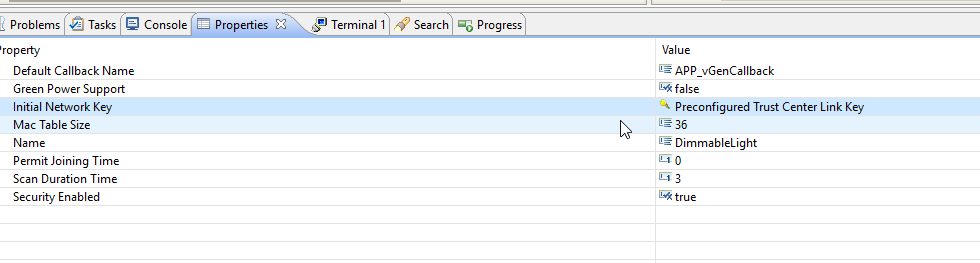
Both devices are Zigbee Compliance and are compatible.
What is the process that you are following? Does the Philips Hue have the permit join enabled?
Please look at the terminal log that the JN is sending? What are the errors that you are seeing?
Did you capture the packets in the air?
Regards,
Mario
- Mark as New
- Bookmark
- Subscribe
- Mute
- Subscribe to RSS Feed
- Permalink
- Report Inappropriate Content
Yes i put the Philips Hue in permit join mode (with the app).
But without the keys i manually put in the JN5168 serial output gives an error in network join 173 (0xAD) according to JN-UG-3113 this is a security key error.
And I found a project on github for ZLL not Zigbee 3 that used the set initial security function with the same keys I tried in my first post.
But I also captured Zigbee traffic with Wireshark and a USB sniffer, and one of the first messages form the Philips Hue is a Transport Key and that is the key:
0x81, 0x42, 0x86, 0x86, 0x5D, 0xC1, 0xC8, 0xB2, 0xC8, 0xCB, 0xC5, 0x2E, 0x5D, 0x65, 0xD1, 0xB8
mario_castaneda
- Mark as New
- Bookmark
- Subscribe
- Mute
- Subscribe to RSS Feed
- Permalink
- Report Inappropriate Content
Hi Youp,
The transport key could change if the device joins to the Zigbee network, but the Coordinator(Philips Hue) will send the transport key, that is encrypted by the Zigbee Alliance Key.
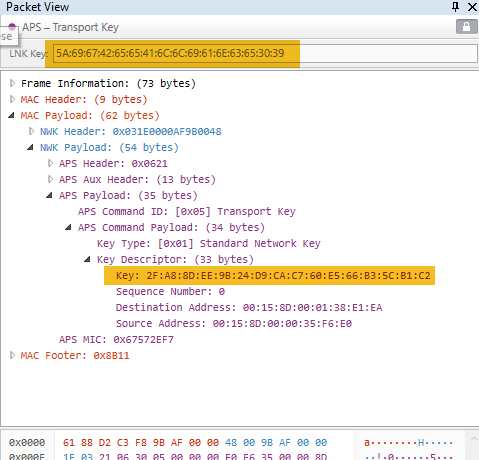
The JN-AN-1218 has the Zigbee Alliance Key. Could you please provide the sniffer log that you have.
Regards,
Mario
- Mark as New
- Bookmark
- Subscribe
- Mute
- Subscribe to RSS Feed
- Permalink
- Report Inappropriate Content
Hey Mario,
As requested here is a capture that i made, and as you can see Wireshark decrypted the message with the Philips Hue key not the zigbeealliance09 key.
(The last 2 rows in the Zigbee Security Header (key/key label) is the key that Wireshark uses to decrypt the message)
And the Transport key itself indeed changes.
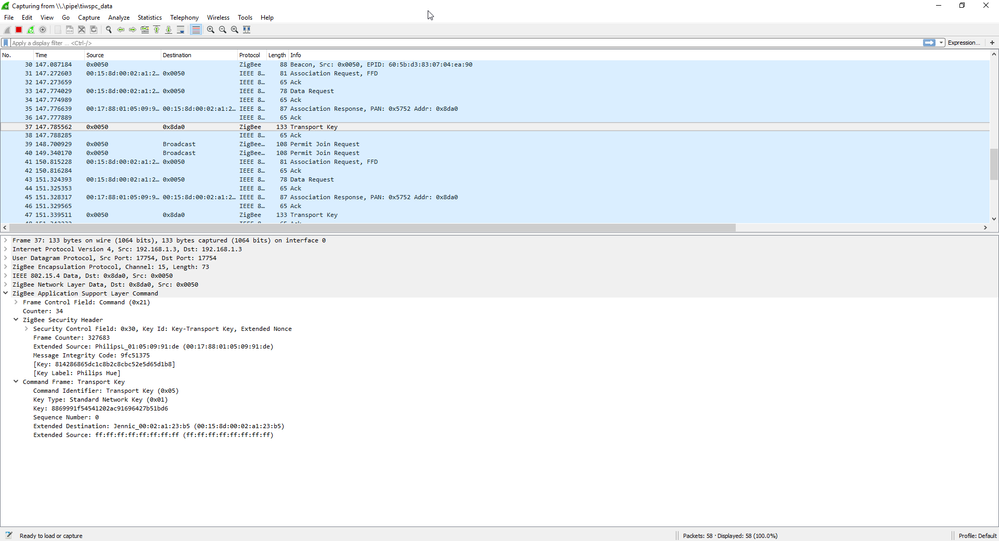
After checking other message I see that all messages are encrypted with the Philips Hue key.
mario_castaneda
- Mark as New
- Bookmark
- Subscribe
- Mute
- Subscribe to RSS Feed
- Permalink
- Report Inappropriate Content
Hi Youp,
Could you please attach the complete sniffer log?
As I can see the coordinator is accepting the device. The transport key is correct, but Wireshark is using the Zigbee Alliance key to decrypt the packets in the air.
Regards,
Mario
- Mark as New
- Bookmark
- Subscribe
- Mute
- Subscribe to RSS Feed
- Permalink
- Report Inappropriate Content
Hi Mario,
I don't have the ZigbeeAlliance09 key in Wireshark only the Philips. That is why I am sure that I need to put the Phillips Hue key in the JN5168 zigbee config.
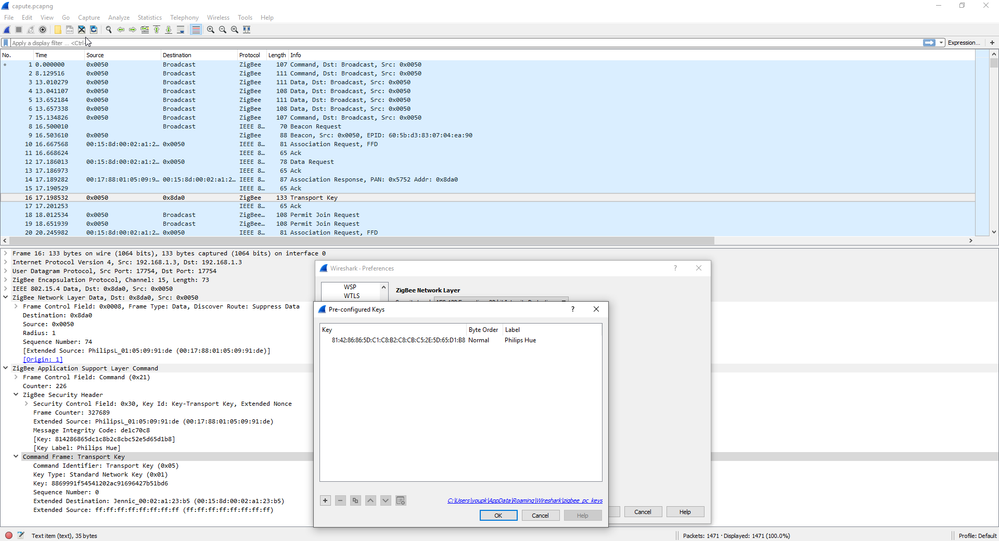
As I said in the previous post Zigbee Security Header -> Key is the decryption key that is used. an not the ZigbeeAlliance09.
And I know that if i put the Philips Hue key into the zps_gen.c file the JN5168 module will join the Philips Hue network.
But to get back to my question how do i put that the Philips key in the config.
According to the JN-UG-3113 chapter 5.8.2 the thing i need to change is the "manufacturer-defined Pre-configured global
link key".
mario_castaneda
- Mark as New
- Bookmark
- Subscribe
- Mute
- Subscribe to RSS Feed
- Permalink
- Report Inappropriate Content
Hi Youp,
The Joining node has a pre-configured link key for encrypted communications with the Trust Center, where this key is used to securely transport the network key from the TC to the node. The TC pas a new key to the device.
The JN-AN-1218 Router decrypts the packets with the ZigBee “09” key, so the node has the Network security key, the one that you are seeing.
In the case that you want to change the ZigBee “09” key for the network joining, you could use the ZPS_eAplZdoAddReplaceLinkKey
uint8 au8Key[16] = { 0x5a, 0x69, 0x67, 0x42, 0x65, 0x65, 0x41,
0x6c, 0x6c, 0x69, 0x61, 0x6e, 0x63, 0x65, 0x30, 0x39 };
ZPS_eAplZdoAddReplaceLinkKey( u64DeviceAddress, au8Key, ZPS_APS_UNIQUE_LINK_KEY);
Regards,
Mario
- Mark as New
- Bookmark
- Subscribe
- Mute
- Subscribe to RSS Feed
- Permalink
- Report Inappropriate Content
Hi Mario
I am still trying to wrap my head around this security thing.
The ZPS_eAplZdoAddReplaceLinkKey doesn't seem to be what i want to achieve. Because it needs a u64DeviceAddress of the partner node.
I checked the stack manual the function is descriped as
This function can be used to introduce or replace the application link key on the local node, where this key will be used to encrypt and decrypt communications with the specified ‘partner node’. If an application link key already exists then it will be replaced.
But that is not what i need I think because the Phillips Hue key is a global link key just like Zigbee "09". So that is per-programmed in the device.
After the node joins the network it gets the link key via the Transport Key frame (the frame in encrypted using Zigbee "09" or in case of Philips Hue with their manufacturer global key) so i should not touch the link key.
Please correct me if my analysis is incorrect.
mario_castaneda
- Mark as New
- Bookmark
- Subscribe
- Mute
- Subscribe to RSS Feed
- Permalink
- Report Inappropriate Content
Hi Youp,
Yes, The Link key is generated by the coordinator, in this case, the Philips Hue.
The JN example and the Philips Hue should be connected without any problem if are certified by Zigbee.
Regards,
Mario
- Mark as New
- Bookmark
- Subscribe
- Mute
- Subscribe to RSS Feed
- Permalink
- Report Inappropriate Content
Hey Mario,
Like i said in the first message, when I manually add the Philips Key everything works like it should.
But my trouble is using the configuration tool provided with Beyond Studio.
mario_castaneda
- Mark as New
- Bookmark
- Subscribe
- Mute
- Subscribe to RSS Feed
- Permalink
- Report Inappropriate Content
Hi Youp,
I'm sorry for my misunderstanding. I reproduced your issue and I am reporting it.
Could you please run some test?
If you do not add any key, does the JN-AN-1218 join to the network?
Regards,
Mario
- Mark as New
- Bookmark
- Subscribe
- Mute
- Subscribe to RSS Feed
- Permalink
- Report Inappropriate Content
Hi Mario,
No problem.
If I don't add any keys I get an 173 (0xAD) error.
If I add the Zigbee Alliance 09 key the JN joins the Philips Hue network.
But doesn't work but that might be due the Philips Hue, the Philips Hue app doesn't recognize it. But in wireshark I see it succeeded joining the network.
If i add Zigbee Alliance 09 & Philips Hue key. The join is successfull and the Hue app also works and you can control the JN like it should.
mario_castaneda
- Mark as New
- Bookmark
- Subscribe
- Mute
- Subscribe to RSS Feed
- Permalink
- Report Inappropriate Content
Hi Youp,
I'm sorry for my late reply. The Preconfigured key is no longer a supported feature.
You can use ZPS_eAplZdoAddReplaceLinkKey and zps_vAplSecSetInitialSecurityState instead.
Sorry for any inconvenience.
Regards,
Mario
