
- Forums
- Product Forums
- General Purpose MicrocontrollersGeneral Purpose Microcontrollers
- i.MX Forumsi.MX Forums
- QorIQ Processing PlatformsQorIQ Processing Platforms
- Identification and SecurityIdentification and Security
- Power ManagementPower Management
- Wireless ConnectivityWireless Connectivity
- RFID / NFCRFID / NFC
- Advanced AnalogAdvanced Analog
- Neural Processing UnitsNeural Processing Units
- MCX Microcontrollers
- S32G
- S32K
- S32V
- MPC5xxx
- Other NXP Products
- S12 / MagniV Microcontrollers
- Powertrain and Electrification Analog Drivers
- Sensors
- Vybrid Processors
- Digital Signal Controllers
- 8-bit Microcontrollers
- ColdFire/68K Microcontrollers and Processors
- PowerQUICC Processors
- OSBDM and TBDML
- S32M
- S32Z/E
-
- Solution Forums
- Software Forums
- MCUXpresso Software and ToolsMCUXpresso Software and Tools
- CodeWarriorCodeWarrior
- MQX Software SolutionsMQX Software Solutions
- Model-Based Design Toolbox (MBDT)Model-Based Design Toolbox (MBDT)
- FreeMASTER
- eIQ Machine Learning Software
- Embedded Software and Tools Clinic
- S32 SDK
- S32 Design Studio
- GUI Guider
- Zephyr Project
- Voice Technology
- Application Software Packs
- Secure Provisioning SDK (SPSDK)
- Processor Expert Software
- Generative AI & LLMs
-
- Topics
- Mobile Robotics - Drones and RoversMobile Robotics - Drones and Rovers
- NXP Training ContentNXP Training Content
- University ProgramsUniversity Programs
- Rapid IoT
- NXP Designs
- SafeAssure-Community
- OSS Security & Maintenance
- Using Our Community
-
- Cloud Lab Forums
-
- Knowledge Bases
- ARM Microcontrollers
- i.MX Processors
- Identification and Security
- Model-Based Design Toolbox (MBDT)
- QorIQ Processing Platforms
- S32 Automotive Processing Platform
- Wireless Connectivity
- CodeWarrior
- MCUXpresso Suite of Software and Tools
- MQX Software Solutions
- RFID / NFC
- Advanced Analog
- Neural Processing Units
-
- NXP Tech Blogs
- Home
- :
- i.MX Forums
- :
- i.MX Processors
- :
- Porting small OLED display to i.MX6ULL 14x14 Evk
Porting small OLED display to i.MX6ULL 14x14 Evk
- Subscribe to RSS Feed
- Mark Topic as New
- Mark Topic as Read
- Float this Topic for Current User
- Bookmark
- Subscribe
- Mute
- Printer Friendly Page
Porting small OLED display to i.MX6ULL 14x14 Evk
- Mark as New
- Bookmark
- Subscribe
- Mute
- Subscribe to RSS Feed
- Permalink
- Report Inappropriate Content
I'm using i.MX6ULL 14x14 Evk.
I succeeded to build Yocto and my evk can boot-up.
Now, I want use small OLED disaply.
My small OLED display is SSD1306.
I found kernel driver code in below path
"linux-imx/drivers/staging/fbtft/
I connected it to ECSPI4 as below picture with help of my H/W member.
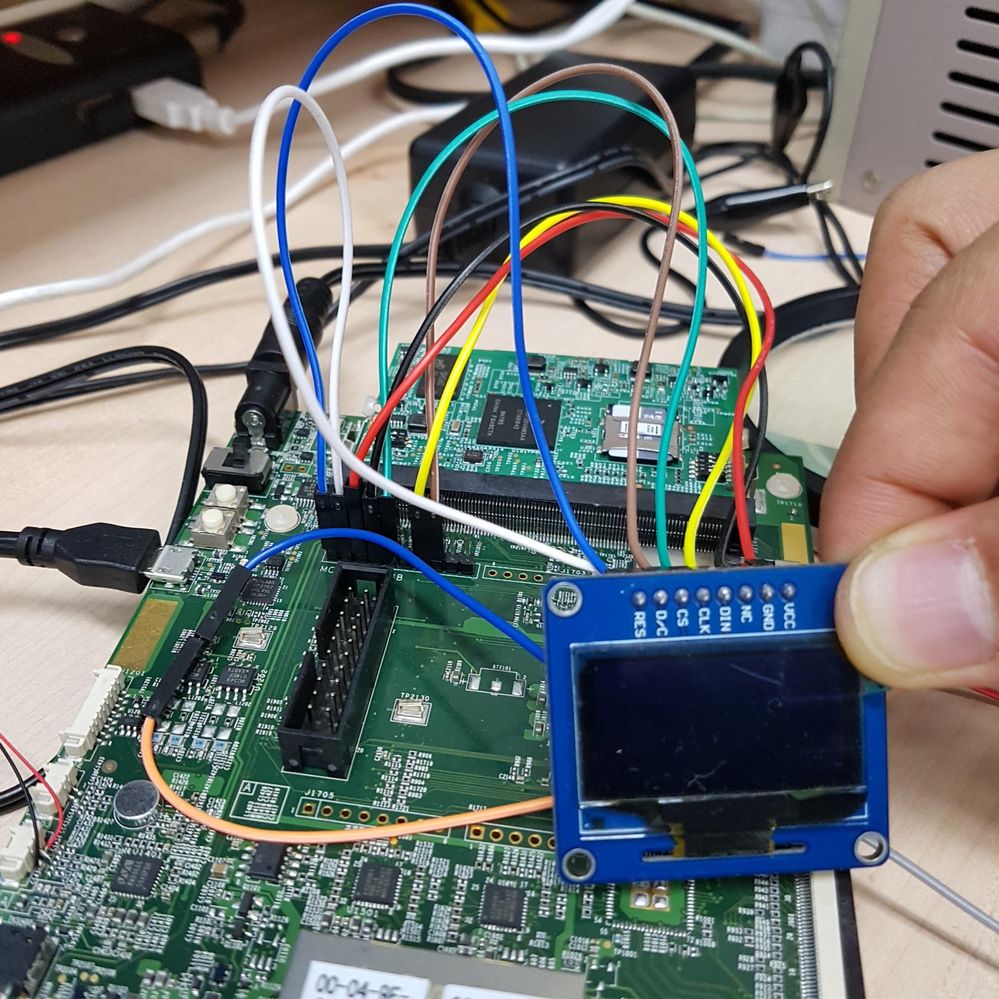
Resolution is this OLED is just 128x64.
Can I use this with "core-image-sato" with X11 ? Or should I choose other bb?
I need to draw some image and text in various font.
How can I enable this display?
Device tree need to be modified? Or, Kernel need to be modified?
I have no idea to start porting this.
Any information needed. Thank you.

- Mark as New
- Bookmark
- Subscribe
- Mute
- Subscribe to RSS Feed
- Permalink
- Report Inappropriate Content
Once you have the SPI interface enabled in the kernel, you should be able to write a test program from userspace program to verify the OLED is working before using the framebuffer. FYI I have SSD1306 running on imx6sx but using the cortex m4 via SPI.

- Mark as New
- Bookmark
- Subscribe
- Mute
- Subscribe to RSS Feed
- Permalink
- Report Inappropriate Content
Sorry but my knowledge is short.
I thought SPI interface enabled since I ran "fbtft_device" success & /dev/fb0 is created.
But can you help more specific about that
Jas Math wrote:
Once you have the SPI interface enabled in the kernel, you should be able to write a test program from userspace program to verify the OLED is working before using the framebuffer. FYI I have SSD1306 running on imx6sx but using the cortex m4 via SPI.
- Mark as New
- Bookmark
- Subscribe
- Mute
- Subscribe to RSS Feed
- Permalink
- Report Inappropriate Content
If you disable FBTFT via menuconfig (ie don't use it), then the spi interface should be available as a linux device ie something like /dev/spidev1.4 . You can then use the linux spi ioctls to open and transmit commands/data to the SSD3106 directly. This way you can verify the spi interface and display work. For SPI see example mxc_spi_test1.c in imx-test-5.3.
- Mark as New
- Bookmark
- Subscribe
- Mute
- Subscribe to RSS Feed
- Permalink
- Report Inappropriate Content
Thank you. I get it.

- Mark as New
- Bookmark
- Subscribe
- Mute
- Subscribe to RSS Feed
- Permalink
- Report Inappropriate Content
Hi Mannsik, what configuration will you use?, that breakout can be used with either spi or i2c interface. From that picture i notice that you're mixing the SPI and I2C pins (at least that you've modfified the IOMUX config), if so, verify your connection first.
You can use the i2c interface (spi maybe needs to be activated through menuconfig), and do some tests from userspace using the console with a HDMI monitor.. Using the i2ctools you can see if your display is connected and send it test commands see this.
The next step would be a kernel module, see more info.
- Mark as New
- Bookmark
- Subscribe
- Mute
- Subscribe to RSS Feed
- Permalink
- Report Inappropriate Content
Thank you Alexis
I connected it to ECSPI4. And, I2C pins will be used as GPIO for D/C and Reset.
So, I can not test with i2ctools which you mentioned. Any similar tool to do test over SPI?
BR.
Mannsik
- Mark as New
- Bookmark
- Subscribe
- Mute
- Subscribe to RSS Feed
- Permalink
- Report Inappropriate Content
Hi Mannsik
I haven't use it yet but maybe you can utilize the spidev driver, see the Documentation, the driver could be disabled from the kernel, if it is the case you can activate it from the menuconfig.
Here i left some links that may be helpful.
Using SPI w/Linux
Enable SPIDEV for all SPI using i.mx6 (Thread)
Driver extensive description
Best Regards.
- Mark as New
- Bookmark
- Subscribe
- Mute
- Subscribe to RSS Feed
- Permalink
- Report Inappropriate Content
To enable this I added some in device tree as below.
In file "imx6ull-14x14-evk.dts"
&iomuxc {
pinctrl-names = "default";
pinctrl-0 = <&pinctrl_hog_1>;
imx6ul-evk {
...
pinctrl_ecspi4: ecspi4grp {
fsl,pins = <
MX6UL_PAD_ENET2_TX_CLK__ECSPI4_MISO 0x70a1
MX6UL_PAD_ENET2_TX_ENi__ECSPI4_MOSI 0x70a1
MX6UL_PAD_ENET2_TX_DATA1__ECSPI4_SCLK 0x70a1
MX6UL_PAD_ENET2_RX_ER__ECSPI4_SS0 0x70a1
>;
};
...
};
...
&ecspi4 {
pinctrl-names = "default";
pinctrl-0 = <&pinctrl_ecspi4>;
status = "okay";
};
...
And added my boardname "tarta-tt" and some code as below.
In file "fbtft_device.c"
{
.name = "tarta-tt",
.spi = &(struct spi_board_info) {
.modalias = "fb_ssd1306",
.max_speed_hz = 16000000,
.mode = SPI_MODE_0,
.bus_num = 4,
.platform_data = &(struct fbtft_platform_data) {
.display = {
.buswidth = 8,
},
.gpios = (const struct fbtft_gpio []) {
{ "reset", 30 },
{ "dc", 31 },
{},
},
}
}
},
And enabled some feature in menuconfig as below to enable SSD1306 OLED display.
--> Device Drivers
--> Staging drivers
--> Support for small TFT LCD display modules
--> <*> FB driver for the SSD1306 OLED Controller
--> <M> Module to for adding FBTFT devices
Build was successful. But, when I do modprobe spi_busnum_to_master returns NULL.
I tried busnum option from 0 to 4, but all of try returns NULL as below.
root@imx6ull14x14evk:~# modprobe fbtft_device name=tarta-tt busnum=3
fbtft_device: module is from the staging directory, the quality is unknown, you have been warned.
fbtft_device: SPI devices registered:
fbtft_device: 74hc595 spi32766.0 100kHz 8 bits mode=0x00
fbtft_device: 'fb' Platform devices registered:
fbtft_device: spi_busnum_to_master(3) returned NULL
fbtft_device: failed to register SPI device
modprobe: ERROR: could not insert 'fbtft_device': Invalid argument
root@imx6ull14x14evk:~#
Please help me to enable SSD1306 for display.
- Mark as New
- Bookmark
- Subscribe
- Mute
- Subscribe to RSS Feed
- Permalink
- Report Inappropriate Content
And one more thing, I enabled SPI_SPIDEV feature in menuconfig.
Best Regards.
Mannsik
- Mark as New
- Bookmark
- Subscribe
- Mute
- Subscribe to RSS Feed
- Permalink
- Report Inappropriate Content
Hey Mannsik
Sorry for the late response, i've been really busy this days. I think that maybe you're loading the fbtft module before the spi-bus controller, i don't have the i.mx with me so i can't verify the exact directory but you could try to insert the spi controller module before the fbtft in /etc/modules-load.d/fbtft.conf .
Best Regards.
- Mark as New
- Bookmark
- Subscribe
- Mute
- Subscribe to RSS Feed
- Permalink
- Report Inappropriate Content
After I modified ecspi4 section in dts as below
SPI3 is working.
&ecspi4 {
fsl,spi-num-chipselects = <1>;
pinctrl-names = "default";
pinctrl-0 = <&pinctrl_ecspi4>;
status = "okay";
};
fsl,spi-num-chipselects = <1>;
should be added.
And now, I can test framebuffer with below command.
# fb-test -f 1 -p 0
Thanks.
BR.
Mannsik
- Mark as New
- Bookmark
- Subscribe
- Mute
- Subscribe to RSS Feed
- Permalink
- Report Inappropriate Content
Hi Mannsik
Can you tell me how can you get these value:
1. value "0x70a1" in your code below
===
...
pinctrl_ecspi4: ecspi4grp {
fsl,pins = <
MX6UL_PAD_ENET2_TX_CLK__ECSPI4_MISO 0x70a1
MX6UL_PAD_ENET2_TX_ENi__ECSPI4_MOSI 0x70a1
MX6UL_PAD_ENET2_TX_DATA1__ECSPI4_SCLK 0x70a1
MX6UL_PAD_ENET2_RX_ER__ECSPI4_SS0 0x70a1
>;
};
===
2. the number "30" , "31" in code below
===
{ "reset", 30 },
{ "dc", 31 },
===
- Mark as New
- Bookmark
- Subscribe
- Mute
- Subscribe to RSS Feed
- Permalink
- Report Inappropriate Content
The value 0x70a1 is for SW_PAD_CTL_PAD_XXX registers.
- Mark as New
- Bookmark
- Subscribe
- Mute
- Subscribe to RSS Feed
- Permalink
- Report Inappropriate Content
Thank you. I see it.
I'm stucking in OLED display (Oled C click) with imx7s (WARP7) by FBTFT driver.
I think it will have same procedure to boot up.
But in final result, can you run OLED display with imx6ull by FBTFT driver only after enable SPI & run "modprobe fbtft_device...." ?
- Mark as New
- Bookmark
- Subscribe
- Mute
- Subscribe to RSS Feed
- Permalink
- Report Inappropriate Content
Yes I enabled OLED.
After enable the fbtft driver and then add the device name in /etc/X11/xserver-common .
"tarta-tt")
ARGS="$ARGS -screen 128x64@180"
DPI="100" ;;
And in some case you need to modify /etc/X11/xorg.conf
to select correct frame buffer in section "Device"
Option "fbdev" "/dev/fb0"
- Mark as New
- Bookmark
- Subscribe
- Mute
- Subscribe to RSS Feed
- Permalink
- Report Inappropriate Content
I think you used "core-image-sato" , is it right ?
- Mark as New
- Bookmark
- Subscribe
- Mute
- Subscribe to RSS Feed
- Permalink
- Report Inappropriate Content
Yes, I used core-image-sato for the first time.
And could enable OLED-Display.
Currently, I'm woking on my own bb based on core-image-sato.
BR.
Mannsik

 igorpadykov
- Mark as New
- Bookmark
- Subscribe
- Mute
- Subscribe to RSS Feed
- Permalink
- Report Inappropriate Content
Hi Mannsik
one can use it with "core-image-sato" with X11 but driver for that lcd
should be included in image. May be useful to start with uboot logo and below links may help
How to use SPI slave within U-Boot?
Best regards
igor
-----------------------------------------------------------------------------------------------------------------------
Note: If this post answers your question, please click the Correct Answer button. Thank you!
-----------------------------------------------------------------------------------------------------------------------
- Mark as New
- Bookmark
- Subscribe
- Mute
- Subscribe to RSS Feed
- Permalink
- Report Inappropriate Content
Thank you for your informative reply.
But, I think Kernel code is quite different from the U-Boot implementation.
