
- Forums
- Product Forums
- General Purpose MicrocontrollersGeneral Purpose Microcontrollers
- i.MX Forumsi.MX Forums
- QorIQ Processing PlatformsQorIQ Processing Platforms
- Identification and SecurityIdentification and Security
- Power ManagementPower Management
- Wireless ConnectivityWireless Connectivity
- RFID / NFCRFID / NFC
- Advanced AnalogAdvanced Analog
- Neural Processing UnitsNeural Processing Units
- MCX Microcontrollers
- S32G
- S32K
- S32V
- MPC5xxx
- Other NXP Products
- S12 / MagniV Microcontrollers
- Powertrain and Electrification Analog Drivers
- Sensors
- Vybrid Processors
- Digital Signal Controllers
- 8-bit Microcontrollers
- ColdFire/68K Microcontrollers and Processors
- PowerQUICC Processors
- OSBDM and TBDML
- S32M
- S32Z/E
-
- Solution Forums
- Software Forums
- MCUXpresso Software and ToolsMCUXpresso Software and Tools
- CodeWarriorCodeWarrior
- MQX Software SolutionsMQX Software Solutions
- Model-Based Design Toolbox (MBDT)Model-Based Design Toolbox (MBDT)
- FreeMASTER
- eIQ Machine Learning Software
- Embedded Software and Tools Clinic
- S32 SDK
- S32 Design Studio
- GUI Guider
- Zephyr Project
- Voice Technology
- Application Software Packs
- Secure Provisioning SDK (SPSDK)
- Processor Expert Software
- Generative AI & LLMs
-
- Topics
- Mobile Robotics - Drones and RoversMobile Robotics - Drones and Rovers
- NXP Training ContentNXP Training Content
- University ProgramsUniversity Programs
- Rapid IoT
- NXP Designs
- SafeAssure-Community
- OSS Security & Maintenance
- Using Our Community
-
- Cloud Lab Forums
-
- Knowledge Bases
- ARM Microcontrollers
- i.MX Processors
- Identification and Security
- Model-Based Design Toolbox (MBDT)
- QorIQ Processing Platforms
- S32 Automotive Processing Platform
- Wireless Connectivity
- CodeWarrior
- MCUXpresso Suite of Software and Tools
- MQX Software Solutions
- RFID / NFC
- Advanced Analog
- Neural Processing Units
-
- NXP Tech Blogs
- Home
- :
- 製品フォーラム
- :
- S12 / MagniVマイクロコントローラ
- :
- how to program TWR-S12G128 using osbdm
how to program TWR-S12G128 using osbdm
- RSS フィードを購読する
- トピックを新着としてマーク
- トピックを既読としてマーク
- このトピックを現在のユーザーにフロートします
- ブックマーク
- 購読
- ミュート
- 印刷用ページ
how to program TWR-S12G128 using osbdm

- 新着としてマーク
- ブックマーク
- 購読
- ミュート
- RSS フィードを購読する
- ハイライト
- 印刷
- 不適切なコンテンツを報告
Hi Radek,
I bought TWR-S12G128 evaluation board. I could able to test the basic LED example preloaded in the board. I took the sample Bootloader_S12 and compiled using code warrior. I could able to create latest .S19 image.
Could you please help me, how to flash the newely created s19 image.
Inside the kit i have a cable DB9 (female header to 10 pin header). Is any external software tool required to flash the controller?

 iggi
iggi
- 新着としてマーク
- ブックマーク
- 購読
- ミュート
- RSS フィードを購読する
- ハイライト
- 印刷
- 不適切なコンテンツを報告
Hi,
There are many ways how to download the .s19 record to the flash memory of an MCU.
You can follow the instruction described in AN4258 application note:
AN4258, Serial Bootloader for S12(X) Microcontrollers Based on 180 nm Techno ... (REV 0)
The DB9 cable is used as an adapter for SCI communication as there isn't that port on the board, just 10-pin header connector. So you can download the .s19 record via Hyperterminal (or other client such as PuTTY) and SCI communication to the MCU flash.
Another way is using the CodeWarrior debugger via BDM. In the CW folder installation (c:\Program Files (x86)\Freescale\CWS12v5.1\prog\), find 'hiwave.exe' and execute it. Prior to that ensure you have connected in-circuit programmer (such as P&E Micro USB Multilink BDM) to the BDM port. You should get this image:
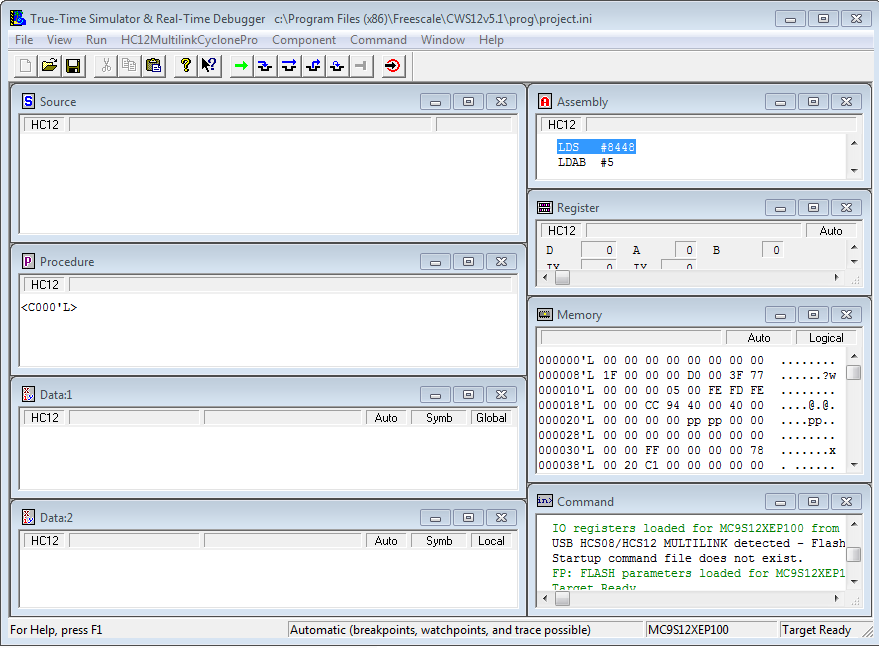
Then click on the HS12MultilinkCyclonePro in the main menu, select Load and in the new window proceed to load the s19 record (other option is to go through Flash..., select the FLash block and then Load)
Hope the information helps.
Have a great day,
iggi
-----------------------------------------------------------------------------------------------------------------------
Note: If this post answers your question, please click the Correct Answer button. Thank you!
-----------------------------------------------------------------------------------------------------------------------
- 新着としてマーク
- ブックマーク
- 購読
- ミュート
- RSS フィードを購読する
- ハイライト
- 印刷
- 不適切なコンテンツを報告
Hi iggi,
Thanks for clear explanation of flashing procedure. I have one doubt regarding SCI communication.
Shall i directly connect the DB9 female connector to the PC? I tried by connecting directly and used teraterm at PC side, still i couldn't able to get console. I used config as 9600, 8N1, Xon/Xoff.
I flashed the bootloader code to the controller using code warrior debug method. And to start boot loader I read a point from AN4258 as "Hold the pin PP0 low and reset the MCU".
Could you please clarify me on this and what needs to be done on TWR - S12G128 eval board to enter into bootloader.
Could you please correct me, if anything is wrong.
Thanks in advance.
