
- Forums
- Product Forums
- General Purpose MicrocontrollersGeneral Purpose Microcontrollers
- i.MX Forumsi.MX Forums
- QorIQ Processing PlatformsQorIQ Processing Platforms
- Identification and SecurityIdentification and Security
- Power ManagementPower Management
- Wireless ConnectivityWireless Connectivity
- RFID / NFCRFID / NFC
- Advanced AnalogAdvanced Analog
- Neural Processing UnitsNeural Processing Units
- MCX Microcontrollers
- S32G
- S32K
- S32V
- MPC5xxx
- Other NXP Products
- S12 / MagniV Microcontrollers
- Powertrain and Electrification Analog Drivers
- Sensors
- Vybrid Processors
- Digital Signal Controllers
- 8-bit Microcontrollers
- ColdFire/68K Microcontrollers and Processors
- PowerQUICC Processors
- OSBDM and TBDML
- S32M
- S32Z/E
-
- Solution Forums
- Software Forums
- MCUXpresso Software and ToolsMCUXpresso Software and Tools
- CodeWarriorCodeWarrior
- MQX Software SolutionsMQX Software Solutions
- Model-Based Design Toolbox (MBDT)Model-Based Design Toolbox (MBDT)
- FreeMASTER
- eIQ Machine Learning Software
- Embedded Software and Tools Clinic
- S32 SDK
- S32 Design Studio
- GUI Guider
- Zephyr Project
- Voice Technology
- Application Software Packs
- Secure Provisioning SDK (SPSDK)
- Processor Expert Software
- Generative AI & LLMs
-
- Topics
- Mobile Robotics - Drones and RoversMobile Robotics - Drones and Rovers
- NXP Training ContentNXP Training Content
- University ProgramsUniversity Programs
- Rapid IoT
- NXP Designs
- SafeAssure-Community
- OSS Security & Maintenance
- Using Our Community
-
- Cloud Lab Forums
-
- Knowledge Bases
- ARM Microcontrollers
- i.MX Processors
- Identification and Security
- Model-Based Design Toolbox (MBDT)
- QorIQ Processing Platforms
- S32 Automotive Processing Platform
- Wireless Connectivity
- CodeWarrior
- MCUXpresso Suite of Software and Tools
- MQX Software Solutions
- RFID / NFC
- Advanced Analog
- Neural Processing Units
-
- NXP Tech Blogs
- Home
- :
- 汎用マイクロコントローラ
- :
- LPCマイクロコントローラ
- :
- MCUXpresso with LPC-LINK2 having error "Target error from Commit Flash write"
MCUXpresso with LPC-LINK2 having error "Target error from Commit Flash write"
- RSS フィードを購読する
- トピックを新着としてマーク
- トピックを既読としてマーク
- このトピックを現在のユーザーにフロートします
- ブックマーク
- 購読
- ミュート
- 印刷用ページ
MCUXpresso with LPC-LINK2 having error "Target error from Commit Flash write"

- 新着としてマーク
- ブックマーク
- 購読
- ミュート
- RSS フィードを購読する
- ハイライト
- 印刷
- 不適切なコンテンツを報告
Hi,
I am using MCUXpresso IDE with LPC-LINK2 on a board with LPC1769 processor.
The same board and the same code I can use LPCXpresso IDE with LPC-LINK1 or LPC-LINK2 as debugger.
I can use MCUXpresso IDE with LPC-LINK1 as debugger.
However, when I try to use MCUXpresso IDE with LPC-LINK2 as debugger, I will receive the following error:
failed to send op Terminate message - rc Em(17). Debug port inaccessible after access at location 0x10002620
Target error from Commit Flash write: Em(17). Debug port inaccessible after access at location 0x10002620
The board is powered through its own power supply, and as the LPC-LINK2 can work with LPCXpresso IDE, I don't think it is a hardware problem.
Any thoughts, suggestions?
Thanks!

 victorjimenez
- 新着としてマーク
- ブックマーク
- 購読
- ミュート
- RSS フィードを購読する
- ハイライト
- 印刷
- 不適切なコンテンツを報告
Hello Jason,
First please follow the next steps to update the firmware of the LPC-Link2 :
Download and install the newest version of LPCScypt 2.0, you can download it from the next link.
Put your board in DFU mode by removing JP1. Once you remove JP1 from your board do a power cycle to reset the board.
Go to the following path on your PC and open the script: <LPCScrypt Install Dir>\scripts\program_JLINK
Press any key to run the script. Please refer below image to see the results when the script runs successfully.
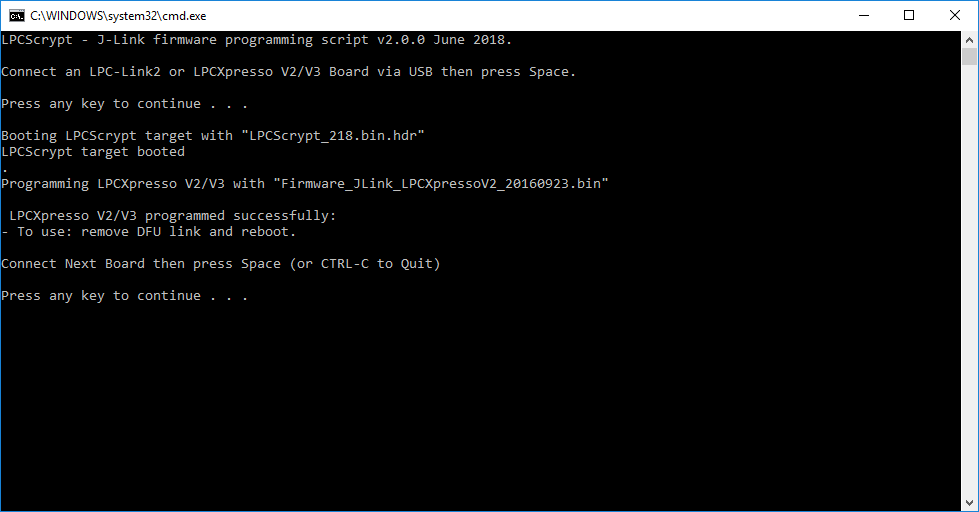
Once the script runs successfully install JP1 on your board and do a power cycle.
Before trying to debug again please erase the old debug files on MCUXpresso IDE as shown below.
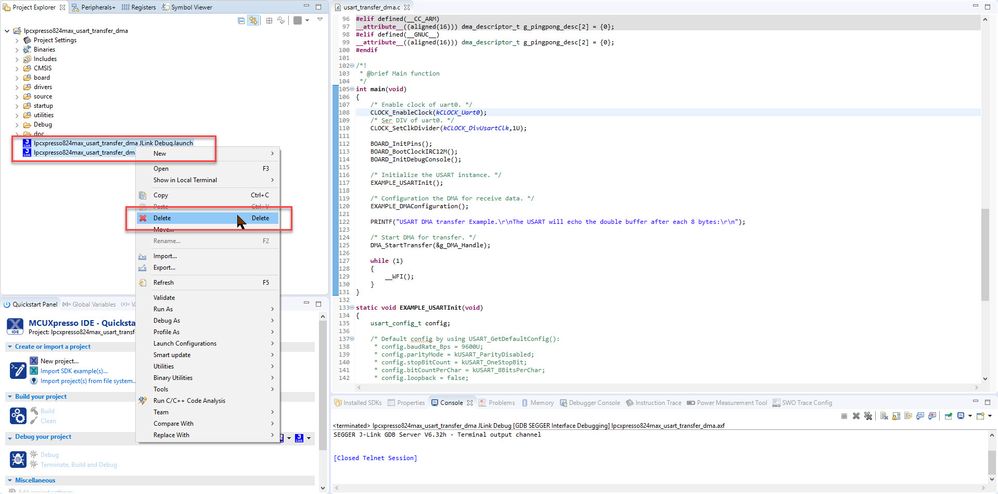
Once you delete the debug files and flash the new firmware please try to debug again.
Hope it helps!
Victor.
-----------------------------------------------------------------------------------------------------------------------
Note: If this post answers your question, please click the Correct Answer button. Thank you!
-----------------------------------------------------------------------------------------------------------------------
