
- Forums
- Product Forums
- General Purpose MicrocontrollersGeneral Purpose Microcontrollers
- i.MX Forumsi.MX Forums
- QorIQ Processing PlatformsQorIQ Processing Platforms
- Identification and SecurityIdentification and Security
- Power ManagementPower Management
- Wireless ConnectivityWireless Connectivity
- RFID / NFCRFID / NFC
- Advanced AnalogAdvanced Analog
- Neural Processing UnitsNeural Processing Units
- MCX Microcontrollers
- S32G
- S32K
- S32V
- MPC5xxx
- Other NXP Products
- S12 / MagniV Microcontrollers
- Powertrain and Electrification Analog Drivers
- Sensors
- Vybrid Processors
- Digital Signal Controllers
- 8-bit Microcontrollers
- ColdFire/68K Microcontrollers and Processors
- PowerQUICC Processors
- OSBDM and TBDML
- S32M
- S32Z/E
-
- Solution Forums
- Software Forums
- MCUXpresso Software and ToolsMCUXpresso Software and Tools
- CodeWarriorCodeWarrior
- MQX Software SolutionsMQX Software Solutions
- Model-Based Design Toolbox (MBDT)Model-Based Design Toolbox (MBDT)
- FreeMASTER
- eIQ Machine Learning Software
- Embedded Software and Tools Clinic
- S32 SDK
- S32 Design Studio
- GUI Guider
- Zephyr Project
- Voice Technology
- Application Software Packs
- Secure Provisioning SDK (SPSDK)
- Processor Expert Software
- Generative AI & LLMs
-
- Topics
- Mobile Robotics - Drones and RoversMobile Robotics - Drones and Rovers
- NXP Training ContentNXP Training Content
- University ProgramsUniversity Programs
- Rapid IoT
- NXP Designs
- SafeAssure-Community
- OSS Security & Maintenance
- Using Our Community
-
- Cloud Lab Forums
-
- Knowledge Bases
- ARM Microcontrollers
- i.MX Processors
- Identification and Security
- Model-Based Design Toolbox (MBDT)
- QorIQ Processing Platforms
- S32 Automotive Processing Platform
- Wireless Connectivity
- CodeWarrior
- MCUXpresso Suite of Software and Tools
- MQX Software Solutions
- RFID / NFC
- Advanced Analog
- Neural Processing Units
-
- NXP Tech Blogs
- Home
- :
- MCUXpresso软件和工具
- :
- Kinetis Design Studio
- :
- Re: KDS support for FRDM-KL03
KDS support for FRDM-KL03

 BlackNight
Hi Marco,
CW for MCU10.6 won't support new devices. New device support goes with KDS and Kinetis SDK.
There is a KL03Z SDK available on the SDK download page:
Software Development Kit for Kinetis MCUs|Freescale
Install that SDK, and then you get an KDS update in
C:\Freescale\KSDK_1.0.0-KL03Z\tools\eclipse_update
Use the menu Help > Install New Software in KDS to install it.
I hope this helps,
Erich

Hi Marco,
Goto the FRDM-KL03 product page:
http://www.freescale.com/webapp/sps/site/prod_summary.jsp?code=FRDM-KL03Z
Click on Downloads tab:
Then you can download a separate KSDK installer for Linux or Windows.
I did the Windows version as FYI.
Install the KL03 KSDK (defaults to c:\Freescale folder).
I told the installer not to update the Windows path when asked.
I opened KSD1.1.1 and pointed the Workspace to the root folder of KSDK for KL03:
i.e. C:\Freescale\KSDK_1.0.0-KL03Z
I then used the Help-->Install New Software…
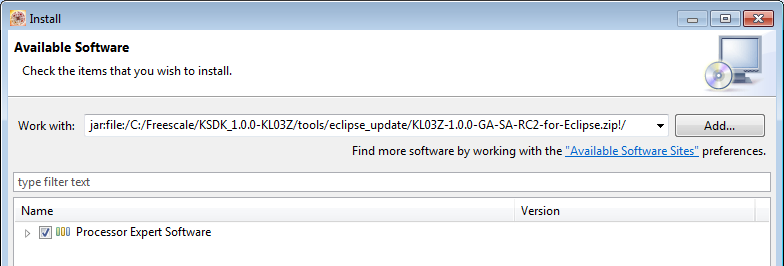
Click Add button then click Archive and point to following folder:
C:\Freescale\KSDK_1.0.0-KL03Z\tools\eclipse_update
Follow the wizard to install and agree with the legal stuff.
This will add in the KL03 Freedom to the Boards and Processors optioned when doing a File--> Kinetis Design Studio Project.
In December when KDS1.2 is released then KL03 will be integrated with it and not be a standalone install.
Regards,
David

It doesn't work fom me,
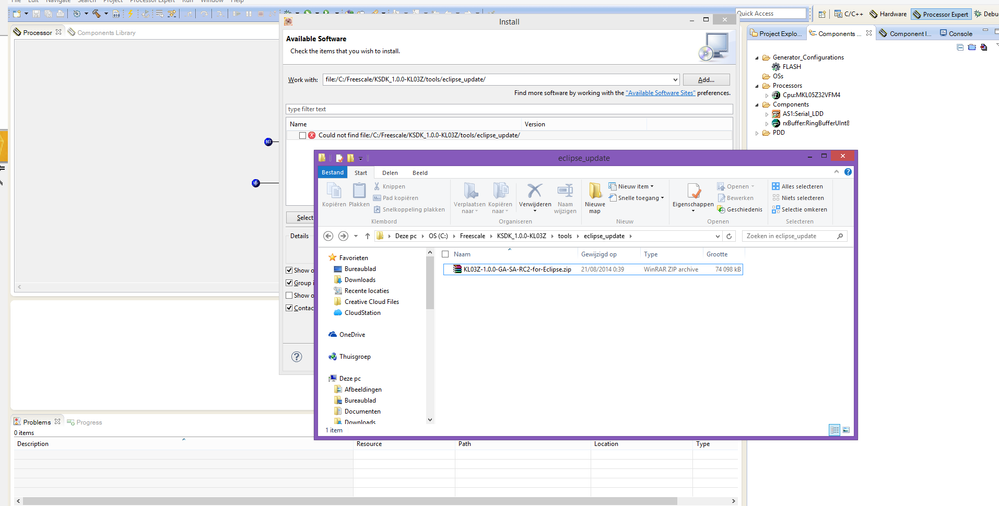
I followed the instructions but, the KDS keep telling me: "Could not find file:/C:/Freescale/KSDK_1.1.0/tools/eclipse_update/" see attached image. The files are availabe on the given location but I'm not able to install them.
Am I doing something wrong?
I m on a 64bit Windows 8 system.
Kind regards
Alex.
 BlackNight
Hi Marco,
CW for MCU10.6 won't support new devices. New device support goes with KDS and Kinetis SDK.
There is a KL03Z SDK available on the SDK download page:
Software Development Kit for Kinetis MCUs|Freescale
Install that SDK, and then you get an KDS update in
C:\Freescale\KSDK_1.0.0-KL03Z\tools\eclipse_update
Use the menu Help > Install New Software in KDS to install it.
I hope this helps,
Erich
