
- Forums
- Product Forums
- General Purpose MicrocontrollersGeneral Purpose Microcontrollers
- i.MX Forumsi.MX Forums
- QorIQ Processing PlatformsQorIQ Processing Platforms
- Identification and SecurityIdentification and Security
- Power ManagementPower Management
- Wireless ConnectivityWireless Connectivity
- RFID / NFCRFID / NFC
- Advanced AnalogAdvanced Analog
- Neural Processing UnitsNeural Processing Units
- MCX Microcontrollers
- S32G
- S32K
- S32V
- MPC5xxx
- Other NXP Products
- S12 / MagniV Microcontrollers
- Powertrain and Electrification Analog Drivers
- Sensors
- Vybrid Processors
- Digital Signal Controllers
- 8-bit Microcontrollers
- ColdFire/68K Microcontrollers and Processors
- PowerQUICC Processors
- OSBDM and TBDML
- S32M
- S32Z/E
-
- Solution Forums
- Software Forums
- MCUXpresso Software and ToolsMCUXpresso Software and Tools
- CodeWarriorCodeWarrior
- MQX Software SolutionsMQX Software Solutions
- Model-Based Design Toolbox (MBDT)Model-Based Design Toolbox (MBDT)
- FreeMASTER
- eIQ Machine Learning Software
- Embedded Software and Tools Clinic
- S32 SDK
- S32 Design Studio
- GUI Guider
- Zephyr Project
- Voice Technology
- Application Software Packs
- Secure Provisioning SDK (SPSDK)
- Processor Expert Software
- Generative AI & LLMs
-
- Topics
- Mobile Robotics - Drones and RoversMobile Robotics - Drones and Rovers
- NXP Training ContentNXP Training Content
- University ProgramsUniversity Programs
- Rapid IoT
- NXP Designs
- SafeAssure-Community
- OSS Security & Maintenance
- Using Our Community
-
- Cloud Lab Forums
-
- Knowledge Bases
- ARM Microcontrollers
- i.MX Processors
- Identification and Security
- Model-Based Design Toolbox (MBDT)
- QorIQ Processing Platforms
- S32 Automotive Processing Platform
- Wireless Connectivity
- CodeWarrior
- MCUXpresso Suite of Software and Tools
- MQX Software Solutions
- RFID / NFC
- Advanced Analog
- Neural Processing Units
-
- NXP Tech Blogs
- Home
- :
- i.MX Forums
- :
- i.MX Processors
- :
- MX8MM won't enter fastboot mode
MX8MM won't enter fastboot mode
- Subscribe to RSS Feed
- Mark Topic as New
- Mark Topic as Read
- Float this Topic for Current User
- Bookmark
- Subscribe
- Mute
- Printer Friendly Page

- Mark as New
- Bookmark
- Subscribe
- Mute
- Subscribe to RSS Feed
- Permalink
- Report Inappropriate Content
Hello, I'm using MX8M Mini EVK with Android 9, under Windows 10. *ADB works* fine but I have a real trouble getting into fastboot mode. I researched hard in all NXP documents - "Android_User's_Guide.pdf", "Android_Quick_Start_Guide.pdf" and even followed iMX6 instructions on how to config fastboot. Nothing works though.
1. Obviously, both "developer mode" as well as "OEM unlocked" option are enabled.
2. When I run "adb shell reboot bootloader" the board is being rebooted but all I see is a blanked screen and both "fastboot oem unlocked" nor "fastboot usb" command ever returns.
3. I have the latest Google USB driver installed (tried to add vendor ID from iMX6 documentations, didn't really work either)
4. It should be noted that I was able to flush the images through UUU (with a new NXP build android_p9.0.0_2.0.0-ga_image_8mmevk.tar.gz) but even with this new build the board won't enter fastboot mode.
Is there any change that needs to take place in the "android_winusb.inf" or "adb_usb.ini" ?
One last note, once the EVK board is booted in attempt to get into fastboot, instead of seeing "EVK_8MM" the device is changed to "USB download gadget", no idea if that's normal?
I will appreciate any help!
Thanks, Mike
Solved! Go to Solution.

 AldoG
AldoG
- Mark as New
- Bookmark
- Subscribe
- Mute
- Subscribe to RSS Feed
- Permalink
- Report Inappropriate Content
Hello,
This may be due to the host PC selects an incorrect driver model of the USB devices, leading to the PC inability to find fastboot device.
After accessing fastboot, run "reboot bootloader" in console after boot, in host side open "Computer Management->Device Manager", you'll note that the USB appears as:
Universal Serial Bus devices -> USB download gadget,

Right click it, and choose “Updated Driver -> browse my computer for driver software ->
let me pick from a list of available drivers on my computer”, clear “Show compatible hardware” item, then choose “ADB devices”,
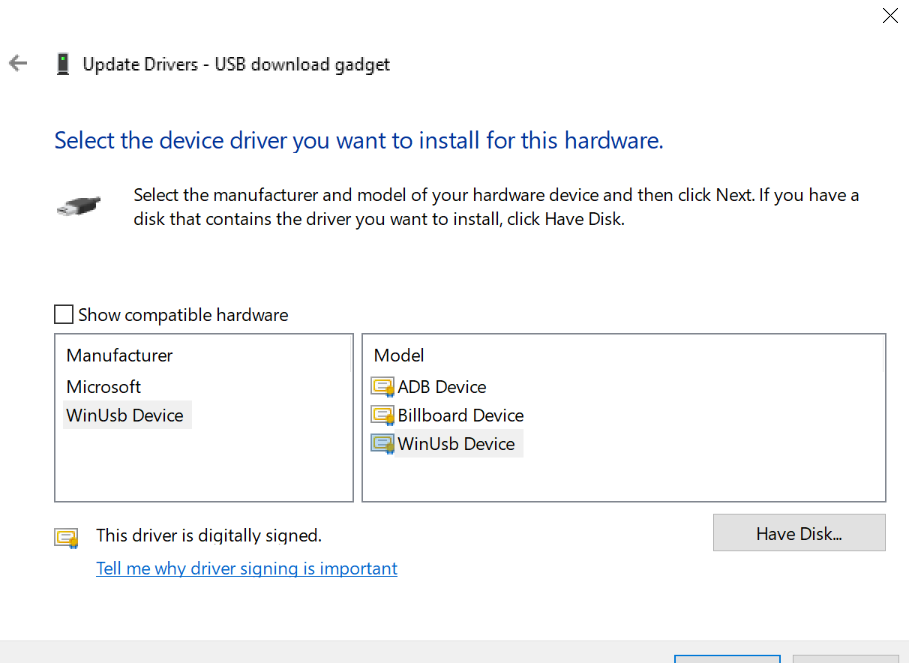
Select yes to the pop-up window, this will select the USB as an ADB device,
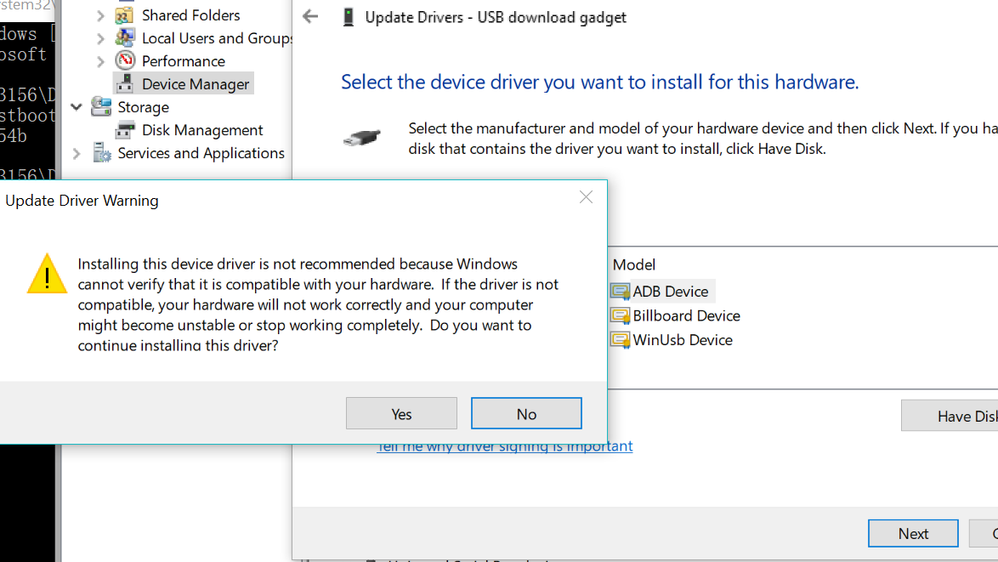
This should fix the issue, and the fastboot device should be listed.
Hope this helps,
Best regards,
Aldo.
-------------------------------------------------------------------------------
Note:
- If this post answers your question, please click the "Mark Correct" button. Thank you!
- We are following threads for 7 weeks after the last post, later replies are ignored
Please open a new thread and refer to the closed one, if you have a related question at a later point in time.
-------------------------------------------------------------------------------
- Mark as New
- Bookmark
- Subscribe
- Mute
- Subscribe to RSS Feed
- Permalink
- Report Inappropriate Content
Qu'est-ce que le pilote du gadget fastboot ?
Le pilote de gadget fastboot est un petit programme logiciel qui permet de démarrer des appareils tels que des smartphones et des tablettes à partir d'un ordinateur en utilisant le protocole fastboot.spd fastboot driver
Fastboot est un outil de ligne de commande de bas niveau utilisé dans le développement Android. Il peut être utilisé pour démarrer un appareil Android en mode de récupération, écrire des fichiers sur l'appareil ou monter et accéder au stockage de données de l'appareil.
- Mark as New
- Bookmark
- Subscribe
- Mute
- Subscribe to RSS Feed
- Permalink
- Report Inappropriate Content
Hi
I have this problem too on Windows 10 and I followed the guide to solve the problem. However the device manager keeps showing "USB download gadget" after installing the Google Driver from https://dl.google.com/android/repository/usb_driver_r13-windows.zip
I would expect something else?
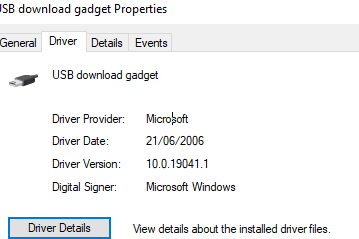
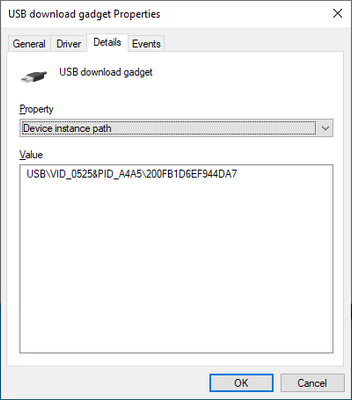
I did try on a MAC with newly Android Studio installed and here fastboot gets instant contact to the device.
Ideas to overcome this?
Best regards
Svend
- Mark as New
- Bookmark
- Subscribe
- Mute
- Subscribe to RSS Feed
- Permalink
- Report Inappropriate Content
Hi Shivani,
Your solution is working only on connected device. If new device is connected and switched to fastboot mode. device couldn't be found. Then we have to select adb device manually again. This works for one device. But this has big productivity issue in factory. Can you help to solve this?

- Mark as New
- Bookmark
- Subscribe
- Mute
- Subscribe to RSS Feed
- Permalink
- Report Inappropriate Content
Hi, [email protected]
Please update the USB Driver from this link to resolve this issue.
Regards,
Shivani
- Mark as New
- Bookmark
- Subscribe
- Mute
- Subscribe to RSS Feed
- Permalink
- Report Inappropriate Content
HI @shivanipatel ,
I have Apalis imx8qm som, with custom board. Fastboot is working with ubuntu system but not for windows 10 system, I have downloaded the files from this link, but still in device manager showing the connect usb as "USB download gadget".
After doing
Right click it, and choose “Updated Driver -> browse my computer for driver software ->
let me pick from a list of available drivers on my computer”, clear “Show compatible hardware” item, then choose “ADB devices” step, The usb driver still showing the "USB download gadget", and not coming in fastboot (not showing list of fastboot devices).
Kindly provide a solution.
- Mark as New
- Bookmark
- Subscribe
- Mute
- Subscribe to RSS Feed
- Permalink
- Report Inappropriate Content
Hello,
Greetings of the day!
Any update on this?
- Mark as New
- Bookmark
- Subscribe
- Mute
- Subscribe to RSS Feed
- Permalink
- Report Inappropriate Content
Hi Shivani,
This is for the same request that was queried by Taesub Youn earlier.
"Your solution is working only on connected device. If new device is connected and switched to fastboot mode. device couldn't be found. Then we have to select adb device manually again. This works for one device. But this has big productivity issue in factory. Can you help to solve this?"
I tried the solution that you had suggested. Installed the Google USB driver (from this link) through the Android SDK manager/tools.
However, it seems like the first time the device is connected, it still does not show up in fastboot mode. We have to manually update the driver from WinUsb devices to adb devices (Device manager -> update driver -> USB download gadget -> adb devices).
Once we update the driver manually, the `fastboot devices` command works,
- fastboot devices
<serial no> fastboot
However, all other fastboot commands fails as below
- fastboot reboot bootloader
Rebooting into bootloader FAILED (Write to device failed (Unknown error))
fastboot: error: Command failed
After the driver was manually updated, once we power cycle the device, then all the fastboot commands are working.
Is there an automatic way to update the driver so that each new device when connected to the PC for the first time gets recognized in the fastboot mode without manually updating the driver (and without rebooting the device)?
Thanks,
Regards,
Anupama
- Mark as New
- Bookmark
- Subscribe
- Mute
- Subscribe to RSS Feed
- Permalink
- Report Inappropriate Content
Hi, mike malgin
Please use the latest fastboot binaries from this link (for windows and linux) and follow the steps mentioned by Aldo Gutierrez to select the proper driver, you will be able to find the device in fastboot mode.
Let us know if you are still facing the issue.
Regards,
Shivani
- Mark as New
- Bookmark
- Subscribe
- Mute
- Subscribe to RSS Feed
- Permalink
- Report Inappropriate Content
I am facing the same problem, the device is not showing in list while entering the command fastboot devices.
I am not able to find the steps mentioned by Aldo Gutierrez.
Please provide another link.
AldoG
- Mark as New
- Bookmark
- Subscribe
- Mute
- Subscribe to RSS Feed
- Permalink
- Report Inappropriate Content
Hello,
This may be due to the host PC selects an incorrect driver model of the USB devices, leading to the PC inability to find fastboot device.
After accessing fastboot, run "reboot bootloader" in console after boot, in host side open "Computer Management->Device Manager", you'll note that the USB appears as:
Universal Serial Bus devices -> USB download gadget,
Right click it, and choose “Updated Driver -> browse my computer for driver software ->
let me pick from a list of available drivers on my computer”, clear “Show compatible hardware” item, then choose “ADB devices”,
Select yes to the pop-up window, this will select the USB as an ADB device,
This should fix the issue, and the fastboot device should be listed.
Hope this helps,
Best regards,
Aldo.
-------------------------------------------------------------------------------
Note:
- If this post answers your question, please click the "Mark Correct" button. Thank you!
- We are following threads for 7 weeks after the last post, later replies are ignored
Please open a new thread and refer to the closed one, if you have a related question at a later point in time.
-------------------------------------------------------------------------------
- Mark as New
- Bookmark
- Subscribe
- Mute
- Subscribe to RSS Feed
- Permalink
- Report Inappropriate Content
Hello Aldo,
We noticed that USB ID getting changed on every build (EVT, DVT, etc). This is causing us to reconfigure windows machines at every build, impacting productivity. What is the reason behind the change? So far we have seen following IDs.
ID 18d1:4ee7 Google Inc.
ID 0525:a4a5 Netchip Technology, Inc. Pocketbook Pro 903
ID 03f0:0667 HP, Inc
-Pad
